
A repeatable workflow for onboarding new staff is a five-stage, owner-assigned process — preboarding, day one orientation, first week, first 30 days, and first 90 days — with department checklists, 30-60-90 templates, and measurable KPIs tied to named owners. Start today with three actions: assign a single process owner, send the preboarding welcome email promptly after offer acceptance, and provision all system accounts at least two business days before the start date.
Every effective new hire workflow must include these core elements:
- Named owner for every task (HR, IT, Finance, hiring manager, or team lead)
- Due date tied to a milestone (offer acceptance, start date, day 30, day 60, day 90)
- Completion standard describing what “done” looks like in measurable terms
- Proof location — a shared drive folder, HRIS task, or ticket number where evidence is stored
- 30-60-90 plan drafted before the new hire’s first day and reviewed at each milestone
Key Takeaways
A repeatable workflow for onboarding new staff requires five stages, named owners for every task, a 30-60-90 plan drafted before day one, and KPIs reviewed at each milestone to catch friction before it becomes attrition.
| Point | Details |
|---|---|
| Five-stage structure | Map every task to preboarding, day one, week one, day 30, or day 60–90 with a named owner and completion standard. |
| Department ownership | HR, IT, Finance, the hiring manager, and the team each have distinct tasks — assign them in your HRIS before the start date. |
| 30-60-90 plan | Draft the plan before day one; review it at each milestone and document progress in writing. |
| KPI tracking | Measure time to productivity, access completion rate, milestone achievement, and 90-day retention to spot problems early. |
| Living document | Review the SOP before every hiring ramp and after any core system change; log every update with a revision date. |
Table of Contents
- What does a practical onboarding workflow look like?
- Step-by-step timeline with checklists and ownership
- Department-level checklists and where to record proof
- How to tailor onboarding for different roles and use 30-60-90 templates
- When and how should you use onboarding tools and automation?
- What KPIs tell you whether onboarding is actually working?
- Common onboarding mistakes and how to fix them fast
- How do you keep the onboarding workflow current?
- What does the evidence say about high-impact onboarding?
- What we’ve learned building onboarding workflows at scale
- Sources
What does a practical onboarding workflow look like?
SHRM defines onboarding as the process of integrating new employees into an organization’s culture and structure. Unlike a one-day orientation, onboarding spans weeks or months and requires active management involvement at every stage. The Atlassian onboarding workflow model frames it as a structured map of steps from offer acceptance to independent performance, with each stage aligned to measurable objectives and named owners.
The five-stage model works because it creates clear handoffs. Each stage has defined start and completion criteria.
Stage 1: Preboarding (offer acceptance to day before start)
Preboarding covers everything between signed offer and first morning. The exit condition: all paperwork is complete, equipment is provisioned, accounts are created, and the new hire has received a welcome email with a first-day agenda. The hiring manager owns the 30-60-90 draft; HR owns the paperwork and compliance forms.
Stage 2: Day one orientation
Day one is about access verification, introductions, and clarity on immediate expectations. Exit condition: the new hire can log into all required systems, has met their manager and buddy, and has a written first-week schedule. IT confirms access; the hiring manager signs off on the welcome meeting.
Stage 3: First week
The first week shifts from logistics to context. The new hire attends team meetings, completes required compliance training, and has a documented first-week goal card. Exit condition: the new hire submits a brief “what I’ve learned” reflection, and the manager confirms the 30-day goal is understood and agreed upon.
Stage 4: First 30 days
The 30-day milestone focuses on role clarity and early contribution. Exit condition: the new hire has completed at least one meaningful, visible task; the manager has conducted a formal 30-day check-in; and the new hire has submitted a day-30 pulse survey.
Stage 5: First 60–90 days (integration)
By day 90, the new hire should be operating with growing independence. Exit condition: the 90-day review is complete, KPIs are documented, and the hiring manager has confirmed whether the new hire is on track, needs support, or has exceeded expectations. AIHR’s new hire checklist guidance recommends assigning responsibilities to HR, managers, IT, and others across these milestones to prevent tasks from falling through the cracks.
Step-by-step timeline with checklists and ownership
The steps below follow the employee onboarding process from pre-arrival through day 90. Each item includes a suggested owner and a short completion standard.
Pre-arrival tasks (offer acceptance to day before start)
- Send offer confirmation and welcome email — Owner: HR. Due: within 24 hours of acceptance. Done when: new hire replies confirming receipt and start date.
- Distribute and collect I-9, W-4, and direct deposit forms — Owner: HR/Payroll. Due: no later than the first day of employment (I-9 must be completed by day three per federal law). Done when: forms are signed, verified, and filed in the HRIS.
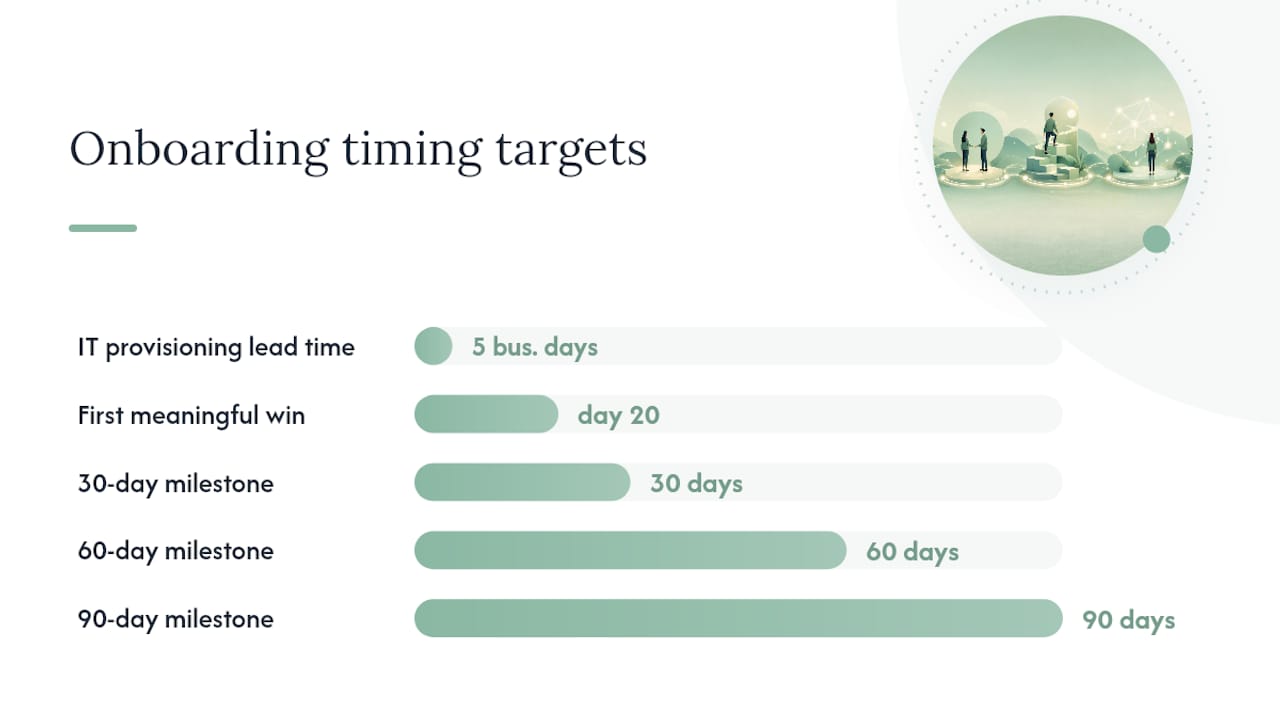
- Submit IT provisioning ticket — Owner: HR or hiring manager. Due: at least five business days before start. Done when: IT confirms accounts are created and hardware is shipped or staged.
- Draft the 30-60-90 plan — Owner: hiring manager. Due: one week before start date. Done when: plan is shared with HR and saved in the HRIS task record.
- Assign a buddy or mentor — Owner: hiring manager or team lead. Due: before start date. Done when: buddy has confirmed availability and received a role brief.
- Send first-day logistics email — Owner: HR. Due: two business days before start. Done when: new hire confirms receipt and has parking, badge, or remote-access instructions.
ADP’s new hire checklist guidance notes that employers often rush this phase and that digital tracking of each milestone prevents last-minute scrambles.
Day one tasks
- Verify all system access — Owner: IT. Due: 9:00 AM on start date. Done when: new hire confirms login to email, HRIS, and any role-specific platforms.
- Conduct manager welcome meeting — Owner: hiring manager. Due: within first two hours. Done when: meeting notes are saved and first-week schedule is shared.
- Introduce buddy — Owner: hiring manager. Due: by noon on day one. Done when: buddy and new hire have had a 30-minute introductory call or meeting.
- Complete required compliance acknowledgments — Owner: HR. Due: end of day one. Done when: signed acknowledgments are stored in the HRIS document folder.
- Distribute first-week goal card — Owner: hiring manager. Due: end of day one. Done when: new hire signs or acknowledges the card in writing.
First week milestones
- Complete mandatory compliance training (harassment, safety, HIPAA if applicable) — Owner: HR. Due: by end of week one. Done when: LMS completion record is logged.
- Attend all scheduled team meetings — Owner: new hire, confirmed by manager. Due: ongoing through week one.
- Submit week-one reflection — Owner: new hire. Due: end of day five. Done when: reflection is shared with manager and filed.
- Manager confirms 30-day goal — Owner: hiring manager. Due: end of week one. Done when: goal is documented in the HRIS or shared project tracker.
30-60-90 day checkpoints
The AIHR employee onboarding framework and Moxo’s role-specific checklist guidance both recommend structured milestone reviews at days 30, 60, and 90.
- Day 30 review — Owner: hiring manager. Done when: written summary of progress against 30-day goals is filed; pulse survey submitted by new hire.
- Day 60 review — Owner: hiring manager. Done when: updated 60-day goal progress is documented; any support needs are escalated to HR.
- Day 90 review — Owner: hiring manager and HR. Done when: formal performance summary is filed; new hire is confirmed as fully integrated or a development plan is initiated.
Department-level checklists and where to record proof
A departmental onboarding checklist must answer four questions for every task: who owns it, when it happens, what completion looks like, and where proof is stored. The table below maps those four columns across the five core departments involved in every new hire workflow.
| Department | Core tasks | Due date | Completion standard | Proof location |
|---|---|---|---|---|
| HR | Collect I-9, W-4, direct deposit; enroll in benefits; file compliance acknowledgments | Day 1 (I-9 by day 3); benefits by day 30 | All forms signed, verified, and filed in HRIS | HRIS document folder |
| IT | Provision email, SSO, role-specific apps, hardware; set MFA; confirm VPN access | 5 business days before start; verified day 1 | New hire confirms login to all systems | IT ticketing system (ticket closed) |
| Finance/Payroll | Set up direct deposit, tax withholdings, expense account | Payroll cutoff before first pay date | First paycheck processed correctly; expense account active | Payroll system record |
| Hiring manager | Draft 30-60-90 plan; conduct welcome meeting; assign buddy; run milestone reviews | Pre-start (plan); day 1 (meeting); days 30/60/90 (reviews) | Written plan filed; meeting notes saved; review summaries documented | HRIS task record or shared drive |
| Team | Schedule team intro meeting; share team norms doc; include new hire in Slack/Teams channels | Week 1 | New hire confirms receipt of norms doc; channel membership verified | Team channel membership log |
A well-structured onboarding SOP should also include a compliance section covering required U.S. deadlines, records retention guidance, and a revision history. FirstHR’s onboarding SOP framework notes that many templates omit this compliance section entirely, which creates legal exposure. Your ops tracker or HRIS should mirror these four columns — owner, due date, status, and proof link — so any auditor or HR leader can verify completion at a glance.
How to tailor onboarding for different roles and use 30-60-90 templates
A single baseline workflow covers the administrative and compliance layer. Role-specific customization happens at the 30-60-90 plan level, where goals, training paths, and success metrics differ by seniority and function.
Segment your onboarding by three dimensions: seniority (individual contributor vs. manager), function (technical vs. non-technical), and prior experience (new to the industry vs. experienced hire). A first-time manager needs explicit training on your performance review process and direct-report expectations in week one. A senior software engineer may skip introductory tool training but needs architecture documentation and a codebase walkthrough by day five.
Copyable 30-60-90 template
Days 1–30: Learn
- Goal 1: Complete all compliance and role-specific training.
- Goal 2: Shadow two to three key workflows or client interactions.
- Goal 3: Deliver one small, visible contribution (a completed ticket, a resolved case, a published document).
Days 31–60: Contribute
- Goal 1: Own at least one recurring responsibility independently.
- Goal 2: Identify one process gap and propose a solution to your manager.
- Goal 3: Build working relationships with five cross-functional contacts.
Days 61–90: Lead
- Goal 1: Complete a project or deliverable with minimal supervision.
- Goal 2: Present a 90-day self-assessment to your manager.
- Goal 3: Confirm readiness for full independent performance.
Sample goals by role
- Customer support representative — Day 30: Handle 20 tickets independently with a quality score above team average. Day 60: Resolve escalations without manager intervention. Day 90: Contribute one knowledge-base article.
- Software engineer — Day 30: Merge two pull requests reviewed by a senior engineer. Day 60: Own a feature end-to-end from ticket to deployment. Day 90: Lead one sprint planning session.
- Admissions coordinator (healthcare) — Day 30: Complete all HIPAA and facility-specific compliance training; process five referrals with supervisor review. Day 60: Manage a full referral caseload independently. Day 90: Achieve target bed-fill rate for assigned payer category. For a deeper look at how onboarding shapes performance in this role, the Smartadmissions guide on onboarding in healthcare tech adoption is worth reviewing.
Templated manager kickoff email
Subject: Welcome to the team — your first-week plan
Hi [Name], I’m looking forward to your first day on [date]. Your first-week schedule is attached. Your buddy, [Buddy Name], will reach out before you start. Your 30-day goal is [specific goal]. Please come ready with any questions about the role or the team. See you soon.
Pro Tip: Send the buddy invitation at least three days before the start date and include a one-paragraph brief on the new hire’s role and background. Buddies who arrive prepared have more productive first conversations.
Moxo’s downloadable onboarding templates cover offer acceptance through day 90 and are available in Excel, Word, and PDF formats for teams that want a ready-made starting point.
When and how should you use onboarding tools and automation?
Automation works best on the administrative layer of the employee onboarding process: paperwork collection, account provisioning, compliance acknowledgment tracking, and milestone reminders. It should not replace manager check-ins, buddy introductions, or the first-week goal conversation. Sage’s onboarding process guidance is direct on this point: automate repetitive manual work, but preserve human touchpoints like mentorship, staged check-ins, and role-specific training.
Integration checklist for onboarding tools
Before selecting a platform, confirm it connects to the systems your team already uses:
- HRIS (Workday, BambooHR, Rippling): task assignment, document storage, milestone tracking
- ITSM/ticketing (ServiceNow, Jira Service Management): IT provisioning requests, access verification
- SSO/MFA (Okta, Microsoft Entra ID): account creation triggers tied to offer acceptance
- Documentation (Confluence, SharePoint, Notion): policy links, team norms, role-specific training paths
- Payroll (ADP, Gusto, Paychex): direct deposit setup, tax form collection
Common automation traps to avoid
Automating the buddy assignment removes the personal element that makes the relationship work. Sending 15 automated emails in the first week creates information overload, not readiness. And triggering account provisioning without a human verification step means no one catches the access error until the new hire’s first morning.
Tool-selection criteria
Evaluate onboarding platforms on four dimensions: scalability (can it handle a 50-person hiring ramp without manual workarounds?), audit trail (does it log who completed what and when?), integrations (does it connect to your HRIS, ITSM, and SSO?), and role-based access (can managers see only their direct reports’ tasks?). Implement in this sequence: configure HRIS task templates first, connect IT provisioning second, add document automation third, and layer in pulse survey triggers last.
For healthcare teams where onboarding intersects with clinical system access, the Smartadmissions healthcare workflow automation guide shows how automation patterns from admissions intake translate directly to staff onboarding integrations.
What KPIs tell you whether onboarding is actually working?
Tracking the right metrics turns onboarding from a gut-feel process into a measurable program. Prioritize these five KPIs:
- Time to productivity: the number of days from start date to the new hire meeting their first independent performance standard. Owner: hiring manager. Reported: at day 90 review.
- Access completion rate: percentage of required system accounts provisioned and verified by 9:00 AM on day one. Owner: IT. Reported: day one.
- 30/60/90 achievement rate: percentage of new hires who complete their milestone goals on schedule. Owner: HR. Reported: after each milestone cycle.
- First-90-day retention rate: percentage of new hires still employed at day 90. Owner: HR. Reported: monthly rolling.
- Manager satisfaction score: hiring manager rating of the onboarding process at day 30 and day 90. Owner: HR. Reported: after each milestone.
Feedback cadence and sample pulse questions
Run four pulse surveys tied to milestones. Keep each survey to three questions maximum.
- Day 1: “Did you have access to all required systems this morning?” / “Did you receive a first-week schedule before today?”
- Week 1: “How clear are your first-30-day goals?” (1–5 scale) / “Have you met your buddy?”
- Day 30: “How supported do you feel by your manager?” / “What is the biggest gap in your onboarding so far?”
- Day 90: “How prepared do you feel for independent performance?” / “What would have made your onboarding more effective?”
Map each KPI to a named owner and a reporting frequency. HR publishes the 30/60/90 achievement rate and retention rate monthly. IT publishes the access completion rate after each new hire start. Hiring managers submit their satisfaction scores within 48 hours of each milestone review.
Common onboarding mistakes and how to fix them fast
The most damaging failure mode is treating onboarding as a single event. A one-day orientation followed by silence leaves new hires without context, relationships, or clear expectations. The fix is structural: build the 30-60-90 plan before day one and schedule milestone check-ins as recurring calendar events that cannot be canceled without rescheduling.
Four other mistakes appear repeatedly across organizations:
- Late equipment or access: new hires who cannot log in on day one lose trust immediately. Fix: submit the IT provisioning ticket at least five business days before start and run a pre-start access verification checklist.
- Unclear manager expectations: new hires often do not know what success looks like at 30 days. Fix: the hiring manager documents and shares the 30-day goal before the start date, not during the welcome meeting.
- Missing cross-team ownership: HR sends the paperwork, but no one tells IT, Finance, or the team lead what they need to do or when. Fix: assign departmental owners in the HRIS workflow and send automated reminders tied to the start date.
- Information overload in week one: stagger knowledge delivery. Cover compliance and access in week one, role-specific processes in weeks two and three, and strategic context in month two.
Pro Tip: Schedule the new hire’s first meaningful win by day 20. A visible, completed task — a resolved ticket, a published document, a successful client call — builds confidence faster than any amount of orientation content. Plan it deliberately with the hiring manager during preboarding.
How do you keep the onboarding workflow current?
An onboarding workflow that is not actively maintained becomes inaccurate within months. Assign a single process owner — typically the HR operations lead or people operations manager — with explicit authority to update the SOP, retire outdated tasks, and publish new versions.
Governance model
- Process owner: HR operations lead. Responsible for maintaining the master SOP, approving changes, and publishing version updates.
- Review cadence: quarterly review as a standing calendar event; ad hoc review triggered by any of the conditions below.
- Authority to update: the process owner can make minor updates (task wording, due dates) unilaterally; structural changes (new stages, new departments) require sign-off from the HR director.
Review triggers
Review the onboarding SOP immediately when any of these occur:
- A core system changes (HRIS, payroll platform, identity provider, or LMS).
- A hiring ramp is planned (more than five new starts in a 30-day window).
- Two or more new hires in the same cohort report the same friction point in their pulse surveys.
- A compliance requirement changes (new I-9 form version, updated state-specific requirements).
- A post-start retrospective surfaces a repeated failure (late access, missing buddy, incomplete training).
Prepared.cloud’s SOP guidance recommends reviewing the workflow before hiring surges and whenever you replace core systems — both are high-value triggers that teams routinely miss.
Post-start retrospective template
Run a 30-minute retrospective within two weeks of each new hire’s day-30 milestone. Three questions:
- What worked exactly as planned?
- What caused friction or delay?
- What one change would prevent that friction for the next hire?
Log the answer to question three as a proposed SOP update. The process owner reviews it within five business days and either accepts, modifies, or rejects it with a written rationale. FirstHR’s SOP framework includes a revision history section for exactly this reason — so every change is traceable and auditable.
What does the evidence say about high-impact onboarding?
The research on effective onboarding strategies points consistently in the same direction: structured programs that combine preboarding, mentorship, staged learning, and scheduled check-ins produce better early retention and faster time to productivity than orientation-only approaches.
SHRM’s onboarding resources highlight that mentor and buddy systems address the relational needs that no automated workflow can replicate. A new hire who has a named person to ask “dumb questions” of in week one is more likely to stay engaged through month three. The buddy role is not informal — it should come with a brief, a time commitment, and a check-in at day 30.
Prioritize early meaningful wins over a mountain of admin tasks. Setting one specific, achievable goal in month one speeds new-hire confidence and autonomy faster than any amount of orientation content. — AIHR, employee onboarding best practices
Sage’s onboarding process guidance makes the case for treating the onboarding workflow as a living document rather than a fixed SOP. Successful teams review and update it before hiring surges and after system changes — not once a year during an HR audit.
Sample pulse questions for mentors and buddies
- Week 1: “Has your new hire asked you at least one question this week?” (Yes/No)
- Day 30: “Does your new hire understand the team’s informal norms and communication preferences?” (1–5 scale)
- Day 60: “Is there anything the new hire needs that they haven’t asked for yet?”
Buddy role template
Commitment: two to three hours per week for the first 30 days; one hour per week for days 31–90.
Responsibilities: answer informal questions, introduce the new hire to key contacts, flag concerns to the hiring manager.
Not responsible for: performance management, formal training delivery, or compliance tasks.
For healthcare admissions teams, where onboarding intersects with clinical workflows and HIPAA compliance, the Smartadmissions guide on seamless onboarding in healthcare covers role-specific considerations that go beyond the standard HR playbook.
What we’ve learned building onboarding workflows at scale
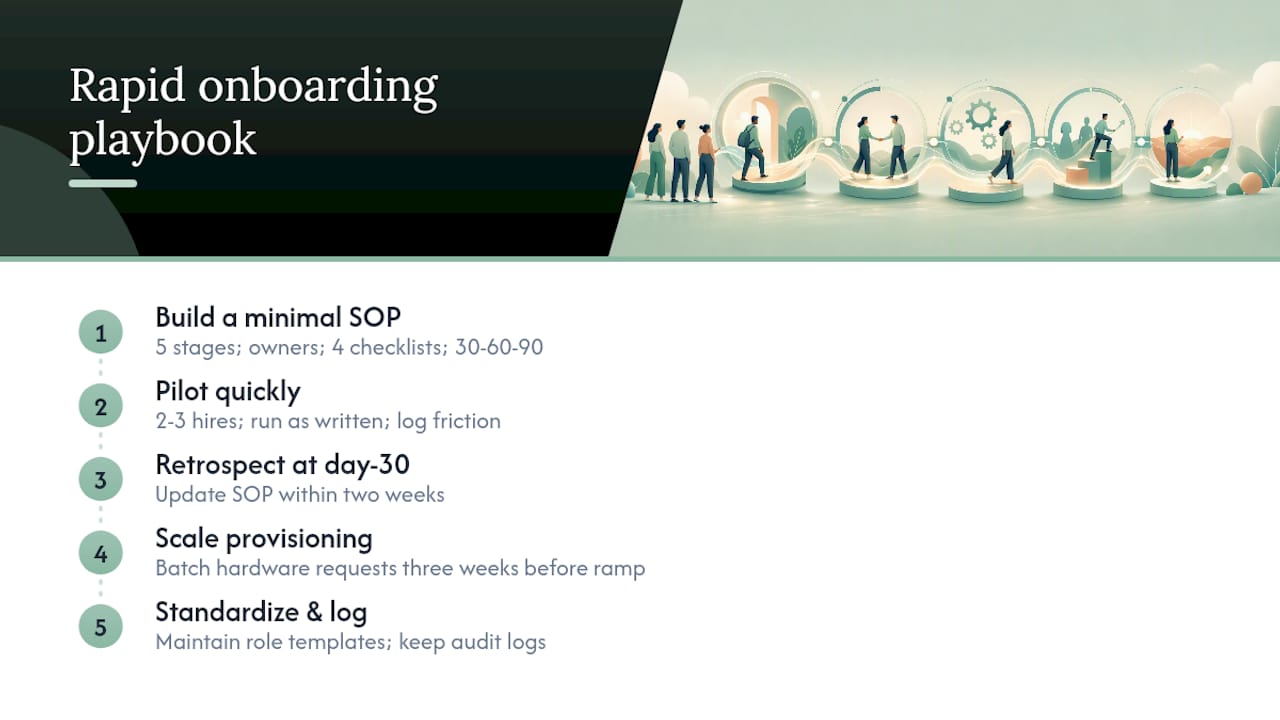
The teams that get onboarding right fastest are the ones that resist the urge to build a perfect system before running it. A minimally viable SOP — five stages, named owners, four checklist columns, and a 30-60-90 template — is more useful on day one than a 40-page document that no one has tested.
Start with a pilot cohort of two or three new hires. Run the workflow exactly as written, log every friction point, and update the SOP within two weeks of their day-30 milestone. That first retrospective will surface more useful improvements than six months of planning meetings.
A few scaling observations worth keeping:
Batch equipment procurement for planned hiring ramps. If you know five people are starting in the same month, submit a single provisioning request three weeks out rather than five individual tickets. IT teams respond faster to consolidated requests, and you eliminate the risk of one hire starting without hardware.
Role templates save more time than any other single investment. Once you have a working 30-60-90 for customer support, software engineering, and admissions coordination, you can onboard a new role by adapting an existing template rather than building from scratch. Keep templates in a shared folder with version dates so managers always pull the current version.
Audit logs matter more than most HR teams expect. When a new hire reports that their access was never provisioned, the first question from IT is “was a ticket submitted?” Without a logged record, the answer is a guess. Build the audit trail into the workflow from the start, not as an afterthought.
For teams standing up the process quickly: assign the process owner today, publish the preboarding email template this week, and run your first post-start retrospective after your next new hire’s day-30 milestone. Those three actions move you from ad hoc to repeatable faster than any software purchase.
Sources
The resources below are vetted for authority and practical usability. Each one offers something specific for HR teams building or improving a new hire onboarding checklist.
- SHRM – Onboarding resources
- ADP – New Hire Checklist
- Prepared
- AIHR – New hire checklist
- Moxo – New hire onboarding checklist for HR teams
- Atlassian – Onboarding workflow