
Standardize your admissions intake forms by defining a minimum data set, locking a green/yellow/red triage rule with named decision owners, and validating those fields inside your EMR or referral software before a bed offer is made. Start this week by capturing six fields on every first-pass referral:
- Primary diagnosis and surgical history (including 30-day procedure details for PDPM accuracy)
- Payer source and authorization status (Medicare, Medicaid, managed care, commercial)
- Therapy needs (PT, OT, SLP goals and estimated intensity)
- Infection or isolation status (MRSA, C. diff, COVID, wound precautions)
- Urgent red flags (active behavioral issues, ventilator dependency, IV medications)
- Preferred discharge location and support system
Pilot the form with one or two hospital partners, then map every field to MDS Section GG and the INTERACT® Hospital-to-Post-Acute Care Transfer Form before you scale.
Pro Tip: Build your intake template in a shared document first. Run 20 consecutive referrals through it manually before touching your EMR configuration. You will catch field-definition problems that no software demo will reveal.
The role of intake forms in admissions extends beyond paperwork. Consistent documentation is the foundation of faster decisions, safer admits, and defensible denials.
Key Takeaways
Standardizing intake forms requires a minimum data set, named decision owners, and EMR-enforced required fields — piloted before facility-wide rollout.
| Point | Details |
|---|---|
| Six first-pass fields | Capture diagnosis, payer, therapy needs, isolation status, red flags, and discharge destination on every referral. |
| Behavioral status is the most-missed field | It was absent in 67.7% of hospital-SNF transitions; make it a required field with no skip logic. |
| Parallel clinical/payer/operations review | Running all three tracks simultaneously cuts response time without sacrificing clinical fit assessment. |
| Pilot before scaling | Run 30–50 referrals through the new form with one hospital partner and measure missingness and response time before expanding. |
| Smartadmissions | Automates field extraction, payer verification, and KPI tracking to support a standardized, audit-ready intake workflow. |
Table of Contents
- What fields does every SNF intake form need to capture?
- Who does what: screening roles, triage rules, and decision owners
- How should you design the intake form layout and workflow?
- What should your EMR or referral software automate?
- How do you pilot and roll out a standardized intake form?
- Which KPIs tell you whether intake standardization is working?
- How do intake fields map to MDS, OASIS, IRF-PAI, and INTERACT®?
- What are the most common intake failures and how do you fix them?
- Why insurance verification must happen before the bed offer
- Data privacy and compliance in intake form standardization
- The case for standardization goes deeper than efficiency
- Smartadmissions gives your team a faster path to standardized intake
- Authoritative resources for intake standardization
- Sources
What fields does every SNF intake form need to capture?
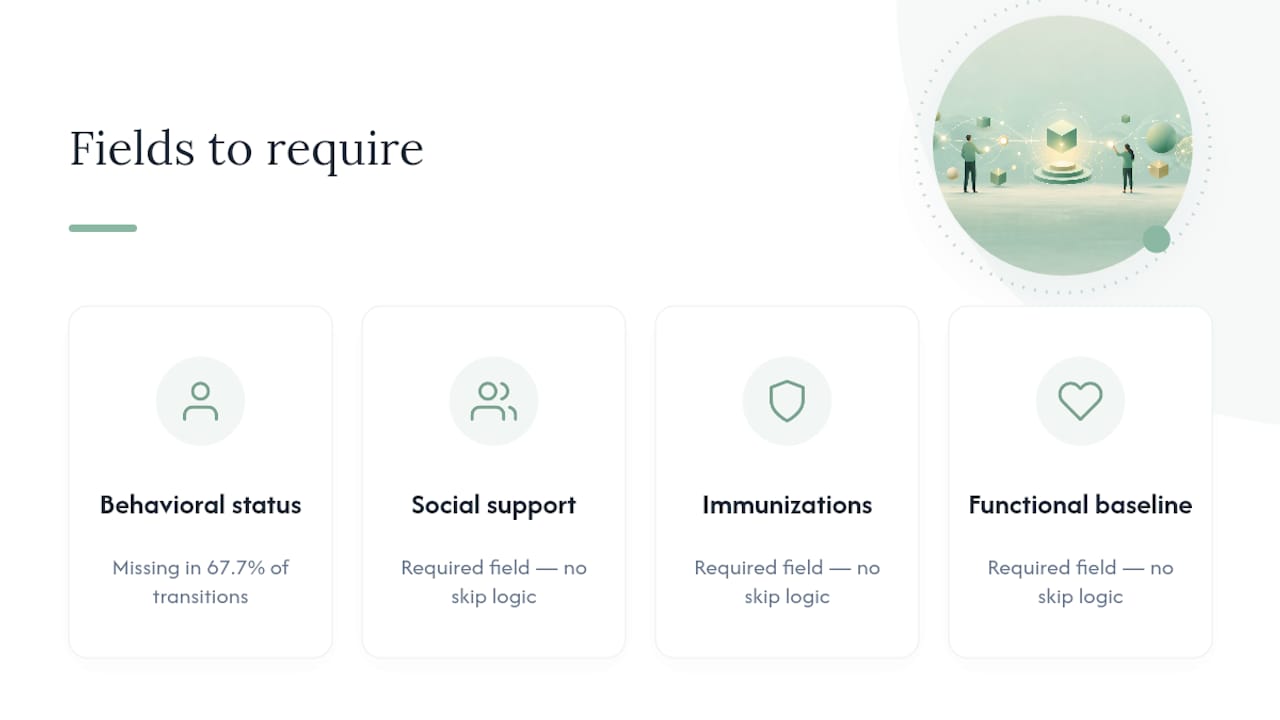
A national survey of hospital-SNF pairs found that behavioral status was missing in 67.7% of transitions and that only a small fraction of pairs received all recommended information types. That gap is not a hospital problem alone — it is a form design problem. If your intake form does not require behavioral status, your team will not ask for it.
Group your mandatory fields into ten domains:
The CMS post-acute care quality report confirms that MDS, OASIS, and IRF-PAI each cover different domains, so a deliberate crosswalk is required — you cannot assume one instrument covers everything your intake form needs.
Force-capture the four most-missed items by making them required fields with no skip logic: behavioral history, social support status, immunization record, and functional baseline.
Who does what: screening roles, triage rules, and decision owners
Research on SNF admission variability shows that payer verification is frequently the first gatekeeper, that liaison backgrounds vary widely (nursing, speech therapy, business administration), and that facilities use differing structures — including green/yellow/red triage and team-based reviews. Without a documented governance model, your decisions are only as consistent as whoever answers the phone.
Assign these roles explicitly:
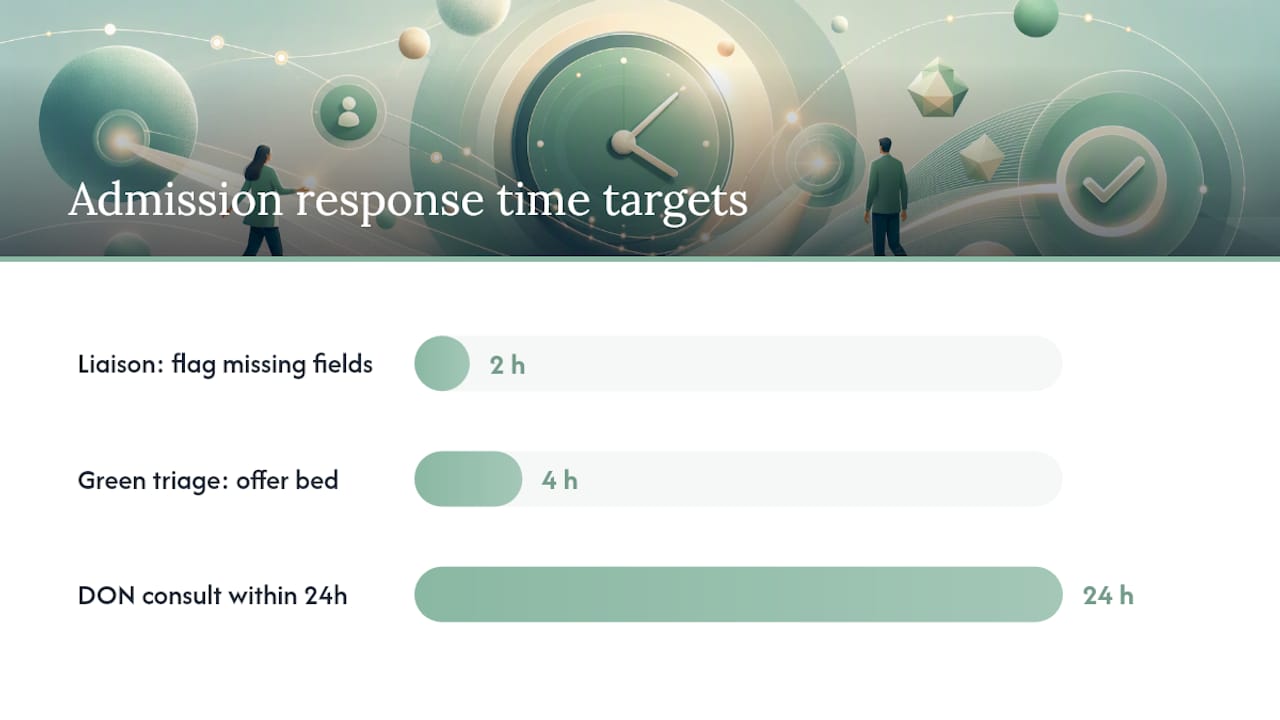
- Liaison/intake coordinator: receives referral, completes first-pass checklist, flags missing fields within two hours
- Admissions coordinator: runs payer verification and authorization check in parallel with clinical review
- Director of Nursing (DON): reviews yellow and red cases, consults attending or medical director when needed
- Medical director: signs off on complex clinical cases (ventilator, behavioral, bariatric)
- Interdisciplinary team (IDT): weekly review of borderline admits and denial patterns
Triage rule template:
- 🟢 Green: Diagnosis is within your clinical capabilities, payer verified, no isolation concerns, therapy goals are clear. Offer bed within four hours.
- 🟡 Yellow: One or more fields missing, payer pending, or moderate clinical complexity. DON consults within 24 hours. Hold bed pending clarification.
- 🔴 Red: Active behavioral crisis, ventilator dependency, payer denied, or clinical resources unavailable. Escalate to medical director. Document denial reason in the referral record.
Governance rule: Every admission decision — accept, hold, or deny — must be documented with a timestamp, the name of the decision owner, and the primary reason. Undocumented decisions cannot be audited, appealed, or learned from.
Pro Tip: Standardize liaison training with a written credential-access checklist: which EMR portals they can log into, which hospital systems send eReferrals, and who to call for a nurse-to-nurse report when the packet is thin.
How should you design the intake form layout and workflow?
Clarity in form design directly reduces missing data. Use these layout rules:
- Summary row at the top: patient name, DOB, primary Dx, payer, and triage color — visible without scrolling.
- Required fields in red or marked with an asterisk: behavioral status, payer, isolation status, and functional baseline cannot be left blank.
- Checkboxes for common conditions: wound care, IV therapy, dialysis, trach/vent, bariatric — faster than free text and easier to query later.
- Dropdowns for diagnosis phrasing: standardize to ICD-10 categories so your analytics are clean.
- Single-line clinical summary field: one sentence the admissions coordinator writes after reviewing the packet — forces synthesis and catches gaps.
The downstream workflow runs in three parallel tracks after receipt:
- Clinical track: DON or charge nurse reviews diagnosis, meds, and functional status
- Payer track: coordinator verifies benefits and authorization
- Operations track: bed availability, room type, isolation requirements
All three tracks must complete before a bed offer is made. Sequential review adds hours; parallel review typically cuts response time in half.
For missing data, set a written follow-up rule: the liaison calls the hospital case manager within two hours of identifying a gap, documents the call in the referral record, and escalates to the DON if the gap is not resolved within four hours.
Pro Tip: Use SBAR format (Situation, Background, Assessment, Recommendation) for nurse-to-nurse calls. It structures the conversation and ensures you ask about behavioral history — the field most likely to be omitted in a freeform call.
What should your EMR or referral software automate?
Facilities using electronic referral software record wins, losses, and denials more completely than those relying on manual logging — and that data is what makes process improvement possible. Automation should handle the repetitive extraction and flagging work so your clinical staff focus on judgment calls.
Automate these checkpoints:
- Ingest eReferral packets and extract key fields automatically
- Flag missing required fields before the packet reaches the coordinator
- Run real-time payer eligibility checks against Medicare, Medicaid, and managed care portals
- Timestamp every status change (received, under review, offered, accepted, denied)
- Route yellow and red cases to the DON queue automatically
Vendor capability checklist — confirm these before selecting or configuring software:
- eReferral ingestion (Direct Secure Messaging, CommonWell, or proprietary portal)
- EHR read access for clinical data pull
- Customizable required-field enforcement with hard stops
- Audit trail with user ID and timestamp on every action
- Secure messaging between facility and hospital liaison
- Analytics dashboard showing response time, win/loss/denial rates, and missingness by field
Keep humans in the loop for final admit decisions, complex clinical cases, and any denial that may be appealed. Automation extracts and flags; your team decides. Review the EMR integration guide for technical configuration steps.
How do you pilot and roll out a standardized intake form?
A 30/60/90-day pilot with one or two hospital partners gives you real-world data before you commit to a facility-wide rollout.
- Days 1–30 (Scope and baseline): Select one high-volume hospital partner. Run 30–50 referrals through the new form. Track missingness rates per field and response time. Do not change the form yet — observe.
- Days 31–60 (Iterate and train): Review missingness data with your DON and liaison team. Revise required fields, dropdown options, and triage criteria based on what you found. Train all admissions staff and hospital liaisons on the updated form. Introduce the nurse-to-nurse call script.
- Days 61–90 (Measure and expand): Add a second hospital partner. Measure success criteria against baseline. Gather written stakeholder feedback from liaisons, coordinators, and nursing.
Success criteria to watch:
- Missingness rate per required field drops below 10%
- Referral response time under four hours for green cases
- Staff compliance rate (forms completed per protocol) above 90%
- Win rate stable or improving relative to pre-pilot baseline
The JAMA survey data showing that 49.6% of hospital-SNF pairs did not receive 80% of recommended information types makes a strong internal case for piloting: present that figure to your hospital partners when asking them to adopt the new transfer checklist.
Which KPIs tell you whether intake standardization is working?
Track these metrics on a weekly dashboard and audit monthly:
- Referral response time: minutes from receipt to first decision (target: under four hours for green)
- Win/loss/denial rate: percentage of referrals accepted, declined by facility, or declined by patient/family
- Missingness rate per field: percentage of submitted forms with each required field blank
- Time-to-bed-occupancy: hours from referral receipt to patient arrival in bed
- 30-day readmission proxy: track admits where behavioral or functional status was missing at intake and compare readmission rates to complete-data admits
| KPI | How to Calculate | Reporting Cadence |
|---|---|---|
| Response time | Timestamp: offer minus receipt | Weekly |
| Win rate | Accepted ÷ total referrals received | Weekly |
| Missingness rate | Blank required fields ÷ total required fields submitted | Weekly |
| Time-to-bed-occupancy | Bed arrival minus referral receipt | Monthly |
| Readmission proxy | 30-day readmits with incomplete intake ÷ total admits | Monthly |
Audit a random sample of 10–15 referral records monthly. Check that triage color matches documented clinical criteria, that denial reasons are recorded, and that timestamps are present on every status change.
Pro Tip: Export your denial reason data quarterly and categorize by the three most common types seen in automated referral datasets: behavioral/high-risk, lack of clinical resources, and financial issues. That breakdown tells you where to invest in clinical capacity or payer contracting.
How do intake fields map to MDS, OASIS, IRF-PAI, and INTERACT®?
A well-designed intake form eliminates rework at the MDS completion stage. Map these fields now:
- MDS Section B (Hearing, Speech, Vision) and E (Behavior): capture BIMS score and behavioral history at intake
- MDS Section GG (Functional Abilities): document prior functional status (eating, mobility, transfers) from the hospital therapy note
- MDS Section I (Active Diagnoses): confirm ICD-10 codes match the referral packet
- MDS Section M (Skin Conditions): capture wound stage, size, and location on the intake form
- OASIS (home health): if the patient may discharge to home health, capture OASIS-relevant items (prior living situation, caregiver availability) at intake
- IRF-PAI: for rehab units, capture FIM-equivalent functional scores and rehabilitation goals
- INTERACT® Transfer Form: use the INTERACT® Hospital-to-Post-Acute Care Transfer Form as your crosswalk template for nurse-to-nurse handoffs
For a ready-to-use intake documentation template and crosswalk configuration guide, the Smartadmissions intake documentation guide covers required-field enforcement and MDS mapping in detail.
Capture payer authorization numbers and benefit-day counts on the intake form before admission. A missing authorization number discovered post-admit is a revenue risk, not a paperwork inconvenience.
What are the most common intake failures and how do you fix them?
Operational red flags and quick fixes:
- Incomplete medication list: Call the hospital pharmacist directly, not the case manager. Request a discharge med reconciliation, not just the admission orders.
- Unknown isolation status: Do not assume. Call infection control at the sending facility. A missed C. diff status can trigger an outbreak.
- Missing payer authorization: Put the bed on a soft hold. Do not admit without a confirmed authorization number or a documented Medicare Part A eligibility check.
- Unclear rehab goals: Ask the hospital therapist, not the case manager. “Patient wants to go home” is not a goal. “Patient needs to ambulate 150 feet with a walker” is.
- Behavioral history absent: Use the nurse-to-nurse call to ask specifically: “Has the patient had any episodes of aggression, elopement, or psychiatric crisis in the last 90 days?”
When a referral cannot be accepted, document the specific reason in the referral record using a standardized denial code. “Not a good fit” is not a denial reason. “Behavioral history of physical aggression; facility lacks a secured memory care unit” is. That documentation protects your facility and keeps your referral pipeline auditable.
Why insurance verification must happen before the bed offer
Payer verification is the first gatekeeper in most SNF admission decisions, and research confirms that insurance eligibility checks drive the initial screening step at facilities across the country. Run verification in parallel with clinical review, never after.
Your verification checklist for every referral:
- Confirm Medicare Part A eligibility and qualifying hospital stay (three-night rule)
- Check managed care authorization requirements and in-network status
- Verify Medicaid eligibility and any spend-down obligations
- Confirm benefit days remaining and any prior authorization requirements
- Document the verification source, date, and staff member who completed it
A bed offered before payer verification is a financial risk. Build a hard stop into your workflow: no bed offer without a completed payer check logged in the referral record.
Data privacy and compliance in intake form standardization
Every field on your intake form is protected health information (PHI) under HIPAA. Standardizing the form means standardizing your compliance posture at the same time.
- Minimum necessary standard: collect only the fields your clinical and operational teams will actually use. A longer form is not a safer form.
- Business Associate Agreements (BAAs): any software vendor handling PHI must have a signed BAA on file before you configure intake fields in their system.
- Audit trails: your EMR or referral software must log who accessed each referral record, when, and what action they took. This is non-negotiable for HIPAA compliance and for your own quality audits.
- Secure messaging: use Direct Secure Messaging or an encrypted portal for all referral packet exchanges. Email attachments with PHI are a compliance liability.
- State-level requirements: some states impose additional consent or data-retention rules beyond HIPAA. Confirm your state’s requirements with your compliance officer before finalizing the form.
The case for standardization goes deeper than efficiency
Most admissions directors frame intake standardization as a speed problem. Get the form filled out faster, respond to referrals faster, fill beds faster. That framing is not wrong, but it misses the more consequential benefit: clinical safety.
When behavioral status is missing at intake — and research shows it is absent in 67.7% of hospital-SNF transitions — your team admits patients without knowing whether they have a history of aggression, elopement, or psychiatric crisis. That is not a documentation gap. That is a staff safety gap and a liability exposure.
The facilities that get the most value from standardized intake are not the ones that respond fastest. They are the ones that use the data they collect to make better decisions over time: tracking denial reasons, auditing missingness rates, and feeding that information back into form design. MDS and INTERACT® give you the crosswalk framework. The pilot gives you the evidence. The governance model gives you the accountability. Put all three together and standardization becomes a clinical quality program, not just an administrative one.
The pragmatic lesson: do not let perfect be the enemy of a working form. A form that captures eight of ten required fields consistently beats a theoretically complete form that staff skip because it takes 20 minutes to fill out. Start with the six fields in the opening checklist, measure compliance, and add fields only when your team has demonstrated they can sustain the baseline.
Smartadmissions gives your team a faster path to standardized intake
Faster bed occupancy starts with a form your team actually uses — and a system that enforces it. Smartadmissions is built specifically for SNFs, rehab centers, and post-acute providers who need to move from manual, inconsistent intake to a validated, auditable workflow without a lengthy IT project.
Three capabilities that map directly to this guide:
- Automated field extraction and validation: Smartadmissions pulls key clinical and payer data from incoming referral packets and flags missing required fields before your coordinator opens the record.
- Real-time payer eligibility checks: Medicare, Medicaid, and managed care verification runs in parallel with clinical review, so no bed offer goes out without a confirmed payer status.
- KPI dashboards: response time, win/loss/denial rates, and missingness rates are tracked automatically, giving your team the weekly data needed to sustain and improve standardization.
Onboarding includes support for custom crosswalks to MDS and INTERACT® workflows, so your intake fields connect directly to your regulatory reporting from day one. See how automated admissions compare to manual workflows, or explore referral management system examples to evaluate what fits your facility. When you are ready to pilot, the Smartadmissions team can have your standardized intake template configured and live within days.
Authoritative resources for intake standardization
- INTERACT® SNF Best Practices Toolkit — Download the INTERACT® Hospital-to-Post-Acute Care Transfer Form and SBAR scripts for nurse-to-nurse handoffs.
- CMS Post-Acute Care Quality Measurement Report — The primary source for MDS, OASIS, and IRF-PAI domain coverage and crosswalk methodology.
- JAMA Network Open: Hospital-SNF Information Sharing Survey — National survey data on what documentation hospitals actually send and what SNFs actually receive.
- JMIR: Electronic Referral Decision-Making in SNFs — Analysis of denial reasons and the value of automated referral software for tracking wins, losses, and denials.
- PMC: SNF Screening and Admission Variability — Qualitative study on triage structures, liaison roles, and payer verification as the primary admission gatekeeper.
- Smartadmissions Intake Documentation Guide — Template and crosswalk configuration guidance for MDS and INTERACT® integration.
- Smartadmissions: Optimize Bed Occupancy — Tactical strategies for connecting intake standardization to bed fill rate outcomes.
Sources
- Variability in skilled nursing facility screening and admission processes: implications for value-based purchasing
- Information sharing practices for hospital to skilled nursing facility transitions: a national survey of hospital-SNF pairs
- Referral decision-making in skilled nursing facilities using electronic referral software: analysis and implications
- Quality Measurement and Data Collection for Post-Acute Care: Final Report
- Skilled Nursing Facility (SNF) Shared Best Practices to Reduce Potentially Preventable Readmissions (PPRs)