
An authorization tracking workflow is the structured process your team uses to log, monitor, and act on every prior authorization request from identification through expiration. The single rule that fixes most delays: build one centralized log, give every record a next-action date, and assign one named owner per authorization. Get that right and automation for EHR integration, ePA, and payer portals speeds the whole system while cutting denials tied to missed deadlines.
TL;DR:
- Ensuring every authorization record has a clear owner, a next-action date, and a complete status is essential to prevent delays and revenue loss.
- Automating verification through electronic prior authorization or RPA works well for high-volume, stable payer rules but requires ongoing monitoring and audit trails.
- Regularly reviewing key KPIs such as days from identification to submission or decision, and expired-authorization incidents, helps track workflow effectiveness.
- Transitioning from spreadsheets to a centralized log with real-time integrations and strict process discipline reduces manual errors and improves compliance.
- Clear staff training, including shadowing and quarterly updates, supports consistent workflow adherence and minimizes risks of missed or expired authorizations.
Table of Contents
- What Belongs in an Authorization Tracking Workflow?
- Which Parts of Authorization Tracking Can You Automate?
- How Should Your Team Run Authorization Tracking Day to Day?
- What KPIs Prove Your Authorization Tracking Workflow Is Working?
- How Do You Move From Spreadsheet to Automated Authorization Tracking?
- How Smart Admissions Applies This Workflow
- How Do You Keep Authorization Data Secure and Compliant?
- How Does Authorization Tracking Connect to Clinical Workflows?
- How Do You Train Staff on Authorization Tracking?
- What Happens When You Optimize Authorization Tracking?
- Where Administrators Go Wrong on Authorization Tracking
- Ready to Automate Your Authorization Tracking Workflow?
- Sources
What Belongs in an Authorization Tracking Workflow?
A working prior authorization tracking log needs specific fields, not a loose collection of notes in a shared spreadsheet. Each field earns its place because it answers a question someone on your team will ask under time pressure.
- Patient identifier and ordering provider: ties the record to the chart and clinical context.
- Payer and plan: because rules and turnaround times differ by plan, not just by carrier.
- Service codes: the exact CPT or HCPCS codes under review, since partial approvals are common.
- Date identified and date submitted: the gap between these two dates is your earliest efficiency signal.
- Submission channel: portal, fax, phone, or ePA, so you know where to check status.
- Payer reference number: your proof of submission and your fastest path to a live rep.
- Status: pulled from a closed taxonomy, never a free-text field.
- Next-action date: the single most important field in the entire workflow.
- Decision, decision date, authorization number, and expiration date: closes the loop and triggers reauthorization planning.
Use a closed status taxonomy so every record sits in exactly one of eight states: Identified, Preparing, Submitted, In Review, Info Requested, Approved, Denied, or Expired/Needs Reauth. Ambiguous statuses like “pending” or “working on it” hide problems instead of surfacing them.
Cadence rules attach directly to status. Verify payer receipt within two business days of submission; if the payer hasn’t acknowledged the request by then, escalate rather than wait. Info Requested items get a one business day response target, since these are the records most likely to expire quietly if ignored.
Pro Tip: Payer reference numbers and next-action dates are the two fields that prevent the most expensive delays. If your team can only standardize two habits this month, standardize those.
Which Parts of Authorization Tracking Can You Automate?
Electronic prior authorization, or ePA, connects your ordering system directly to payer decision engines, often through your EHR’s order entry screen. It works well for high-volume, well-defined services where payer rules are published and stable. Eligibility checks and payer API connections handle the repetitive verification work that used to consume hours of staff time.
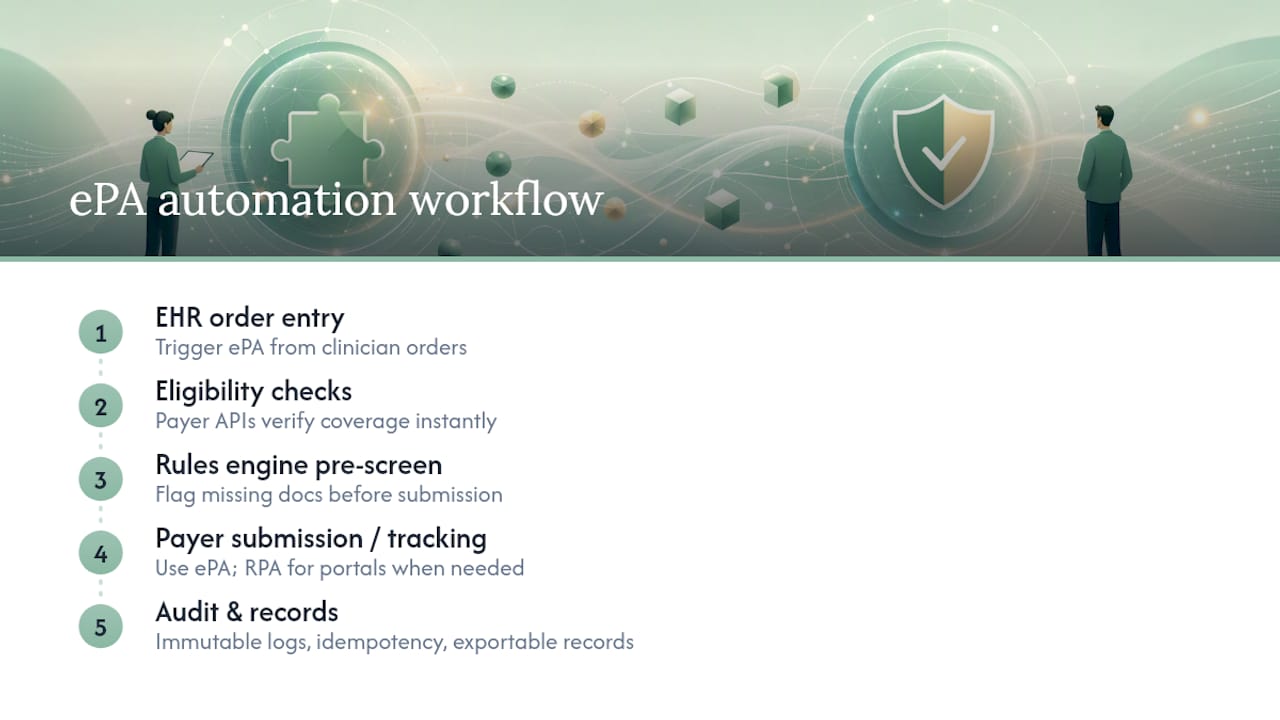
Rules engines and policy libraries can pre-screen requests against payer criteria before submission, flagging documentation gaps automatically. Reserve human review for medical necessity judgment calls, appeals strategy, and any payer whose rules change faster than your rules engine can track.
For payers without ePA support, robotic process automation (RPA) can log into portals and pull status updates on a schedule. RPA works, but it’s fragile. Portal redesigns break scripts without warning, so budget ongoing monitoring rather than treating RPA as “set and forget.”
Whatever you automate, build in an immutable audit trail, idempotency keys on submissions so a retry never creates a duplicate request, and exportable decision records for appeals. MACPAC’s analysis of prior authorization automation treats this kind of infrastructure as necessary for scaling volume without scaling headcount proportionally.
Automation’s real payoff: Industry reporting from HFMA shows prior authorization imposes measurable time and cost burdens on providers, and automation reduces manual touches while speeding approvals. The CAQH Index is a useful benchmark for setting realistic ePA adoption targets for your facility rather than assuming full digital coverage on day one.
Read more on prior authorization automation gains if you’re weighing which processes to tackle first.
How Should Your Team Run Authorization Tracking Day to Day?
Every authorization record needs exactly one named owner. Split queues by payer, by service line, or by facility, whichever matches how your staff already specializes. Shared ownership is how records go stale; nobody escalates a request they don’t believe is theirs.
- Start each shift by pulling the next-action worklist sorted by the oldest overdue date first, not by whatever record happens to be on top.
- Process Info Requested items before anything else, since these carry the shortest response windows.
- Verify receipt on anything submitted in the last two business days that hasn’t shown a status change.
- Escalate silent payers through a documented path (supervisor contact, payer provider relations line) rather than an informal phone call nobody logs.
- Once approval lands, hand the record to scheduling immediately so the authorization number and expiration date travel with the visit, not in a separate email.
Pro Tip: A next-action date with no owner is just a suggestion. Pair the two, every time, and your worklist runs itself.
For payer-specific quirks, a insurance portal workflow guide can help standardize how staff document each submission channel.
What KPIs Prove Your Authorization Tracking Workflow Is Working?
Track five numbers monthly: days from identified to submitted, days from submitted to decision, the percentage of records touched on their cadence schedule, expired-authorization incidents, and denial rate specifically attributable to expired authorizations. Share this report with operations weekly, clinical leads biweekly, and finance monthly, since each audience acts on a different slice of it.
Audit trail requirements matter here too. Immutable decision logs that record who changed what and when protect you during appeals and compliance reviews alike.
| Metric | What it reveals |
|---|---|
| Volume submitted | Workload and staffing needs |
| Avg. days to decision | Payer responsiveness trends |
| % touched on cadence | Whether the workflow is actually being run |
How Do You Move From Spreadsheet to Automated Authorization Tracking?
You don’t need full automation on week one. Sequence the work so early wins fund later investment.
- Day 0: Create the log, even in a spreadsheet. Define your eight statuses, assign one owner per record, and set cadence rules in writing.
- Weeks 1 to 6: Standardize submission channels, require payer reference number capture on every submission, and build the daily next-action worklist as a habit.
- Months 2 to 6: Integrate your EHR, enable ePA wherever the payer supports it, deploy a rules engine for your highest-volume payers, and layer RPA onto remaining manual portals.
- Ongoing: Train staff on the SOP, run monthly audits against your KPI targets, and pilot any new automation on one payer before rolling it facility-wide.
See more automation patterns in examples of healthcare workflow automation.
How Smart Admissions Applies This Workflow
Smart Admissions builds the centralized log, eligibility verification, and EMR and payer portal integrations described above into one system, so admissions teams aren’t stitching together spreadsheets and portal logins by hand. The audit trail captures every status change automatically, which matters as much for appeals as for daily oversight… These are product examples of the design principles in this guide, not a claim that every facility needs the same tools.
How Do You Keep Authorization Data Secure and Compliant?
Authorization records carry protected health information, which puts HIPAA squarely at the center of any tracking system design, whether it’s a spreadsheet or a full platform. Access controls matter first: staff should see only the records tied to their assigned queue, not the entire facility’s authorization history by default.

Role-based permissions, encrypted data at rest and in transit, and business associate agreements with any vendor touching the log are baseline requirements, not optional extras. If your workflow uses RPA to log into payer portals, those credentials need the same protection as any clinical system login, including rotation schedules and multi-factor authentication.
The audit trail itself does double duty here. An immutable decision log that shows who accessed a record, what they changed, and when, satisfies both operational needs and compliance documentation requirements simultaneously. During a HIPAA audit or a payer appeal, that same log is your evidence trail.
One overlooked risk: authorization tracking spreadsheets shared over email or stored on local drives outside your EHR’s security perimeter. These are common in facilities still transitioning off manual processes, and they represent exactly the kind of ungoverned PHI exposure that turns a minor process gap into a reportable incident. Moving the log into a governed system, even before full automation, closes that gap immediately.
How Does Authorization Tracking Connect to Clinical Workflows?
Authorization status can’t live in a silo separate from the clinical team, because clinicians and schedulers are the ones who trigger the process and act on its outcome. The workflow should start the moment a clinician flags an order as requiring prior authorization, not after the request lands on an admissions coordinator’s desk. Creating a pending entry at order entry, rather than waiting for formal submission, closes the gap where requests get lost between departments.

Communication pathways need to run both directions. When a payer requests additional clinical documentation, that request has to reach the treating clinician quickly, since admissions staff usually can’t supply medical necessity justification on their own. Conversely, once an authorization is approved, scheduling and clinical staff need the authorization number and expiration date immediately, so services aren’t delivered outside the approved window.
Facilities that treat authorization tracking as a back-office function separate from clinical operations tend to see the same failure pattern: approvals expire before the service is delivered, or clinical documentation requests sit unanswered because nobody flagged them to the right person. Building shared visibility, whether through integrated dashboards or simple status notifications tied to the EHR, keeps both sides of the workflow moving on the same timeline.
How Do You Train Staff on Authorization Tracking?
New hires need more than a walkthrough of the software. They need to understand why the closed status taxonomy exists and why a next-action date isn’t optional paperwork. Start training with the cost of getting it wrong: a single expired authorization can mean an unreimbursed service and a difficult conversation with a patient’s family.
Pair new staff with an experienced owner for their first two weeks of live queue work, rather than relying solely on documentation. Authorization tracking has enough payer-specific nuance that shadowing catches edge cases a written SOP misses. Build a short reference card covering your eight statuses, your cadence rules, and your escalation path, since staff under pressure need a quick lookup, not a lengthy manual.
Revisit training quarterly, not just at onboarding. Payer rules shift, your rules engine’s coverage expands, and staff drift back toward old habits like vague status notes if nobody reinforces the standard. A monthly audit that spot checks a sample of records for complete payer reference numbers and current next-action dates does double duty as both a quality check and a training refresher.
Cross-train at least two people per payer queue. Single points of failure in authorization tracking are a staffing risk as much as a process risk.
What Happens When You Optimize Authorization Tracking?
The connection between a disciplined authorization tracking workflow and patient care is direct, not theoretical. AMA survey data shows that delays tied to prior authorization can lead to serious adverse events when needed care gets held up waiting on a decision that should have been escalated days earlier. A next-action cadence that catches silent payers within two business days is a patient-safety mechanism as much as an efficiency one.
On the financial side, expired authorizations and missed documentation windows translate directly into denied claims and unreimbursed services. Tightening the workflow, capturing payer reference numbers consistently, and closing the loop on decision dates reduces the denial rate tied specifically to procedural gaps rather than medical necessity disputes. That’s a meaningfully different problem to solve, and it’s one entirely within your team’s control.
Faster decisions also mean faster bed occupancy for post-acute and skilled nursing facilities, where an authorization delay can stall an admission that’s otherwise ready to proceed. The operational impact of automated admissions compounds across a full census, not just one referral at a time.
Where Administrators Go Wrong on Authorization Tracking
Three mistakes recur constantly: no single owner per record, no next-action date discipline, and status fields left vague enough to hide real problems. Fix those three, and most of your denial-driven revenue leakage disappears. Keep your SOPs and audit records current. They’re your best defense in an appeal.
— Harry
Ready to Automate Your Authorization Tracking Workflow?
Spreadsheets get you organized; they don’t get you fast. Smart Admissions replaces the manual log-and-chase routine with a centralized system built around the same principles covered here, so your team spends time on decisions instead of status checks.
- Centralized authorization log with next-action dates and single-owner assignment built in
- Real-time eligibility verification tied to EMR and payer portal integrations
- Immutable audit trail for every status change and decision
- Analytics that surface your days-to-decision and on-cadence percentages automatically
If your team is still tracking authorizations across spreadsheets and payer portal tabs, explore referral management systems built for efficiency and see how the workflow above runs inside one platform. Schedule a demo to see your own payer mix modeled before you commit to anything.
Sources
- Prior authorization tracking: build a PA log that works
- Prior authorization cost and time burdens increase for providers
- CAQH Index report