
Start a mandatory, role-based 8-week admissions training program that pairs hands-on EMR practice with train-the-trainer coaching and clear KPIs. Facilities that skip structured training tend to repeat the same mistakes: research from UCSF found nursing homes often provide only limited initial training instead of ongoing, tailored instruction. That gap costs you time-to-bed and referral conversions.
Begin this week with three moves:
- Get sign-off from your administrator and director of nursing on mandatory attendance (not optional) for all admissions-facing roles.
- Identify two or three super-users to become trainers before the broader rollout starts.
- Build session one around five items: referral intake basics, eligibility verification, EMR login and navigation, documentation standards, and your facility’s time-to-bed target.
Smart Admissions can support this from day one by giving trainees a sandbox environment to practice referral review without touching live patient data.
Key Takeaways
Mandatory, role-based training with hands-on EMR practice and clear KPIs is what separates admissions teams that improve from those that stay stuck repeating the same errors.
| Point | Details |
|---|---|
| Make attendance mandatory | Optional sessions tend to predict poorer HIT adoption and slower skill retention. |
| Match training to role | Coordinators, nurses, bed managers, and payer specialists each need different depth of practice. |
| Fix infrastructure first | Confirm devices, Wi-Fi, and sandbox EMR access before training begins, not during it. |
| Track a short KPI set | Time-to-bed, conversion rate, and documentation error rate reveal whether training is working. |
| Use software to scale practice | Smart Admissions gives trainees a realistic sandbox and surfaces KPIs automatically as the program scales. |
Table of Contents
- Who Needs Training and What Each Role Must Master
- How Should You Design the Training Program?
- What Technology and IT Support Do You Need First?
- What Should Each Training Session Actually Cover?
- How Do You Make the Training Actually Stick?
- Which KPIs Prove the Training Is Working?
- What Does an 8-Week Rollout Timeline Look Like?
- What Usually Goes Wrong, and How Do You Fix It?
- What One Admissions Director Learned From Running This Plan
- How Smart Admissions Supports Your Training Rollout
- Sources
Who Needs Training and What Each Role Must Master
Not every admissions team member needs the same depth of training. Matching content to role prevents wasted time and keeps sessions relevant.
Your core roles and their priority competencies:
- Admissions coordinator: referral triage, first-pass packet review, EMR data entry, communication with hospital liaisons.
- Admissions nurse or liaison: clinical intake review, PDPM-relevant diagnosis capture, acuity assessment, care plan handoff.
- Bed manager: occupancy tracking, unit-level capacity matching, transfer coordination.
- Business office or payer specialist: insurance eligibility checks, authorization tracking, payer contract terms.
- Float staff and supervisors: cross-role fluency plus escalation protocols.
New hires need deeper EMR practice time; experienced staff moving into admissions from clinical roles usually need more focus on payer rules and documentation standards instead.
How Should You Design the Training Program?
Structure matters more than content volume. A single orientation day will not stick. Studies reviewed in SagePub’s literature review found many facilities ran sessions as short as 20 to 30 minutes for support staff, with higher satisfaction reported only where training lasting multiple days occurred.
Run an 8-week onboarding cycle, then shift to monthly one-hour refreshers and a quarterly deep-dive day covering system updates or policy changes. Make every core session mandatory. Optional attendance tends to predict poorer HIT adoption, according to the same UCSF report.
Mix formats deliberately:
- Classroom sessions for policy and compliance content.
- Small-group simulation for referral triage and EMR workflows.
- One-on-one preceptor time for new hires shadowing live admissions.
- Microlearning modules (10 to 15 minutes) for refreshers between shifts.
For train-the-trainer staffing, select two or three super-users who receive extended, hands-on instruction, then coach peers during rollout. Adjust their workload during training weeks so coaching does not compete with their regular caseload.
Pro Tip: Pull your super-users from staff who already troubleshoot for coworkers informally. They are already doing the job. You are just giving them the title and the time.
What Technology and IT Support Do You Need First?
Training fails fast when the infrastructure underneath it does not hold up. Multiple studies found insufficient devices, slow wireless, and thin IT support directly impaired HIT adoption in nursing homes, regardless of how good the curriculum was.
Before your first session, confirm:
- Reliable Wi-Fi coverage across every unit where admissions staff work.
- At least one device per two trainees for hands-on practice.
- Sandbox or test access to your EMR and referral system, separate from live patient records.
- Single sign-on or dedicated test accounts for each trainee.
- Guaranteed helpdesk response, ideally on-site during the first two rollout weeks.
Keep practice accounts scrubbed of real patient information. Review your patient data security practices with trainees before anyone touches live PHI, even in a supervised setting.
What Should Each Training Session Actually Cover?
Break the curriculum into modules that map directly to the job, not generic customer-service content. Each module needs a clear owner, a defined exercise, and materials trainees can keep.
Give every trainee a printed cheat sheet and sample referral packet to keep at their desk. For eligibility-specific content, pull directly from your patient eligibility verification checklist so the module reflects real workflow steps, not abstract theory.
How Do You Make the Training Actually Stick?
Instruction without practice evaporates within weeks. The exercises that convert training into on-shift competence share one trait: they mimic real pressure.
Run these regularly:
- Timed first-pass packet drills, scored against your facility’s target turnaround time.
- Parallel review simulations where trainees run clinical, payer, and operational checks side by side, mirroring how real admissions decisions get made.
- Phone-call roleplays with hospital liaisons, including a partner resource on discharge and handoff communication for context on the receiving end.
- EMR documentation sprints under a clock.
Assess with a mix of end-of-module practical tests, observed live admissions scored against a checklist, and short knowledge quizzes. Require periodic re-certification to maintain skills.
Pro Tip: Have trained super-users provide extended shadowing support to new hires during initial admissions, not just their first day. Confidence at hour eight looks very different from confidence at week two.

Which KPIs Prove the Training Is Working?
You cannot manage what you do not measure, and training programs without KPIs tend to quietly fade after the first cohort. Monitor a concise set of key performance indicators regularly.
| KPI | Measurement method | — |
|---|---|---|
| Time-to-first-response | Automated referral log timestamps | Reduce by 20 to 30% |
| Referral-to-admit conversion (fit rate) | Weekly tracking against total referrals | Steady increase, no swings |
| Documentation error rate | Random chart audits | Under 5% error rate |
| Time-to-complete intake | Timed drills plus live tracking | Reduce by 15% |
| Staff competency pass rate | End-of-module practical tests | Over 90% on first attempt |
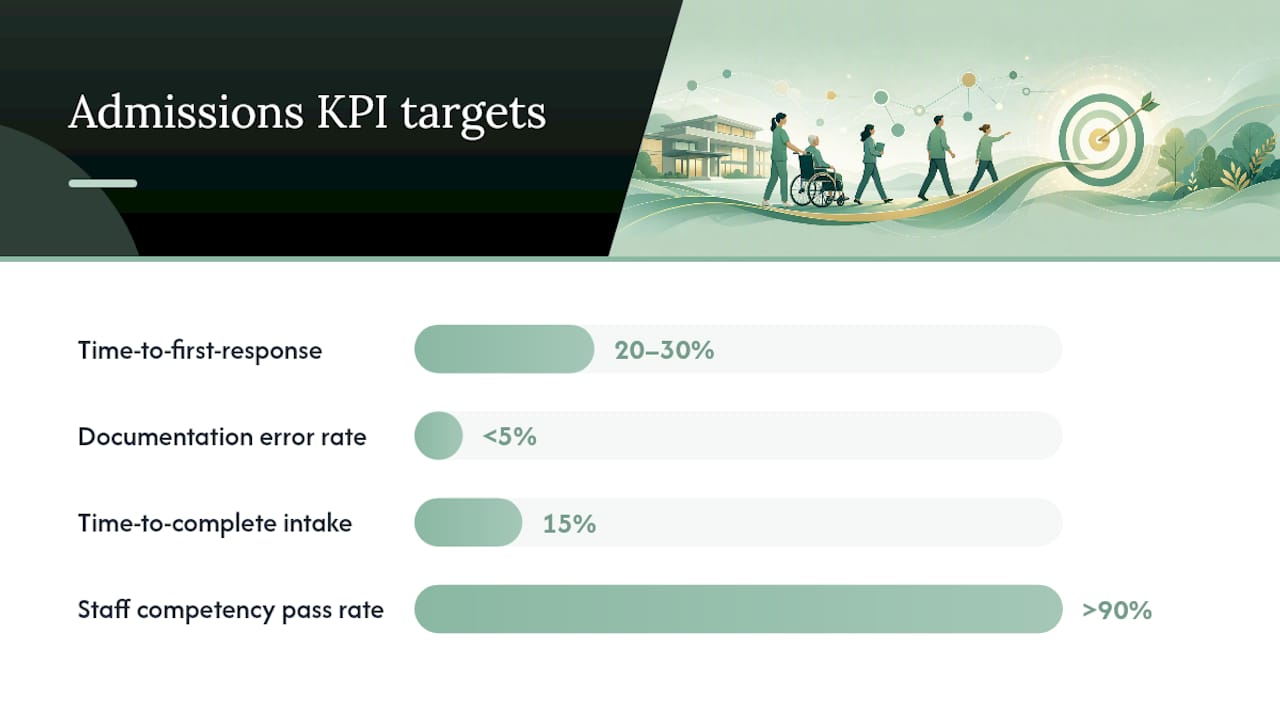
Facilities that skip formal, ongoing training rarely see these numbers move, because inadequate investment in training and infrastructure consistently shows up as a direct driver of slow HIT adoption. Review these figures weekly for the first month, then monthly after that.
What Does an 8-Week Rollout Timeline Look Like?
Copy this timeline and assign owners by name before week one begins.
- Pre-work: Assess current skill gaps, set up EMR sandbox accounts, confirm device availability. Owner: admissions director.
- Weeks 1 to 4: Run onboarding modules in sequence (triage, eligibility, clinical intake, EMR workflows). Owner: clinical educator plus super-users.
- Weeks 5 to 6: Supervised live admissions with shadowing from trained super-users. Owner: admissions director.
- Week 7: Practical assessment and rework for anyone below the competency threshold. Owner: clinical educator.
- Week 8: Certification and go-live with active KPI monitoring. Owner: admissions director plus IT lead.
Before week one, confirm hospital partners know about any temporary response-time changes, and get payroll or HR to approve compensation adjustments for super-user trainers. Facilities that formalize this timeline in writing see far fewer skipped sessions than those that treat training as informal on-the-job learning, consistent with the mandatory-attendance findings from UCSF.
What Usually Goes Wrong, and How Do You Fix It?
The same five problems show up across most rollouts. None of them are surprising once you know what to watch for.
- Not enough training time: Shift to microlearning modules staff can complete between admissions instead of long blocks nobody can attend.
- Optional attendance: Make core sessions mandatory and tie completion to scheduling, not personal initiative.
- Device or connectivity shortages: Build a shared device pool for training weeks and test Wi-Fi coverage before the first session.
- Leaders unfamiliar with the systems: Include supervisors and directors in the same training track as frontline staff, not a separate abbreviated version.
- Inconsistent decision rules: Document facility-specific admission rules in writing so staff are not guessing case by case.
These issues consistently predict failed HIT adoption in the research, and every one has a fix that costs almost nothing but planning time.
What One Admissions Director Learned From Running This Plan
By week four, the biggest shift was not speed. It was consistency: staff started applying the same first-pass checklist regardless of who picked up the referral. The real surprise was how much shift coverage mattered. We staggered training sessions across two shifts instead of pulling everyone at once, and referral response times never dipped during rollout. Documentation errors dropped noticeably once staff had a standard cheat sheet at their desk instead of relying on memory.
How Smart Admissions Supports Your Training Rollout
Running this training manually works, but it takes time your admissions team may not have during a busy referral season. Smart Admissions automates the repetitive parts of intake, referral extraction, missing-document flags, eligibility checks, so your trainees practice on real workflow patterns instead of hypothetical scenarios.
The platform integrates with existing EMR and insurance portals, meaning your sandbox training environment can mirror live systems without exposing real patient data. It also surfaces the KPIs covered above, time-to-bed, conversion rate, documentation accuracy, automatically, so you are not building spreadsheets by hand during a rollout that already demands your attention elsewhere.
Smart Admissions works best once your team has the core competencies down and is ready to scale efficiency gains. If you are building your 8-week plan now, explore what referral management software actually does and see whether a trial period fits into your week 5 or 6 supervised-admissions phase.
Sources
- Health Information Technology Implementation: Implications for Nursing Home Workforce
- Nursing Home Implementation of Health Information Technology: Review of the Literature Finds Inadequate Investment in Preparation, Infrastructure, and Training
How long should admissions staff training take?
Plan for an 8-week onboarding cycle covering core competencies, followed by monthly one-hour refreshers and a quarterly deep-dive session.
Who should train new admissions staff?
Use a train-the-trainer model: two or three super-users receive extended instruction, then coach peers, with clinical leaders teaching PDPM and intake content directly.
What KPIs show admissions training is working?
Track time-to-first-response, referral-to-admit conversion rate, documentation error rate, and staff competency pass rate on practical assessments.
Should attendance be mandatory or optional?
Mandatory. Optional attendance is one of the strongest predictors of weak technology adoption and inconsistent admissions decisions in skilled nursing facilities.