
TL;DR:
- Effective patient intake is crucial for smooth revenue cycle management, clinical accuracy, and patient satisfaction. Implementing compliant, patient-centric digital forms integrated with EHRs reduces errors, claim denials, and operational delays. Regular monitoring, staff training, and continuous optimization ensure a reliable, HIPAA-compliant, and efficient intake process.
Patient intake is where your revenue cycle, clinical accuracy, and patient experience either hold together or fall apart. For healthcare administrators and admissions staff, a weak data intake process means denied claims, delayed bed assignments, and frustrated patients before care even begins. This intake data management guide walks you through the exact steps your team needs to collect, validate, and protect patient data at every stage of admissions. From HIPAA-compliant form design to EHR integration and continuous optimization, you will find practical, specific guidance here.
Table of Contents
- Key takeaways
- Your intake data management guide: building the right foundation
- Step-by-step: managing patient intake data efficiently
- Common pitfalls and compliance risks to address early
- How to test, verify, and optimize your intake process
- My perspective on intake data as a strategic priority
- How Smartadmissions helps your team get this right
- FAQ
Key takeaways
| Point | Details |
|---|---|
| Build compliance into the architecture | Use encryption, role-based access, and audit logs before collecting a single data point. |
| Design forms with patients in mind | Conditional logic and pre-population reduce abandonment and entry errors at the source. |
| Validate data before it enters the EHR | Confidence scoring and manual review queues stop billing failures before they start. |
| Exception workflows protect front-desk flow | Plan for 10 to 20% of patients who arrive without completed forms to avoid bottlenecks. |
| Measure and iterate after launch | Track completion rates, error frequencies, and denial rates to drive continuous improvement. |
Your intake data management guide: building the right foundation
Before your team touches a single intake form or workflow, three things must be in place: defined data requirements, technical safeguards, and trained staff. Skipping any one of these creates compliance exposure and operational breakdowns that are much harder to fix after launch.
The data fields your team must capture
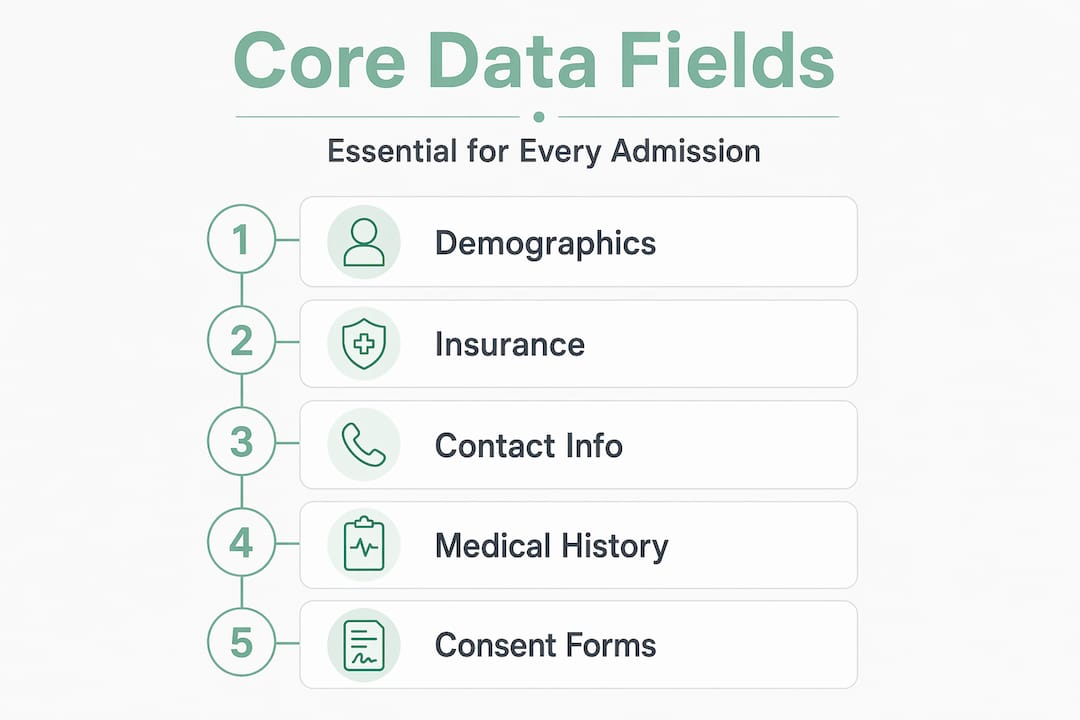
Every patient admission requires a consistent set of core data fields. These include full demographics (legal name, date of birth, address, preferred language), insurance details (member ID, group number, payer name, authorization requirements), medical history and current diagnoses, emergency contact information, and signed consents. Missing or inaccurate insurance data is one of the most direct causes of claim denials, so treat those fields as non-negotiable.
Technical safeguards and HIPAA compliance
HIPAA-compliant digital intake requires encryption using TLS 1.2 and AES-256 protocols, role-based access control so staff only see what their role requires, and automated audit logging for every data interaction. You also need signed Business Associate Agreements (BAAs) with every vendor who processes or stores protected health information (PHI). Compliance-by-design, meaning these controls are built into your intake platform from day one rather than added later, is the standard your facility should hold vendors to.
Staff roles and training
Front desk staff need 1 to 2 hours of focused training covering form workflows, exception handling, and data entry guidelines. Clinical teams need a shorter orientation focused on how incoming patient data appears in the EHR and what flags or notifications they should act on. Assigning a designated data quality owner, typically a senior admissions coordinator, gives your team a clear escalation point for data issues.
Pro Tip: Create a laminated quick-reference card for front desk staff that covers the three most common exception scenarios. This prevents hesitation and keeps intake moving during busy admission periods.
Step-by-step: managing patient intake data efficiently
Once your foundation is in place, follow this ordered sequence to execute an effective data intake process from the patient’s first contact to EHR entry.
- Design patient-friendly intake forms. Use conditional logic so irrelevant questions disappear based on earlier answers. Pre-populate fields with known data from previous visits or referrals. Keep forms to the minimum required fields for the initial visit. Long, repetitive forms are the primary cause of abandonment, and patient-first mobile check-in with self-service options directly improves satisfaction and completion rates.
- Offer secure, digital intake channels. Provide at least three access points: online portal links sent before arrival, kiosk stations at your facility entrance, and tablet-based intake for patients who need in-person assistance. Each channel should use the same underlying form structure so data maps consistently to your EHR fields regardless of how the patient completed the form.
- Automate data capture and validation. Set mandatory field rules, format validation (date fields, phone number structures, insurance ID patterns), and real-time error prompts. Digital intake reduces check-in times by 30 to 50% and decreases claim denials caused by inaccurate data. Automation does not replace staff review. It removes the repetitive verification tasks so your team can focus on genuine exceptions.
- Integrate with your EHR using validated API connections. EMR integration requires verifying API connectivity and confirming support for HL7 or FHIR standards. Do not assume your intake vendor and EHR vendor have a working connection. Test it explicitly with a sample data set that covers every field in your intake form. Use data mapping documentation to confirm field-to-field alignment before going live.
- Apply confidence scoring to extracted data. When your system uses OCR to capture insurance cards or referral documents, confidence scoring on OCR extraction flags low-certainty reads for manual review rather than passing potentially corrupted data into the EHR. This single practice prevents a significant portion of downstream billing failures.
- Configure workflow automation for routing and notifications. Set up automatic confirmations for patients when intake is complete. Route completed intake records to the appropriate clinical team with a task notification. Set alerts for incomplete or flagged records. Configure all notifications to contain only generic information, never PHI in a message body or subject line.
Pro Tip: Build a data mapping matrix in a spreadsheet before your EHR integration goes live. List every intake form field, the corresponding EHR field name, the field type, and the accepted format. This document becomes your debugging reference when data errors appear post-launch.
Common pitfalls and compliance risks to address early
Even well-planned intake systems run into predictable problems. Knowing them in advance means your team handles them with a defined response rather than improvising at the front desk.
- Patients without pre-completed forms. Designing for 10 to 20% of patients who arrive without completed intake is critical. Your exception workflow should include a kiosk or tablet option that maps directly to the same EHR fields as the digital form. Without this, front desk staff revert to paper, which creates inconsistent data and double-entry work.
- Notification leaks of PHI. Email or SMS alerts containing PHI in the message body or subject line constitute a HIPAA violation risk. Configure all outbound notifications to carry only a generic prompt, such as “Your intake form is ready,” with a secure link to the actual data. This protects both your facility and your patients.
- Data mapping errors between intake and EHR. These are often invisible until a claim is denied or a clinical record is incomplete. Run monthly audits of a sample of records to check field-level accuracy. When errors appear, trace them back to the intake form field or the API mapping, not just the staff member who entered the data.
- Skipping the testing phase. Administrators under pressure to launch quickly often push past pilot testing. Pilot phases with small patient groups identify form errors, improve EHR mapping accuracy, and surface staff confusion before the problems scale.
- Neglecting patient education. If patients do not know why you are collecting specific data or how to complete the digital form, completion rates drop and errors increase. A brief instruction sheet or a short walkthrough video linked from the intake email reduces friction significantly.
- Undertrained staff on compliance protocols. Your intake data management best practices are only as strong as the people executing them. Regular refreshers on HIPAA, access control procedures, and data entry guidelines keep your team aligned as staff turn over.
How to test, verify, and optimize your intake process
A successful launch is not the finish line. Your intake workflow needs ongoing measurement and adjustment to maintain accuracy as your patient volume and payer mix evolve.

Pilot testing before full rollout
Run your intake system with a defined subset of patients, typically 20 to 50 admissions, before activating it across your full census. Test every channel: online portal, kiosk, and tablet. Verify that data flows correctly through the EHR integration end to end. Collect feedback from both patients and staff after each pilot admission.
What to measure and how often
| Metric | What it tells you | Review frequency |
|---|---|---|
| Form completion rate | Percentage of patients finishing intake before arrival | Weekly |
| Abandonment point | Where in the form patients stop completing | Weekly |
| Data error rate | Fields failing validation or requiring manual correction | Weekly |
| EHR mapping accuracy | Percentage of intake fields correctly transferred | Monthly |
| Claim denial rate (intake-related) | Denials tied to demographic or insurance errors | Monthly |
| Patient satisfaction score | Patient-reported experience with intake process | Quarterly |
Tracking analytics like completion rates and error frequencies allows your team to make targeted improvements rather than guessing where the friction is. If your abandonment rate spikes at question 12, that question needs redesign. If your insurance field error rate is high, add a format example directly in the form field.
Iterating and A/B testing
Once you have three months of baseline data, begin testing variations. Try a shorter form version against your current version for new admissions. Test different pre-arrival notification timing to see what improves completion rates. Even small changes, like rewording a confusing consent question, can measurably reduce errors. Apply intake workflow optimization principles continuously rather than treating your intake system as a set-and-forget tool.
Pro Tip: Set a quarterly intake review on your calendar now. Thirty minutes reviewing your six core metrics prevents the slow drift toward error accumulation that most facilities do not notice until a billing audit forces the conversation.
My perspective on intake data as a strategic priority
I have seen facilities invest heavily in clinical technology while treating patient intake as a checkbox. The results are predictable: claim denials pile up, admissions staff burn out on manual corrections, and patients arrive feeling like they are filling out forms for a DMV appointment rather than receiving care.
What I have learned is that treating intake as a strategic touchpoint with deliberate design changes the entire admissions dynamic. When a patient completes a well-designed mobile intake form before they arrive, your clinical team already has the data they need. Your front desk handles exceptions rather than re-entering everything. Your billing team works from clean records. That chain of outcomes starts with a form field.
The compliance and technology pieces are real requirements, not suggestions. But the facilities that get the most from their intake investments are the ones that also ask: does this feel reasonable for our patients to complete? Does this workflow make sense for our staff under pressure at 8:00 AM on a Monday?
The future of intake management sits at the intersection of AI-assisted data extraction, real-time eligibility verification, and genuinely patient-centered design. Those capabilities are available now. The question is whether your team has the process discipline to use them well.
— Harry
How Smartadmissions helps your team get this right
Smartadmissions is built specifically for skilled nursing facilities, rehabilitation centers, and post-acute care providers who need a faster, more accurate admissions process without adding administrative burden to their teams.
The platform automates insurance eligibility verification, clinical documentation review, and referral routing, all integrated directly with your existing EHR. Your admissions staff spend less time on manual data checks and more time on the decisions that require human judgment. With built-in HIPAA compliance safeguards, AI-powered data extraction, and real-time analytics, Smartadmissions gives your team the tools to automate admissions and achieve up to 20% faster bed occupancy. If you are ready to put this guide into practice with a platform designed for exactly your use case, explore admissions efficiency solutions from Smartadmissions today.
FAQ
What is an intake data management guide for healthcare?
An intake data management guide is a structured reference covering how to collect, validate, and protect patient data during the admissions process. It addresses form design, EHR integration, HIPAA compliance, and workflow automation specific to healthcare facilities.
How does digital intake reduce claim denials?
Digital intake reduces claim denials by capturing accurate insurance and demographic data at the point of collection, eliminating the transcription errors that cause most eligibility-related rejections.
What HIPAA safeguards does digital intake require?
Digital intake platforms must use TLS 1.2 or AES-256 encryption, role-based access control, and automated audit logging. All vendors handling PHI must sign a Business Associate Agreement before your facility uses their system.
How should we handle patients who do not complete digital intake before arrival?
Design an exception workflow using kiosk stations or tablets on-site that map to the same EHR fields as your digital form. Exception workflows for patients who arrive without completed forms prevent front-desk bottlenecks and maintain data consistency.
How often should we review our intake data process?
Review core metrics including form completion rates, data error rates, and claim denial rates monthly. Conduct a broader process review quarterly to identify workflow changes, staff training gaps, or form redesign opportunities.