
TL;DR:
- A comprehensive intake data validation process involves multi-stage checks, explicit error routing, and identity-based duplicate prevention to ensure accurate patient records. Combining real-time entry validation with asynchronous batch reviews helps identify and resolve errors efficiently, reducing delays and billing inaccuracies. Clear rejection reasons and scheduled validation improve workflow speed and data integrity across healthcare admissions.
The intake data validation process is a systematic, multi-stage approach to verifying patient admission data for accuracy, completeness, and consistency before it enters your clinical systems. For admissions coordinators and facility administrators at skilled nursing facilities, rehabilitation centers, and post-acute care providers, a well-designed validation pipeline is the difference between a clean patient record and a cascade of billing errors, duplicate charts, and delayed bed occupancy. Frameworks like the NACC validation pipeline and tools like the REDCap Data Quality application demonstrate that structured, sequential checks catch errors at the point of entry rather than downstream, where corrections cost significantly more time and staff effort.


What are the key stages in an effective intake data validation process?
The NACC validation pipeline defines four sequential stages that form the backbone of any reliable intake data validation process: schema validation, identifier lookup, preprocessing and transformation, and data quality checks. Each stage serves a distinct purpose, and rejection decisions differ depending on where in the pipeline an error surfaces.
Stage 1: Schema and header validation is the first gate. The system checks whether the incoming file or form submission matches the expected format, field names, and data types. If the schema is invalid, the entire file is rejected before any record-level processing begins. This protects your system from malformed data contaminating downstream records.
Stage 2: Identifier lookup maps each patient ID in the submission to an existing record in your system. Rows with unmatched identifiers are rejected individually rather than triggering a full-batch rejection. This means a single bad ID does not block valid records from processing, which is critical when your admissions team is handling multiple referrals simultaneously.
Stage 3: Preprocessing and transformation checks handle data conversions such as date formatting, unit standardization, and field normalization. Duplicate detection also runs at this stage. Records that fail transformation rules or are flagged as duplicates can be conditionally rejected or routed for review, depending on your workflow configuration.
Stage 4: Data quality checks apply business logic rules. These include checks for missing required fields, numerical outliers, and calculation errors. A patient weight entered as 1,200 pounds instead of 120 pounds, for example, would trigger an outlier alert at this stage rather than passing silently into the clinical record.
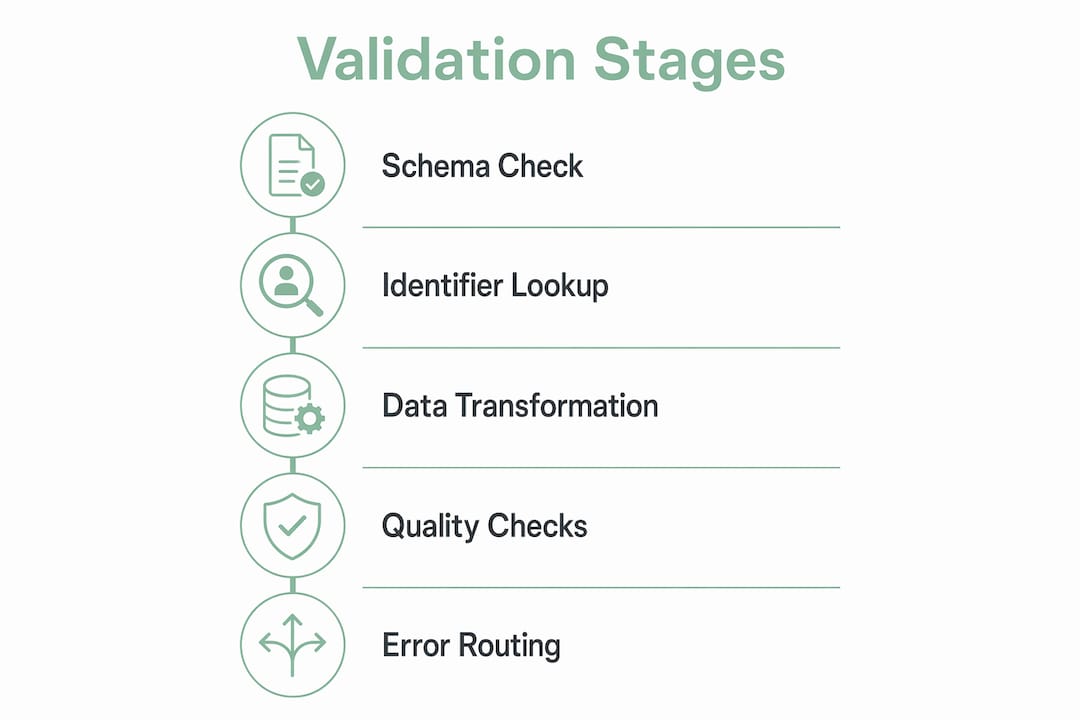
The key operational insight from the NACC staged rejection strategy is that quarantining only failed records reduces downstream noise. Your team focuses correction effort on specific problematic rows rather than reprocessing entire batches, which protects both speed and staff focus.
Pro Tip: Map your current intake form fields to each of these four stages before configuring any validation tool. Knowing which fields belong to schema checks versus business logic rules prevents misconfigured rules that either block valid records or pass bad data.
For a detailed walkthrough of how these stages connect to your full admissions workflow, the step-by-step intake process guide from Smartadmissions covers each phase with practical examples.
How can admissions teams implement real-time and asynchronous data quality checks?
Combining real-time validation during data entry with asynchronous batch checks after submission gives your team two layers of error prevention. Neither approach alone is sufficient for a high-volume admissions environment.
Real-time validation, also called synchronous validation, catches errors the moment a staff member or referring provider enters data into an intake form. AI-powered validation provides immediate field-level feedback, showing users the correct input format before they move to the next field. This prevents error accumulation and reduces the volume of corrections needed after submission. For admissions coordinators managing multiple referrals per shift, this immediate feedback loop is one of the highest-return improvements you can make to your intake form validation workflow.
Asynchronous or batch validation runs after submission, either on a schedule or triggered manually. The REDCap Data Quality application provides nine preset validation rules and supports custom logic, executed in either synchronous or batch mode. This flexibility matters because some checks, such as cross-referencing insurance eligibility or verifying clinical consistency across multiple fields, cannot run in real time without slowing the data entry experience.
High-impact validation rules your team should configure include:
- Required field checks: Flag any submission missing patient name, date of birth, insurance ID, or primary diagnosis code.
- Format validation: Reject phone numbers, dates, and insurance numbers that do not match expected patterns.
- Numerical outlier detection: Alert on values outside clinically plausible ranges, such as age, weight, or lab results.
- Logical consistency checks: Verify that admission date is not earlier than the referral date, or that a patient’s listed medications are consistent with their documented diagnoses.
- Duplicate detection: Identify submissions that share key identifiers with existing records before writing to the database.
The REDCap Data Quality application exports validation errors to CSV, which your admissions team can use as a structured error resolution queue. Each row in the export identifies the specific field, the rule that failed, and the record ID, giving staff a clear starting point rather than a vague error message.
Pro Tip: Schedule asynchronous batch validation to run at the end of each shift rather than only at week’s end. Catching errors within hours of entry means the referring provider or patient is still reachable for clarification, cutting your average correction time significantly.
What best practices improve error handling and decision routing in intake validation workflows?
Error handling is where most intake validation systems fail in practice. A system that flags errors but provides no clear next step creates as much frustration as no validation at all.
The intake contract design principle is direct: use explicit error codes rather than generic failure states. An error labeled “unsupported_file_type” or “missing_fields” tells your admissions coordinator exactly what went wrong and what to do next. An error labeled “submission failed” tells them nothing. This distinction directly affects how quickly your team resolves failures and moves patients through the admissions pipeline.
Effective decision routing assigns each failed record to one of three clear states:
- Outright rejection: The record cannot be processed and must be resubmitted from scratch. Use this for schema failures, unsupported file types, or records with no matching patient identifier.
- Human review queue: The record contains data that requires clinical or administrative judgment before it can be accepted. Use this for outlier values, conflicting diagnoses, or incomplete insurance information.
- Quarantine for further processing: The record is held pending additional information, such as a missing authorization number or a pending eligibility verification result.
Maintaining detailed logs of rejection reasons and workflow states is not optional. It is the audit trail that protects your facility during compliance reviews and gives your team the data needed to identify recurring error patterns. If 30% of your rejections consistently come from a single referring provider’s formatting errors, that is a training opportunity, not a system failure.
| Rejection Category | Operational Impact | Recommended Routing |
|---|---|---|
| Unsupported file type | Entire submission blocked | Outright rejection, resubmit |
| Missing required fields | Record incomplete for clinical use | Human review queue |
| Duplicate patient identifier | Risk of duplicate chart creation | Quarantine, identity resolution |
| Numerical outlier | Potential clinical safety risk | Human review queue |
| Failed identifier lookup | No matching patient record found | Outright rejection or manual match |
The visibility on failure reasons that explicit routing provides also reduces the manual detective work your admissions staff performs when a referral stalls. Instead of tracing a record through multiple systems to find out why it was not processed, your team sees the rejection reason and next state immediately.
How does validated identity mapping prevent duplicate records in intake submissions?
Duplicate patient records are one of the most operationally damaging outcomes of a weak data intake verification process. They create billing errors, fragment clinical history, and can result in a patient receiving care based on an incomplete record.
Medplum’s intake data model describes the standard approach: before creating any new patient record, the intake system performs an identifier lookup to check whether the incoming submission matches an existing patient. If a match is found, the system updates the existing record rather than creating a new one. This update-or-insert logic, commonly called upsert, is the technical foundation of duplicate prevention.
Upsert logic is particularly important for clinical history resources such as allergy lists, medication records, and care plans. A patient who submits an intake form twice, once at referral and once at admission, should not end up with two separate allergy records. Idempotent upsert operations handle network glitches and patient retries gracefully, writing the same data twice without creating duplication.
Practical recommendations for your admissions team:
- Standardize your patient identifier fields across all intake forms. Inconsistent use of Social Security numbers, medical record numbers, or insurance IDs makes identifier lookup unreliable.
- Configure conflict resolution rules for cases where two records partially match. Decide in advance whether a partial match routes to human review or triggers an automatic merge.
- Train staff to recognize duplicate scenarios. A referring provider who resubmits a corrected form is the most common source of duplicates. Staff should know to flag these for the identity resolution queue rather than processing them as new admissions.
- Audit your duplicate rate monthly. A rising duplicate rate signals a gap in your identifier lookup configuration or a change in referring provider behavior that needs addressing.
Pro Tip: When configuring your intake system, use the patient’s date of birth combined with their insurance member ID as a composite identifier for lookup. This combination is more reliable than name-based matching, which fails on hyphenated names, nicknames, and data entry variations.
For additional guidance on managing the documentation that supports identity verification, the intake documentation guide from Smartadmissions covers the specific documents your team needs at each stage of the admissions process.
Key takeaways
A well-structured intake data validation process requires staged checks, explicit error routing, and identity-based duplicate prevention to maintain data integrity across every patient admission.
| Point | Details |
|---|---|
| Use staged validation | Run schema, identifier, transformation, and quality checks in sequence to isolate errors precisely. |
| Combine real-time and batch checks | Synchronous field-level alerts prevent entry errors; asynchronous batch rules catch logical inconsistencies. |
| Require explicit rejection reasons | Error codes like “missing_fields” or “unsupported_file_type” give staff clear next steps and reduce resolution time. |
| Apply upsert logic for identity matching | Update existing records rather than creating new ones to prevent duplicate patient charts from resubmissions. |
| Log all validation states | Detailed rejection logs support compliance audits and reveal recurring error patterns from specific referral sources. |
Why staged validation is the design decision most admissions teams skip
Most admissions teams I have worked with treat data validation as a single gate: either the record passes or it does not. That binary approach is the root cause of most intake bottlenecks I have seen in skilled nursing and post-acute care settings.
The shift to staged validation, where schema errors, identifier failures, and business logic violations are each handled separately, changes the operational dynamic entirely. Your staff stops spending time on blanket resubmissions and starts resolving specific, named problems. That is a fundamentally different workflow, and it is faster by a measurable margin.
What I have also observed is that explicit rejection reasons do more than speed up corrections. They change how referring providers interact with your facility. When a provider receives a clear message that their submission failed because of a missing authorization number rather than a vague system error, they fix the right thing immediately. Over time, that clarity reduces your inbound error rate from that provider.
The integration between validation and documentation management is the piece most facilities underinvest in. Validation catches the error. Documentation management determines whether the corrected record reaches the right clinical staff before the bed decision needs to be made. Both functions need to work together, not as separate systems. Smartadmissions is built around exactly that connection, which is why the platform’s EMR integration approach is worth examining if your current setup treats validation and documentation as separate workflows.
My advice for 2026: use your validation error logs as a continuous improvement tool. Track rejection rates by error type, by referring provider, and by time of day. That data tells you where to invest your next training or configuration effort, and it gives you a defensible record of your data quality process for compliance purposes.
— Harry
How Smartadmissions supports your intake data validation workflow
Smartadmissions is built specifically for skilled nursing facilities, rehabilitation centers, and post-acute care providers that need a reliable, automated intake data validation process without adding complexity to their admissions team’s workload. The platform integrates directly with your existing EMR and insurance portals, running real-time eligibility verification and clinical data checks as part of the intake workflow rather than as a separate step.
Smartadmissions applies structured validation logic at each stage of the intake pipeline, flags errors with specific rejection reasons, and routes failed records to the appropriate review queue automatically. Duplicate prevention through identity matching is built into the platform’s intake data model, so your team does not need to configure upsert logic manually. Explore how Smartadmissions compares to manual workflows in the manual vs. automated admissions breakdown, or review the referral management system examples to see how leading facilities are structuring their intake validation today.
FAQ
What is the intake data validation process in healthcare?
The intake data validation process is a multi-stage workflow that verifies patient admission data for accuracy, completeness, and consistency before it is written to clinical systems. It typically includes schema validation, identifier lookup, data transformation checks, and business logic quality rules.
Why do duplicate patient records occur during intake?
Duplicate records most often result from resubmitted intake forms where the system creates a new patient record instead of updating the existing one. Applying upsert logic and identifier-based matching prevents this by checking for an existing record before any write operation.
What is the difference between real-time and batch data validation?
Real-time validation checks data at the moment of entry and provides immediate field-level feedback to the user. Batch validation runs after submission on a schedule or on demand, applying more complex business logic rules such as cross-field consistency checks and eligibility verification.
How should admissions teams handle validation failures?
Each failed record should be routed to one of three explicit states: outright rejection for unrecoverable errors, human review for records requiring clinical judgment, and quarantine for records awaiting additional information. Explicit rejection reasons are required so staff know the correct next step without manual investigation.
What fields should always be included in intake form validation?
Required field checks should cover patient name, date of birth, insurance member ID, primary diagnosis code, and admission date at minimum. Format validation should apply to phone numbers, dates, and insurance identifiers to prevent downstream billing and eligibility errors.