
Referral data standards for post-acute admissions mean requiring a US Core conformant ServiceRequest plus linked clinical resources so your EMR can ingest and auto-populate intake assessments. That single requirement, applied consistently with referral partners, turns a narrative fax into structured data your system can read. Admissions teams that adopt this policy see fewer incomplete referrals and faster bed decisions.
TL;DR:
- Support for US Core ServiceRequest with linked clinical resources is essential to enhance automation, reduce incomplete referrals, and enable faster bed decisions.
- Confirm that referring systems support both reasonCode and reasonReference, with support for key resources like Condition, Observation, DiagnosticReport, and DocumentReference.
- Ensuring referral bundles include discharge summaries as DocumentReference, recent labs as Observations, and assessment data per PACIO guidelines improves intake accuracy.
- Pilot testing with top referral sources helps identify vendor gaps early and improves overall data quality before full implementation.
- Adopting structured data standards unlocks faster admission processing and streamlined workflows with platforms like Smart Admissions.
Table of Contents
- What a ServiceRequest is and why referral bundles need supporting resources
- US Core ServiceRequest elements every vendor conversation should cover
- Why PACIO and CMS guidance matter for post-acute referrals
- The referral data checklist your intake process should require
- Six steps to implement standards with your EMR and referral partners
- Tracking whether your referral standards are actually working
- What deployments actually teach you about referral standards
- Turning these standards into faster bed fill with Smart Admissions
- Sources
- FAQ
What a ServiceRequest is and why referral bundles need supporting resources
A ServiceRequest is the FHIR resource that represents a referral or order. Its core fields include intent, code, requester, subject, authoredOn, and status, which together tell your team who ordered what, for whom, and when. On their own, though, these fields describe an order, not a patient’s clinical picture.
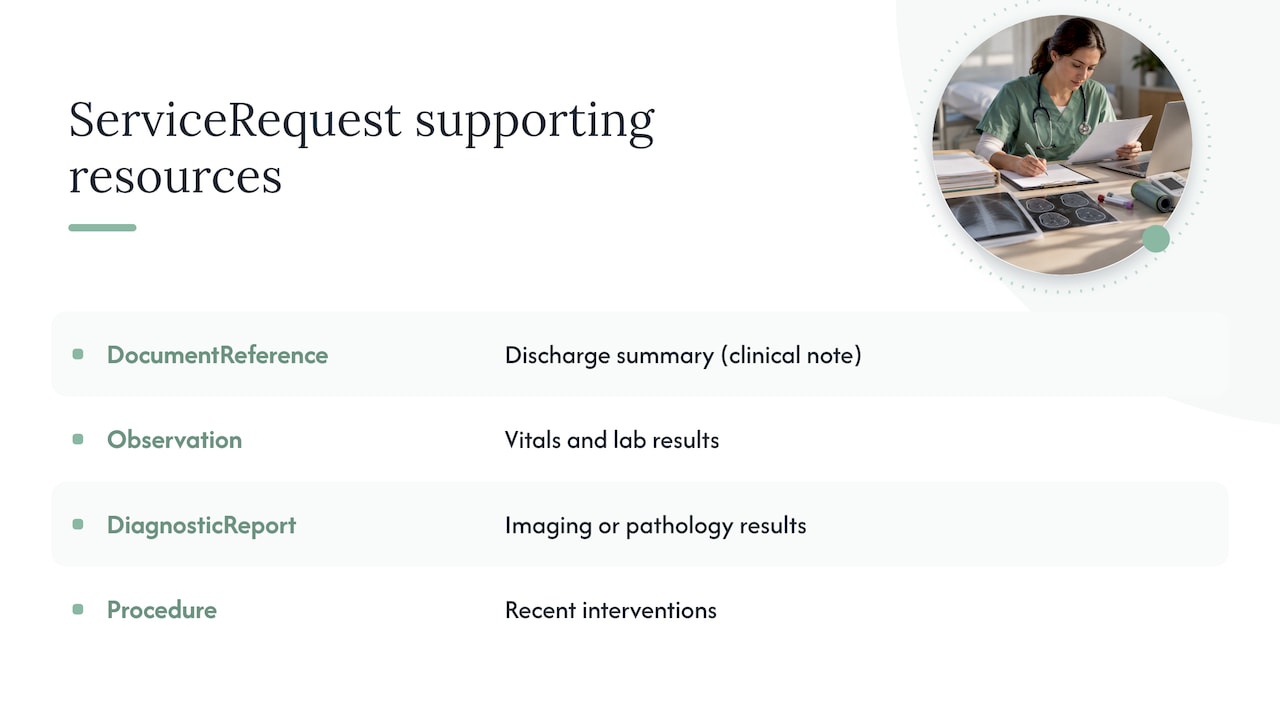
That’s why a usable referral bundle links the ServiceRequest to supporting resources: DocumentReference for the discharge summary, Observation for vitals and labs, DiagnosticReport for imaging or pathology results, and Procedure for recent interventions. Without those links, your staff ends up calling the hospital to track down a med list that should have arrived automatically.
Picture a hospital sending a referral for a patient needing skilled rehab after a hip fracture. A bare ServiceRequest tells you rehab is needed. A ServiceRequest linked to a DocumentReference containing the discharge summary and an Observation with the latest mobility assessment lets your intake form populate itself, cutting the back-and-forth calls that stall same-day admission decisions.
US Core ServiceRequest elements every vendor conversation should cover
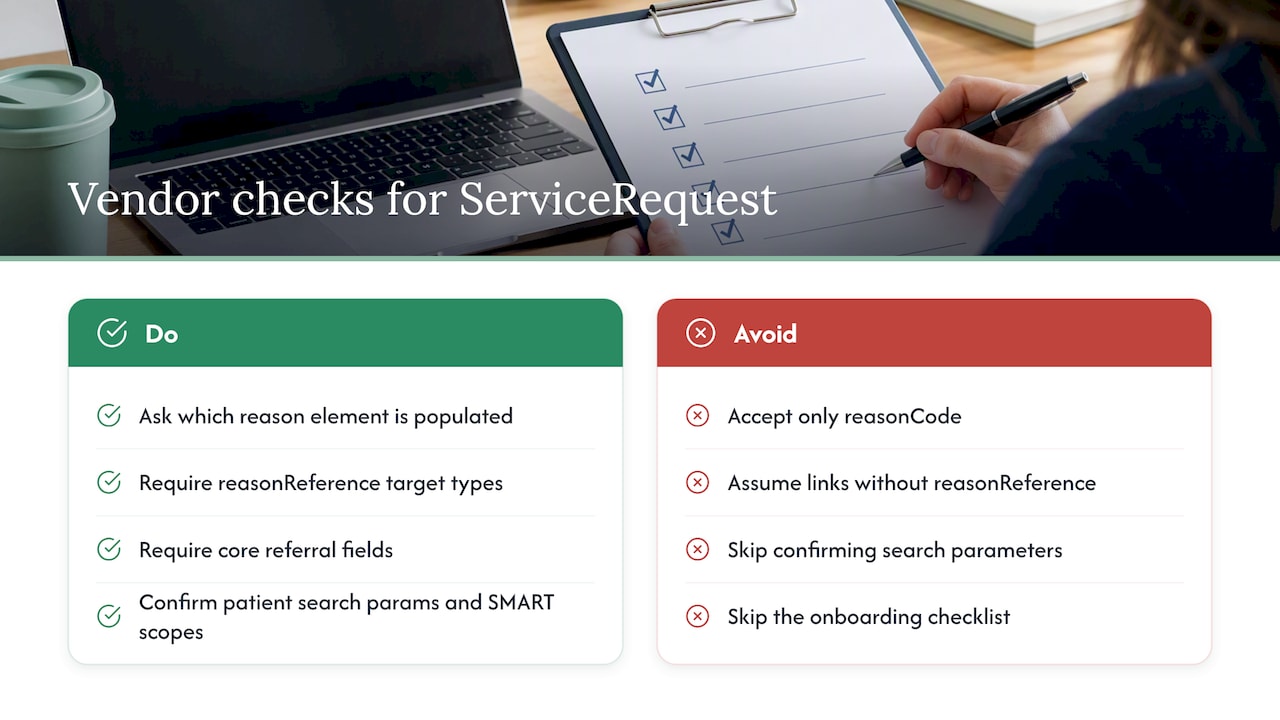
The US Core ServiceRequest Profile sets the baseline for what you can reasonably demand from referring EHRs. Servers must support at least one of ServiceRequest.reasonCode or ServiceRequest.reasonReference, while certifying client applications must support both. That distinction matters when you’re negotiating with a hospital’s IT team: ask which reason element their system populates, because a server that only sends reasonCode without reasonReference will not link you to the underlying Condition or Observation.
When reasonReference is used, servers must support at least one target resource type, typically Condition, Observation, DiagnosticReport, or DocumentReference, while clients should support all of them. Build this into your onboarding checklist as a pass or fail item rather than an assumption.
Beyond reason-for-referral, push for consistent population of code (the service being requested), requester, priority, supportingInfo, and authoredOn. These fields let your system sort and prioritize incoming referrals instead of routing everything to a single inbox for manual review.
During vendor discussions, confirm two more things: which search parameters the sending system exposes for patient lookup, and whether SMART scopes are supported at the resource level. Skipping this step is the most common reason integrations stall after go-live.
Why PACIO and CMS guidance matter for post-acute referrals
The PACIO project focuses on standardizing assessment data, specifically MDS and OASIS items, so post-acute providers receive the same structured information regardless of which EHR sent it. PACIO’s Transitions of Care guidance recommends bundling ServiceRequest with supporting documentation so the assessment data your facility needs on day one arrives with the referral rather than after three phone calls.
CMS reinforces this direction from the payer side. Its interoperability rule for payer-to-payer data exchange requires impacted payers to expose USCDI data classes through APIs and builds on FHIR and US Core as the shared foundation. For admissions teams, the practical effect is fewer referrals missing the assessment-level detail needed for a same-day decision, and less time spent chasing hospitals for information that should have been structured from the start.
The referral data checklist your intake process should require
Give this list to your referral partners and your EMR vendor as a baseline requirement, not a wish list.
- Patient identifiers: name, date of birth, and a stable identifier your system can match against existing records.
- ServiceRequest core fields: code, intent, status, requester, authoredOn, and priority populated on every referral.
- Reason for referral: reasonCode or reasonReference linked to a Condition, Observation, or DiagnosticReport per US Core requirements.
- Discharge summary: delivered as a DocumentReference, not a scanned PDF buried in an attachment.
- Recent vitals and labs: as Observation resources rather than narrative text in a cover letter.
- Assessment data: MDS or OASIS items referenced per PACIO Transitions of Care guidance where applicable.
- Standard vocabularies: SNOMED CT for referral orders, LOINC for lab and observation codes, and ICD-10 for diagnoses.
Validation does not require a large IT project. A quick spot check, opening a sample referral bundle and confirming the coded fields resolve to real SNOMED or LOINC codes, catches most vendor gaps before they become your team’s problem.
Pro Tip: Ask your top three referral sources to send one test bundle before go-live. A single real-world sample reveals more integration gaps than a page of vendor specifications.
Six steps to implement standards with your EMR and referral partners
Rolling out referral data standards works best as a sequence rather than an all-at-once mandate. These six steps, run in order, keep both your IT team and your referral partners aligned.
- Request a CapabilityStatement from each referring system and confirm US Core ServiceRequest support along with resource-level SMART scopes.
- Define your accepted payload in writing: required elements, accepted vocabularies, and fallback rules for partners who cannot yet send full bundles.
- Map incoming fields to your intake forms, including MDS or OASIS assessment items, and build validation rules that flag missing required fields automatically.
- Run sample-bundle tests with two or three high-volume referral partners before opening the connection to everyone.
- Test search and link resolution, confirming patient search parameters work and that DocumentReference links actually resolve to accessible files.
- Set service level agreements and train staff on what to do when a referral arrives incomplete, so exceptions do not default to manual re-entry.
Pro Tip: Pilot with your highest-volume referrer first. Fixing one relationship’s data quality teaches your team more than a dozen partial fixes spread across every hospital that sends you patients.
Our playbook on synchronizing referral data walks through field-level mapping in more detail if your team wants a reference during step three.
Tracking whether your referral standards are actually working
Three metrics tell you whether the policy is holding: the percentage of referrals arriving with the full required payload, the time from receipt to admission decision, and the rate at which intake fields auto-populate without manual entry. Pull these from your EMR’s audit trail and your admissions platform’s activity logs rather than relying on staff estimates, which tend to undercount the manual work actually happening.
For a pilot, a reasonable early target is getting a substantial portion of referrals from your top partners into structured format within a few months. Anything short of that after three months usually points to a vendor conversation that needs to happen, not a workflow problem on your end.
What deployments actually teach you about referral standards
The friction usually isn’t the FHIR specification itself, it’s convincing a referring hospital’s IT team to turn on fields they already support but never activated. Start with your busiest referral source, require DocumentReference links from day one, and treat every incomplete bundle as a data point rather than an exception to work around manually.
— Harry
Turning these standards into faster bed fill with Smart Admissions
Requiring US Core conformant referrals is only half the job. The other half is having a system that actually uses that structured data instead of dumping it into another inbox for manual review. Smart Admissions ingests US Core conformant ServiceRequest bundles, maps linked DocumentReference and Observation content directly into your intake assessments, and cuts the review time your team spends reconciling discharge summaries by hand.
When you evaluate any referral platform, including ours, ask for three things in the demo: confirmation of US Core ServiceRequest support, DocumentReference linking for discharge summaries and med lists, and a realistic onboarding timeline. Smart Admissions is built for onboarding under an hour with hands-on support from a team that has worked specifically on admissions documentation. Plans run $597 per month or $6,447 per year, listed on our pricing page, and the platform is backed by a guarantee that it pays for itself within 30 days. If your team is ready to see how structured referral data turns into a faster bed fill rate, book a walkthrough on the pricing page above.
Sources
For technical detail beyond this guide, review the US Core ServiceRequest Profile, the ServiceRequest resource definition, PACIO’s project site, CMS’s payer API workflow rule, and the ISP entry on Referral Order maturity.
- US Core ServiceRequest Profile – US Core Implementation Guide v9.0.0
- PACIO project and transitions of care implementation guidance
- CMS payer-to-payer API workflow (CMS-0057-F)
FAQ
What are referral data standards in healthcare admissions?
Referral data standards define how patient referral information, including diagnosis, requester, and supporting clinical documents, gets structured for electronic exchange. In practice, this means a ServiceRequest resource conformant to the US Core profile, linked to resources like DocumentReference and Observation.
Why does US Core require reasonCode or reasonReference?
US Core requires servers to support at least one of these two elements so every referral carries a documented reason, whether as a simple code or a reference to a Condition or Observation. Certifying client applications must support both elements, which is why the profile treats this as a baseline interoperability requirement rather than an optional feature.
How does PACIO differ from US Core for post-acute referrals?
US Core defines the general FHIR profile for ServiceRequest and related resources across healthcare settings, while PACIO focuses specifically on standardizing post-acute assessment data like MDS and OASIS items for transitions of care. The two overlap where a referral bundle needs both a US Core conformant ServiceRequest and PACIO-guided assessment documentation attached.
What maturity level are referral orders at today?
The Interoperability Standards Platform lists Referral Order as a Level 2 USCDI data element, meaning exchange quality still varies across systems. Admissions teams should expect inconsistency and plan pilots with their highest-volume referral partners before rolling standards out broadly.
Which code systems should referral data use?
Referral orders should use SNOMED CT for the referral or service code, LOINC for lab and observation values, and ICD-10 for diagnosis codes. The ISP guidance on Referral Order specifically recommends SNOMED CT to support computable, structured referral documentation.