
TL;DR:
- Referral data synchronization ensures patient referral records are consistent across EMR, CRM, and insurance systems in real time. Regular audits, proper field mapping, and server-side tracking help maintain data accuracy and improve admissions efficiency. Implementing automated synchronization tools and strict data standards reduces errors and optimizes referral management processes.
Referral data synchronization is defined as the process of aligning patient referral records across multiple systems, including Electronic Medical Records (EMR), CRM platforms, and insurance portals, so every system reflects the same accurate information in real time. For healthcare administrators and admissions staff, knowing how to synchronize referral data is the difference between a full census and a missed admission. Specialized referral automation can improve response times by about 80% and ROI from referral partners by up to 700%. That performance gap exists because synchronized data removes the manual reconciliation that slows every intake decision.
How to synchronize referral data: tools and prerequisites
Effective referral data syncing methods start with the right infrastructure. Before your team configures a single sync, three prerequisites must be in place: standardized data fields, secure API access, and a middleware or integration layer that connects your source systems.
Core tools and requirements at a glance:
| Tool or requirement | Purpose |
|---|---|
| Middleware platform (e.g., LeadSyncPro) | Routes referral records between CRMs and EMRs in real time |
| Secure API credentials | Authenticates data exchange between systems |
| Standardized field mapping document | Defines how fields like insurance ID and admission status translate across systems |
| FHIR or HL7 data standards | Governs interoperability between healthcare data systems |
| Webhook or scheduled sync configuration | Triggers data updates automatically on defined events or intervals |
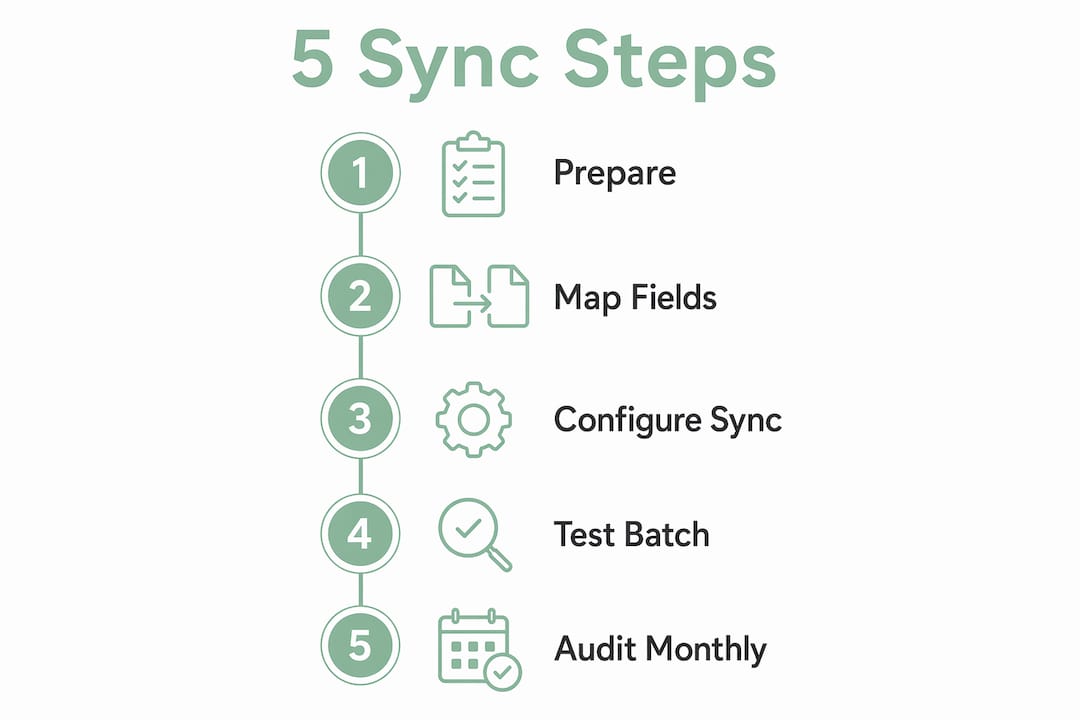
Referral management middleware like LeadSyncPro supports unlimited referral volume, smart fallback logic, and real-time two-way sync across multiple CRMs. That capability matters because most healthcare facilities receive referrals from several sources simultaneously. Without a middleware layer, your team manually reconciles records, which introduces errors and delays.
Data quality is a prerequisite, not an afterthought. Your fields must use consistent formats before any sync begins. Birthdates, insurance IDs, and admission status codes must follow the same structure in every connected system. Skipping this step causes duplicate records that corrupt your census data.
What is the step-by-step process for syncing referral data?
Synchronizing referral information across healthcare systems follows a defined sequence. Skipping steps, particularly field mapping, produces errors that compound over time.
-
Audit your current data fields. List every field your referral sources send, including patient name, date of birth, insurance carrier, diagnosis code, and referral source. Compare that list against the fields your EMR and CRM accept. Note every mismatch.
-
Build a field mapping document. Manual field mapping and data transformation logic prevent duplicate records and data mismatches. Define transformation rules for each field. For example, map “DOB” from the referral source to “date_of_birth” in your EMR, and standardize date formats to MM/DD/YYYY throughout.
-
Choose your sync method. Real-time two-way synchronization using webhooks or APIs keeps referral data consistent and avoids the stale snapshots common with batch syncs. Use webhooks for event-triggered updates, such as a new referral submission or a status change. Use scheduled batch syncs only for low-priority historical data.
-
Configure bidirectional data flows. Set your integration layer to push updates in both directions. When your admissions team updates a patient’s status in the EMR, that change must reflect in your CRM and referral tracking system within seconds. One-way syncs create version conflicts that require manual correction.
-
Implement automated error detection. Configure your middleware to flag records that fail validation rules, such as missing insurance IDs or unrecognized diagnosis codes. Set up automated alerts so your admissions staff receives a notification before a failed record causes a gap in your census.
Pro Tip: Test your sync with a controlled batch of 10–20 referral records before going live. Verify that every field maps correctly and that bidirectional updates trigger as expected. This single step catches 80% of configuration errors before they affect real patient data.
Maintaining data integrity throughout the process requires discipline. Assign one team member to own the field mapping document and update it whenever a referral source changes its data format. Treat that document as a living record, not a one-time setup task.

How do audits keep referral data accurate over time?
Regular audits are the most reliable way to maintain referral data accuracy after synchronization is live. Automated systems are not self-correcting. Without periodic verification, errors accumulate silently.
- Monthly manual referral tracing: Select a random sample of 10–20 conversions each month. Trace each referral from its source event through to the admission record. Confirm that the referral source, date, and outcome match across every connected system.
- Verify event stream consistency: Compare the referral events your tracking system logs against the records your EMR received. Any gap between those two counts signals a sync failure or a missed webhook event.
- Check for over-counting: Most automated systems over-count by 5–10% without audits and correction. Over-counting inflates your referral source performance data and leads to poor resource allocation decisions.
- Run validation logic checks: Configure your middleware to run automated validation on every incoming record. Flag records with duplicate referral IDs, missing required fields, or status codes that do not match your defined list.
- Set automated alerts for sync failures: Your team should not discover a sync failure by noticing a gap in the census. Alerts must fire within minutes of a failed sync event.
Accurate referral data is not a technology problem. It is a process problem. The facilities that maintain the cleanest data are the ones that schedule audits, assign ownership, and treat every discrepancy as a signal worth investigating.
Pro Tip: Build your audit results into a monthly report that your admissions director reviews. Tracking audit findings over time reveals patterns, such as a specific referral source that consistently sends malformed data, that you can address at the source.
What are the most common referral data sync challenges?
Synchronization failures follow predictable patterns. Knowing the failure modes in advance lets your team resolve them before they affect patient intake.
- Client-side tracking failures: Client-side tracking fails for 30–40% of users due to ad-blockers and privacy controls. This means a significant share of referral attribution data never reaches your CRM if you rely solely on browser-based tracking. The fix is server-side tracking, which stores referral IDs directly in your database or billing metadata, bypassing browser limitations entirely.
- Mismatched data formats: When a referral source sends insurance IDs as alphanumeric strings and your EMR expects numeric-only values, the record fails silently. Your field mapping document must include format transformation rules for every field that differs between systems.
- Duplicate records from sync ID conflicts: If your middleware assigns a new record ID to an existing referral during a retry event, you end up with two records for the same patient. Enforce unique referral ID validation at the point of ingestion to prevent this.
- Historical data correction gaps: When you fix a mapping error after go-live, past records do not automatically correct. Schedule a retroactive data correction run after any field mapping change to bring historical records into alignment.
- Webhook delivery failures: Webhooks can fail silently if the receiving endpoint is temporarily unavailable. Configure retry logic with exponential backoff so failed webhook events re-attempt delivery before falling back to a manual queue.
Reducing referral errors in healthcare requires addressing these failure modes systematically, not reactively. Build troubleshooting protocols into your sync configuration from day one.
What are the best practices for referral data synchronization?
The best practices for referral data apply across facility size and system complexity. These recommendations reflect what consistently produces clean, reliable referral records.
- Enforce UTM parameter conventions. UTM parameters (utm_source, utm_medium, utm_campaign, utm_content) structured consistently across all referral channels prevent chaotic data collection. Define a naming convention and enforce it with every referral source before they send their first record.
- Sanitize data before every sync. Strip extra spaces, standardize capitalization, and validate required fields before any record enters your EMR or CRM. Data sanitization at ingestion prevents downstream errors.
- Integrate referral sync with your EMR. EMR integration reduces referral processing times and improves bed occupancy rates. When your referral data flows directly into the EMR without manual re-entry, your admissions staff spends time on clinical decisions, not data entry.
- Use real-time two-way sync for active referrals. Batch syncs introduce lag that affects time-sensitive admissions decisions. Reserve batch processing for archival or reporting data only.
- Update sync protocols when standards change. FHIR and HL7 standards evolve. Assign a team member to monitor updates from the Office of the National Coordinator for Health Information Technology (ONC) and schedule protocol reviews at least twice per year.
- Document every integration change. Every time you modify a field mapping rule or add a new referral source, update your integration documentation on the same day. Undocumented changes are the leading cause of unexplained sync failures during staff transitions.
Pairing these practices with a structured referral prioritization process gives your admissions team a complete workflow from first contact to confirmed admission.
Key Takeaways
Accurate referral data synchronization requires structured field mapping, real-time bidirectional sync, and monthly audits working together as a system, not as isolated tasks.
| Point | Details |
|---|---|
| Field mapping is foundational | Define transformation rules for every field before configuring any sync to prevent duplicate records. |
| Real-time sync outperforms batch | Webhooks and APIs keep referral data current; batch syncs introduce lag that affects admissions decisions. |
| Audits catch what automation misses | Monthly manual tracing of 10–20 referrals verifies source accuracy and prevents over-counting errors. |
| Server-side tracking is non-negotiable | Client-side tracking fails for 30–40% of users; server-side storage of referral IDs closes that gap. |
| EMR integration reduces manual work | Connecting referral sync directly to your EMR cuts re-entry errors and improves bed fill rates. |
What I’ve learned about referral data sync in healthcare admissions
The facilities that struggle most with referral data are not the ones with the worst technology. They are the ones that treated synchronization as a one-time IT project rather than an ongoing operational discipline.
What I’ve observed consistently is that the moment a facility assigns clear ownership of the field mapping document and builds a monthly audit into the admissions calendar, data quality improves within 60 days. Not because the technology changed, but because someone is now accountable for the output.
The shift to server-side tracking is the single most underused improvement available to admissions teams right now. Browser-based tracking was never designed for healthcare referral workflows. It was designed for e-commerce. Storing referral IDs in your internal database or billing metadata gives you attribution data that survives ad-blockers, browser resets, and privacy updates.
My honest recommendation: before you add any new integration or referral source, audit what you already have. Most teams discover that 20–30% of their existing referral records contain mapping errors that have been silently compounding for months. Fix the foundation first. The referral tracking outcomes you want are already within reach once the data underneath them is clean.
— Harry
Referral management systems built for healthcare admissions
Healthcare admissions teams that manage referral data manually face a compounding problem: every new referral source adds another layer of reconciliation work. Smartadmissions addresses this directly with an AI-powered referral management platform built for skilled nursing facilities, rehabilitation centers, and post-acute care providers.
Smartadmissions integrates with your existing EMR and insurance portals to deliver real-time eligibility verification, automated clinical assessments, and centralized documentation, all without requiring your staff to re-enter data across systems. The result is faster bed occupancy and fewer intake errors. For a practical look at how referral management systems perform in real healthcare environments, the referral management system examples page covers seven proven approaches your team can evaluate today.
FAQ
What does referral data synchronization mean in healthcare?
Referral data synchronization is the process of aligning patient referral records across EMR, CRM, and insurance systems so every platform reflects the same accurate information. It eliminates manual reconciliation and reduces intake errors.
How do I synchronize referral data between my EMR and CRM?
Build a field mapping document that defines how each referral field translates between systems, then configure a real-time bidirectional sync using webhooks or APIs. EMR and referral integration reduces processing time and minimizes duplicate records.
Why does client-side referral tracking fail?
Client-side tracking fails for 30–40% of users because ad-blockers and privacy controls prevent browser-based scripts from firing. Server-side tracking, which stores referral IDs directly in your database, bypasses this limitation entirely.
How often should I audit referral data accuracy?
Monthly audits are the standard practice. Trace a random sample of 10–20 referral conversions each month to verify that source attribution and outcome data match across all connected systems.
What is the fastest way to reduce referral data errors?
Enforce standardized data formats and UTM parameter conventions before any referral source sends its first record. Sanitizing data at the point of ingestion prevents the majority of downstream mapping errors and duplicate records.