
A patient placement workflow that centralizes intake, runs parallel clinical and eligibility checks, and automates bed matching will cut referral response time and raise placement conversion for your skilled nursing or rehabilitation facility.
- Admissions automation can deliver roughly 20% faster bed occupancy, according to Smartadmissions outcome data.
- Your single next action: map every referral channel your team currently monitors and consolidate them into one intake queue before changing anything else.
Table of Contents
- Where does your referral workflow lose time and conversions?
- Which KPIs should you track for placement performance?
- How to implement intake automation in 30 days or less
- What HIPAA and data governance requirements apply to intake automation?
- How Smartadmissions closes the gaps in your placement process
- Key Takeaways
- What admissions directors actually notice after automating intake
- See Smartadmissions in action with a live pilot
- Useful sources
Where does your referral workflow lose time and conversions?
Nearly all post-acute facilities monitor referrals across multiple channels simultaneously. A WellSky survey found that 97% of organizations track multiple referral channels, and nearly two-thirds manage four or more sources. Fragmented intake is the single largest source of delayed responses and missed placements. Consolidating those channels into one worklist is the first fix, not the last.
| Manual Pain Point | Automated Fix |
|---|---|
| Referrals arrive via eFax, portal, and email with no unified queue | AI intake consolidates all channels into one prioritized worklist |
| Staff manually read packets to find diagnosis and payer | AI document extraction surfaces key fields in structured form |
| Clinical and payer reviews run sequentially | Parallel workflow triggers both checks simultaneously |
| Eligibility verified by phone after accept decision | Real-time insurance portal integration verifies eligibility before the decision |
| Bed availability checked by walking the floor or calling charge nurse | EMR-linked bed board updates in real time |
| Ownership unclear when coordinator is out | Role-based routing assigns backup owners automatically |
Providers who respond to a referral first are 22% more likely to secure placement, according to industry survey data. That competitive gap widens when your team is still hunting for a missing face sheet while a faster facility has already confirmed the bed.
Late discovery of missing documents is the second-biggest bottleneck. Following referral documentation best practices reduces those gaps before the clinical reviewer even opens the file.
Pro Tip: Flag any referral with an ICU or step-down origin, a wound VAC, or a ventilator dependency as high-acuity on receipt. Route those directly to the clinical reviewer, bypassing the standard first-pass queue, so your team responds within 60 minutes instead of the standard 4-hour window.
Which KPIs should you track for placement performance?
Seven metrics give admissions leaders a complete picture of workflow health. Track them at the frequencies below and set a baseline before you change any process.
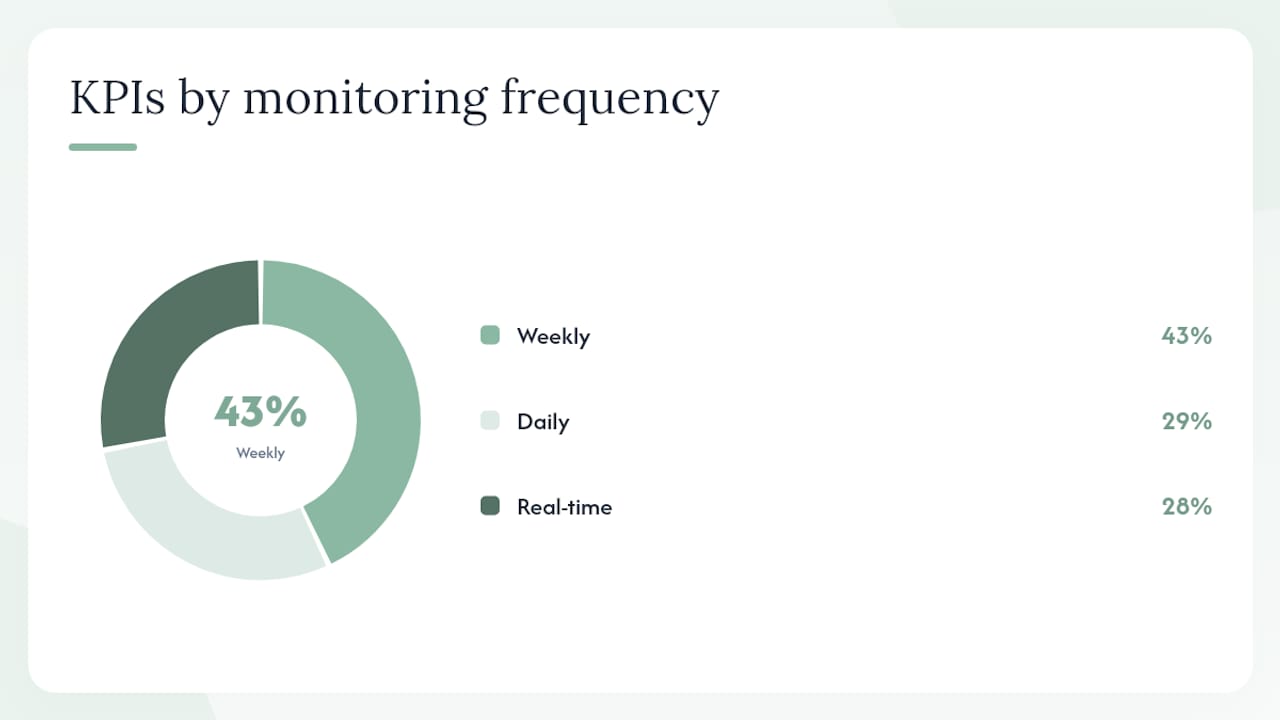
| KPI | How to Measure | Frequency | Target Benchmark |
|---|---|---|---|
| Referral response time | Time from referral receipt to first outbound contact | Real-time | Under 1 hour |
| Referral-to-admit conversion rate | Accepted admissions ÷ total referrals received | Weekly | 40%+ for SNF average |
| Days to fill (vacant bed) | Days from bed vacancy to new admission | Weekly | Under 3 days |
| Bed occupancy rate | Occupied beds ÷ licensed beds | Daily | — |
| Time to first available bed | Time from referral accept to confirmed bed assignment | Real-time | Same business day |
| Documentation completeness on admission | % of day-one charts with all required fields complete | Daily | — |
| Referral leakage rate | Referrals received but not converted or formally declined | Weekly | — |
Capture a 30-day baseline for each metric before go-live. Without a baseline, you cannot demonstrate ROI to ownership or justify the subscription cost to finance.
How to implement intake automation in 30 days or less
Successful deployment depends on rules capture and integration quality, not on feature count alone. The checklist below reflects a realistic phased rollout.
- Week 1–2 — Integration setup: Connect eFax, secure messaging, and hospital portals to the intake platform. Link the EMR using HL7 or FHIR standards. Confirm the EMR integration passes admission documentation back without manual re-entry.
Stakeholder RACI (simplified):
| Phase | IT | Admissions Director | Clinical Lead | Finance | Vendor Success |
|---|---|---|---|---|---|
| Discovery | Consulted | Accountable | Responsible | Informed | Consulted |
| Integration | Responsible | Informed | Consulted | Informed | Accountable |
| Pilot | Responsible | Accountable | Responsible | Informed | Responsible |
| Training | Informed | Accountable | Responsible | Informed | Responsible |
| Go-live | Responsible | Accountable | Consulted | Informed | Responsible |
High-level cost expectations: internal FTE time typically runs 20–40 hours across the discovery and pilot phases. SaaS subscription and implementation fees vary by platform and facility size; request a line-item quote from your vendor before committing. Facilities that complete discovery and integration in parallel rather than sequentially tend to reach go-live faster.
Pro Tip: Run your pilot using real referrals but with a parallel manual process as backup. This protects decision quality while your team builds confidence in the automated workflow, and it gives you a clean side-by-side comparison for your 30-day review.
What HIPAA and data governance requirements apply to intake automation?
Any intake automation tool that handles protected health information (PHI) is a business associate under HIPAA. That means a signed Business Associate Agreement (BAA) is required before the vendor touches a single referral document.
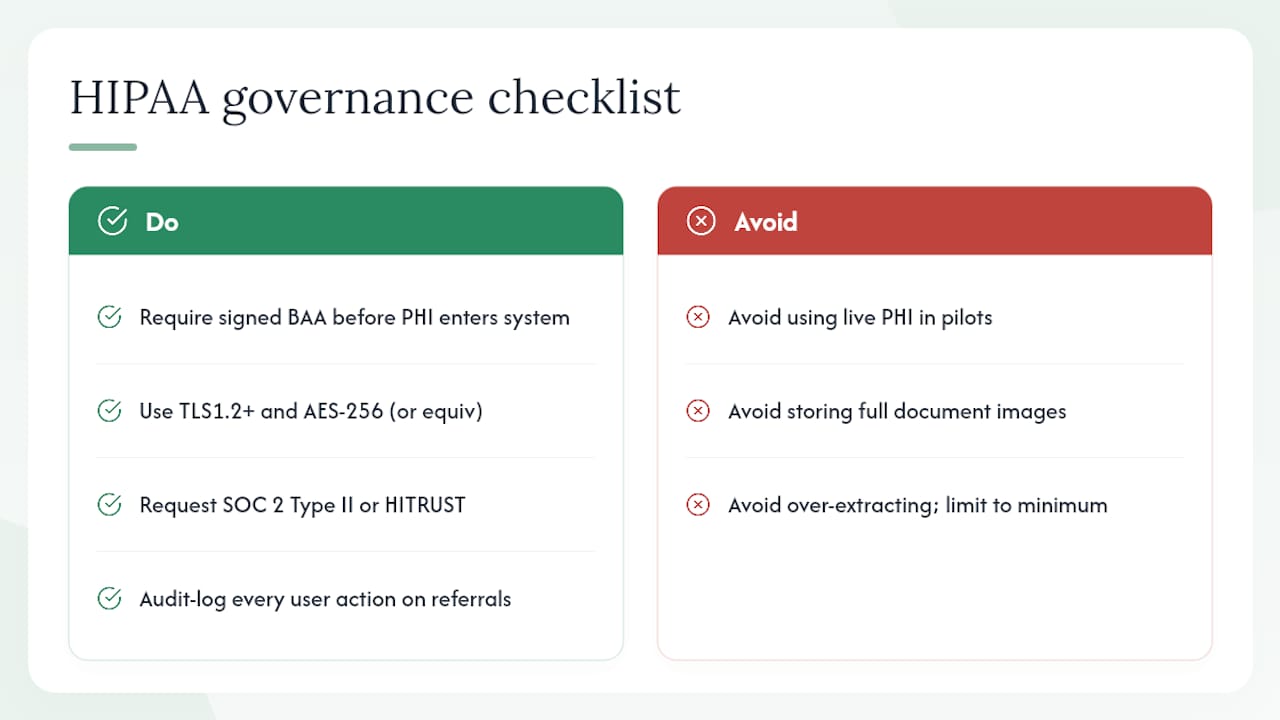
Minimum governance checklist for intake automation vendors:
Require a signed BAA before any PHI enters the system. Confirm data is encrypted in transit (TLS 1.2 or higher) and at rest (AES-256 or equivalent). Request SOC 2 Type II or HITRUST CSF certification evidence. Clarify data retention periods and your right to export or delete records. Confirm the incident response SLA (notification within 60 days is the HIPAA floor; 24–72 hours is best practice). Establish role-based access controls so intake coordinators see only the referrals assigned to their queue.
For pilot testing, always use de-identified or synthetic referral packets rather than live PHI. Audit logging should capture every user action on a referral record so your compliance team can reconstruct any access event. Scope data extraction to the minimum necessary fields: diagnosis, payer, functional status, and contact information are sufficient for intake decisions. Storing full document images is rarely necessary and increases your breach surface area.
This article provides general information, not legal or compliance advice. Confirm current HIPAA requirements and your specific obligations with a qualified healthcare attorney or compliance officer.
How Smartadmissions closes the gaps in your placement process
Smartadmissions is a purpose-built SaaS platform that addresses each step of the referral-to-admission workflow: unified intake across all referral channels, AI-powered document extraction and clinical summarization, parallel real-time eligibility verification, EMR integration via HL7 and FHIR, configurable bed-matching rules, and an analytics dashboard with audit logging.
Feature-to-workflow alignment:
- EMR integration: Passes accepted admission data directly into your existing EHR system, so clinical and billing teams start with complete records on day one. See the full EMR integration guide for prerequisites.
Facilities using Smartadmissions report roughly 20% faster bed occupancy after deploying admissions automation. The platform supports a fast pilot: most facilities complete integration and go-live within 30 days when EMR credentials and referral source access are prepared in advance.
Pro Tip: Before your demo, pull your last 30 days of referral data and note your current response time and conversion rate. Bringing those numbers to the conversation lets the Smartadmissions team show you a concrete before/after projection rather than a generic pitch.
Key Takeaways
A modern patient placement workflow built on parallel checks, consolidated intake, and AI-assisted document review is the fastest path to higher bed occupancy and fewer missed referrals.
| Point | Details |
|---|---|
| Consolidate referral channels first | Unifying eFax, portal, and messaging into one queue is the highest-leverage first step before any other automation. |
| Run clinical and eligibility checks in parallel | Sequential reviews add hours to your response time; parallel checks keep you under the 4-hour decision window. |
| Track 7 core KPIs from day one | Referral response time, conversion rate, days to fill, occupancy, bed availability, documentation completeness, and leakage give a full operational picture. |
| Pilot with one unit before full rollout | A single-unit pilot with a manual backup protects decision quality and produces a clean 30-day ROI comparison. |
| Smartadmissions automates the full workflow | The platform covers unified intake, AI extraction, eligibility verification, EMR integration, and analytics, with roughly 20% faster bed occupancy reported. |
What admissions directors actually notice after automating intake
The most immediate change is not the metrics dashboard. It is the inbox. Before automation, a typical morning starts with sorting faxes, chasing missing face sheets, and fielding calls from discharge planners asking for a status update. After go-live, those tasks compress into a single queue review where the AI has already flagged the high-acuity cases and surfaced the payer information.
Fewer rushed admits follow naturally. When your team has a complete clinical summary before the accept decision rather than after, the admits that do go forward are better matched to your facility’s capabilities. Day-one documentation gaps drop because the intake packet transfers directly to the EMR rather than being re-keyed by a coordinator under time pressure.
The implementation tip worth carrying into your leadership conversations: protect decision quality explicitly during the transition. Speed is the goal, but not at the cost of accepting referrals your facility cannot safely serve. Configure your routing rules to require a clinical reviewer sign-off on any high-acuity case, even after automation is live. That one guardrail prevents the most common post-go-live complaint, which is that the system moved too fast for the clinical team to keep up.
See Smartadmissions in action with a live pilot
Faster referral response and higher bed occupancy are measurable outcomes, not aspirations. Smartadmissions delivers both by replacing fragmented, manual intake with a single AI-powered workflow that your team can learn in days, not months.
The platform connects to your existing EMR and referral portals, runs eligibility checks before you commit to an admit, and gives your admissions director a real-time view of every open referral. Facilities that complete the 30-day pilot see the occupancy and conversion data they need to make a permanent decision with confidence. Review the manual vs. automated admissions comparison to see exactly where the time savings come from, then schedule a demo at smartadmissions.ai to start your pilot.
Useful sources
- Smart Admissions
- Why automate admissions: 20% faster bed occupancy
- 7 Examples of Referral Management Systems for Efficiency
- How to Handle Referral Documentation: 7 Best Practices
- How to Integrate EMR with Referrals for Streamlined Intake
- Patient intake checklist for skilled nursing homes 2026