
Insurance eligibility batch checks let you verify coverage for hundreds or thousands of patients in one submission instead of checking each patient one at a time. The core benefit is throughput: you send a list, a queue processes it against payers using the ASC X12N 270/271 transaction set, and results come back without anyone at your facility touching a keyboard for each patient.
Batch is the right call when the check isn’t time sensitive: nightly coverage refreshes, weekly census audits, or clearing your full admissions pipeline before month end. Real-time checks still win when you need an answer in seconds, like verifying a walk-in or a same-day admission. Platforms like Stedi and tools built around Centers for Medicare & Medicaid Services (CMS) requirements both support this batch pattern, and Smart Admissions builds it directly into admissions workflows.
- Scheduled appointment refreshes (24 to 72 hours out)
- Weekly or monthly full-census eligibility sweeps
- Large-volume background jobs during off-hours
Batch processing typically completes in 15 to 30 minutes, though retries and payer downtime can stretch that window considerably.
Key Takeaways
Batch eligibility checks succeed when facilities pair a stable real-time integration with disciplined retry windows, complete field data, and consistent monitoring of failure patterns.
| Point | Details |
|---|---|
| Match batch to use case | Use batch for scheduled refreshes and audits, real-time for walk-ins and same-day admissions. |
| Always include memberId | Rows with a member ID mismatch far less often than those relying on name and DOB alone. |
| Expect 15 to 30 minute processing | Retries and payer downtime can extend completion beyond that baseline window. |
| Build in retry logic | An 8 to 24 hour retry window resolves most temporary payer failures without manual work. |
| Smart Admissions fits the pilot pattern | Its platform pairs real-time and scheduled batch eligibility checks with EMR integration and searchable batch history. |
Table of Contents
- When Batch Eligibility Checks Make Sense vs. Real-Time Verification
- How the Batch Eligibility Check Process Actually Works
- Required Fields for Accurate Batch Eligibility Submissions
- Best Practices for Running a Reliable Batch Eligibility Program
- Compliance Standards Governing Batch Eligibility Verification
- Fixing the Most Common Batch Eligibility Errors
- How Smart Admissions Handles Batch Eligibility for Admissions Teams
- An Honest Look at What Actually Moves the Needle
- Put Batch Eligibility Checks on Autopilot with Smart Admissions
- Frequently Asked Questions
- Sources
When Batch Eligibility Checks Make Sense vs. Real-Time Verification
The decision usually comes down to one question: does the answer need to arrive in seconds, or can it wait a few hours? If a patient is sitting in your lobby or on the phone right now, run a real-time check. If you’re clearing tomorrow’s appointment schedule or refreshing coverage on your entire current census, batch eligibility verification is the more efficient tool.
Volume is the other deciding factor. A facility checking five or ten patients a day rarely needs batch infrastructure. But once you’re verifying dozens of scheduled admissions per week, or running a monthly audit across your entire book of active patients, submitting one large batch beats running the same check hundreds of times manually. Stedi’s batch eligibility API allows up to 10,000 checks in a single request, processed asynchronously against a returned batch ID.
The trade-off is latency. Real-time checks return an answer in seconds; batch checks queue, route to the payer, and often take 15 to 30 minutes to complete, sometimes longer when a payer’s system is slow to respond. You’re trading immediacy for scale, and for most administrative workflows, that trade is worth making.
Common batch use cases include:
- Nightly refreshes ahead of the next day’s scheduled appointments
- Weekly or monthly audits of your full active patient roster
- Pre-admission verification for a stack of pending referrals
- Periodic reconciliation to catch coverage terminations before claims go out.
Pro Tip: Start new payer integrations with real-time checks first. Once you’ve confirmed your data mapping and payer connectivity are solid, scale up to batch. Submitting a 2,000-row batch against a connection you’ve never tested is how you end up debugging hundreds of failures at once instead of a handful.
How the Batch Eligibility Check Process Actually Works
Submission happens one of two ways: upload a CSV file through a web portal, or send a batch request through an API. Either method returns a batch ID immediately, a synchronous confirmation that your submission was received, while the actual eligibility lookups run asynchronously in the background.
From there, each row in your file becomes its own independent eligibility search. The system routes every patient record to the correct payer based on the trading partner service ID you supplied, and payers process these requests at their own pace, sometimes throttling volume during peak hours. This is why a 5,000 patient batch doesn’t return all 5,000 results at the same moment. Some clear in minutes; others queue behind payer system delays.
Here’s the typical lifecycle, from row to result:
- You submit a CSV or API batch containing one row per patient.
- The system validates the file structure and returns a batch ID.
- Each row enters an asynchronous queue and is routed to its payer.
- The payer processes the request and returns an ASC X12N 271 response, or a temporary error if unavailable.
- Failed or delayed items enter a retry cycle, often re-submitted every 30 minutes for up to 24 hours.
- Completed results post to a status endpoint, tagged with your original submitter transaction identifier.
- Your team polls the batch status, retrieves completed statuses, and stores the final response.
Picture it as a simple flow: your CSV or API call feeds a queue, the queue fans out to individual payers, failed attempts loop back through retries, and everything that succeeds lands in a results store you can poll.
Most platforms expose this through endpoints like Retrieve Batch Status, Retrieve Batch Check Statuses, and a polling pattern for individual eligibility checks. The field that ties it all together is the submitter transaction identifier, the unique key you assign to each row so you can match a returned result back to the right patient record.
Pro Tip: Build your submitter transaction identifier from something stable and parseable, like a facility code plus appointment ID plus date. When you’re reconciling 3,000 results against your admissions system at 7 a.m., a clean identifier means an automated script does the matching instead of a staff member scrolling through spreadsheets.
Required Fields for Accurate Batch Eligibility Submissions
Every row in your batch file needs enough information for the payer to find the right patient and return usable benefit details. Skimping on fields is the single most common cause of unmatched or rejected batch items.
At minimum, include the trading partner service ID (the payer’s identifier in the clearinghouse network), a unique submitter transaction identifier, and subscriber details: member ID, date of birth, and last name. Always include the member ID when you have it. Omitting it and relying on name and date of birth alone significantly raises your mismatch rate.
Service dates matter too. Most platforms accept service dates covering up to 12 months in the past through the end of the current month, though Medicare-specific lookups sometimes allow an exception into the next calendar month. Stick to one service type code per request when possible; most systems default to code 30 (general medical care) if you leave it blank.
Payer ID formatting trips up more batches than any other single issue. Some payer IDs require leading zeros, and dropping them causes an otherwise valid row to fail matching entirely.
| Field | Description | Why It Matters |
|---|---|---|
| tradingPartnerServiceId | The payer’s ID in the network | Routes the request to the correct payer; formatting errors (missing leading zeros) cause silent failures |
| submitterTransactionIdentifier | Your unique key per row | Lets you match returned results back to the right patient record |
| memberId | Subscriber’s insurance ID | Sharply reduces mismatch rate versus name/DOB alone |
| dateOfBirth | Subscriber’s DOB | Required for identity matching, especially when memberId is missing |
| serviceDate | Date of service or check | Must fall within the payer’s accepted window, typically trailing 12 months |
| serviceTypeCode | Type of benefit requested | Limit to one per request; defaults to 30 if omitted |
For Medicare lookups, expect payer-specific requirements: some batch workflows call for a distinct trading partner service ID such as MBILU or MBILUNOSSN, plus the patient’s Medicare Beneficiary Identifier rather than a Social Security number. Check your platform’s documentation for the exact template before you build a Medicare batch file.
A basic CSV template needs columns for tradingPartnerServiceId, submitterTransactionIdentifier, memberId, lastName, dateOfBirth, serviceDate, and serviceTypeCode. If you’re submitting through an API instead, the JSON payload mirrors these same fields nested under a subscriber object, with the batch wrapped in an array of individual check requests.
Best Practices for Running a Reliable Batch Eligibility Program
Sequence matters more than most administrators expect. Validate your data mapping with real-time checks before you ever attempt a batch. Once a handful of real-time checks return clean results against a given payer, run a small pilot batch of 50 to 100 records. Only after that pilot clears without a wave of mismatches should you scale to your full patient roster.

Pre-upload validation catches the errors that are cheapest to fix before submission: missing member IDs, malformed payer IDs, or dates outside the accepted window. A simple spreadsheet check before you upload saves hours of triage after the batch completes.
Retry configuration deserves real attention. Automated retries, re-submitted every 30 minutes for up to 24 hours, meaningfully raise completion rates for items that hit temporary payer downtime or throttling. An 8 to 24 hour retry window gives slower payers time to respond without leaving your team staring at a stalled batch all day.
Scheduling cadence depends on your use case. Appointment refreshes work best as nightly overnight jobs, timed to complete before morning staff arrive. Broader census audits fit a weekly or monthly cadence. NextGen and similar practice management systems support both manual batch submission and scheduled background jobs, and breaking a very large list into smaller chunks tends to reduce payer throttling and improve completion times.
Track a small set of KPIs weekly:
- Completion rate (percentage of submitted rows with a final response)
- Breakdown of failure types (unmatched, missing field, payer timeout)
- Average time to complete a full batch
- Percentage of rows requiring manual follow-up
Automated remediation rules help too. When a payer returns an AAA03 “unable to respond” code, an automatic re-submission often resolves it without staff intervention. For persistent match failures, a cascading search that tries an alternative combination of identifiers, such as name and DOB when member ID fails, catches many cases that would otherwise need a phone call.
A well-tuned retry and cascading search setup can meaningfully cut the manual follow-up queue, since most failures are temporary payer issues rather than genuinely bad data.
Pro Tip: Keep a searchable log of every past batch response, including the failed rows. When a payer’s system has a bad day and 200 items fail, you want to filter your log to exactly that subset instead of re-checking your entire patient list.
Compliance Standards Governing Batch Eligibility Verification
Every batch eligibility transaction in the U.S. rides on the same backbone: ASC X12N 270/271, the HIPAA-recognized transaction set for electronic eligibility inquiries and responses. Whether you’re submitting one check or ten thousand, the underlying request and response format doesn’t change.
CAQH CORE operating rules layer additional requirements on top of that transaction set, including expectations around response completeness and turnaround. CMS has adopted federally mandated operating rules that require health plans to provide secure electronic access to eligibility data and to return financial details, deductibles, copays, and coinsurance, in response to a provider inquiry. That obligation applies whether the inquiry arrives through a real-time or batch channel.
Medicare checks carry their own wrinkle: lookups typically require the Medicare Beneficiary Identifier rather than a Social Security number, and date-range rules can differ slightly from commercial payers.
Health plans are required to provide secure electronic access to eligibility and benefit information and to return financial responsibility details, not just a yes-or-no coverage answer, when a provider submits an eligibility inquiry.
For your own compliance posture, maintain auditable logs of every batch submitted and every response received, and confirm your transmission channel meets HIPAA security requirements before you connect any new payer or vendor system.
- Confirm your vendor supports ASC X12N 270/271 natively
- Verify CAQH CORE-aligned response times for your primary payers
- Store MBI data securely and separately from SSNs
- Keep audit logs of every batch submission and response
Fixing the Most Common Batch Eligibility Errors
Most batch failures trace back to a handful of repeat offenders. An unmatched member usually means the member ID is missing or the name and date of birth don’t line up exactly with the payer’s records. A missing required field, often the trading partner service ID or service date, causes an immediate rejection rather than a delayed one. Payer throttling and AAA03 “unable to respond” codes are typically temporary and resolve on retry. Invalid payer ID formatting, particularly missing leading zeros, causes silent mismatches that look like a coverage problem but aren’t.
| Point | Details |
|---|---|
| Unmatched member | Add the memberId if missing, or run a cascading search using name and DOB as a backup key. |
| Missing required field | Check tradingPartnerServiceId and serviceDate formatting before resubmitting. |
| Payer throttling / AAA03 | Let the automated retry cycle run; these usually resolve within the 8 to 24 hour window. |
| Invalid payer ID format | Confirm leading zeros and correct length against the payer’s published ID list. |
- Sort failed rows by error code before triaging
- Re-check payer ID formatting first, it’s the most common silent failure
- Escalate to payer support only after retries and cascading searches have run their course
How Smart Admissions Handles Batch Eligibility for Admissions Teams
Smart Admissions is a SaaS platform built specifically for skilled nursing facilities, rehabilitation centers, and post-acute care providers, and it uses an AI-powered referral management assistant to combine real-time eligibility verification with scheduled batch runs, all integrated directly with your EMR and insurance portals. That means your admissions team isn’t juggling a separate eligibility tool on top of the system they already use to manage referrals.
For administrators evaluating a pilot, the platform offers:
- Guided onboarding support during your first batch runs
- Configurable schedules for nightly or weekly eligibility refreshes
- Built-in retry handling so temporary payer failures resolve automatically
- Searchable batch history so billing staff can filter straight to failed rows
Pro Tip: Involve your IT lead, billing lead, and admissions lead in the same pilot conversation from day one. Eligibility data touches all three roles, and decisions made without one of them tend to surface as rework later.
An Honest Look at What Actually Moves the Needle
The conventional advice on batch eligibility checks focuses almost entirely on the submission mechanics: build the CSV, hit the endpoint, wait for results. That’s the easy 20%. The part that actually determines whether your program works is retry configuration and field discipline, the unglamorous stuff nobody puts on a feature list.
Facilities that skip the real-time pilot phase and jump straight to a 5,000 row batch almost always regret it. Not because batch processing is unreliable, but because payer mapping errors that would have surfaced in ten real-time tests instead surface across thousands of rows at once, and someone has to sort through that mess by hand.
The other overlooked piece is the submitter transaction identifier. It sounds like a technical footnote, but a poorly designed one turns a clean batch result into a reconciliation headache. Get the boring fundamentals right first. The volume benefits of batch checking only materialize once your data foundation can support it.
Put Batch Eligibility Checks on Autopilot with Smart Admissions
If you’ve been running eligibility checks manually or stitching together a separate batch tool alongside your EMR, Smart Admissions gives you one place to do both, without the added software license or the integration project. Referral and admissions data already lives in the platform, so eligibility checks run against records your team is already working with, not a duplicate spreadsheet someone has to keep in sync.
That matters most during a busy admissions week, when a batch refresh needs to run overnight and be ready before your team’s morning huddle, not sometime that afternoon. Smart Admissions handles the scheduling, retry logic, and results tracking so your billing staff spends their time on the small subset of rows that actually need a phone call.
See how it fits your facility’s admissions volume with a look at referral management systems built for this workflow, or start a trial to run your first pilot batch this week.
Frequently Asked Questions
What are insurance eligibility batch checks?
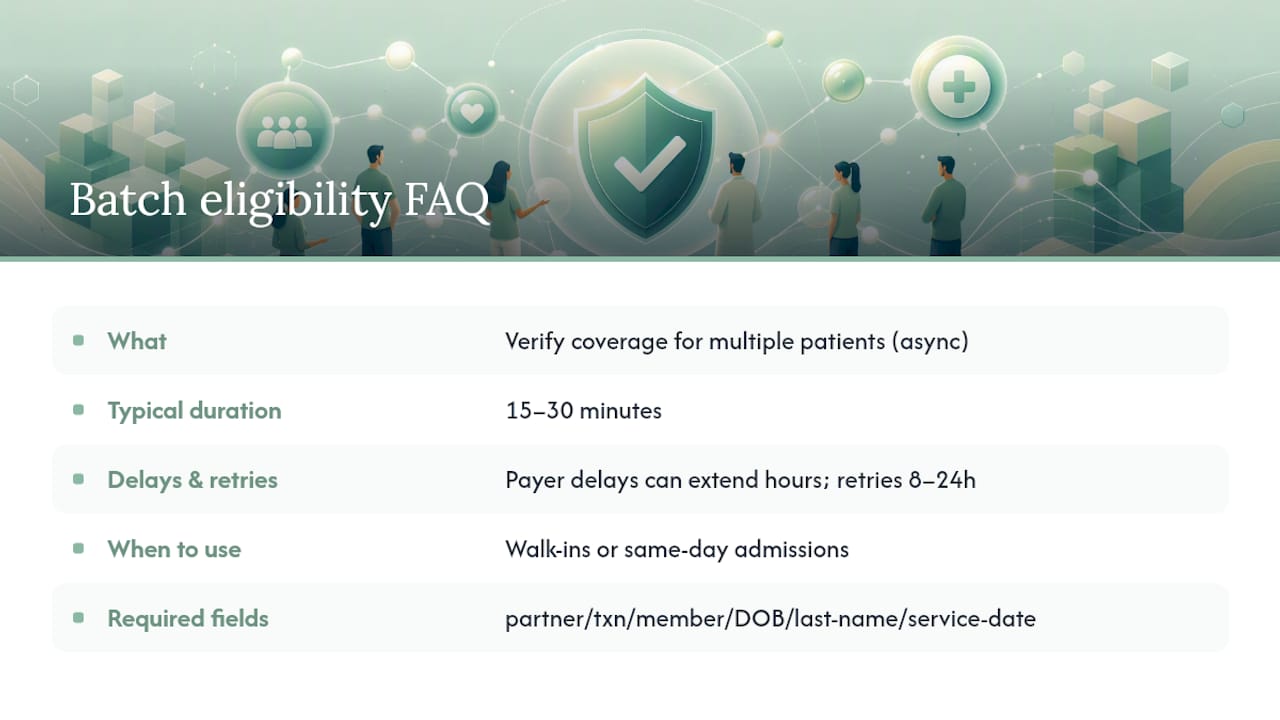
Insurance eligibility batch checks verify coverage for multiple patients in a single submission, either through a CSV upload or an API request, with results returned asynchronously rather than instantly.
How long does batch eligibility verification take to complete?
Most batches complete in 15 to 30 minutes, though retries and payer system delays can extend that window, sometimes to several hours for a subset of rows.
When should I use real-time checks instead of batch?
Use real-time verification for walk-ins, same-day admissions, or any situation where you need an answer in seconds rather than minutes.
What fields are required for a batch eligibility submission?
At minimum, include the trading partner service ID, a unique submitter transaction identifier, member ID, date of birth, and last name, plus a valid service date.
Why do some batch rows fail while others succeed?
Failures usually trace back to missing member IDs, malformed payer IDs, or temporary payer throttling, most of which resolve through an automated retry cycle within 8 to 24 hours.
Sources
Standards documents define the rules; vendor documentation defines the templates. Read both before your first production batch.
- Health plan eligibility benefit inquiry and response – CMS
- ASC X12N 270/271 standard page – OIT VA
- Eligibility – InstaMed Developer Portal
- Submit Eligibility Requests – NextGen Help Guide