
Automate eligibility at booking, re-verify 48 hours before the visit, and route exceptions to a dedicated queue. That three-step sequence is how to streamline insurance checks without adding headcount, and it’s the fastest fix available to most skilled nursing and post-acute admissions teams today.
Get these first steps in place this week:
- Map your top 10 to 15 payers by claim volume and confirm which support electronic eligibility checks.
- Turn on clearinghouse or payer API connections for those payers before touching anything else.
- Require complete member ID, group number, and date of birth at the point of booking, not after.
Pro Tip: Facilities using real-time verification have reported cutting administrative time on eligibility tasks by 50 to 70 percent in documented client implementations. Start with your highest-volume payers to see that kind of gain fastest.
Key Takeaways
Streamlining insurance checks works best when automated eligibility verification runs at booking and again 48 hours before the visit, with exceptions routed immediately to trained staff.
| Point | Details |
|---|---|
| Sequence checkpoints correctly | Verify at booking, re-verify 48 hours out, and check again morning-of for high-risk cases. |
| Fix intake data first | Validation rules on member ID and group number prevent most downstream verification failures. |
| Prioritize top payers | Automate your top 10 to 15 payers by claim volume before expanding to smaller ones. |
| Track five core KPIs | Monitor time-to-verify, auto-verify rate, eligibility denials, backlog, and pre-visit resolution rate. |
| Consider Smart Admissions | Smartadmissions integrates EMR and payer data for real-time verification, cited at 50 to 70 percent admin time savings in client implementations. |
Table of Contents
- How Do You Streamline Insurance Checks Step by Step?
- What Technology Actually Speeds Up Verification?
- What Should a Daily Verification Workflow Look Like?
- Which Metrics Prove Your Verification Process Is Working?
- Why Do Insurance Checks Fail, and What Actually Fixes Them?
- How Long Does It Take to See ROI From Streamlining?
- Case Study: How One Skilled Nursing Facility Cut Verification Time
- What Changed on the Floor After We Automated Verification
- Ready to Put This Playbook on Autopilot?
- Frequently Asked Questions
- Sources
How Do You Streamline Insurance Checks Step by Step?
Speed comes from sequencing, not just software. The teams that cut verification time the most follow a strict order of operations: get clean data in, check it at the right moments, and route anything abnormal to a human immediately instead of letting it sit.
1. Fix data capture at pre-registration. Most verification delays start before anyone runs a check. Require member ID, group number, date of birth, and subscriber relationship on every intake form, with validation rules that reject incomplete submissions before scheduling confirms. A dropdown-driven form catches typos an open text field never will.
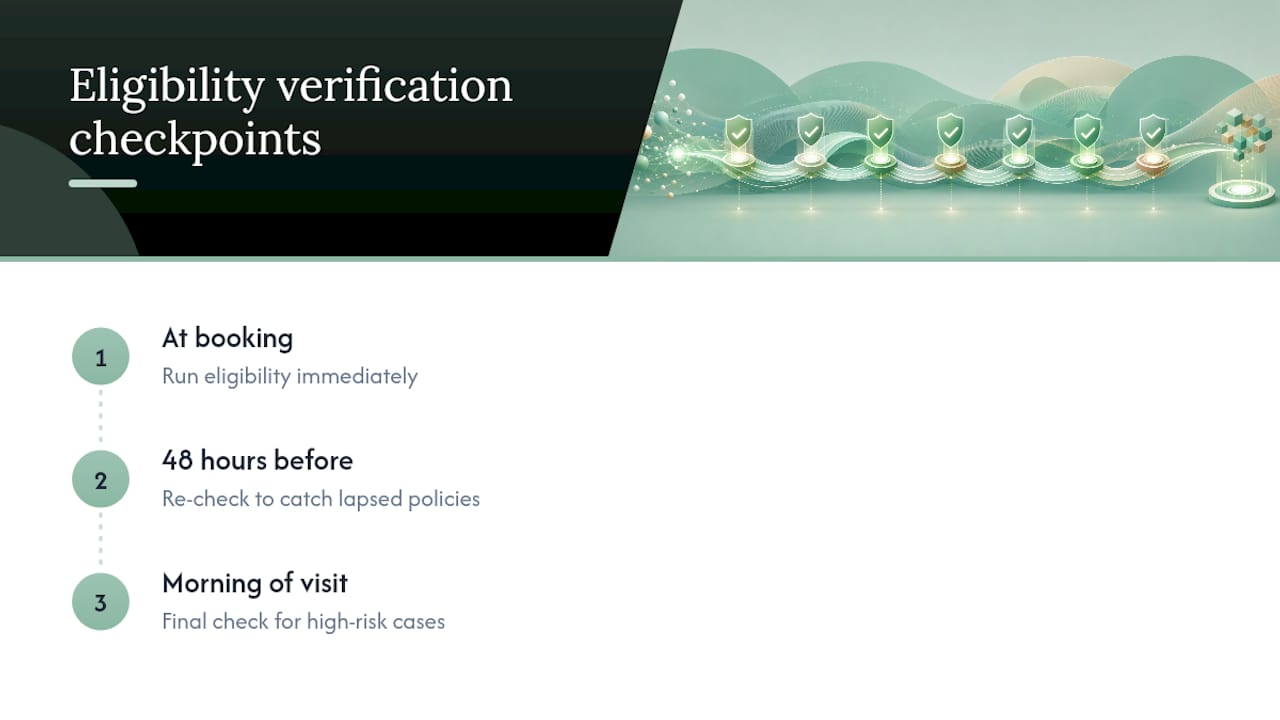
2. Verify at three fixed checkpoints. Run eligibility the moment the visit is booked, again 48 hours before the appointment, and once more the morning of for high-risk cases. This three-checkpoint model is standard guidance in automated verification workflow design, and it exists because coverage genuinely changes between booking and the visit date. Catching a lapsed policy 48 hours out gives staff time to fix it; catching it at check-in does not.
3. Define exceptions precisely, then route them. An exception isn’t just “verification failed.” Separate inactive coverage, prior-authorization requirements, and member-not-found errors into distinct categories, because each needs a different fix and a different person to fix it. Inactive coverage goes to patient outreach. Prior-auth needs go to a clinical liaison. Member-not-found errors often mean a data entry problem that goes straight back to intake.

4. Split roles by function, not by shift. One person owns exception review and decides what’s actionable. A second person handles patient outreach for missing or incorrect information. A third runs payer calls for anything that can’t resolve electronically. Blending these roles is how facilities end up with a single overworked staffer drowning in a queue that three specialists could clear in an hour.
5. Automate the payers that matter first. Don’t try to automate every payer relationship on day one. The CAQH Index shows electronic connectivity adoption keeps climbing across the industry, but coverage still varies by payer. Start with the 10 to 15 payers generating most of your claim volume, get those checks running reliably, then expand outward. Trying to boil the ocean on integration is the single most common reason automation projects stall.
Solid intake habits make every later step easier, and Smartadmissions has a detailed checklist for intake data capture worth reviewing against your current forms.
What Technology Actually Speeds Up Verification?
The vocabulary here trips people up more than the concepts. A 270/271 transaction is the electronic eligibility inquiry and response format that CMS governs under HIPAA’s administrative simplification rules. Your system sends a 270, the payer answers with a 271, and that response tells you plan status, copay, and deductible information in seconds instead of a phone hold.
A clearinghouse sits between your practice management system and dozens of payers, translating your requests into the format each payer expects so you don’t build a custom connection to every insurer. A payer API is a direct line to a single insurer’s eligibility data, usually faster than a clearinghouse but only worth building for your highest-volume payers. OCR, optical character recognition, extracts member ID and group numbers from a photographed insurance card, cutting a manual data entry step out of intake entirely.
Building the pipeline itself takes a few concrete steps:
- Connect your EHR or practice management system to a clearinghouse account and confirm bidirectional data flow.
- Set a webhook trigger that fires an eligibility check automatically the moment a visit gets booked.
- Store the raw 270/271 response alongside the parsed summary, so staff can audit exactly what a payer said if a denial comes later.
- Build fallback logic for API timeouts or payer downtime that routes the check to a manual queue instead of failing silently.
Formisoft’s implementation guide walks through connecting intake triggers to payer responses in more technical detail, and it’s worth a read if your team is scoping build versus buy.
On compliance: log every verification attempt and its outcome, keep an audit trail tied to a user or system ID, and limit which fields display PHI on shared screens. None of this needs to be complicated, but it does need to exist before you go live.
Pro Tip: Build retry logic into every integration from day one. A payer API that times out once will time out again during your busiest morning, so a system that automatically retries twice before flagging for manual review saves staff from chasing false failures.
What Should a Daily Verification Workflow Look Like?
A clear role matrix prevents the most common breakdown in verification workflows: everyone assuming someone else is handling the exception queue. Scheduling staff own data capture at booking. A verification specialist owns the automated check results and the exception queue. A prior-authorization coordinator owns anything flagged for clinical review. A supervisor owns payer escalations that specialists can’t resolve alone.
For missing or invalid insurance information, a short script keeps outreach consistent:
An automated text or email version can run the same request without tying up a phone line, reserving live calls for cases that don’t resolve after one automated nudge.
Set service-level targets for exceptions:
- Respond to payer-error queue items within 4 business hours.
- Resolve prior-authorization exceptions within 5 business days of flagging.
- Close member-not-found errors same day, since these usually trace back to a data entry fix.
A single-screen verification view, showing plan status, copay, deductible remaining, and any active flags on one screen, cuts the clicking and tab-switching that eats staff time on every single case.
Which Metrics Prove Your Verification Process Is Working?
Five numbers tell you almost everything about verification health: time-to-verify, auto-verify rate, denials tied to eligibility errors, verification backlog size, and the percentage of exceptions resolved before the visit happens.
- Time-to-verify measures minutes from trigger to confirmed result; automated checks should complete in under a minute for connected payers.
- Auto-verify rate is the share of checks that resolve without human touch. As CAQH Index data shows connectivity gains accelerating industry-wide, this rate should climb steadily as you expand payer automation.
- Eligibility-related denials should drop measurably once pre-visit verification catches lapsed coverage before the claim goes out.
- Backlog size tracks how many checks sit unresolved at end of day, a direct proxy for staffing strain.
A 10 to 20 percent improvement in auto-verify rate typically translates into hours of staff time recovered weekly. Run a daily exception dashboard for frontline staff, a weekly trend report for supervisors, and a monthly summary for leadership tracking denial-dollar impact.
Why Do Insurance Checks Fail, and What Actually Fixes Them?
Most verification failures trace back to a short list of repeat offenders, and the fixes are just as predictable once you know what to look for.
- Typos in member ID or demographics cause a huge share of false failures; intake validation rules catch these before submission.
- Outdated insurance cards produce inactive-coverage flags; an automated patient prompt to confirm current coverage before the visit heads this off.
- Dual coverage coordination confuses which payer is primary; a payer mapping table flags dual-coverage cases for manual review automatically.
- Payer API downtime stalls checks entirely; a fallback manual queue keeps the process moving instead of stopping cold.
- Unexpected prior-authorization rules surface late; a managed prior-auth checklist per payer catches these earlier in the process.
AHIMA’s denial-resolution guidance traces most claim denials back to exactly these upstream verification gaps, which is the strongest argument for fixing intake before scaling automation. The quickest win: tightening intake validation alone eliminates a large share of the “morning-of” scramble that eats staff time before every shift.
How Long Does It Take to See ROI From Streamlining?
Realistic timelines matter more than optimistic ones here, because rushed rollouts create the exact chaos automation is supposed to fix.
- Weeks 1 to 4: Fix intake forms, add validation rules, and identify your top payers by volume. These changes cost nothing and produce visible results almost immediately.
- Weeks 5 to 8: Pilot automated checks with your top three to five payers, tracking auto-verify rate and time-to-verify daily.
- Months 3 to 6: Expand automation across your full top-15 payer list and formalize exception routing and SLAs.
A pilot checklist should include a defined sample size, the specific payers included, clear success metrics, staff training on the new exception queue, and a documented fallback if the integration fails mid-visit.
Track admin hours recovered and denials avoided as your two core savings measures. A facility processing 200 verifications weekly that shifts even half to full automation can recover meaningful staff hours within the first pilot month, well before full rollout completes.
Case Study: How One Skilled Nursing Facility Cut Verification Time
A skilled nursing facility integrated its EMR with a clearinghouse connection and layered automated re-checks on top of its existing intake process. The rollout ran in phases: EMR connection first, clearinghouse eligibility checks second, then automated 48-hour re-verification once the core pipeline proved stable.
Pro Tip: Smart Admissions clients have reported saving 50 to 70 percent of administrative time on eligibility tasks after implementation, measured across their documented client rollouts. That range holds because the biggest time sink, manual phone verification, disappears almost entirely once real-time checks take over.
- EMR and clearinghouse connected through standard 270/271 transaction flow.
- Exceptions routed automatically to a dedicated review queue instead of front-desk staff.
- Re-verification triggered 48 hours pre-visit without manual intervention.
What Changed on the Floor After We Automated Verification
The morning scramble disappeared first. Before automation, our team spent the first hour of every shift chasing coverage questions that should have been caught days earlier. Now exceptions surface the afternoon before, giving staff time to actually solve them instead of reacting under pressure.
If you adopt one change immediately, make it this: run re-verification 48 hours before every visit, not just at booking.
Ready to Put This Playbook on Autopilot?
Manually running through timing checkpoints, payer mapping, and exception routing works, but it takes constant staff attention to keep every rule from slipping. Smartadmissions builds that entire playbook into the referral and admissions workflow itself, connecting to your EMR and payer clearinghouse so eligibility checks fire automatically at booking and again 48 hours out, with exceptions routed to the right person instead of sitting in a shared inbox.
The platform maps directly onto what this article covers: real-time eligibility verification, EMR integration, and automated exception handling, without requiring your team to build the pipeline from scratch. Facilities that have adopted it report meaningful reductions in administrative time on eligibility tasks, and onboarding support is included from day one to help your team get the top-payer automation running quickly.
If you’re weighing whether to build this internally or adopt a ready-made system, start by reviewing what referral management actually solves for admissions teams, then request a walkthrough of how the pilot rollout would look for your facility.
Frequently Asked Questions
How do you run an insurance eligibility check?
Submit a 270 transaction through your clearinghouse or payer API with the patient’s member ID, group number, and date of birth. The payer returns a 271 response confirming plan status, copay, and deductible details, typically within seconds for connected payers.
What do you do with an insurance check once it’s complete?
Store the parsed result in the patient’s record, flag any exceptions (inactive coverage, prior-auth needed) for staff review, and confirm the verified benefits with the patient before the visit if copay or deductible amounts are unusual.
How often should you re-verify insurance for returning patients?
Re-verify at every new visit at minimum, and add a 48-hour pre-visit check for any patient with a history of coverage changes or a payer known for frequent plan updates.
What’s the difference between a clearinghouse and a payer API?
A clearinghouse routes requests to many payers through one connection, while a payer API connects directly to a single insurer, usually faster but only practical to build for your highest-volume payers.
Sources
- Health Plan Eligibility Benefit Inquiry and Response | CMS
- 2023 CAQH Index Report
- Claims denials: a step-by-step approach to resolution | Journal of AHIMA
- How to Set Up Automated Insurance Verification (Step-by-Step) | Formisoft