
Referral document management means capturing, tracking, and routing referral orders and their supporting documents from the moment a referral arrives until the loop closes. We recommend one approach: standardize intake, route every referral to an accountable worklist, verify eligibility early, connect to your EMR, and automate the repetitive steps. This mirrors guidance from AHRQ and CMS, and it’s the model we built Smart Admissions around.
TL;DR:
- Every referral needs a clinical question, patient identifiers, supporting records, and urgency; assign an owner and timestamp from receipt through closure.
- Use OCR with standardized templates to extract patient details from faxes and scans, then link every attachment to one patient record to prevent duplicate charts.
- Run eligibility checks within 48 to 72 hours of intake, and route tasks into administrative, clinical, and scheduling pools rather than one shared inbox.
- Flag missing information automatically after a defined delay; AHRQ describes unread referral reminders after two weeks, with audit trails recording each status change and owner.
- Track review time, conversion, and closed loop rate monthly; pilot one referral source, record baseline results, and expand only after measurable improvement.
Table of Contents
- What counts as a referral document, and what’s its lifecycle?
- Referral states and worklists: who owns what, and when
- Turning faxes, portals, and scans into usable data
- Connecting referrals to your EHR without a full FHIR build
- Automation priorities that actually reduce manual work
- What to measure, and how closing the loop gets reported
- A pilot-to-scale roadmap for rolling this out
- How Smart Admissions operationalizes referral document management
- What admissions leaders should prioritize first
- How Smart Admissions can help you put this into practice
- FAQ
- Sources
What counts as a referral document, and what’s its lifecycle?
A complete referral record needs a handful of fixed fields before your team can act on it: the clinical question, patient identifiers, supporting documentation, and an urgency flag. Treat these as separate but linked pieces, following the distinction HL7 draws between an order and the files that support it.
- Clinical question: the specific reason for referral, not just a diagnosis code.
- Patient identifiers: name, date of birth, insurance details, and a unique reference number.
- Supporting documents: history, labs, imaging, and prior notes attached to the order.
- Urgency indicator: routine, urgent, or STAT, set at intake and never left blank.
In FHIR terms, the order itself maps to a ServiceRequest, while the attachments map to DocumentReference resources. A referral then moves through recognizable states: received, under review, missing information, scheduled, and closed. Each state needs a timestamp and an owner, which is what makes the lifecycle trackable instead of a pile of faxes sitting in a bin.
Referral states and worklists: who owns what, and when
A referral worklist only works when every state has a clear definition, a required piece of evidence, and a named owner. Without that structure, referrals sit untouched and nobody can say why.
- Received: logged with a timestamp; no review has started.
- Under review: an admissions coordinator is actively checking completeness and eligibility.
- Missing information: flagged with the specific document or data point needed, and a reminder date.
- Scheduled: appointment or admission date confirmed and attached to the record.
- Closed: consult report or admission outcome received and filed against the original referral.
Route referrals into pools by urgency, referring organization, or facility type so the right coordinator sees the right case first. Build in escalation rules: a referral sitting in “missing information” for more than a set number of days should automatically surface on a supervisor’s dashboard. The AHRQ eReferral implementation handbook describes marking unread referrals and sending automated reminders after two weeks, with audit trails that show exactly when each state changed and who made the change. That audit trail matters later when you need to prove a referral wasn’t lost, only delayed.
Pro Tip: Require a reason code whenever a referral moves back from “scheduled” to “under review.” Reopened referrals without a documented reason are the fastest way to lose track of what actually happened.
Turning faxes, portals, and scans into usable data
Referrals still arrive through a mix of channels, and each one has a cost. Fax remains common in post-acute care but requires manual data entry unless paired with optical character recognition. Portals and direct eReferral connections produce structured data with far less rework. Secure email sits in between: faster than fax, but still unstructured unless templated.
- Fax: reliable and familiar, but every field has to be typed in by hand without OCR.
- Portal submissions: structured intake forms reduce errors and speed up matching.
- Secure email: fast to send, but attachments need the same normalization as faxes.
- Direct eReferral: the most efficient channel when both sides support it.
Apply OCR with standardized templates so key fields, patient name, date of birth, referring physician, are extracted automatically and matched against existing records instead of rekeyed. Store every supporting file as a single DocumentReference tied to one patient record to prevent duplicate charts when the same referral arrives twice through different channels.
Connecting referrals to your EHR without a full FHIR build
You don’t need a complete FHIR implementation on day one to get real integration value. HL7’s ServiceRequest resource models the referral order itself, while DocumentReference carries the supporting files, and together they give your EHR a structured way to represent a referral instead of a scanned attachment with no metadata.
- Map required fields (identifiers, urgency, clinical question) directly into ServiceRequest so nothing needs manual re-entry.
- Embed patient and encounter identifiers at intake to avoid duplicate charts downstream.
- Where full FHIR connectivity isn’t available yet, use scheduled CSV exports or API syncs to move worklist data into your EHR on a regular cycle.
- Treat DocumentReference as the single storage point for supporting files, regardless of which integration pattern you use.
Our guide on integrating EMR with referrals walks through field mapping in more detail for teams planning this step.
Automation priorities that actually reduce manual work
Not every task deserves automation on day one. Start with the steps that create the most backlog and work down from there.
- Auto-triage complete versus incomplete referrals and route complete ones straight to scheduling pools, skipping manual review entirely.
- Run eligibility checks at intake, not after admission, to catch coverage problems before they turn into denials.
- Build role-based task pools, administrative, clinical, and scheduling, so work is delegated by function instead of landing on one overloaded inbox.
- Standardize request and response templates for high-value referrals so clinical information arrives in a consistent format every time.
AMA STEPS Forward guidance on task-focused pools shows that delegating by role, rather than dumping everything into a single inbox, reduces burden and speeds throughput when paired with clear protocols. Eligibility checks deserve particular attention: running them within 48 to 72 hours of intake catches coverage issues before they become denials, which matters even more in post-acute settings where bed placement decisions move fast. Our referral prioritization strategies guide covers triage rules in more depth.
Pro Tip: Automate the sorting step first, not the decision step. Let software separate complete referrals from incomplete ones before you automate anything that affects clinical judgment.
What to measure, and how closing the loop gets reported
Three metrics tell you most of what you need to know: review time from receipt to decision, the referral-to-appointment conversion rate, and the closed-loop rate, meaning the share of referrals where the referring clinician actually receives a consultant report.
- Review time: how long a referral sits before a coordinator acts on it.
- Conversion rate: the percentage of referrals that convert into a scheduled appointment or admission.
- Closed-loop rate: referrals where a report made it back to the referring clinician.
CMS’s eCQM guidance (CMS50) defines a closed referral loop as the referring clinician receiving a consultant report tied to the first referral of the measurement period, which is the benchmark used in federal quality reporting. Use your worklist timestamps and audit trail to report these metrics on a regular cadence, monthly at minimum, so leadership can see whether review times are trending down and where referrals stall most often. Our piece on reducing referral times breaks down tactics for each stage of the funnel.
A pilot-to-scale roadmap for rolling this out
Start small, prove it works, then expand. That sequence matters more than the specific tools you choose.
- Pick one referral source or specialty for a pilot and record baseline review time and conversion rate before changing anything.
- Define your required fields, state dictionary, and worklist owners in writing before any technology changes.
- Add eligibility checks and scheduling integration to the pilot workflow, then measure the same KPIs again.
- Expand to additional referral sources once the pilot shows measurable improvement, and formalize governance for ongoing review.
Our referral overflow guide covers what to do when volume outpaces your pilot’s capacity.
How Smart Admissions operationalizes referral document management
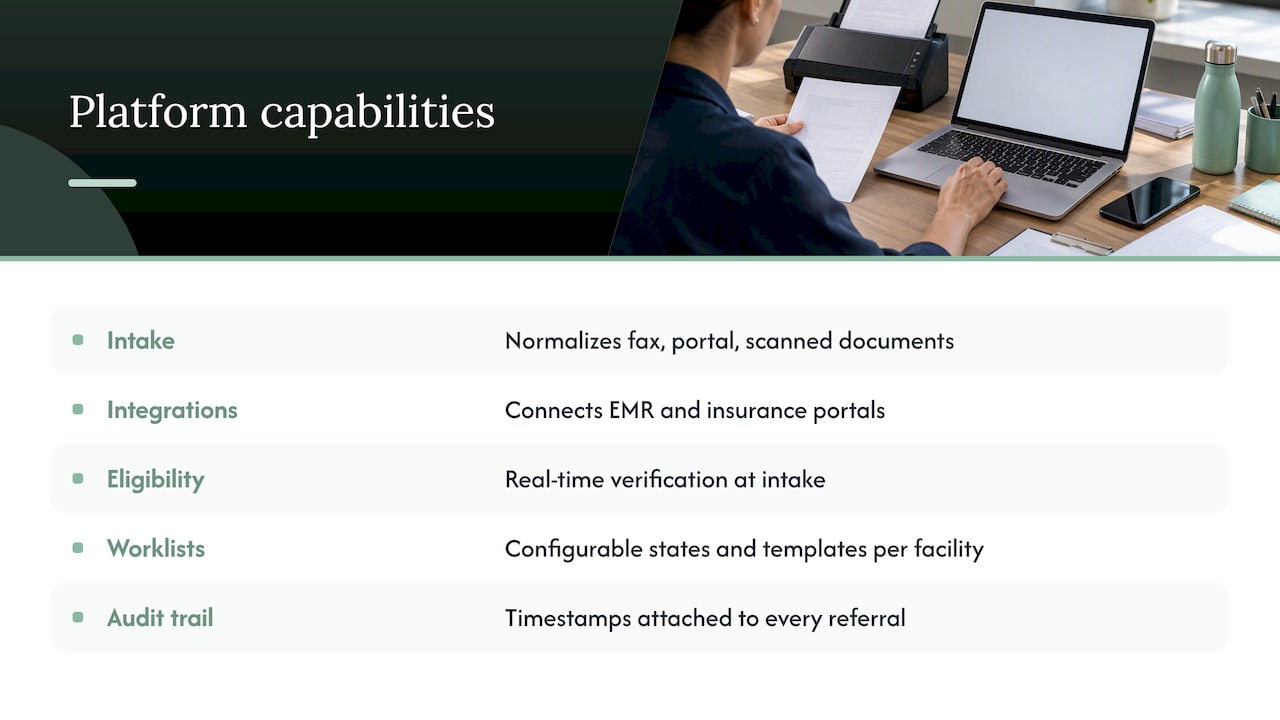
We built Smart Admissions around the exact workflow this guide describes. Our platform automates intake normalization across fax, portal, and scanned documents, connects to existing EMR and insurance portal systems, and runs real-time eligibility verification at the point of intake rather than after admission. State dictionaries and worklist templates are configurable per facility, with timestamps and audit trails attached to every referral automatically.
Our positioning centers on three operational outcomes: shorter referral review times, improved bed occupancy through faster decisions, and reduced staff burnout from manual data entry. These are the goals we designed the platform to pursue for skilled nursing, rehabilitation, and post-acute care admissions teams specifically, not a general-purpose referral tool adapted after the fact.
What admissions leaders should prioritize first
If you fix one thing, fix intake standardization and early eligibility checks. Measure review time and closed-loop rate within the first month. Everything else, automation, integration, scale, builds on that foundation.
— Harry
How Smart Admissions can help you put this into practice
Every step in this guide, standardized intake, accountable worklists, EMR integration, and eligibility checks run early, maps directly to a platform designed to support skilled nursing, rehabilitation, and post-acute care admissions teams.
Our AI-powered assistant automates document capture and normalization, runs real-time eligibility verification at intake, and syncs with your existing EMR and insurance portals so your team spends less time on data entry and more time on decisions. Plans run $597 per month or $6,447 per year on our pricing page, with onboarding typically completed in under an hour. If you’re ready to see how this fits your facility’s referral volume, book a demo or check current pricing today.
FAQ
What is a paper referral?
A paper referral is a physical or faxed document containing a patient’s clinical question, identifiers, and supporting records, sent from one provider to another. It requires manual data entry or OCR scanning to become part of a trackable digital workflow.
What is the definition of referral management?
Referral management is the structured process of receiving, tracking, and routing referral documents from intake through scheduling and completion. It includes defining required data fields, assigning worklist ownership, and confirming the referral loop closes with a consultant report.
How long is a referral valid?
Referral validity periods vary by payer, specialty, and state regulation, so facilities should confirm the specific window with the referring provider or insurer rather than assume a standard timeframe. Checking eligibility and authorization status early in the intake process helps avoid acting on an expired referral.
How long does it usually take for a referral to be approved?
Approval timelines depend on the completeness of the referral documentation, the urgency flag assigned at intake, and how quickly eligibility can be verified. Referrals with complete documentation and automated eligibility checks typically move through review faster than those requiring follow-up for missing information.
Sources
- Use of an Electronic Referral System to Improve the Outpatient Primary Care–Specialty Care Interface | AHRQ
- ServiceRequest – FHIR R5 (HL7)
- CMS eCQM guidance (CMS50) – closing the referral loop