
Secure messaging for admissions means using HIPAA-compliant channels, ideally EHR-integrated Direct exchange or a vendor messaging tool covered by a signed BAA, and holding every exchange to three standards: authenticate the recipient, encrypt the transmission, and keep an auditable log. Get those three right, and most of the compliance burden around referrals and intake takes care of itself. The sections below walk through the channel options, the legal expectations behind them, and a step-by-step checklist your team can put to work today.
TL;DR:
- Direct secure email supports referrals across different EHRs, while connected EHR messaging suits routine volume; texting requires encryption, audit logs, device protections, and a signed BAA.
- Treatment referrals generally need no prior authorization, but staff must verify recipients and transmit securely; patient directed transfers to third party apps require risk disclosure.
- Verify encryption in transit and at rest, unique staff logins, multifactor authentication, and user linked logs; although storage encryption is an addressable safeguard, teams should require it.
- Build referral routines around minimum necessary forms, delivery confirmation, and scheduled log reviews; assign permissions by role and test a verified backup route for outages.
Table of Contents
- 1. Secure messaging options admissions teams encounter
- 2. Legal and compliance expectations for admissions messaging
- 3. Technical safeguards to verify in any messaging tool
- 4. A step-by-step checklist for sending secure referrals
- 5. How an admissions platform can reduce messaging risk
- 6. User roles and permissions built for admissions staff
- 7. Emergency communication protocols within secure messaging
- 8. Audit and compliance reporting for admissions processes
- 9. Cross-departmental communication best practices
- 10. Connecting secure messaging to your referral and admissions software
- Admissions leader perspective: why secure messaging pays off
- How Smart Admissions supports secure admissions messaging
- FAQ
- Sources
1. Secure messaging options admissions teams encounter
Admissions staff typically work with four types of secure channels, and each fits a different moment in the referral and intake process.
Direct secure email, built on the Direct standard, uses X.509 certificates and encrypted protocols to move clinical documents between verified healthcare endpoints. It suits referrals well because it gives both sender and recipient addressable identity assurance, something a regular email account cannot offer, and it works even when the sending facility and the receiving facility use different EHR platforms, according to ONC guidance on directed exchange.
EHR-integrated messaging, when both parties operate on connected or interoperable systems, usually delivers stronger workflow and audit integration for high-volume referral traffic than a stand-alone app, per the same ONC guidance. Secure texting or team-communication apps offer convenience for quick clinical questions, but they only qualify for PHI use when the vendor provides audit logging, encryption, and device-level protections, and when a business associate agreement is in place. Patient-directed portals and apps add a fourth layer: when a patient asks you to transmit their records to a personal app, your obligations shift, which we cover next.
- Direct secure email fits provider-to-provider referrals across different EHR systems.
- EHR-integrated messaging fits high-volume, routine intake traffic within connected networks.
- Secure texting apps fit quick internal coordination, only under a signed BAA.
- Patient portals fit transfers the patient initiates and directs themselves.
2. Legal and compliance expectations for admissions messaging
HIPAA permits covered entities to disclose protected health information to another provider for treatment purposes without prior patient authorization, which covers most referral and intake exchanges your team handles daily. That permission comes with a condition: the sender has to transmit the information securely and take reasonable steps to confirm it reaches the correct recipient, as laid out in HHS guidance on exchange for treatment. A separate HHS fact sheet extends similar latitude to certain health care operations, provided the disclosure meets minimum necessary standards.
A few operational rules follow directly from that guidance:
- Confirm any messaging vendor signs a business associate agreement before PHI moves through its system.
- Send only the minimum necessary data for the specific referral or operational task at hand.
- Document the reasonable steps taken to verify the recipient’s identity before transmission.
- When a patient directs you to send records to a third-party app, inform them of any risk the first time they make that request.
Risk analysis is foundational, not optional: OCR guidance on risk analysis identifies it as the starting point for selecting safeguards that protect electronic PHI, which means your messaging setup should trace back to a documented risk assessment, not a vendor’s marketing claims.
3. Technical safeguards to verify in any messaging tool
Before trusting a system with referral documents or intake forms, admissions leads should confirm the following technical safeguards are actually in place, not just promised in a sales deck.
- Encryption in transit and at rest: TLS, S/MIME, or the Direct protocol should protect messages while moving and while stored, per HHS technical safeguards guidance.
- Unique user identification and multi-factor authentication: every staff member needs their own login, never a shared credential, with a second verification factor for access.
- Automatic logoff and session timeout: unattended workstations in a busy admissions office should lock PHI out of view within minutes.
- Emergency access procedures: a documented way to reach patient data during a system outage or staffing gap, without bypassing identity verification permanently.
- Comprehensive audit logging: every send, open, attachment download, and edit should generate a timestamped record tied to a specific user.
- Certificate-based identity and network integration: Direct exchange and CEHRT-connected systems rely on X.509 certificates to confirm both parties are who they claim to be, as described in ONC’s Direct Project overview.
Pro Tip: Ask any vendor to show you a sample audit log entry before you sign, not just describe one. If they can’t produce it, treat that as a red flag.
Encryption at rest is sometimes listed as an addressable specification under the Security Rule rather than strictly required, but for admissions teams handling referral volume, treating it as mandatory removes the guesswork.
4. A step-by-step checklist for sending secure referrals
Once the technical pieces are confirmed, the daily work comes down to habit. This sequence keeps every referral and intake message compliant without requiring an IT background.
- Verify recipient identity first. Confirm the Direct address or EHR identity of the receiving provider before you send anything, matching the reasonable-steps standard in HHS treatment-exchange guidance.
- Apply minimum necessary templates. Use structured intake forms that capture only what the referral requires, rather than exporting an entire chart.
- Name and tag attachments clearly. Link each document to a patient identifier and referral number so nothing gets misfiled on the receiving end; our guide to secure electronic signatures covers the attachment-verification piece in more depth.
- Confirm delivery and log the event. Treat a delivery failure the same way you’d treat a fax that didn’t go through: escalate immediately, and document the resolution.
- Review audit logs on a set schedule. Weekly or monthly spot checks catch misdirected messages or access anomalies before they become a bigger problem.
Teams that build these five steps into their intake rhythm tend to spend less time troubleshooting after the fact. Our patient data security guide for admissions teams walks through the same checklist with facility-specific examples.
5. How an admissions platform can reduce messaging risk
Manual referral handling spreads PHI across email inboxes, fax machines, and personal phones, which multiplies the number of places a breach can happen. Platforms built specifically for admissions workflows fold several of the safeguards above directly into the referral process instead of leaving them to individual staff habits.
- The platform integrates with existing EMR and insurance portal systems, so referral data moves through a connected, auditable path rather than a patchwork of separate tools.
- An AI-powered referral management assistant supports real-time eligibility verification and clinical assessment review within the same workflow where documents are received.
- Documentation and audit trail features track referral activity, giving admissions teams a record to review rather than relying on memory.
- Because the system is structured with compliance in mind, the compliance burden shifts from ad hoc staff decisions to a supported, repeatable workflow.
That shift matters most for small admissions teams juggling high referral volume: fewer manual handoffs mean fewer points where a message can go to the wrong recipient or sit unlogged.
6. User roles and permissions built for admissions staff
Admissions teams rarely need the same access as clinical or billing staff, and a messaging or referral system should let you set permissions that reflect that difference. Role-based access control means an intake coordinator can view and act on incoming referrals without having visibility into unrelated clinical records, while an admissions director retains broader oversight to review team activity and resolve escalations.
Practical role setup usually separates a few tiers: front-line coordinators who send and receive referral messages, supervisors who approve exceptions and review flagged items, and administrators who manage user accounts and audit settings. Each tier should map to a specific set of permissions rather than a blanket “admin” or “staff” label, since overly broad access is one of the more common findings in a HIPAA risk analysis.
When staff turnover happens, which is frequent in admissions departments, permission changes need to happen the same day a role changes, not weeks later. A system that lets you deactivate a departing employee’s credentials immediately, while preserving their past audit trail for compliance review, closes a gap that manual processes often leave open. Reviewing role assignments on a quarterly basis, alongside your broader audit log review, keeps access aligned with who actually needs it.
7. Emergency communication protocols within secure messaging
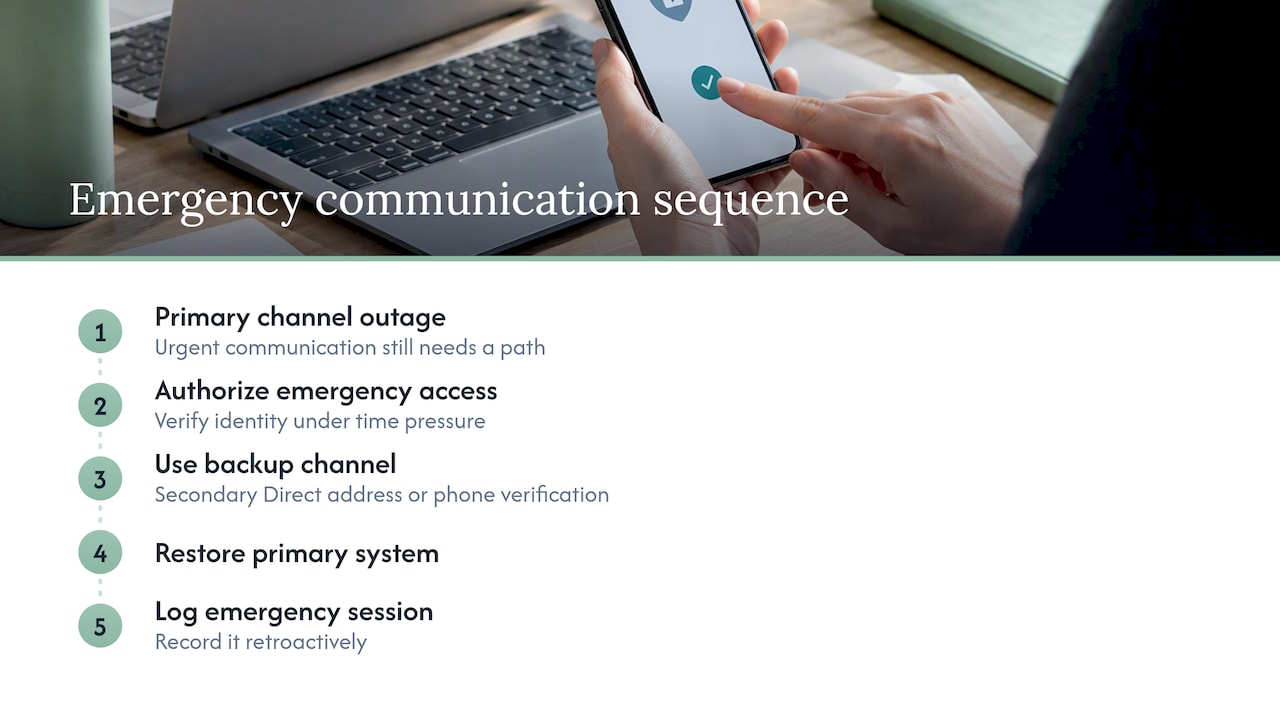
Admissions work doesn’t pause for a system outage, so every secure messaging setup needs a documented path for urgent communication when the primary channel fails. That path should specify who can authorize emergency access, how identity gets verified under time pressure, and how the emergency session gets logged once normal access resumes.
A workable emergency protocol usually includes a designated backup channel, such as a secondary Direct address or a documented phone verification process, paired with a requirement to log the incident retroactively once the primary system is restored. The goal is to avoid two failure modes at once: staff defaulting to unsecured text messages or personal email during a crisis, and emergency access becoming a permanent, unmonitored workaround.
Facilities handling time-sensitive transfers, such as a hospital discharge that needs same-day placement, benefit from testing their emergency protocol before it’s needed rather than discovering gaps during an actual outage. Building a short tabletop drill into annual workforce training, alongside the risk analysis work described in OCR’s risk analysis guidance, gives admissions staff a tested sequence to follow rather than improvising under pressure.
8. Audit and compliance reporting for admissions processes
An audit trail only helps if someone actually reviews it, and admissions departments benefit from reporting that’s scoped to their specific workflow rather than a generic system-wide log. That means filtering audit reports by referral status, sender and recipient identity, attachment access, and time to send, so a compliance review can spot a misdirected message or a stalled referral without wading through unrelated clinical activity.
A practical reporting cadence includes a weekly scan for delivery failures or unusual access patterns, a monthly summary for the admissions director covering referral volume and any flagged incidents, and a documented annual review that ties back to the facility’s broader risk analysis. Keeping these reports organized by referral episode, rather than by individual message, makes it far easier to answer the question an auditor or surveyor is most likely to ask: can you show the full chain of custody for this patient’s referral documents?
Retention matters too. Audit logs tied to PHI transmission should be kept long enough to support both HIPAA recordkeeping expectations and your facility’s own internal compliance policy, with the retention period documented in writing rather than left to informal practice.
9. Cross-departmental communication best practices
Admissions rarely works in isolation. A single referral touches nursing, billing, case management, and sometimes therapy or dietary services before a bed is filled, and secure messaging has to support that handoff without creating duplicate, unsecured copies of the same document.
The strongest practice is a single source of truth: one secure thread or record per referral that every relevant department can access according to their role, rather than admissions forwarding attachments separately to each team by whatever channel is fastest. That approach limits the minimum necessary data each department sees, since billing may only need insurance verification while nursing needs the clinical assessment.
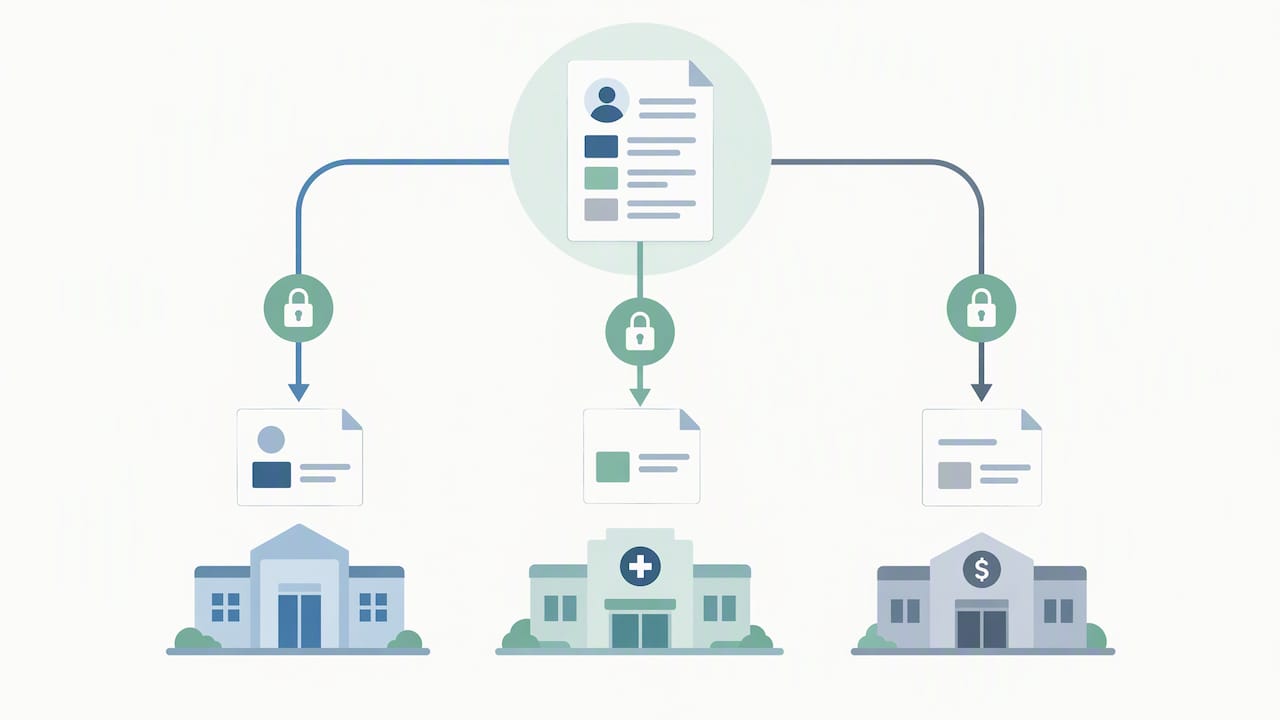
Setting shared expectations in writing also helps: which department initiates contact for a given referral stage, how quickly each team is expected to respond, and what counts as an escalation. Facilities that document this handoff sequence as part of their workforce training tend to see fewer duplicate requests and fewer PHI copies sitting in personal inboxes, which is exactly the kind of sprawl a risk analysis is meant to catch.
10. Connecting secure messaging to your referral and admissions software
Secure messaging works best when it isn’t a separate tool bolted onto your existing referral process, but a layer built into the software your team already uses to track intake. When messaging and referral management share the same system, a document attached to a referral carries its audit trail with it automatically, instead of living in a separate email thread that someone has to manually cross-reference later.
Integration with your EMR and insurance eligibility tools also cuts down on duplicate data entry, since the same patient identifiers and referral details that populate your intake record can carry through to the secure message without retyping. Our guide to integrating EMR with referrals walks through the setup steps in more detail.
For teams evaluating options outside a connected platform, resources like WellCheck’s overview of referral management software are worth reviewing to understand what closed-loop tracking and follow-up management look like in practice, particularly for community health and SDoH-focused programs. Whatever system you choose, the integration question to ask is simple: does a referral’s communication history stay attached to the referral itself, or does it live somewhere your team has to go hunting for it later?
Admissions leader perspective: why secure messaging pays off
Speed and privacy used to feel like a trade-off in admissions. We’ve found the opposite is usually true: a referral that moves through a verified, logged channel on the first try gets answered faster than one bounced between fax and phone calls while someone confirms it reached the right person. A small change, like requiring recipient verification before every send, tends to cut rework more than it slows anything down. Build the checklist into your routine, and the platform choice gets easier.
— Harry
How Smart Admissions supports secure admissions messaging
We built Smart Admissions around the referral workflow itself, not a generic messaging add-on. Our platform integrates with existing EMR and insurance portal systems, so referral documents move through a connected, auditable path with documentation and audit trail features built in, and our AI-powered referral assistant supports real-time eligibility checks alongside secure handling of incoming referral data.
- Review current Monthly and Annually pricing to see which plan fits your admissions volume.
- See how a connected referral workflow compares to manual handling in our guide to automated versus manual admissions.
Request a walkthrough of the platform and see how your team’s referral messaging could look with fewer manual handoffs.
FAQ
Which text app is untraceable?
No consumer texting app is truly untraceable, and admissions staff shouldn’t be looking for one. The right question is whether a messaging tool provides encryption, audit logs, and a signed business associate agreement, which standard consumer apps typically do not offer.
Is RCS texting HIPAA compliant?
Standard RCS texting is not designed to meet HIPAA’s technical safeguard requirements on its own, since it lacks the audit logging and BAA coverage covered entities need. Admissions teams should rely on Direct secure email, EHR-integrated messaging, or a vendor platform that explicitly signs a BAA, as described in HHS technical safeguards guidance.
What is safer, iMessage or SMS?
iMessage encrypts messages between Apple devices, while standard SMS does not encrypt content in transit, making iMessage the more secure option between two Apple users. Neither, however, meets HIPAA’s audit trail and BAA requirements for transmitting patient referral information in a healthcare setting.
What are the best texting apps for admissions teams?
The strongest option for admissions work is a secure messaging tool built into an EHR-integrated or referral management platform, since it combines encryption, audit logging, and a BAA in one system. Standalone secure texting apps can work too, but only when the vendor meets those same requirements under a signed agreement.
How do I secure admissions communication day to day?
Verify the recipient’s identity before sending, use only the minimum necessary data in each message, and confirm the channel encrypts transmissions and logs activity automatically. Pairing that routine with a documented risk analysis, as outlined in OCR’s risk analysis guidance, covers most of what a facility needs for compliant daily referral handling.
Sources
- Permitted uses and disclosures: exchange for treatment (HHS)
- Directed Exchange: Q&A for Providers (HealthIT/ONC)