
Duplicate chart prevention comes down to three habits: search before you create, verify with at least two identifiers, and monitor duplicate rates on a schedule. In admissions, a second chart for the same person usually starts at the moment of registration, when a referral arrives fast and someone has to decide quickly. This guide gives your admissions team seven steps to stop duplicates at the source, with a checklist you can adopt this month.
TL;DR
- Duplicate charts are mostly created at registration, through typos, missing identifiers, and rushed searches of the existing index.
- Search with at least three criteria before creating any new record, and confirm identity with at least two identifiers.
- Turn on similar-name alerts, run potential-duplicate reports on a set schedule, and never merge records without a review step.
- Train registration staff at orientation and again on a recurring basis, because turnover in these roles is high.
- Reading referrals from portals, fax, and email in one place makes the search-first habit easier to keep.
Table of Contents
- Why duplicate charts matter in post-acute admissions
- What causes duplicate charts at admission
- Step 1: Search before you create
- Step 2: Verify identity with at least two identifiers
- Step 3: Standardize how data is entered
- Step 4: Turn on system safeguards and alerts
- Step 5: Use temporary charts and a pre-creation check for unregistered referrals
- Step 6: Train staff and limit who can create records
- Step 7: Monitor duplicates and handle them safely
- A weekly duplicate chart prevention checklist
- Our perspective: prevention starts before the chart exists
- See how Smart Admissions fits your intake workflow
- FAQ
- Sources
Why duplicate charts matter in post-acute admissions
A duplicate chart is more than a tidy-up problem. The ONC SAFER Guide states that creating a duplicate (split) record or commingling two patient records is a serious patient safety risk. When a person has two records, information such as diagnoses, allergies, medications, and advance directives can end up in different places. AHIMA warns that this separation can inhibit a provider’s access to critical information and lead to improper care or additional testing.
The operational cost is just as real. The Indian Health Service notes that duplicate charts create inefficiencies for registration, billing, and reporting teams. A survey of Twin Cities healthcare organizations also found that duplicates can lead to unnecessary replication of lab orders and tests, which raises the cost of treatment.
Nursing homes have an extra reason to care. The Washington State Department of Social and Health Services explains that a duplicate resident is one real person who exists as two or more records in the MDS system. That means an admission mistake can follow the resident into assessments and reporting.
What causes duplicate charts at admission
Knowing the causes tells you where to put controls. The IHS lists these common causes:
- Inconsistent data entry at registration
- Typos or misspelled names
- Missing or incorrect dates of birth or Social Security numbers
- Re-registration because of inadequate patient look-up
- System access limitations or user permissions
The ONC adds that nonstandard registration practices and no access to a common database are frequent culprits. Speed is a driver too. AHIMA reports that a rushed or incomplete search of the master patient index can lead registrars to create a duplicate or select the wrong record.
A 2025 study in PMC found that 62% of duplicate records are created within the emergency department. Your admissions team sits downstream of that pressure. Hospitals send referrals quickly, expect answers quickly, and may spell a name differently than your own records do. Each referral is a chance for a mismatch.
Step 1: Search before you create
The most effective single rule is also the simplest: nobody creates a new record until a search has been done and documented.
AHIMA recommends performing at least three search criteria before creating a new person record and training registrars to use different techniques and combinations of identifiers. In practice, that can look like this:
- Search by last name and date of birth.
- Search by first name, last name, and a partial Social Security number or Medicare ID if you have one.
- Search by prior names, nicknames, or alternate spellings.
- Search by address or phone number as a last check.
If the search returns a plausible match, open it and compare before deciding. If it returns none, note the search criteria used. That note helps anyone who later investigates a suspected duplicate.
Step 2: Verify identity with at least two identifiers
The Joint Commission says acceptable identifiers include a name, assigned identification number, telephone number, date of birth, or another person-specific identifier. It also states that a room number is not a unique identifier. Use two identifiers consistently within each setting.
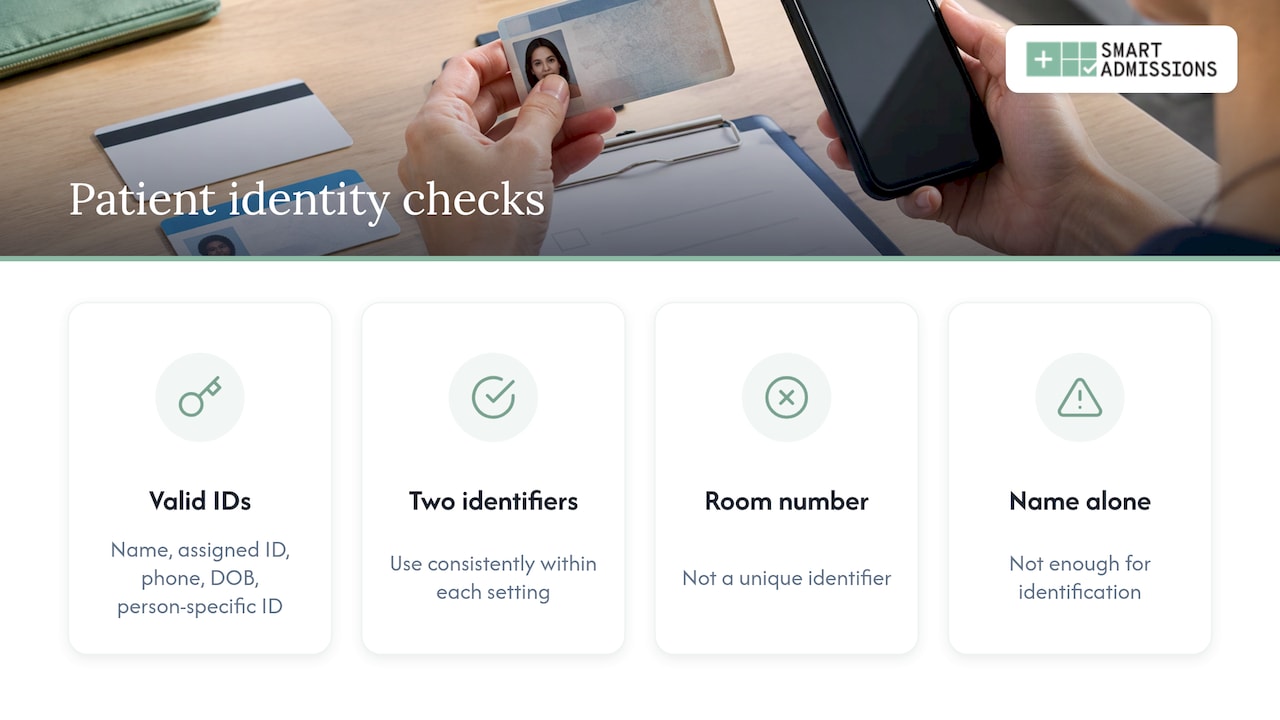
Name alone is not enough. A study in BMJ Quality & Safety found that matching first and last names occurred in 16.49% to 40.66% of records across five healthcare organisations, and adding date of birth reduced that range to 0.16% to 15.47%. Date of birth helps a lot, yet it still leaves overlap, which is why a second and third check matters.
For referral packets, compare the identifiers on the hospital face sheet against what you hold. Where the two disagree, resolve the discrepancy with the referring hospital before you create or update a record.
Step 3: Standardize how data is entered
Typos and inconsistent formats create most avoidable duplicates. The Joint Commission’s Quick Safety Issue 45 recommends a standardized process for capturing patient information wherever registration occurs, using standard conventions from NIST for names, name modifiers, and dates.
A short data-entry standard for your team might cover:
- Legal name as it appears on an ID or birth certificate, with nicknames in a separate field
- One format for suffixes such as Jr. and III
- One date format, with the month spelled out in three or four letters
- A rule for hyphenated and two-part surnames
AHIMA also suggests scripted questions for registrars, such as whether the person has received care from the facility before, goes by a nickname, or how they spell their first, middle, and last names. Scripts make the search consistent from one shift to the next.
Step 4: Turn on system safeguards and alerts
Human care is necessary, and system support makes it easier. The ONC SAFER Guide recommends a phonetic algorithm such as Soundex to alert users to possible matches, along with warnings when a user tries to create a record for someone whose name matches or resembles another patient’s.
The MedPro Group checklist adds that the EHR should monitor for records with similar demographic data but name variations and alert users who try to create a record that resembles an existing one. It also recommends safeguards that keep staff from having multiple patient records open at once.
The same guidance supports a central source of truth. The ONC recommends an enterprise-wide master patient index so staff can identify patients before importing data. For multi-facility groups, that means one shared index rather than separate lists at each building. Our guides on how to centralize patient records and how to organize patient files walk through the setup.
Step 5: Use temporary charts and a pre-creation check for unregistered referrals
Not every referral becomes an admission. If you create full records for every inquiry, you multiply the chances for duplicates when the same person is referred again by a different hospital or a different department.
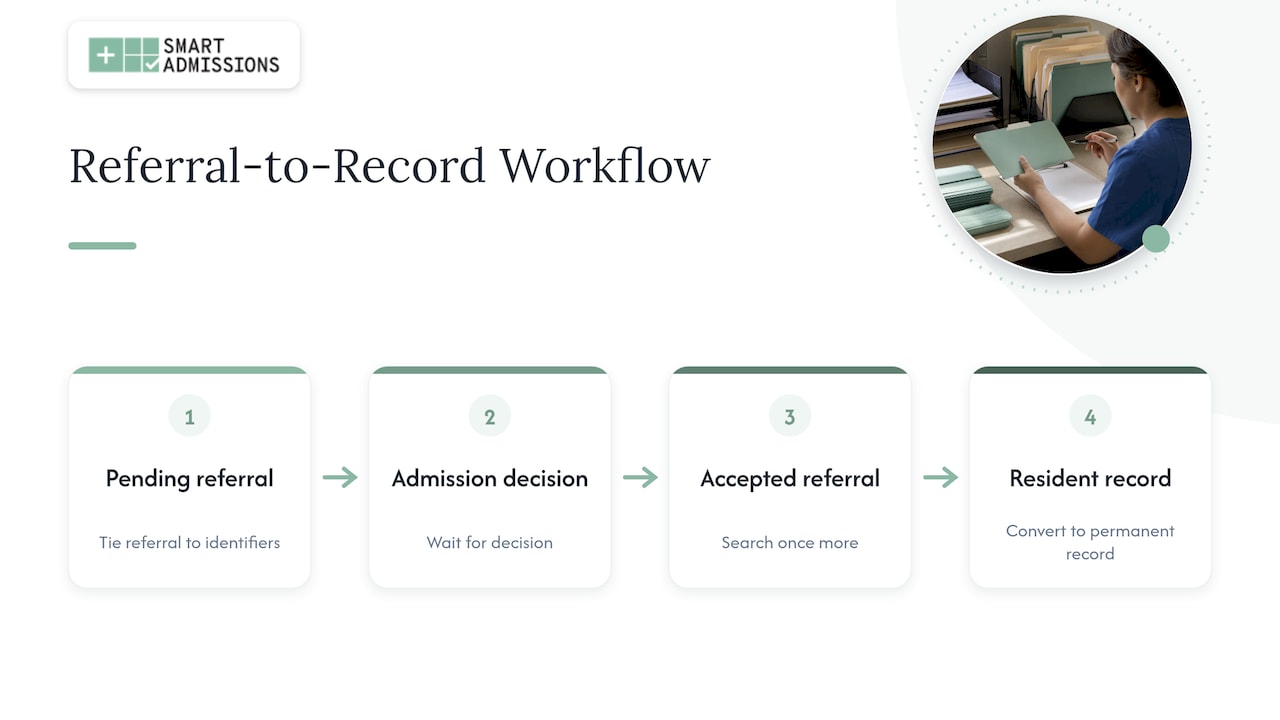
The IHS best practice page notes that temporary charts may be used when a new patient is scheduled but not yet registered, and that staff should communicate with HIM before assigning a new record number. A similar principle works for post-acute referrals: keep the referral in a pending state, tied to identifiers, until the admission decision is made. When the person is accepted, convert the pending item into the permanent resident record after one more search.
This is also where an interoperable workflow pays off. When accepted referrals flow into your EHR without retyping, there are fewer places for a name to be misspelled. See our overview of interoperability in healthcare admissions and our patient records workflow for the details.
Step 6: Train staff and limit who can create records
Training is where many prevention programs fall short. AHIMA cites an ONC report that the average length of employment for registrars is approximately four months, and that these entry-level staff often get little training after their first introduction. AHIMA’s authors argue for an ongoing education plan, not orientation alone.
A practical training plan includes:
- A search-before-create walkthrough on day one, using real examples with names removed
- A quarterly refresher that shares the duplicates found since the last session
- A feedback loop from HIM or medical records to admissions, since AHIMA notes that what HIM learns about registration errors may never reach the registration department
Permissions matter too. Only staff who have completed training should be able to create new resident records, and everyone else should be able to search and request. Role-based permissions are part of broader access control and data protection planning for a care facility. For your own admissions environment, our patient data security guide covers the safeguards that sit around the chart.
Step 7: Monitor duplicates and handle them safely
Prevention is not finished at registration. The ONC SAFER Guide recommends that the EHR can run a report listing potential duplicate records and that the organization tracks its own duplicate error rate. The Joint Commission likewise recommends regular inspection for patient identification errors and potential duplicate records.
The IHS suggests running its Scan and Potential Duplicate Patient reports weekly. The Twin Cities survey recommends daily reports, a committee to track duplicates, and continuing training. It also stresses keeping the number from ever increasing, since sudden jumps could signal a larger problem.
For a benchmark, the ONC Patient Identification and Matching Final Report states that an error rate below eight percent is the industry-recognized standard. AHIMA’s whitepaper title sets a more ambitious 1% target. Pick a target, measure monthly, and report it to your administrator.
When you find a suspected duplicate
Do not merge on a hunch. The IHS process is a good model:
- Flag both records for review.
- Have HIM determine which record is primary and manage the merge.
- Make sure lab, pharmacy, and other clinical information transfers correctly.
- Reassign appointments or pending items from the duplicate to the primary record.
Merge direction matters. PointClickCare’s support page describes a common problem where the good record and the duplicate are merged in the wrong order, and says the bad record should be merged into the good one. Confirm the correct direction with your EHR support team before you act.
Also know the difference between related errors. AHIMA defines a duplicate as two or more record numbers for the same person, an overlay as when the wrong patient is registered or documented on another patient’s record, and an overlap as more than one identifier for the same person across facilities. Overlays are the dangerous ones, so treat them as clinical events, not clerical ones.
A weekly duplicate chart prevention checklist
Use this list as a standing agenda for your admissions and HIM leads:
- Review the potential duplicate report and clear every item.
- Count new duplicates found, and note where they were created (portal, fax, email, phone).
- Check that every new record has a documented search.
- Spot-check five new records for format and identifier consistency.
- Share patterns with the registration staff involved.
- Confirm that new hires completed the search-before-create training.
- Log merges, including who approved them.
This takes less time than tracing a clinical or billing error back to its origin, and it gives your leadership a figure they can follow.
Our perspective: prevention starts before the chart exists
We built Smart Admissions with people who have run admissions, MDS, and reimbursement. What we saw again and again is that duplicate charts do not start in the EHR. They start in the inbox, the fax queue, and the hospital portal, where the same person arrives under slightly different names and details.
That is why our platform reads every referral, whether it comes through a portal, fax, or email, and puts it in one place before anyone creates a record. When your team sees all referral activity together, it is much easier to notice that today’s referral is last month’s inquiry, and to decide with confidence.
We designed the platform to be EHR-independent and integrated with PointClickCare, so accepted referrals move into your existing workflow without duplicate entry. Less retyping means fewer chances for a typo to become a second chart. Leadership also gets visibility into referral sources, response times, and acceptance rates, which gives your team a clear view of where the process needs attention.
Our view is simple: speed alone is not the goal. A fast yes or a defensible no only helps if it is attached to the right person and the right record.
Harry
See how Smart Admissions fits your intake workflow
If your team is retyping referral details from faxes and portals, a single review point can cut down the handoffs where duplicate charts appear. Smart Admissions is available as a monthly plan at $597 per month or an annual plan at $6,447 per year. You can also start with a free trial or see how the platform works step by step. For a broader view of your front-end process, read our step-by-step intake process.
FAQ
What is the fastest way to reduce duplicate charts?
Require a documented search before any new record is created, using at least three search criteria. Pair it with two-identifier verification and a weekly duplicate report. These three habits address the most common causes: rushed look-ups, typos, and missing identifiers.
What is a good duplicate record rate?
The ONC’s final report on patient identification and matching calls an error rate under eight percent the industry-recognized standard. Many organizations aim lower, and AHIMA’s whitepaper discusses a 1% target. Track your own rate monthly so you can see whether it is going up or down.
Should we merge duplicate charts right away?
No. Flag both records, let HIM determine which one is primary, and confirm that clinical information transfers correctly. Check the merge direction with your EHR support team first, because a merge in the wrong order can create new problems.
Does the same approach work for duplicate resident records in the MDS?
Yes, the principle is the same. Use care when setting up a new resident file, and review roster reports for residents who appear more than once. Your state agency may have specific guidance on MDS duplicate residents, so check with it.
Sources
- Best Practice on Avoiding Duplicate Charts, Indian Health Service
- Patient Identification, ONC SAFER Guide
- Patient Identification and Matching Final Report, ONC
- Organizational Factors Contributing to Duplicate Records, PMC
- Duplicate Medical Records: A Survey of Twin Cities Healthcare Organizations, PMC
- Exposing Double Identity at Patient Registration, AHIMA
- Best Practices for Patient Matching at Patient Registration, AHIMA
- A Realistic Approach to Achieving a 1% Duplicate Record Error Rate, AHIMA
- Two Patient Identifiers, The Joint Commission
- Quick Safety Issue 45, The Joint Commission
- BMJ Quality & Safety study on matching patient identifiers
- Improving Patient Identification and Matching in Electronic Health Records, MedPro Group
- Preventing MDS Duplicate Residents, Washington State DSHS
- Customer Support FAQs, PointClickCare