
TL;DR:
- Insurance portals are payer-hosted systems that verify patient coverage and process transactions using HIPAA-mandated EDI formats. Their fragmented design and varying login procedures increase staff workload and errors, but emerging FHIR APIs promise streamlined, automated workflows. Building standardized procedures and adopting API-based integrations will enhance verification accuracy, efficiency, and compliance in healthcare admissions.
If your admissions team has ever lost an hour chasing eligibility across three different payer websites, you already understand why explaining insurance portals clearly matters. Insurance portals are web-based systems that payers provide so healthcare providers can verify patient coverage, submit prior authorizations, and check claim status. For skilled nursing facilities and post-acute care providers, these portals are a daily operational reality. Yet most staff receive little formal training on how they actually work, what standards govern them, or why they behave so differently from one payer to the next. This article changes that.
Table of Contents
- Key Takeaways
- Explaining insurance portals: definitions and standards
- Why every payer portal feels different
- The shift toward FHIR APIs and interoperability
- Best practices for using insurance portals effectively
- Manual portal navigation vs. automated integration
- My take on where portal complexity really comes from
- How Smartadmissions supports your portal workflows
- FAQ
Key Takeaways
| Point | Details |
|---|---|
| HIPAA 270/271 standards govern portals | Eligibility transactions follow mandatory EDI formats with strict response timing requirements from CAQH CORE. |
| Portal fragmentation slows your team | Each payer portal has unique login requirements, UI layouts, and session rules that create workflow inconsistency. |
| Dual verification reduces denials | Running batch checks days before admission and real-time checks at intake captures coverage changes that a single check misses. |
| FHIR APIs are replacing portal-only access | CMS-0057-F mandates standardized APIs that will reduce dependence on manual portal navigation over time. |
| Automation outperforms manual navigation | Web agents and API integrations improve throughput, reduce human error, and scale better than manual portal workflows. |
Explaining insurance portals: definitions and standards
At the technical level, an insurance portal is the user-facing access point to a payer’s eligibility and benefits data. Staff log in, enter patient identifiers, and retrieve coverage information. But what most training programs skip is the structured transaction layer running underneath that interface.
HIPAA requires covered entities to use the ASC X12 EDI 270/271 format for electronic eligibility verification. The 270 is the inquiry your system sends. The 271 is the response your system receives. Every portal that handles eligibility is processing these transactions in the background, whether your staff sees the raw data or not.
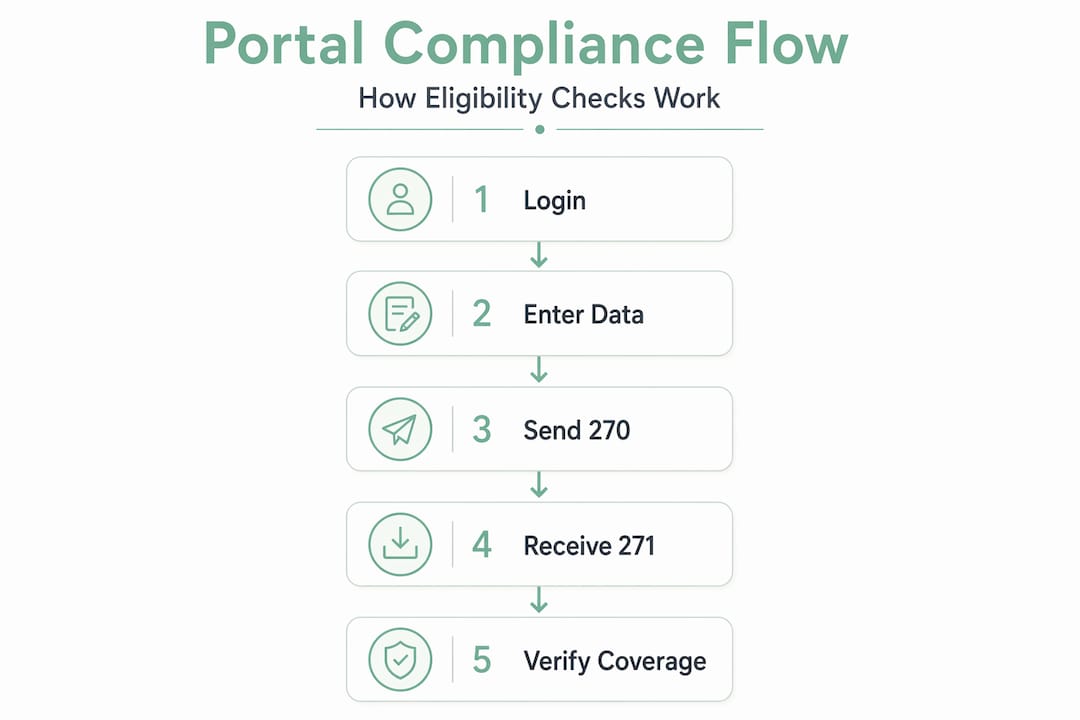
The CAQH CORE operating rules add specific performance requirements on top of HIPAA. Real-time 270/271 transactions must respond in under 20 seconds. Batch transactions, used for processing large volumes overnight, must return results by the next business day. These are not suggestions. They are enforceable operating standards.
Key portal features your team interacts with daily include:
- Eligibility inquiry forms: Entry fields for patient name, date of birth, member ID, and NPI
- Benefit summary screens: Displays of active coverage, copay amounts, deductible status, and visit limits
- Prior authorization submission: Structured forms for requesting approval on planned services
- Claim status tracking: Real-time or near-real-time updates on submitted claims
- Secure messaging: HIPAA-compliant communication with payer representatives
Security is non-negotiable throughout every interaction. HIPAA compliance requirements include encryption in transit, multi-factor authentication, least-privilege access controls, and ongoing audit logging. Every staff member with portal access is handling protected health information and must treat it accordingly.
Pro Tip: Document your facility’s authorized portal users by payer and review the list quarterly. Staff turnover creates orphaned accounts that represent both a security risk and a HIPAA compliance exposure.
Why every payer portal feels different
If your staff struggles when switching between payer portals, they are not doing anything wrong. The fragmentation is structural. Payer portals differ significantly in their login methods, session timeout rules, user interface layouts, and where they display eligibility status. What lives on tab two in one portal may require a sub-menu navigation in another.
Common friction points your team likely recognizes:
- Multi-factor authentication (MFA): Some portals use TOTP apps. Others send SMS codes. A few still rely on security questions. Each requires a different login sequence.
- Session timeouts: Portals often expire sessions after 10 to 15 minutes of inactivity. Staff who work through a patient list may find themselves re-authenticating repeatedly.
- Prior authorization tracking: Inpatient prior auth workflows require recording tracking numbers and rechecking status two to four weeks after initial submission. Each portal stores this information differently.
- Account creation barriers: Some payers, like TRICARE, require portal account creation before staff can access digital benefit documents such as Explanations of Benefits.
The practical impact on your admissions team is significant. Staff who navigate five or more portals daily carry a higher cognitive load, make more data-entry errors, and take longer to complete verification tasks than staff who work within a standardized workflow. For understanding insurance websites across multiple payers, the best protection is a facility-level standard operating procedure that anchors verification to objective identifiers. Always confirm patient name spelling, date of birth, and member ID before recording any benefit information. When status results are ambiguous, call the payer and document the confirmation with a representative name and timestamp.
Pro Tip: Build a one-page payer portal reference sheet for your team listing each portal’s URL, MFA method, session timeout threshold, and where prior auth tracking numbers are stored. Update it every quarter.

The shift toward FHIR APIs and interoperability
The insurance portal you use today is not the final form this technology will take. The CMS-0057-F interoperability rule mandates that payers implement standardized FHIR-based APIs covering prior authorization, provider data access, and patient data portability. This is a fundamental shift in how eligibility and authorization data flows.
FHIR stands for Fast Healthcare Interoperability Resources. Unlike traditional portal navigation, FHIR APIs allow your EHR or admissions software to query payer data directly, without a staff member logging into a web browser. The result is faster responses, fewer manual steps, and data that arrives in a structured format your systems can read immediately.
The operational implications for your facility include:
- Reduced portal fragmentation: API-enabled workflows allow a single integration point to reach multiple payers rather than requiring separate portal logins
- Standardized data formats: FHIR responses follow consistent structures, reducing the parsing errors common in screen-scraped portal data
- Provider Access Connectivity Hubs: These centralized access points aggregate payer connections, giving providers one place to route eligibility and authorization requests
- Process redesign requirements: Adopting API workflows means updating identity management, routing logic, and monitoring infrastructure
For post-acute providers managing healthcare admissions interoperability, staying current on CMS-0057-F timelines is worth prioritizing now. Facilities that build awareness of FHIR-based workflows today will transition with less disruption as payer compliance deadlines approach.
Best practices for using insurance portals effectively
Knowing how portals work is only half the equation. The other half is building workflows that get the most accurate data with the least staff effort.
-
Run batch eligibility checks 3 to 5 days before admission. Batch processing allows your team to identify coverage gaps, plan changes, or inactive policies before the patient arrives. Batch eligibility detects plan changes that would otherwise surface as a denial after discharge.
-
Run a real-time check at the point of check-in. Insurance coverage can change between your batch run and the admission date. A same-day real-time 270 inquiry confirms that what your batch returned is still accurate.
-
Read the 271 EB segments carefully. The EB segments in a 271 response carry the detailed benefit data your facility needs: active or inactive coverage status, copay amounts, deductible balances, and visit limits. Financial details in the 271 must be parsed carefully. One of the most common errors is reading an EB01=6 segment, which indicates inactive coverage, as if it were active.
-
Document what you verify and how you verified it. Record the portal name, date and time of the inquiry, response received, and the staff member who performed the check. This documentation supports appeals if a claim is denied later.
-
Watch for payer-specific enhancements. Payers are actively improving their transaction capabilities. Cigna’s 2026 enhancements to 270/271 transactions now support all 181 CAQH CORE service type codes and return remaining visit and unit counts, giving providers more detailed benefit data than was available previously.
-
Prioritize automation for high-volume payers. If your facility verifies eligibility for the same five payers every day, those are strong candidates for automated eligibility verification that reduces manual portal time while increasing accuracy.
Pro Tip: When a 271 returns a status you do not expect, such as active coverage for a patient who reported losing insurance, call the payer to confirm before admitting. Document the call. A portal response is not always the final word.
Manual portal navigation vs. automated integration
Understanding the gap between manual and automated workflows helps your team make the case for technology investment and set realistic expectations for what each approach delivers.
| Factor | Manual portal navigation | Automated integration |
|---|---|---|
| Speed per verification | 3 to 10 minutes per patient | Seconds per patient |
| Scalability | Limited by staff hours | Scales with volume automatically |
| Error rate | Higher due to manual data entry | Lower with structured data parsing |
| Response to UI changes | Staff adapts manually | Requires automation update |
| Prior auth tracking | Manual tracking and follow-up | Automated status monitoring |
| Cost per verification | Higher labor cost | Lower unit cost at volume |
Web agents simulate browser-based navigation using authorized credentials to extract eligibility data from payer portals without staff intervention. They are a practical option when a payer does not yet support direct API access. The tradeoff is that web agents require maintenance when portals update their interfaces.
API integrations are the more durable solution. When a payer supports direct EDI or FHIR-based API connectivity, your admissions software can query eligibility data in the background during the referral review process. Staff receive structured benefit data without touching a portal at all.
A few considerations when evaluating automation options:
- Confirm which of your top payers support API connectivity and which require web agent solutions
- Prioritize automation for payers with the highest monthly verification volume
- Build exception workflows for cases where automation returns incomplete or ambiguous results
The goal of post-acute admissions automation is not to eliminate staff judgment. It is to remove the repetitive, low-value steps so your team can focus on cases that genuinely need clinical and administrative expertise.
My take on where portal complexity really comes from
I’ve watched admissions teams spend enormous energy on portal management without ever addressing the root cause of their frustration. The complexity is not accidental. Each payer built its portal independently, optimizing for its own administrative processes rather than for provider usability. That history explains everything: the inconsistent UIs, the different MFA methods, the session timeouts that never seem timed for how your staff actually works.
What I’ve found is that the facilities with the least portal-related chaos are not the ones with the most technical staff. They are the ones with the clearest documented procedures. When every staff member follows the same verification sequence and records results in the same format, the portal differences become manageable.
I’m also honest about automation. Web agents are useful, but they are not set-and-forget. Payer portal updates break automation regularly. The facilities that do best with automation are the ones that monitor performance consistently and have a process for flagging failures quickly. API-based integrations are more stable, and as CMS-0057-F timelines advance, more payers will offer them.
My strongest advice: do not wait for the technology to mature before improving your processes. The habits your team builds around manual verification today are the same habits that will determine whether automation succeeds tomorrow.
— Harry
How Smartadmissions supports your portal workflows
If explaining insurance portals to your team is only the beginning, the next step is building systems that handle them more efficiently at scale.
Smartadmissions integrates directly with insurance portals and EHR systems to automate real-time eligibility verification during the referral review process. Your admissions staff receives structured benefit data without manually logging into each payer portal, reducing verification time and decreasing claim denials before they start. For facilities ready to move beyond manual workflows, exploring top referral management tools and reviewing examples of referral management systems can help you identify where automation delivers the greatest operational impact for your team.
FAQ
What is an insurance portal in healthcare?
An insurance portal is a payer-hosted web platform where healthcare providers verify patient eligibility, submit prior authorizations, and check claim status. These portals process eligibility data using HIPAA-mandated ASC X12 270/271 EDI transactions in the background.
Why do different payer portals have different login requirements?
Each payer built its portal independently, resulting in variations in multi-factor authentication methods, session timeout settings, and user interface layouts. These differences are structural and require facilities to maintain payer-specific navigation procedures.
What is insurance portal integration?
Insurance portal integration connects your admissions or EHR software directly to payer eligibility systems via EDI or FHIR-based APIs, allowing eligibility data to be retrieved automatically without staff manually logging into individual portals.
How often should eligibility verification be performed?
Best practice is to run a batch eligibility check three to five days before admission to catch coverage changes early, then perform a real-time verification at the point of check-in to confirm current coverage status on the day of admission.
What does the CMS-0057-F rule mean for insurance portals?
CMS-0057-F requires payers to implement standardized FHIR APIs for prior authorization and data access, which will progressively reduce reliance on manual portal navigation and support more automated, interoperable eligibility workflows across healthcare providers.