
Referral auto-accept rules are the criteria your intake system uses to admit a patient referral without manual review, based on documented evidence that the packet is complete, the payer will cover the stay, and the facility can actually deliver the care. Auto-accept is appropriate only when three non-negotiables hold: clear clinical and financial evidence, a full audit trail, and a working override path for a human to step in when something doesn’t fit.
TL;DR:
- Auto-accept rules must verify comprehensive clinical details, proper authorization, and exact bed and staffing availability for the specific admission date.
- Referral packets need to confirm key data points like diagnosis, supplies, and patient needs, not just mention relevant keywords or vague descriptors.
- All decisions require detailed records including the rule version, extraction source, reason code, override details, and actual admission outcomes for compliance and review.
- Data integrations with EMR, payer systems, and staffing directories must operate in parallel and in real time to ensure accurate, fast decisions.
- Begin automation with limited diagnoses or referral sources, measure false accept rates, and expand gradually to prevent increasing liability or clinical risk.
Table of Contents
- What Should Your Auto-Accept Checklist Verify?
- How Do You Build Rules That Won’t Backfire?
- What Compliance Records Does Every Auto-Accept Decision Need?
- Which Integrations Actually Make Auto-Accept Work?
- How Do You Govern Rules Once They’re Live?
- What Should Admissions Leaders Accept as the Real Trade-Off?
- How Smart Admissions Handles Auto-Accept Rules for You
- Where to Verify the Rules Behind Your Auto-Accept Logic
- Sources
- FAQ
What Should Your Auto-Accept Checklist Verify?
Before any rule fires, your system needs to pull specific data points and confirm they meet threshold, not just detect that they exist. A referral packet mentioning “wound care” isn’t the same as a packet confirming a Stage 3 wound with a documented dressing-change order and available supplies. Speed only helps if the underlying extraction is accurate.
Run these checks in every rule set:
- Clinical fit: primary diagnosis, documented daily skilled need, signed physician order, medication complexity, oxygen or ventilator requirements, wound/IV/line status, isolation or infectious status, and behavioral risk flags.
- Financial fit: payer type, current authorization status, Medicare 3-day qualifying stay indicator (or a documented waiver), and Medicare Advantage plan caveats that may override standard rules.
- Operational fit: bed type match, staffing and skill coverage on the proposed admission date, and equipment availability.
Sort every referral into one of three buckets. Automatic accept requires a complete packet, confirmed authorization or clear Medicare eligibility, and confirmed bed/staff/equipment match for that exact date. Pending covers referrals missing one or two verifiable items, like a pending authorization or an unclear qualifying stay, where a quick follow-up can resolve it. Decline applies when a hard mismatch exists, such as a skilled need your facility cannot safely staff for. Automated intake should always produce these three states rather than force a binary yes or no, since a pending state lets your team request the missing document instead of losing the referral outright.
Pro Tip: Build your rules to flag “insufficient data” separately from “fails criteria.” A missing document and a genuine clinical mismatch need different follow-up, and lumping them together in the same decline bucket buries the ones you could still win.
How Do You Build Rules That Won’t Backfire?
Treat each rule as a set of atomic checks, individual boolean or extracted fields, combined into rule groups with a defined precedence order. A well-built rule group evaluates clinical fields first, then financial fields, then operational fields, and stops at the first hard fail rather than continuing to process a referral that’s already disqualified. This keeps your logic auditable: anyone reviewing a decision later can trace exactly which check triggered it.
Three templates cover most skilled nursing scenarios:
- Low-risk auto-accept: full documentation packet, signed physician order, clearly documented daily skilled need, and active authorization on file. This is your tightest, safest rule and should carry the highest confidence threshold.
- Payer-conditional accept: same clinical bar, but authorization is pending verification. The rule auto-accepts contingent on a real-time eligibility check clearing within a defined window, and routes to pending if it doesn’t.
- Bed and staff conditional: clinical and financial checks pass, but the rule holds for confirmation that the specific room type and shift staffing match the patient’s needs on the actual admission date, not just “generally available” capacity.
Avoid three anti-patterns that quietly erode safety. First, never auto-accept based on a diagnosis keyword alone. A “CHF” flag means nothing without current vitals, oxygen needs, and functional status attached to it. Second, don’t build rules that ignore pending authorizations just because the clinical picture looks clean; an unresolved authorization is a financial exposure regardless of how straightforward the diagnosis reads. Third, never let a rule auto-accept without checking staffing and equipment on the specific admission date. A facility that’s fully staffed today can be short two RNs on the day a referral is scheduled to arrive.
Pro Tip: Give every rule a version number and an effective date. When a denial comes back three weeks later, you need to know exactly which rule logic was live the day that referral was accepted.
What Compliance Records Does Every Auto-Accept Decision Need?
Medicare’s SNF three-day rule requires a qualifying inpatient hospital stay of three consecutive days, not counting the discharge day, before Part A will cover a skilled nursing admission, unless an approved waiver applies. Your rules must verify and document that qualifying stay, or the specific waiver that excuses it, for every Medicare referral before auto-accept fires. The Medicare Benefit Policy Manual spells out the underlying level-of-care criteria, skilled services, daily need, and medical necessity, that your extraction logic should be checking against, not just the presence of a hospital discharge summary.
Every automated decision needs a record that includes:
- The rule version that made the call and its effective date
- The extraction source document, page, and timestamp it pulled from
- A reason code explaining the result (accept, pending, decline)
- Any reviewer override, with the reason attached
- The downstream admission outcome, so you can check the decision against what actually happened
The HHS minimum-necessary standard requires you to limit PHI access to what each role actually needs to do its job. That means your admissions coordinators, clinical reviewers, and billing staff likely need different access tiers within the same rule engine, and your business associate agreements should reflect exactly what your automation vendor can see and store.
Which Integrations Actually Make Auto-Accept Work?
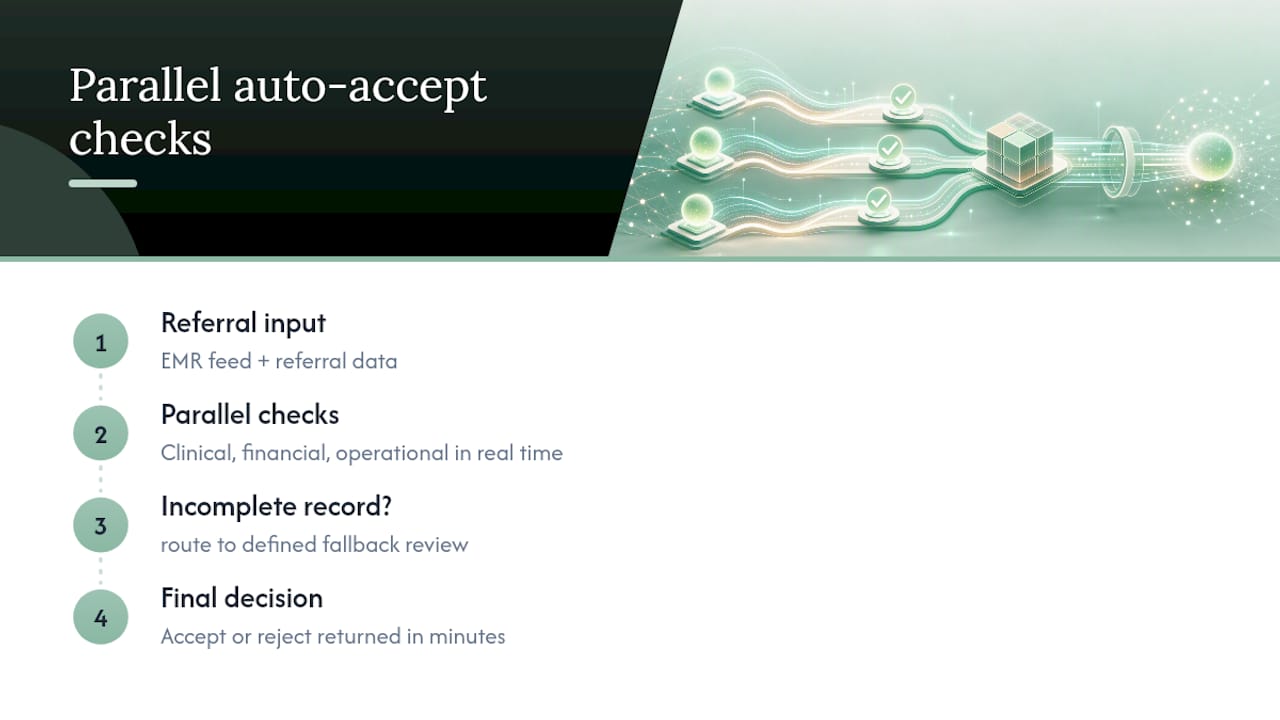
Rules are only as good as the data feeding them, and that means three systems have to talk to each other in something close to real time. Your EMR feed needs to reliably surface physician orders, MDS assessments, recent vitals, and the active problem list, and your logic needs a defined fallback when a record arrives incomplete rather than silently treating a blank field as a pass.
Payer and insurance integration handles the financial side: real-time eligibility checks, authorization status, and flags for Medicare Advantage plan rules or three-day waiver paths that don’t follow standard Medicare logic. Bed inventory and staffing feeds close the loop by matching required skills and equipment to scheduled staff and room type for the actual admission date, not a general capacity snapshot from that morning.
The strongest architecture runs these three check types, clinical, financial, and operational, in parallel rather than one after another. Sequential checks add unnecessary handoffs and delay, while parallel processing gets you a decision in minutes and keeps outcomes consistent across referrals. That speed matters most when a hospital case manager is holding three competing offers and the first clear “yes” often wins the placement.
How Do You Govern Rules Once They’re Live?
Even a mature rule set needs a controlled override path. Name a specific approver for each override category, require documented evidence for the exception, and attach a reason code so the decision is traceable months later. Schedule an outcome review on every override, not just the ones that go wrong, so you’re learning from the exceptions that worked too.
Track these KPIs monthly:
- Auto-accept rate as a share of total referrals processed
- Percentage of auto-accepts that later trigger a claims denial
- Average time-to-decision from referral receipt to accept or decline
- Top reasons referrals are lost after a pending or decline decision
| Governance element | What to capture | Why it matters |
|---|---|---|
| Rule version | Version number, effective date | Traces which logic made each decision |
| Override record | Approver name, reason code, evidence | Keeps exceptions accountable and reviewable |
| Outcome link | Admission result vs. original decision | Closes the loop for rule refinement |
Screening and admission processes vary widely across facilities largely because documentation transfer is inconsistent and hospital staff don’t always understand a given SNF’s actual capabilities. Facilities that formalize screening criteria and loop in clinical staff early see far fewer inconsistent decisions, which is exactly what a well-audited rule set is designed to produce.
What Should Admissions Leaders Accept as the Real Trade-Off?
Automation buys you speed, but speed without a narrow pilot is how false accepts pile up before anyone notices. Start with a single referral source or diagnosis category, measure outcomes for a defined window, and expand only once false-accept rates stay low. Automation should lighten the cognitive load on your coordinators, not quietly shift clinical or claims liability onto a rule nobody reviewed lately. Smart Admissions can support that pilot design, from integrations to the analytics that tell you whether it’s working.
— Harry
How Smart Admissions Handles Auto-Accept Rules for You
The platform connects AI extraction, EMR data, and payer eligibility checks into one configurable rule engine designed for admissions teams.
The platform extracts diagnoses, skilled needs, authorization status, and documentation gaps automatically, then routes each referral into accept, pending, or decline buckets with a full audit log behind every decision, including reviewer overrides and outcome tracking. Onboarding takes under an hour, support stays responsive when you need to adjust a rule fast, and the referral-to-bed workflow is built to shorten the time between referral receipt and a confirmed admission. Plans run $597 per month or $6,447 annually, with a guarantee that the software pays for itself within 30 days. Check current plan details and start a trial on the pricing page.
Where to Verify the Rules Behind Your Auto-Accept Logic
Cross-check your criteria against the CMS 3-day rule billing guidance, the Medicare Benefit Policy Manual, and HHS minimum-necessary guidance before finalizing any rule set.
Sources
- Medicare Benefit Policy Manual
- HHS — Minimum necessary FAQs (HIPAA)
- Variability in skilled nursing facility screening and admission processes: implications for value-based purchasing
FAQ
What Are Referral Auto-Accept Rules?
Referral auto-accept rules are the automated criteria an admissions system uses to accept a patient referral without manual review, based on verified clinical, financial, and operational data. They only work safely when paired with an audit trail and an override path for human review.
Does the Medicare 3-Day Rule Affect Auto-Accept Decisions?
Yes. Medicare Part A requires a qualifying 3-day inpatient hospital stay before SNF coverage applies, unless a specific waiver is in place, so your rules must verify and document that stay or the waiver before auto-accepting a Medicare referral.
How Do I Set Auto-Accept Rules Without Increasing Denial Risk?
Require complete documentation, confirmed authorization, and confirmed staffing and bed availability on the exact admission date before any rule fires automatically. Route anything missing one of those elements to a pending or human-review bucket instead of forcing an accept or decline.
How Much Does Smart Admissions Cost?
Smart Admissions is priced at $597 per month or $6,447 billed annually, with a guarantee that the platform pays for itself within 30 days. Full plan details are available on the pricing page.
How Do You Track Whether Auto-Accept Rules Are Working?
Track the auto-accept rate, the percentage of auto-accepts that later trigger claims denials, and average time-to-decision. Reviewing these monthly, alongside rule version history, lets you spot a rule that’s drifted before it causes a pattern of bad placements.