
A patient transfer workflow is the sequence of steps that moves a referral from first contact to an occupied bed, and the fastest path through it comes down to four things: a standardized first-pass review, parallel clinical and financial checks instead of sequential ones, a named owner with a clear SLA at every handoff, and automation for the repetitive parts of intake. Get those four right and everything else in this guide falls into place.
Admissions teams that still run referrals through one person at a time, checking clinical fit, then payer authorization, then bed availability, lose winnable placements to facilities that move faster. The Centers for Medicare & Medicaid Services (CMS) requires physician orders and a completed MDS assessment before a resident’s first day of care, and the Patient-Driven Payment Model (PDPM) hinges on capturing accurate clinical detail at admission. Platforms like Smart Admissions exist specifically to compress this workflow without cutting corners on either requirement.
The fastest version of this process shares four traits:
- Standardized first-pass review that flags diagnosis, payer type, skilled need, and red flags within minutes of receipt.
- Parallel review tracks so clinical, financial, and operational fit get checked at the same time, not one after another.
- A single named owner for each handoff, with a documented SLA attached to the transition.
- Automation for repetitive tasks like document extraction and eligibility checks, freeing staff to handle exceptions.
Key Takeaways
A faster patient transfer workflow depends on standardized first-pass review, parallel checks instead of sequential ones, and clear SLAs backed by automation for repetitive tasks.
| Point | Details |
|---|---|
| Standardize first-pass review | Extract diagnosis, payer, and skilled need quickly for every referral. |
| Run reviews in parallel | Launch clinical, financial, and operational checks simultaneously to cut hours off decisions. |
| Assign clear SLAs and owners | Attach a deadline and a named role to every handoff, including escalation triggers. |
| Pilot before full rollout | Test automation on one referral source for 60 to 90 days before scaling facility-wide. |
| Automate the repetitive layer | Platforms like Smart Admissions extract packet data and verify eligibility to speed bed fill rate. |
Table of Contents
- Why Fixing Your Patient Transfer Process Matters
- What Are the Steps in a Patient Transfer Workflow?
- What Technology Do You Need to Speed Up Transfers?
- Who Owns Each Step in the Handoff?
- What Causes the Most Delays, and How Do You Fix Them?
- How Do You Pilot This Workflow Without Disrupting Operations?
- Which KPIs Actually Prove the Workflow Is Working?
- What Does This Look Like in Practice?
- Put This Workflow on Autopilot With Smart Admissions
- Frequently Asked Questions
- Sources
Why Fixing Your Patient Transfer Process Matters
Every delay in your patient transfer process has a dollar figure attached, even when nobody calculates it. A referral that sits unreviewed for six hours often lands at the next facility on the hospital’s list, not because your facility was a worse fit, but because you answered too late. A referral accepted in a rush, without full documentation, becomes a rushed admission, and a rushed admission raises the odds of PDPM coding errors and MDS assessment gaps that surface during an audit.
Three KPIs absorb the damage first: time-to-placement, referral-to-admit conversion, and bed fill rate. When first-pass review is inconsistent, referral-to-admit conversion drops because good referrals get declined out of caution or lost to slower processing. When bed assignment lags behind clinical clearance, occupied-but-unbilled days pile up and bed fill rate stalls.
The clinical stakes run in parallel with the financial ones. CMS requires a physician’s order and a completed comprehensive assessment before care begins, and hospitals can face penalties for failing to hand off required documentation. Pre-admission best practices call for explicit nurse-to-nurse communication and a defined list of required fields, covering primary diagnosis, surgical history from the last 30 days, and MDS Section GG functional items, precisely because gaps in that handoff create both care risk and reimbursement risk at once.
What Are the Steps in a Patient Transfer Workflow?
A well-run patient transfer process steps through six stages, and the biggest time savings come from running steps three and four in parallel rather than end to end.
- Capture the referral. Intake receives the packet, often dozens to a high number of pages of mixed fax and EMR exports, and logs it in your system within minutes of arrival.
- Run the first-pass triage. Within a short time window, a coordinator or automated extraction tool confirms diagnosis, payer, skilled need, and any immediate red flags.
- Launch parallel reviews. Clinical review, financial and payer authorization checks, and operational fit assessment start simultaneously, typically wrapping within a few hours.
- Apply the decision gate. Each referral gets sorted into accept, decline, or pending, using documented facility rules rather than case-by-case judgment calls.
- Assign or hold the bed. Once accepted, a bed manager confirms availability and holds the room, ideally within an hour of the accept decision.
- Schedule transport and hand off documentation. Admission date, transport, and the full documentation packet transfer to the admitting nurse 24 to 72 hours before arrival.
Screening at step four works best when facilities separate criteria into three buckets: automatic fit, automatic no-go, and cases that require operator review. Codifying those rules means a referral gets the same answer no matter who is on shift that day.
| Step | Owner | Typical Timeframe |
|---|---|---|
| Referral capture | Referrals coordinator | Minutes |
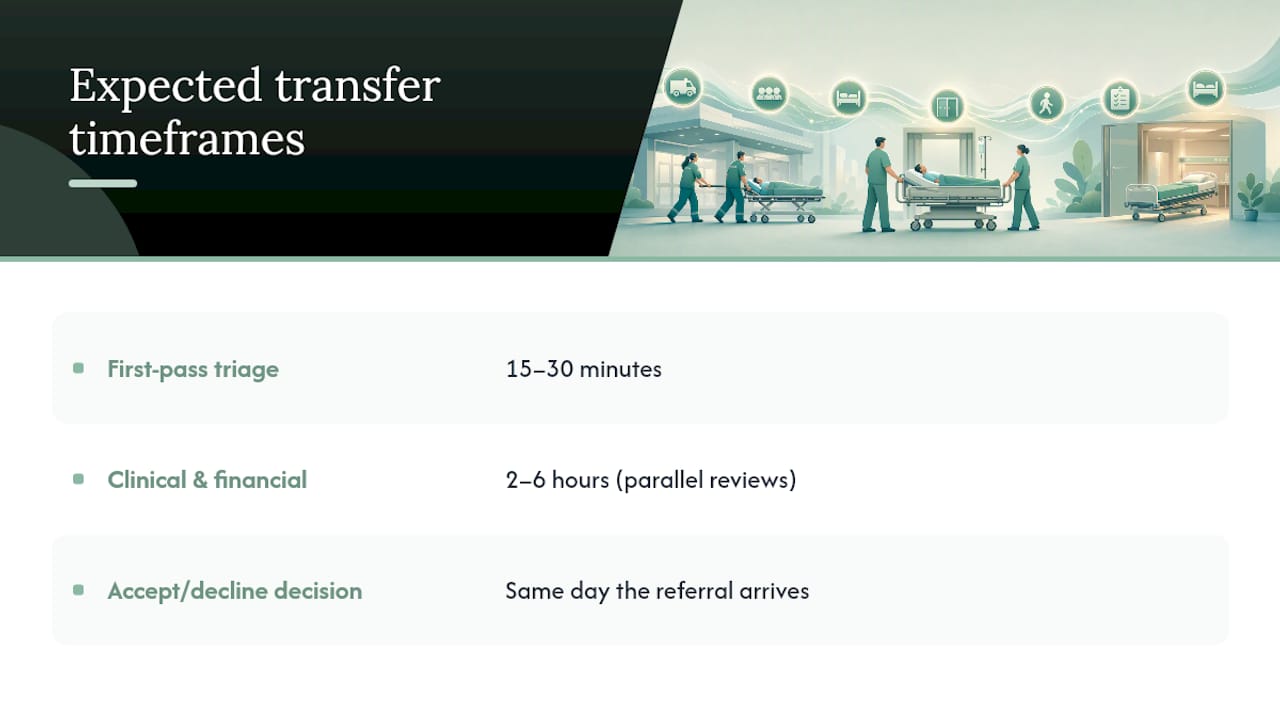
| First-pass triage | Referrals coordinator | 15–30 minutes |
| Parallel clinical/financial/operational review | Clinical reviewer, finance lead, bed manager | 2–6 hours |
| Accept/decline/pending decision | Admissions director | Same day |
| Bed assignment | Bed manager | Within 1 hour of accept |
| Documentation handoff and transport scheduling | Admitting nurse | 24–72 hours before arrival |
Escalate any referral sitting in “pending” past its SLA window straight to the admissions director rather than letting it age quietly in an inbox.
What Technology Do You Need to Speed Up Transfers?
The technology stack behind an efficient patient transport workflow needs to talk to the systems you already run, not replace them. Prioritize these integrations first:
- EMR integration so clinical data flows both directions without re-keying.
- Document capture and fax ingestion to handle the mixed-format packets hospitals actually send.
- Insurance eligibility APIs and payer portal connections for real-time authorization checks instead of phone tag.
- ADT feeds to catch discharge timing changes before they blindside your bed manager.
- Scheduling and bed board tools that reflect true, current availability.
Beyond connectivity, look for automation that does the repetitive work: AI-driven first-pass extraction of diagnosis and payer data, rule-based facility-fit scoring, missing-document alerts, and a visible audit trail showing who owns each case right now. Automation should reduce wasted clinician time by surfacing exceptions, not by making final acceptance decisions on its own.
Pro Tip: In any vendor demo, feed the system a real, messy referral packet and check two things: how accurately it extracts diagnosis and payer data, and how often it raises a false-positive red flag on a clean case. A tool that cries wolf on every referral erodes staff trust in weeks.
Explore how EMR integration fits into this stack, and see practical examples of workflow automation already running in skilled nursing settings.
Who Owns Each Step in the Handoff?
Guidelines for patient handoff only work when every step has exactly one accountable owner and a deadline attached to it. Ambiguity here is where referrals stall.
| Role | Responsibility | Sample SLA |
|---|---|---|
| Referrals coordinator | Capture and first-pass triage | Respond within 30 minutes of receipt |
| Clinical reviewer (DON/RN) | Verify skilled need and clinical fit | Sign off within 4 hours |
| Finance/authorization lead | Confirm payer eligibility and authorization | Complete within 4 hours |
| Bed manager/occupancy lead | Assign and hold bed | Confirm within 1 hour of accept |
| Admitting nurse | Verify documentation, prep for arrival | Complete 24 hours before admission |
Set escalation rules alongside these SLAs: if clinical sign-off runs past four hours, the case routes automatically to the DON’s backup. If a bed hold isn’t confirmed within an hour of acceptance, the admissions director gets notified. Document every escalation so patterns, not just individual missed deadlines, become visible over time. Review staff efficiency tactics built around exactly this kind of role clarity.
What Causes the Most Delays, and How Do You Fix Them?
Most delays trace back to a handful of repeat offenders:
- Missing documentation. Fix it with a standard required-fields checklist sent to referring hospitals up front, plus a nurse-to-nurse call confirming receipt before the case moves forward.
- Sequential rather than parallel review. Fix it by restructuring your workflow so clinical, financial, and operational checks launch at the same time, not one after another.
- Unclear facility-fit rules. Fix it with the three-bucket screening system: auto-fit, auto-no-go, and operator review, applied consistently regardless of who’s on shift.
- Payer authorization gaps. Fix it with a standing checklist of Medicare Advantage plans that historically cause friction, reviewed quarterly.
- Bed-not-ready logistics. Fix it by syncing your bed board with housekeeping and maintenance status in real time, not on a lag.
Pro Tip: One under-used fix: build a two-line email template for hospital liaisons requesting missing documentation. Coordinators who improvise this request each time add hours of delay compared to a template that goes out in under a minute.
How Do You Pilot This Workflow Without Disrupting Operations?
Roll out changes in three phases rather than flipping the whole workflow overnight.
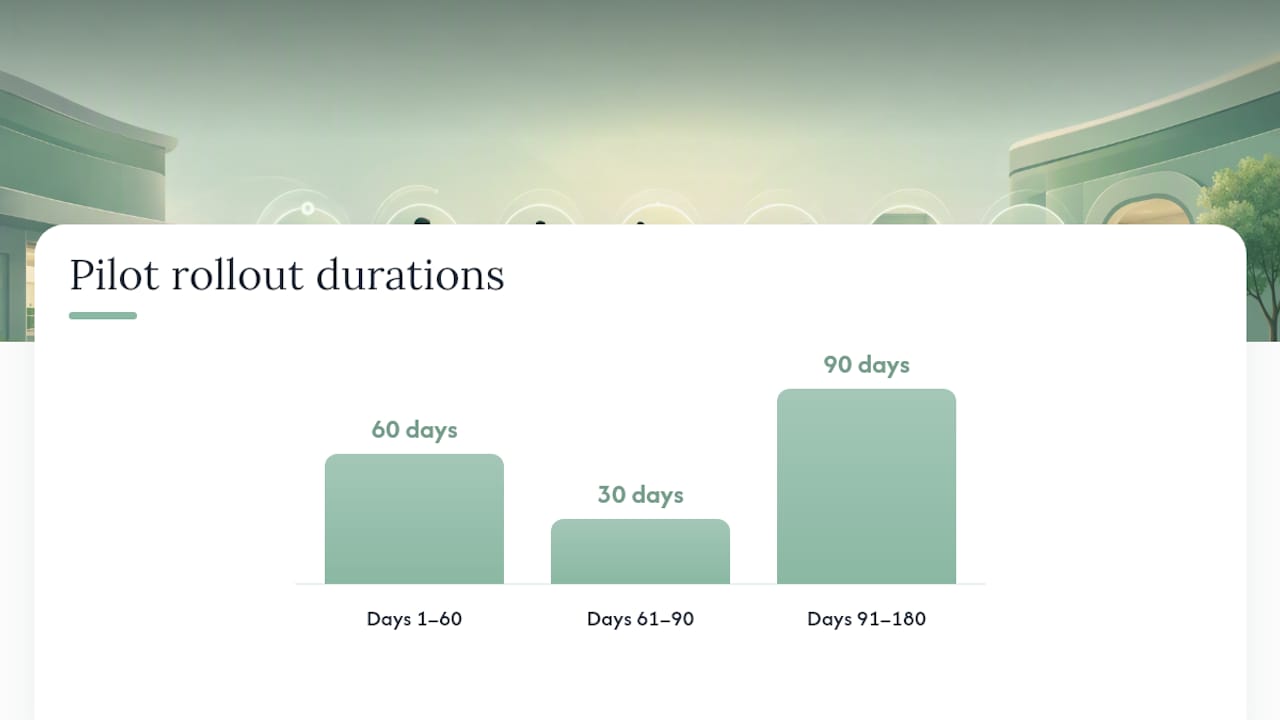
- Days 1 to 60: Align and map. Get clinical, financial, and admissions leadership agreeing on the same decision rules, then map your current data flow and identify where documents get stuck.
- Days 61 to 90: Build and train. Configure automation rules, train staff on the new SLAs, and select a pilot cohort, ideally one referral source or unit rather than the whole facility at once.
- Days 91 to 180: Run and evaluate. Track pilot metrics weekly, then decide go or no-go for full rollout based on measurable improvement.
| Phase | Key Activity | Success Signal |
|---|---|---|
| Days 1–60 | Stakeholder alignment, data mapping | Documented rules and workflow map complete |
| Days 61–90 | Build automation rules, train staff, select pilot cohort | Staff trained, pilot cohort live |
| Days 91–180 | Run pilot, track metrics, go/no-go decision | Measurable gains in response time and conversion |
Track time-to-first-response, referral-to-admit conversion, and missing-document rate throughout the pilot. A manual-versus-automated comparison is worth reviewing with your leadership team before you set pilot targets, since it frames realistic expectations for what automation alone can and can’t fix.
Which KPIs Actually Prove the Workflow Is Working?
Six numbers tell you whether your admissions process is genuinely faster, not just busier.
- Time-to-placement: hours from referral receipt to bed assignment.
- Referral response time: minutes to first-pass triage completion.
- Referral-to-admit conversion: accepted referrals divided by total referrals received.
- Bed fill rate: occupied beds divided by total licensed beds.
- Missing-document rate: referrals requiring follow-up requests divided by total referrals.
- Documentation-related denials: denials attributable to incomplete records at admission.
Build a dashboard with these six panels reviewed weekly by operations staff and monthly by executive leadership. Referral-to-admit conversion and missing-document rate are the two earliest indicators that a process change is working, since they move faster than bed fill rate, which lags by days. Strategies for optimizing bed occupancy go deeper into target-setting for that specific metric.
What Does This Look Like in Practice?
I’ve watched admissions teams treat every referral like a fresh puzzle, reconstructing the same diagnosis and payer checks from scratch each time, and I’ve watched teams that treat referrals like a repeatable process with a script. The second group wins more placements, not because they work harder, but because they’ve removed the guesswork from the first ten minutes of every case.
One pattern stands out from teams that made this shift: a referral for a post-surgical patient arrived late on a Friday afternoon, historically the worst time slot for slow response. Because first-pass triage was standardized and automated extraction had already flagged the payer type and skilled need, the clinical reviewer and finance lead started their checks promptly, in parallel, instead of waiting for Monday. The bed was held by evening and the patient was admitted Saturday morning. That outcome wasn’t luck. It was a workflow designed so nobody had to decide what to do next.
The gap between facilities that struggle with referrals and facilities that thrive isn’t effort or headcount. It’s whether the first ten minutes of every referral follow a script or get reinvented from scratch.
Put This Workflow on Autopilot With Smart Admissions
Everything in this guide, standardized first-pass review, parallel checks, clear SLAs, works better when the repetitive parts run themselves instead of eating staff hours. Smart Admissions is built around that exact idea: it integrates with your EMR and insurance portals to extract packet data automatically, verify eligibility in real time, and route each referral to the right owner with a visible audit trail.
The goal isn’t replacing your clinical judgment. It’s giving your team back the hours currently lost to manual document review and phone-tag eligibility checks, so first-pass triage happens in minutes instead of hours and bed fill rate climbs as a result. Facilities that automate this layer of intake report meaningfully faster bed occupancy as documentation gaps and duplicate data entry disappear from the process.
If you’re ready to see how this fits your own referral volume, start with a walkthrough of referral management systems built for skilled nursing and rehab facilities, and request a demo to see your own referral packets run through first-pass extraction.
Frequently Asked Questions
What is a patient transfer workflow in skilled nursing admissions?
It’s the full sequence from referral receipt to admission, including intake, eligibility verification, clinical review, bed assignment, and documentation handoff, each with a defined owner and timeframe.
How long should each step in the patient transfer process take?
First-pass triage should finish within 15 to 30 minutes, parallel clinical and financial reviews within 2 to 6 hours, and the accept or decline decision the same day the referral arrives.
What causes most delays in patient movement guidelines?
Missing documentation, sequential rather than parallel reviews, unclear facility-fit rules, and payer authorization gaps account for most of the lost time between referral and admission.
Do I need special technology to run an efficient patient transfer method?
You need EMR integration, insurance eligibility connections, and document extraction at minimum. Automation handles the repetitive data work so staff can focus on exceptions and decisions.
How should facilities handle HIPAA compliance during intake automation?
Any vendor handling PHI needs a signed business associate agreement and documented data handling practices; confirm this directly with your compliance officer before connecting any system to your EMR.
Sources
- Pre-Admission, Admission and Discharge Clinical Best Practices for Skilled Nursing Facilities (PDF)