
Data migration for admissions software works when you treat it as a short, controlled project with a defined scope, a cleaned and mapped data set, HIPAA safeguards, real-world testing, a planned cutover and a month of close monitoring afterward. Skilled nursing facilities that follow these steps keep referrals moving while the new system goes live, and they avoid the duplicate records, payer errors and missing history that make admissions teams distrust a new tool.
This guide walks your admissions director, administrator and IT lead through each phase in order, with checklists you can copy into your project plan.
TL;DR
- Define what moves, what stays in the legacy system and the exact cut-off date before anyone exports a file.
- Clean payer, patient and referral-source data first, then document every field mapping in a data dictionary.
- Encrypt data in transit and at rest, run a security risk analysis and sign a Business Associate Agreement with every vendor that touches ePHI.
- Test edge cases with the staff who will use the data, then plan cutover, rollback and a month of monitoring.
- Choose software that is EHR-independent, so accepted referrals flow into your existing workflow without duplicate entry.
Table of Contents
- What data migration for admissions software actually covers
- Step 1: Build the plan, scope and cut-off points
- Step 2: Inventory and clean your data before you export it
- Step 3: Map every field and document the rules
- Step 4: Protect ePHI and control access throughout
- Step 5: Test with real cases and the people who use them
- Step 6: Plan cutover, fallback and downtime
- Step 7: Train staff and monitor after go-live
- Common migration problems and how to fix them
- How to choose software that makes migration easier
- Perspective: why a smaller migration is usually the better one
- Get started with Smart Admissions
- FAQ
- Sources
What data migration for admissions software actually covers
In a skilled nursing facility, admissions data is wider than a patient list. It usually includes referral history, referral sources, hospital contacts, payer and eligibility information, clinical summaries received with each referral, decision notes (why you said yes or no), bed assignments and the documents attached to each case.
Not all of it should move. A realistic scope sorts data into three groups:
- Migrate and use daily: active and recent referrals, referral-source contacts, payer records, facility rules and bed data.
- Migrate for reference: historical accept and decline decisions, response times and lost-opportunity reasons, which feed your analytics.
- Leave in the legacy system: long-term care documentation that your clinical team will keep accessing there.
This split matches the guidance in a 2024 implementation guide from the American College of Health Care Administrators, which advises facilities to identify which clinical data will migrate and to keep the remaining care data accessible in the old system.
If your goal is a faster referral workflow, the admission workflow guide for skilled nursing facilities shows where migrated data will be used every day.
Step 1: Build the plan, scope and cut-off points
Start with a written implementation plan that lists tasks, timelines and an owner for each task. The ACHCA guide recommends exactly this, and it also asks facilities to set clear cut-off dates for activity in the legacy system and start dates in the new one.
For admissions, the cut-off decision is practical: which referrals will be finished in the old system, and which will be opened in the new one? A common approach is to let referrals already under review finish where they started, and open every new referral in the new system from the go-live date.
Your project plan should name these roles:
- Executive sponsor: usually the administrator, who resolves priority conflicts.
- Admissions lead: owns the rules, the decisions and the test cases.
- IT or EHR administrator: owns exports, access and integrations.
- Business office lead: owns payer and financial data review.
- Clinical liaison: a nurse or MDS coordinator who reviews how clinical summaries appear.
An AHIMA case study on merging patient identification systems describes health information management and IT leaders overseeing the project, with registration, scheduling and business office staff involved. The same mix works in a nursing facility, scaled to your size.
Scope checklist
- List every system that holds referral or admissions data: EHR, spreadsheets, shared inboxes, fax logs, hospital portals.
- Decide what moves, what is archived and what stays.
- Set the cut-off date and the go-live date.
- Assign one owner per task and one backup.
- Schedule training and testing before the go-live date, not after.
Step 2: Inventory and clean your data before you export it
Migration moves bad data as faithfully as good data. Cleaning first is the cheapest quality control you have.
The ACHCA guide recommends a thorough review of existing billing payers, removal of redundant entries and reconciliation of outstanding balances before exporting data to new software. For admissions, payer cleanup matters twice: it affects your records, and it affects how any scoring tool reads your payer mix.
What to clean
- Payers: merge duplicate payer names (for example, the same Medicare Advantage plan entered three ways), retire inactive plans and confirm plan types.
- Patients and referrals: find duplicate people, mismatched dates of birth and records with missing identifiers. The Office of the National Coordinator notes that a standards-driven approach can prevent migration problems, including duplicate patient records.
- Referral sources: standardize hospital and physician-group names so you can later measure which sources send the right patients.
- Facility rules: write down your clinical capabilities, staffing limits, payer preferences and bed types in plain language, because a decision engine can only apply rules you have defined.
- Dates: confirm admission, discharge and referral timestamps use one format and one time zone.
The master patient index deserves special attention. A federal privacy and security guide includes an AHIMA case study describing the MPI as the foundation for EMRs and its accuracy as critical.
Step 3: Map every field and document the rules
Field mapping is where most migrations quietly fail. A field called “Payer” in one system may be “Primary Insurance” in another, and one may store a code while the other stores text.
The OpenFn documentation on mapping specifications recommends obtaining source and target field lists plus sample input and output records, then writing field-level mappings and transformation rules into a data dictionary. Follow that method.
A simple data dictionary layout
| Source field | Target field | Transformation rule | Owner |
|---|---|---|---|
| Primary Insurance | Payer | Map to standardized payer list; flag unmatched names | Business office |
| Referral Date/Time | Referral received | Convert to one time zone, keep original timestamp | Admissions |
| Hospital Name | Referral source | Match to master list of sources | Admissions |
| Diagnosis text | Clinical summary | Keep original text; do not overwrite | Clinical liaison |
| Bed Unit | Bed type | Map to current unit names | Administrator |
Two more practices from an interoperability guide by a health IT firm are worth adopting: define the system of record for each data element, and normalize terminology to controlled vocabularies. In plain terms, decide which system wins when two disagree, and use standard code sets instead of free text where you can.
If you are comparing tools while mapping, the customizable healthcare software guide explains why configurable rules matter for facility-specific decisions.
Step 4: Protect ePHI and control access throughout
A migration copies protected health information, often several times: an export, a transfer, a staging area and the final destination. Each copy needs the same protection as the original.
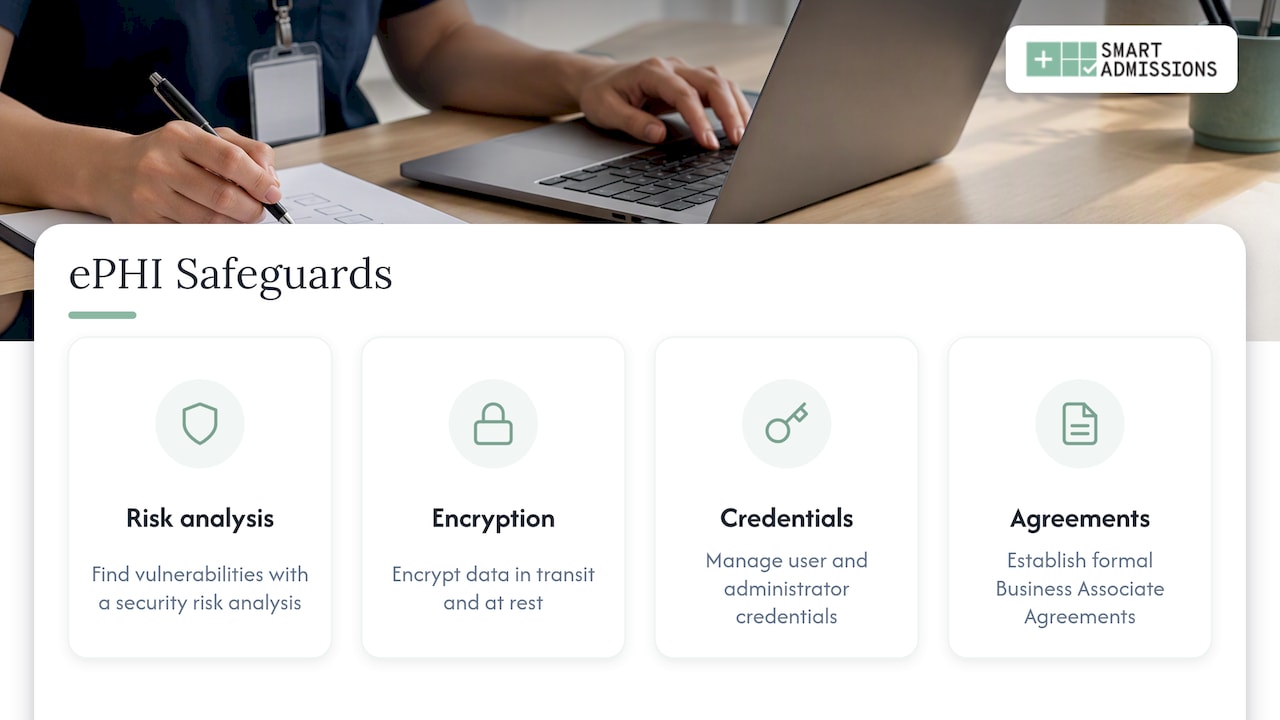
Federal guidance from the Office of the National Coordinator describes the baseline in its Shared Nationwide Interoperability Roadmap: perform a security risk analysis to find vulnerabilities, encrypt data in transit and at rest, manage user and administrator credentials, and establish formal Business Associate Agreements.
The Department of Health and Human Services adds that a cloud provider that stores or processes ePHI for you is a business associate, and you need a HIPAA-compliant business associate agreement with it. HHS states this holds even when the provider handles only encrypted data and has no encryption key.
Security checklist for the migration window
- Update your security risk analysis to cover the migration itself, not just day-to-day operations.
- Sign a Business Associate Agreement with the software vendor and any migration contractor before sharing data.
- Use encrypted transfer methods only; never send exports by regular email or unencrypted removable drives.
- Give migration staff the minimum access they need, and remove it when the project ends.
- Log who exported, moved and loaded each data set.
- Delete temporary copies and staging files, and document that you did.
For a deeper look at safeguards inside an admissions workflow, read our patient data security guide.
Step 5: Test with real cases and the people who use them
A migration that loads without error messages is not a migration that works. Testing must show that the data is complete, accurate and usable.
The ACHCA guide recommends reviewing and validating migrated data for accuracy and completeness. The health IT firm guide cited earlier goes further: test real edge cases, compare source payloads against target transformations, and involve clinical or operational staff in reviewing exceptions. It warns that skipping edge cases such as duplicate demographics or corrected results can lead to integration failures.
Build a test set
Pull 25 to 50 real referrals (with appropriate access controls) that include the awkward ones:
- A patient with two spellings of the same name.
- A referral with a secondary payer and a managed care authorization.
- A referral that was declined, then re-sent by the hospital.
- A referral that arrived by fax with incomplete clinical notes.
- A patient readmitted within 30 days.
- A record with a corrected date or corrected payer.
For each case, compare the old record with the new one, field by field, against your data dictionary. Ask your admissions coordinators, not only IT, to sign off. The ONC advisory committee’s 2019 task force recommendations support involving intended users when testing how exchanged data is used.
The AHIMA case study mentioned earlier also stresses verifying admission and discharge dates and times after upload to protect integrity in the live environment. Date errors are easy to miss and expensive when they feed reporting or billing.
Integration test
If your new platform connects to your EHR, test the handoff too. Accept a test referral and confirm that it appears in the EHR workflow once, with the right demographics and payer, and without re-keying. Our platform is EHR-independent and integrates with PointClickCare so that accepted referrals flow into existing workflows without duplicate entry, and that is exactly the behavior to prove before go-live.
Step 6: Plan cutover, fallback and downtime
Cutover is the moment your team stops working in the old system and starts in the new one. For admissions it is more forgiving than clinical documentation, but hospitals still expect answers in minutes, so plan it.
A health IT consulting article on migration cutover recommends manually abstracting admitted patients’ data and active orders into the target system, using staff who are trained on the new workflows and know the patients, providers and locations. It also suggests enabling device integrations early to avoid manual entry delays. For an admissions team, the equivalent is hand-entering any referral still in progress.
Cutover plan
- Freeze: stop creating new records in the legacy system at the agreed time.
- Final export: take a last export and store it securely as your rollback reference.
- Load and verify: load the final data and run your short smoke test (five referrals, five payers, five beds).
- Abstract open cases: manually enter referrals still under review.
- Announce: tell hospital liaisons which email, fax number or portal route is active.
- Keep the old system read-only: your team can look up history without writing new data there.
Decide in advance what triggers a rollback, such as a failed smoke test or a critical mapping error, and who has authority to call it. Choose a low-volume window; many facilities avoid the start of a week or the day before a holiday weekend, when hospital discharges often peak.
Step 7: Train staff and monitor after go-live
The migration is not finished at go-live. The AHIMA case study describes monitoring patient census and errors for one month afterward, assigning an employee to work on new duplicate records, and placing an IT and clinical support team on-site for several weeks.
Training matters as much as the data. A LeadingAge case study highlights hands-on, in-person sessions that mirror the live environment, with nursing, CNA and administrative staff involved, as a way to shorten the learning curve during transitions.
First 30 days checklist
- Review a sample of new referrals daily for the first two weeks, then weekly.
- Track duplicate records created and resolve them within a set number of days.
- Compare response times and acceptance rates against your pre-migration baseline.
- Collect staff questions in one shared log and answer them in a weekly huddle.
- Confirm payer and bed data still match reality after the first census changes.
- Close out legacy access, and archive the final export according to your retention policy.
Common migration problems and how to fix them
| Problem | Typical cause | Fix |
|---|---|---|
| Duplicate patients | Name or date-of-birth variants, no matching rule | Run a duplicate report before load; assign one person to merge confirmed matches |
| Payers missing or mislabeled | Uncleaned payer list | Standardize the payer list before mapping; flag unmatched entries |
| Referral sources split into many names | Free-text hospital names | Create a master source list and map to it |
| Wrong admission dates | Time zone or format differences | Verify dates after upload against source records |
| Staff keep using the old system | Weak training or unclear cut-off | Set the read-only date and train with real cases |
| Clinical summaries truncated | Field length limits | Test long records; store full text in documents if needed |
How to choose software that makes migration easier
Migration effort depends partly on what you are migrating to. Ask each vendor these questions:
- Is the platform EHR-independent, so you are not forced to replace your clinical system?
- Does it read referrals from portals, fax and email, or only one channel?
- Can you configure decision rules around your clinical capabilities, staffing, payer mix, PDPM reimbursement and bed availability?
- Will the vendor sign a Business Associate Agreement and describe how data is encrypted?
- Who supports you during onboarding, and do they understand SNF admissions?
Our referral-to-bed process guide and admissions decision-making guide show how the data you migrate is used once the platform is live.
Perspective: why a smaller migration is usually the better one
We built Smart Admissions with people who have run admissions, worked in MDS and managed reimbursement, and the pattern we see is consistent: facilities over-plan the history and under-plan the rules.
A decision engine does not need ten years of old records to be useful on day one. It needs your facility’s own rules: what clinical needs you can meet, how your staffing limits admissions, which payers you want, how PDPM reimbursement affects margin and which beds are open. Get those right, move the recent referral and payer data that supports them, and you can respond to a hospital with a confident yes or a defensible no in minutes.
That is why we configure to each facility’s rules, stay EHR-independent and integrate with PointClickCare so accepted referrals flow into existing workflows without duplicate entry. Your admissions director should spend the migration deciding rules, not retyping records.
Harry
Get started with Smart Admissions
If you are ready to move referral review into one place, Smart Admissions reads every referral from portals, fax and email, scores it against your facility’s own rules and flags high-cost medications before you accept. Plans are published on our pricing page: $597 per month, or $6,447 per year. See the full flow on how our patient referral software works.
FAQ
How long does data migration for admissions software take?
It depends on how many systems hold your admissions data and how clean that data is. Cleaning payers and referral sources and writing the data dictionary usually take longer than the transfer itself. Set your timeline from your own scope, and build in testing and a month of monitoring after go-live.
Do I need to migrate all historical referrals?
No. Move active and recent referrals, payer records, referral sources and your facility rules, and keep older records in the legacy system as read-only reference. The ACHCA guide advises identifying which data migrates and keeping the rest accessible in the old system.
Is a Business Associate Agreement required for migration?
Yes, when a vendor or contractor creates, receives, maintains or transmits ePHI on your behalf. HHS guidance on cloud computing says that provider is a business associate, and you need a compliant agreement in place before data is shared. Your compliance officer or counsel should review the agreement.
What is the most common migration mistake?
Exporting uncleaned data. Duplicate payers, duplicate patients and inconsistent referral-source names carry straight into the new system and distort your reports. Clean and standardize first, then map.
Can I switch admissions software without replacing my EHR?
Yes, if the platform is EHR-independent. Smart Admissions is designed to work alongside your EHR and integrates with PointClickCare, so accepted referrals reach your existing workflow without duplicate entry.
Sources
- Navigating Change: The Journey of Software Implementation for SNFs (ACHCA, 2024)
- Overcoming Challenges of Merging Multiple Patient Identification and Matching Systems (AHIMA)
- Data Standards (ONC Playbook)
- Guide to Privacy and Security of Electronic Health Information (ONC)
- Writing Data Element Mapping Specifications (OpenFn)
- Interoperability Between Disparate EHR Systems (All Star Tech)
- A Shared Nationwide Interoperability Roadmap (ONC)
- Guidance on HIPAA and Cloud Computing (HHS)
- HITAC Conditions and Maintenance of Certification Task Force Recommendations (2019)
- Acute vs. Ambulatory Patient Care During a Migration Cutover
- Actors Fund-Netsmart Case Study (LeadingAge)