
Admission capacity planning works only when it prioritizes staffed, clinically appropriate beds and payer- and diagnosis-aware intake rules over raw occupancy targets. A bed that appears empty on the census but lacks the right shift coverage or specialty competency is not true capacity. Referral platforms exist to help your admissions team make that distinction fast, referral by referral.
TL;DR:
- True capacity depends on licensed, physically available, staffed, and clinically appropriate beds, not just occupancy percentage.
- Staffing levels, especially shift-specific nurse hours, are critical for determining actual admission readiness beyond bed counts.
- Capacity models should separately track certification, staffing, and specialty capabilities to improve admission safety and speed.
- Building weekly forecasts that include discharges, pending referrals, authorizations, and resource constraints helps prevent staffing and bed mismatches.
- Automating eligibility verification, clinical assessment, and authorization tracking can reduce admission delays and optimize bed utilization.
Table of Contents
- What Counts as True Admission Capacity?
- How Do You Build a Capacity Model That Actually Works?
- What Should Your Weekly Admissions Forecast Include?
- How Do CMS Rules Change What Counts as an Admit-Ready Bed?
- What Should Your First 90 Days of Capacity Planning Look Like?
- Where Administrators Get Capacity Planning Wrong
- Let Automation Run the Capacity Model for You
- Sources
- FAQ
What Counts as True Admission Capacity?
Occupancy percentage tells you almost nothing about whether you can safely admit the next referral. Real capacity depends on four distinct numbers, and most facilities only track one.
Certified beds are what your license allows. Physically available beds are the ones not tied up by renovation, isolation, or double-occupancy limits. Staffed beds reflect who’s actually on the floor for a given shift, not your daily average. Clinically appropriate beds are the subset where your team has the competencies, equipment, and supplies for that specific resident’s needs, per the CMS facility-assessment guidance.
Staffing metrics matter just as much as bed counts. Hours per resident day (HPRD) set a baseline, but a facility-wide average can obscure staffing shortages during specific shifts. A retrospective study of 627 skilled nursing facilities found that referral acceptance correlated significantly with diagnosis category and payer type, while daily occupancy and nursing hours did not predict acceptance in day-to-day operations.
Statistic: Diagnosis and payer type drove admission decisions in that 627-facility dataset, not the census number most dashboards lead with.
Reliable data sources for building your baseline include:
- CMS Care Compare provider data for certified beds and staffing benchmarks
- Payroll-Based Journal (PBJ) staffing submissions
- Your own facility assessment, updated whenever your resident mix shifts
How Do You Build a Capacity Model That Actually Works?
A usable model separates three layers instead of collapsing them into one occupancy number: bed certification, shift staffing, and service-line capability. Track each independently and admissions decisions get faster and safer.
- Count beds by certification type, then subtract beds blocked by isolation, maintenance, or roommate incompatibility to get physically available beds.
- Map staffed beds by shift, not by daily average. The evening or weekend shift is almost always your binding constraint, not the 7 a.m. snapshot most reports use.
- Tag specialty capability per unit, covering ventilator support, wound care, bariatric equipment, or behavioral health competency.
- Set payer-acceptance rules by service line. An orthopedic referral with a short expected stay and a strong Medicare Advantage authorization pathway clears differently than a complex behavioral health case needing psychiatric coverage you staff only on day shift.
- Weight incoming referrals by diagnosis and payer probability, using your own historical acceptance data the way the 627-facility study weighted diagnosis category and insurance type as acceptance drivers.
Here’s a short rule flow admissions coordinators can run before ever picking up the phone to confirm a bed: check staff competency for the diagnosis against tonight’s shift roster, confirm equipment and supply availability, verify authorization status with the payer, then and only then schedule the admission.
Pro Tip: Build your payer-acceptance rules around expected authorization lag, not just coverage type. A referral with a covered benefit but a five-day authorization delay can block a bed longer than an uninsured admission with same-day approval.
Facilities with concentrated hospital referral relationships may develop more targeted service-line rules due to a more predictable referral mix. That predictability comes with a tradeoff worth understanding before you lean on it.
What Should Your Weekly Admissions Forecast Include?
A weekly cadence, not a daily scramble, is what keeps beds filling without staffing surprises. Run this forecast every week, ideally on the same day so your team builds the habit:
- Planned discharges for the coming seven days, by unit
- Pending referrals in the pipeline, with diagnosis and payer flagged
- Authorizations still awaiting payer decision, with expected turnaround
- Staffing by shift, not daily average, for each unit
- Specialty-resource constraints, like ventilator beds or dedicated behavioral health staff
An exception queue catches referrals that are clinically appropriate but temporarily blocked, so they don’t quietly disappear. Each entry needs an owner, a documented reason, a next-review date, and an escalation path if the block persists past 48 hours.
Referral handoffs from hospitals should always include a clinical summary, current medication list, and authorization status before your team commits to a bed. Facilities with strong hospital ties can screen more selectively for predictable, short-term patients, which also means diversifying referral sources reduces your exposure if one hospital’s volume drops.
| Dashboard element | Why it belongs next to open beds |
|---|---|
| Open beds by unit | Baseline capacity number |
| Acuity fit score | Confirms clinical match, not just census |
| Authorization status | Flags payer delays before they block a bed |
| Expected length of stay | Helps forecast next-week turnover |
How Do CMS Rules Change What Counts as an Admit-Ready Bed?
CMS facility-assessment requirements mean a certified bed isn’t admission-ready until you’ve documented that you can actually staff and support it. The revised QSO-24-13-NH guidance requires facilities to assess competencies, supplies, equipment, physical environment, and shift-level coverage as part of defining resident capacity.
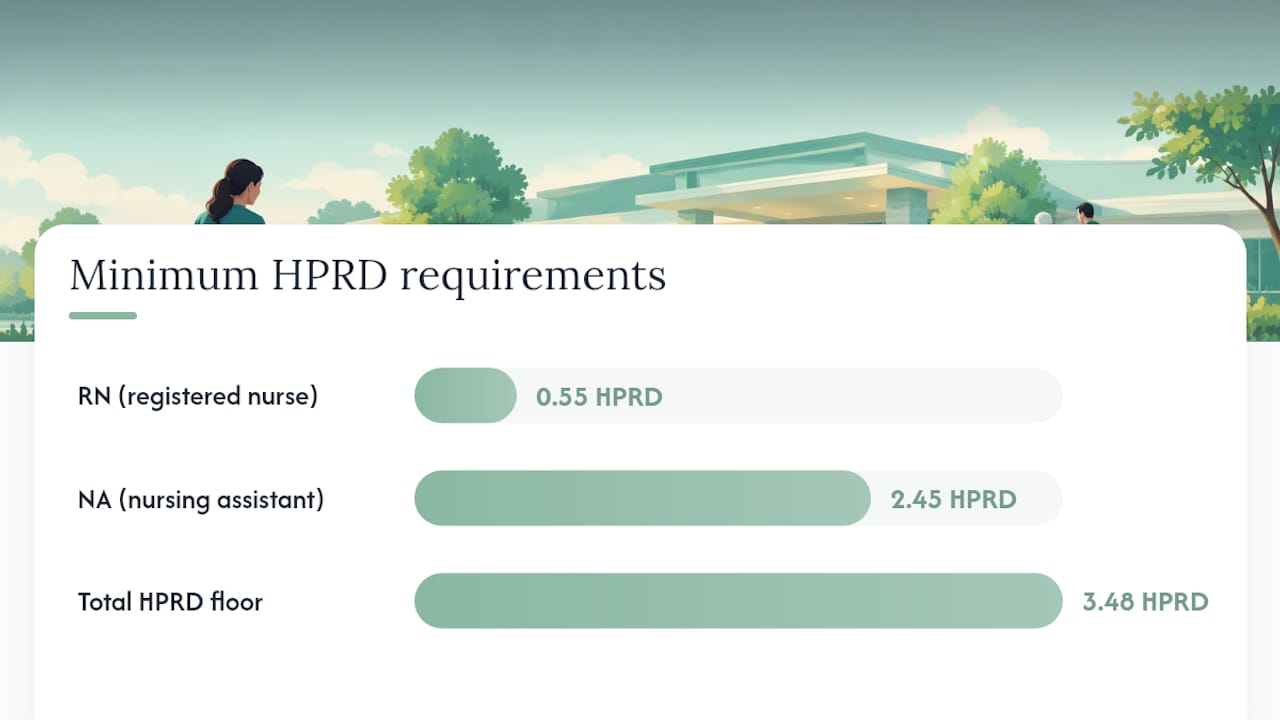
The Federal Register final rule on minimum staffing standards sets minimum hours per resident day, including 0.55 RN and 2.45 NA HPRD within a 3.48 total HPRD floor, with exemption provisions for facilities that meet specific hardship criteria.
Practical compliance steps to fold into your admissions process:
- Update your facility assessment any time you accept a new resident type or diagnosis category you haven’t admitted before
- Document staffing levels and competencies tied to each admission decision, not just at survey time
- Maintain a written contingency plan for census surges or unexpected staffing shortages
- Keep patient rights and admission-refusal documentation current. A refusal based on inability to meet clinical needs must be documented the same way an acceptance is
What Should Your First 90 Days of Capacity Planning Look Like?
A phased rollout keeps this from becoming another binder nobody opens after week one.
- Days 1 to 30: Update the facility assessment, map all four bed categories (certified, physical, staffed, clinically appropriate), and assign an owner for each data source.
- Days 1 to 30: Train the admissions team on payer- and diagnosis-aware acceptance criteria, replacing any occupancy-only checklist still in use.
- Days 31 to 60: Stand up the weekly forecast meeting and build the exception queue with defined escalation paths.
- Days 31 to 60: Set service-line acceptance rules for your top three referral diagnosis categories.
- Days 61 to 90: Track KPIs weekly: referral acceptance rate by payer and diagnosis, time-to-authorize, time-to-admit, bed fill rate, exception queue backlog, and 30-day readmission rate.
- Days 61 to 90: Review and adjust rules based on which diagnosis or payer categories are getting stuck in the exception queue most often.
Assign a single owner per checklist item. Split accountability is the fastest way for a 90-day plan to quietly stall at day 40.
Where Administrators Get Capacity Planning Wrong
Most facilities I’ve seen struggle with capacity planning aren’t short on beds. They’re short on the right kind of visibility into the beds they already have. The most common mistake is treating occupancy percentage as a proxy for capacity, when the research on admission decisions shows payer type and diagnosis category carry far more weight in what actually gets accepted.
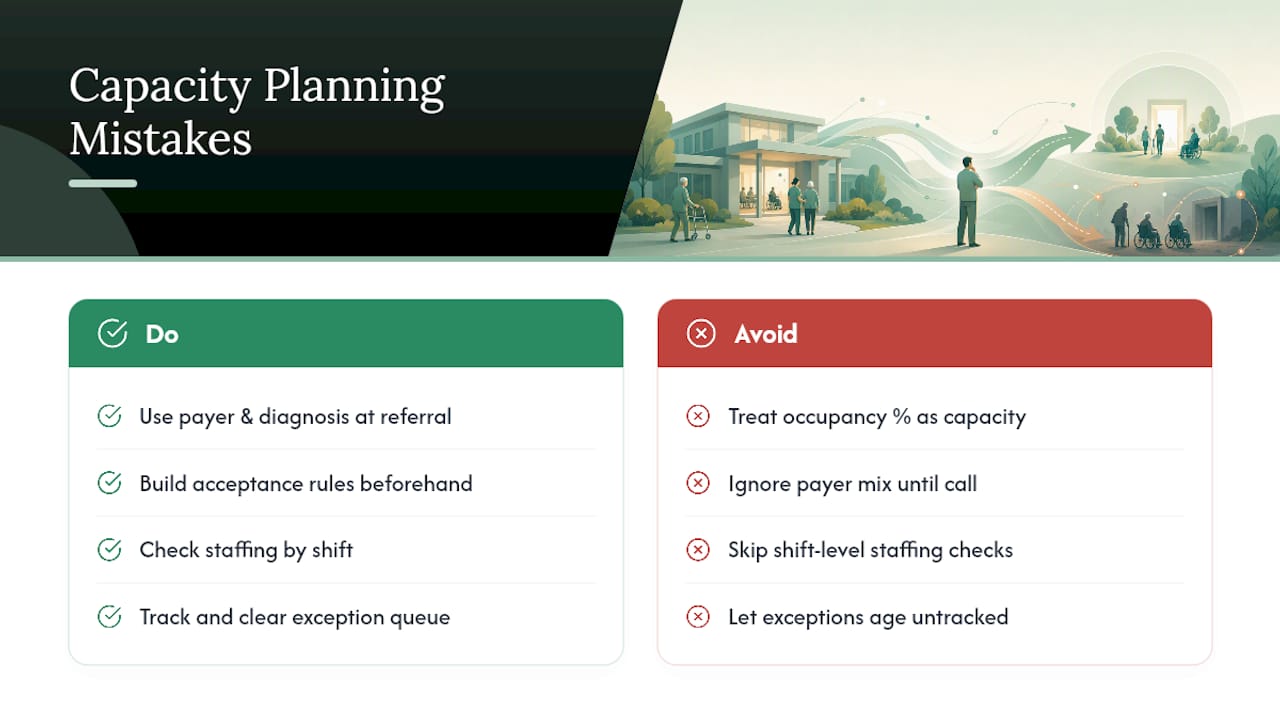
The second mistake is ignoring payer mix until a referral is already on the phone, instead of building acceptance rules in advance. The third is skipping shift-level staffing checks and discovering the gap only when a resident arrives and the specialty coverage isn’t there. The fourth, and maybe most costly, is letting the exception queue go untracked so clinically appropriate referrals quietly age out and disappear.
Smart Admissions was built by people who’ve watched these four mistakes repeat across facility after facility, which is why the platform’s eligibility verification and EMR integration features focus on surfacing payer and clinical fit data at the moment a referral lands, not after the bed is already committed.
— Harry
Let Automation Run the Capacity Model for You
Certain platforms are designed to run payer- and diagnosis-aware capacity models automatically rather than relying on spreadsheets. These tools can verify insurance eligibility in real time, pull clinical assessment data through EMR integration, and surface authorization status when a referral arrives, helping teams reduce time spent on documentation and focus on decision-making.
A 30-day pilot is a reasonable way to test this against your current process. Track time-to-admit, authorization lag, and bed fill rate before and during the pilot, and you’ll have a clear read on whether automation moves those numbers. Review the Monthly or Annual pricing plans and see which fits your facility’s referral volume, or look at how automated admissions compares to manual workflows before you start.
Sources
- Factors Influencing Admission Decisions in Skilled Nursing Facilities: Retrospective Quantitative Study
- QSO-24-13-NH: Revised Guidance for Long-Term Care Facility Assessment Requirements
- Medicare and Medicaid Programs; Minimum Staffing Standards for Long-Term Care Facilities
FAQ
What Is Admission Capacity Planning?
Admission capacity planning is the process of matching incoming referrals to beds you can actually staff and clinically support, not just beds that appear open on the census. It weighs diagnosis category, payer type, and shift-level staffing rather than relying on occupancy percentage alone.
How Is Staffed Capacity Different From Certified Beds?
Certified beds reflect your facility’s license, while staffed beds reflect who’s actually working a given shift. A facility can have certified beds sitting empty yet be unable to admit safely because evening or weekend staffing doesn’t support the resident’s needs.
What KPIs Matter Most for Admissions Teams?
Referral acceptance rate by payer and diagnosis, time-to-authorize, time-to-admit, bed fill rate, and exception queue backlog give the clearest picture of whether your capacity model is working. Reviewing these weekly catches problems before they become a pattern.
Does Smart Admissions Help With Capacity Planning Directly?
Smart Admissions supports capacity planning by verifying insurance eligibility in real time and integrating with existing EMR systems, so your team can check clinical and payer fit before committing a bed. Current pricing is available on the Smart Admissions pricing page.
How Often Should We Update Our Facility Assessment?
Update the facility assessment any time your resident mix changes, including when you start accepting a new diagnosis category, per CMS guidance. Most facilities also review it on a set annual cycle even without a major mix shift.