
Admissions SLA tracking means setting a maximum time for each step between a referral arriving and a resident being admitted, then measuring every referral against those limits. For a skilled nursing facility, that usually covers the first response, the clinical review, the payer check, the decision and the move-in. This guide shows which seven SLAs to track, which data fields you need, how to set targets, and how to review the numbers every week.

TL;DR
- Admissions SLA tracking assigns a time limit and an owner to each stage of a referral, from receipt to admission.
- Start with seven SLAs: first response, completeness check, clinical review, eligibility verification, decision, family and hospital communication, and acceptance to admit.
- Every status change needs a timestamp and a user name. This also gives you the audit trail HIPAA expects you to be able to review.
- Review SLA compliance weekly, not quarterly, and look at the referrals that missed their limit before looking at the average.
- Automation makes this practical, because timestamps are captured as work happens instead of typed in afterward.
Table of Contents
- What an admissions SLA is and why it matters
- The 7 admissions SLAs worth tracking
- Data fields you need for reliable tracking
- Set targets that your team can meet
- Escalation rules that keep SLAs honest
- Why timestamps and audit trails are also a compliance matter
- Why manual SLA tracking breaks down
- Our perspective: measure the referral, not the person
- Run a weekly SLA review in 20 minutes
- Worked example: finding the bottleneck
- How Smart Admissions supports SLA tracking
- Common mistakes in admissions SLA tracking
- Getting started this month
- FAQ
- Sources
What an admissions SLA is and why it matters
An SLA, or service level agreement, is a commitment about how fast something gets done. IT teams use the term for support tickets. In admissions, the “customer” is the hospital case manager waiting for an answer, and the family waiting to know where their parent will go next.
Most facilities already have an informal SLA: “we try to answer referrals the same day.” The trouble is that nobody can say how often that happens. Without a written limit and a timestamp, a referral that sat for six hours looks identical to one answered in twenty minutes.
Tracking turns that habit into data. It shows where referrals stall, which referral sources get slower service, and which shifts or days of the week create gaps. It also gives your administrator a factual basis for staffing and workflow decisions instead of impressions.
The 7 admissions SLAs worth tracking
You do not need twenty metrics. These seven cover the path of a referral and each one can be measured with two timestamps.
| # | SLA | Starts when | Ends when | Example target (set your own) |
|---|---|---|---|---|
| 1 | First response | Referral received | Referral source gets an acknowledgment | Within 1 hour in business hours |
| 2 | Completeness check | Referral received | Missing documents identified and requested | Within 2 hours |
| 3 | Clinical review | Packet complete | Clinical reviewer records an assessment | Same business day |
| 4 | Eligibility verification | Packet complete | Coverage and authorization status confirmed | Same business day |
| 5 | Decision | Packet complete | Accept, decline or conditional accept recorded | Within 4 business hours |
| 6 | Communication | Decision recorded | Hospital and family notified | Within 1 hour of decision |
| 7 | Acceptance to admit | Accepted | Resident physically admitted | Matches the discharge date requested |
The targets above are examples to help you start, not industry standards. Set yours from your own current numbers, then tighten them as the team improves.
1. First response time
This is the clock the referral source feels most. Measure from the moment the referral lands, whether by fax, portal, email or phone, to the first human or automated acknowledgment. Count calendar time outside business hours separately so a Friday evening referral does not distort your Monday numbers.
2. Completeness check
Incomplete packets are a common cause of delay. Track how long it takes to identify what is missing and request it, and track the share of referrals that arrive incomplete. If one hospital sends incomplete packets repeatedly, you now have a specific conversation to have with its discharge planners.
3. Clinical review time
Measure from a complete packet to a recorded clinical assessment. Record who reviewed it and what they found, so the decision can be explained later. Our article on how AI is transforming referral reviews describes how a long manual review can be compressed.
4. Eligibility verification time
Medicare rules expect providers to verify a beneficiary’s eligibility on admission or as soon afterward as practical, according to the Medicare Claims Processing Manual. Checking earlier, at the referral stage, protects you from admitting a resident whose coverage turns out to be a problem. Track the time to a confirmed answer, and track how many referrals end up pending authorization.
5. Decision time
This is the number administrators care about most: complete packet to a recorded accept, decline or conditional accept. Always record a decline reason from a fixed list (clinical needs, payer, bed availability, behavioral, other). Over a quarter, that list tells you which gaps cost you admissions.
6. Communication time
A fast decision that nobody hears about is a slow decision. Track the time from decision to notification of the hospital case manager and the family. This is the easiest SLA to meet and the one hospitals remember.
7. Acceptance to admit
The last stretch includes bed assignment, transport, orders and room readiness. Measure from acceptance to the actual admission, and flag accepted referrals that were lost to another facility or changed plans. For related strategies, see our guide to optimizing bed occupancy in skilled nursing.
Data fields you need for reliable tracking
The SLAs only work if every referral record carries the same fields. A minimum set:
- Referral ID and a unique patient identifier
- Referral source (hospital, unit, case manager) and channel (fax, portal, phone, email)
- Received timestamp
- Stage name with start and end timestamps for each stage
- Owner (the named person or role responsible at each stage)
- Completeness status and a list of missing items
- Payer, eligibility result and authorization status
- Decision, decision reason code and decision-maker
- Target admission date and actual admission date
- SLA status for each stage: met, at risk or breached
The single most important rule is that timestamps are created by the system when the action happens. A coordinator who fills in times from memory at the end of the day will produce numbers nobody trusts.
Set targets that your team can meet
Setting targets is a short exercise, not a project.
- Pull a baseline. Review 30 to 60 recent referrals and note the time at each of the seven points. Use the median and the slowest quartile, not only the average.
- Separate business hours from off hours. Agree on what the clock does overnight and on weekends, and write it down.
- Set a first target close to your median. If your first response currently takes three hours for half of referrals, a one-hour target on day one only teaches the team to ignore the dashboard.
- Assign one owner per stage. An SLA with two owners has none.
- Define “at risk.” For example, when 75% of the allowed time has passed. This gives the team a chance to act before a breach.
- Tighten every month or two as the numbers stabilize.
Make sure the targets reflect how patients are actually being discharged. Hospitals are working toward faster payer responses too: AHIP reported in April 2026 that participating health plans had reduced prior authorization requirements by 11% and aimed for real-time responses on 80% of electronic approvals by 2027. As payers speed up, a slow facility becomes the bottleneck.
Escalation rules that keep SLAs honest
A tracked SLA with no consequence is a report, not a control. Define what happens when a stage is at risk or breached:
- At risk: the owner gets an alert and the admissions director sees the referral in a queue.
- Breached: the director is notified and the reason is logged (waiting on hospital documents, payer portal down, no reviewer available).
- Repeated breach from the same source: the director raises it in the next conversation with that hospital.
Logging the reason matters. A breach caused by missing documents is a referral-source problem. A breach caused by no reviewer on Sunday is a staffing problem. The fix is different, and the data should tell you which one you have.
Why timestamps and audit trails are also a compliance matter
SLA data and compliance data overlap. The HIPAA Security Rule requires procedures to regularly review records of information system activity, found at 45 C.F.R. § 164.308(a)(1)(ii)(D), and the HHS resolution agreement with Montefiore is a public example of an enforcement action involving a failure to review such activity. A paper log or a shared spreadsheet cannot show who changed a referral’s status or when.
A system that records every status change with a user and a time gives you both the SLA numbers and a reviewable trail of who made an admission decision. Confirm your specific obligations with your compliance officer or counsel.
Why manual SLA tracking breaks down
Many teams start with a spreadsheet. It works for a week. Then three problems appear:
- Entry lag. Times are typed in after the fact, so they are approximate.
- Missing data. Referrals that arrive by fax and get a phone call never reach the sheet at all.
- No alerts. A spreadsheet cannot tell you a referral is about to breach.
The underlying issue is interoperability. A CMS presentation on the IMPACT Act explains that standardized, electronically exchanged data is intended to reduce reliance on manual processes in post-acute care. The same logic applies inside your facility: if the referral, the eligibility result and the decision live in separate places, someone must copy times between them. For a side-by-side view, read manual vs automated admissions.
Our perspective: measure the referral, not the person
We build admissions software for skilled nursing facilities, rehabilitation centers and post-acute providers, and we see the same pattern. Teams that start admissions SLA tracking as a way to catch slow coordinators get defensive data and stalled adoption. Teams that treat it as a map of where referrals wait get improvement quickly.
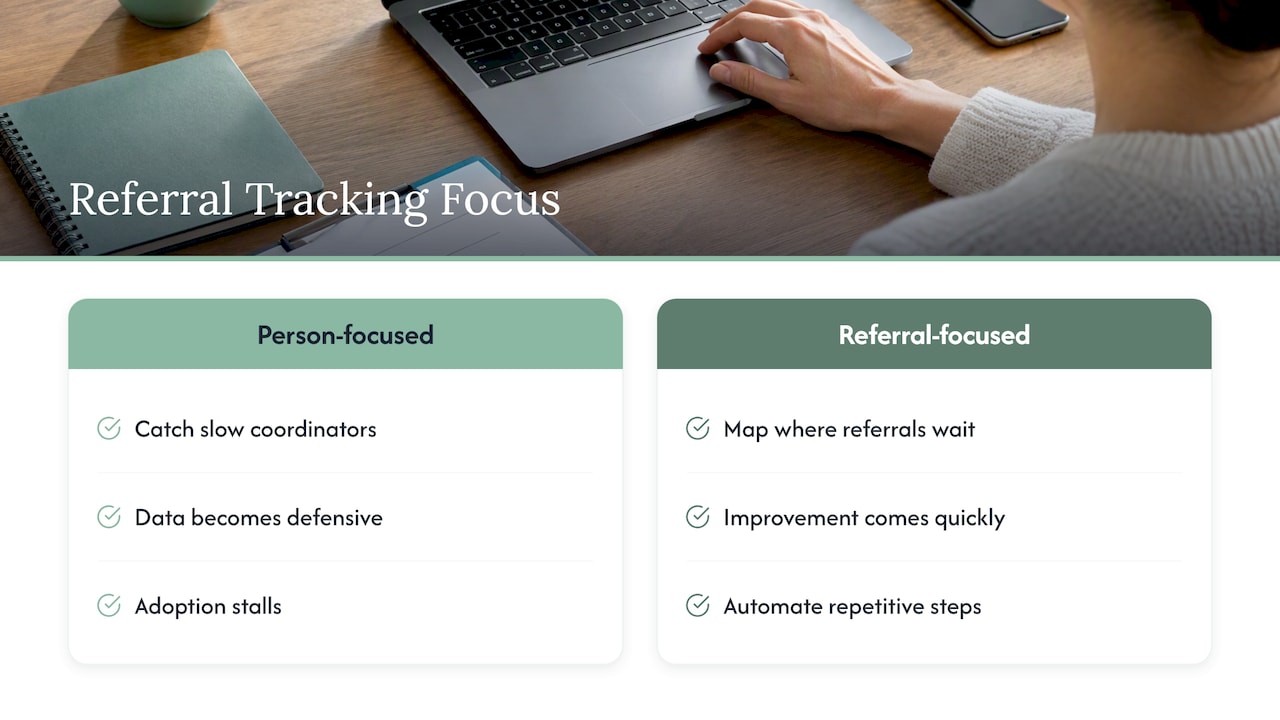
The biggest delays are usually not the clinical judgment. They are the waiting: for a missing face sheet, for a payer portal, for someone to open a fax. That is why we focus on automating the repetitive steps, such as pulling documents into one record, verifying eligibility against insurance portals in real time and routing referrals to the right reviewer. When those steps run on their own, the SLA clock mostly measures decisions, which is where your experienced people add value.
Our advice: pick three SLAs first (first response, decision, acceptance to admit), get them accurate, then add the rest. Accurate timestamps on three metrics beat approximate numbers on fifteen.
— Harry
Run a weekly SLA review in 20 minutes
The top-ranking guidance on this topic makes the same point we do: compliance is a weekly habit, because a monthly report arrives after the damage is done. A simple agenda:
- Compliance rate per SLA for the week (referrals meeting the limit divided by total referrals).
- Slowest five referrals and why each was slow.
- Breaches by referral source, to spot hospitals that send incomplete packets.
- Decline reasons, to see whether declines are clinical, payer-related or capacity-related.
- Conversion: how many accepted referrals became admissions, and the reasons for those that did not.
- One change for next week. Only one, so you can see whether it worked.
Keep the meeting short and the audience small: the admissions director, the lead coordinator, and the clinical reviewer. Share a one-page summary with the administrator.
Worked example: finding the bottleneck
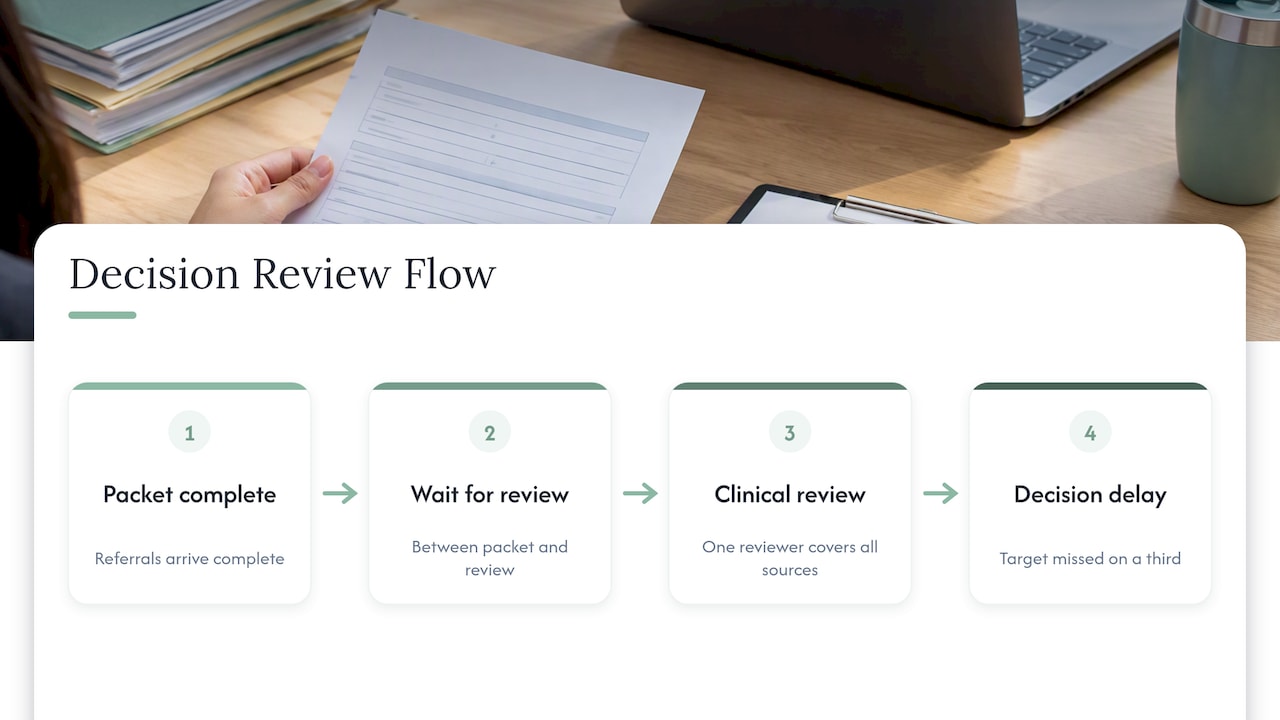
Suppose your weekly review shows that first response is within target for most referrals, but decision time is missed on a third of them. Looking at the stage timestamps, most of those delays sit between “packet complete” and “clinical review started.” Referrals arrive complete, then wait.
The cause turns out to be a single reviewer covering all sources. The fix may be a second trained reviewer on busy days, or automated pre-screening so that the reviewer starts with a summary instead of a raw packet. Without stage-level timestamps, you would see only that decisions are slow and might blame payers or hospitals. With them, you know where to act.
This is also where our guide to enhancing referral tracking for higher bed occupancy helps: it ties each stage to the occupancy result you care about.
How Smart Admissions supports SLA tracking
Smart Admissions is an AI-powered referral management assistant for skilled nursing facilities, rehabilitation centers and post-acute providers. It integrates with your existing EMR and insurance portals, verifies eligibility in real time, supports clinical assessments and keeps referral documentation in one place, with analytics so your team can see where referrals wait. Onboarding takes under an hour, and we back it with a guarantee that the software pays for itself within 30 days.
Plans are $597 per month or $6,447 per year. See the details on the pricing page, or read how EMR integration with referrals works before you decide.
Common mistakes in admissions SLA tracking
- Tracking averages only. One referral that waited two days disappears inside a good average. Report the slowest referrals and the percentage within target.
- Too many metrics. If the team cannot recite the SLAs, they will not act on them.
- No decline reason codes. You lose the most useful data for capacity and marketing decisions.
- Stopping the clock at the wrong time. Define start and stop events in writing before collecting data.
- Using SLAs punitively. People will stop recording honestly.
- Ignoring the hospital side. If a source delays documents, log it and share the data with them professionally.
Getting started this month
A realistic first month:
- Week 1: Define the seven stages, start and stop events, and owners. Pull a baseline from recent referrals.
- Week 2: Set initial targets and enable timestamps on every status change.
- Week 3: Run the first weekly review. Fix data-entry gaps, not people.
- Week 4: Tighten one target, add escalation rules and share a summary with your administrator.
For wider context on reducing manual work, see our overview of streamlining administrative tasks in healthcare admissions.
FAQ
What is an SLA tracker in admissions?
An SLA tracker is a report or dashboard that compares the actual time each referral spends in each admissions stage with a target time. It flags referrals that are at risk or late and shows compliance rates over time. In a nursing facility, it usually sits inside the referral management system.
What is a 3 day SLA?
It is a commitment to finish a step within three days. In skilled nursing admissions, three days is typically too slow for the first response or decision, because hospitals plan discharges within hours. A multi-day limit may suit later steps such as authorization follow-up, if your payer mix requires it.
What is the difference between an SLA and a KPI?
An SLA is a specific time commitment, such as responding to a referral within one hour. A KPI is any measure of performance, such as admission conversion rate. SLA compliance is itself a KPI, and meeting your SLAs tends to improve other KPIs such as occupancy.
How often should we review admissions SLAs?
Weekly. A monthly or quarterly review shows problems after many referrals have already been lost. Use a short weekly meeting for operations and a monthly summary for your administrator or owner.
Sources
- Medicare Claims Processing Manual, Chapter 2 (CMS)
- Health Plans Reduce Prior Authorization, Support Continuity of Care (AHIP)
- Resolution Agreement between HHS Office for Civil Rights and Montefiore (HHS.gov)
- The IMPACT Act of 2014: Frequently Asked Questions (CMS)