
To reduce manual data entry in skilled nursing admissions, capture each referral once, let software read and score it, and push the accepted record into your EHR so nobody types it a second time. Most of the keystrokes come from three places: referrals arriving by portal, fax and email, re-keying the same demographics into several systems, and long admission forms with fields nobody uses. Fix those three and your team gets hours back for hospital relationships and for deciding which patients your facility can serve well.
This guide is written for admissions coordinators, admission directors, administrators and owners. It walks through seven steps, shows where each one tends to go wrong, and explains which parts of the job still need a trained human.
Key Takeaways
- Re-keying happens at referral intake, at EHR entry and on the admission form itself. Each one needs its own fix.
- Enter data once, then push it. A 40-bed skilled nursing facility completed more than 800 admissions, transfers and discharges with no duplicate entry after integrating with its EHR.
- Automated extraction is not perfect, so pair it with confidence thresholds, rules-based checks and a coordinator review of the key clinical fields.
- Protect the data you automate: HIPAA Security Rule safeguards apply to every system that touches ePHI, including fax machines and copiers.
- Measure before and after: minutes per referral, touches per admission, response time and lost referrals.
Table of Contents
- Where Manual Data Entry Hides in Admissions
- 7 Steps to Reduce Manual Data Entry in Your Facility
- What Still Needs a Human Reviewer
- Protect the Data You Automate
- Measure Whether You Did Reduce Manual Data Entry
- Perspective: Why Facility-Specific Matters
- Put It to Work in Your Facility
- FAQ
- Sources
Where Manual Data Entry Hides in Admissions
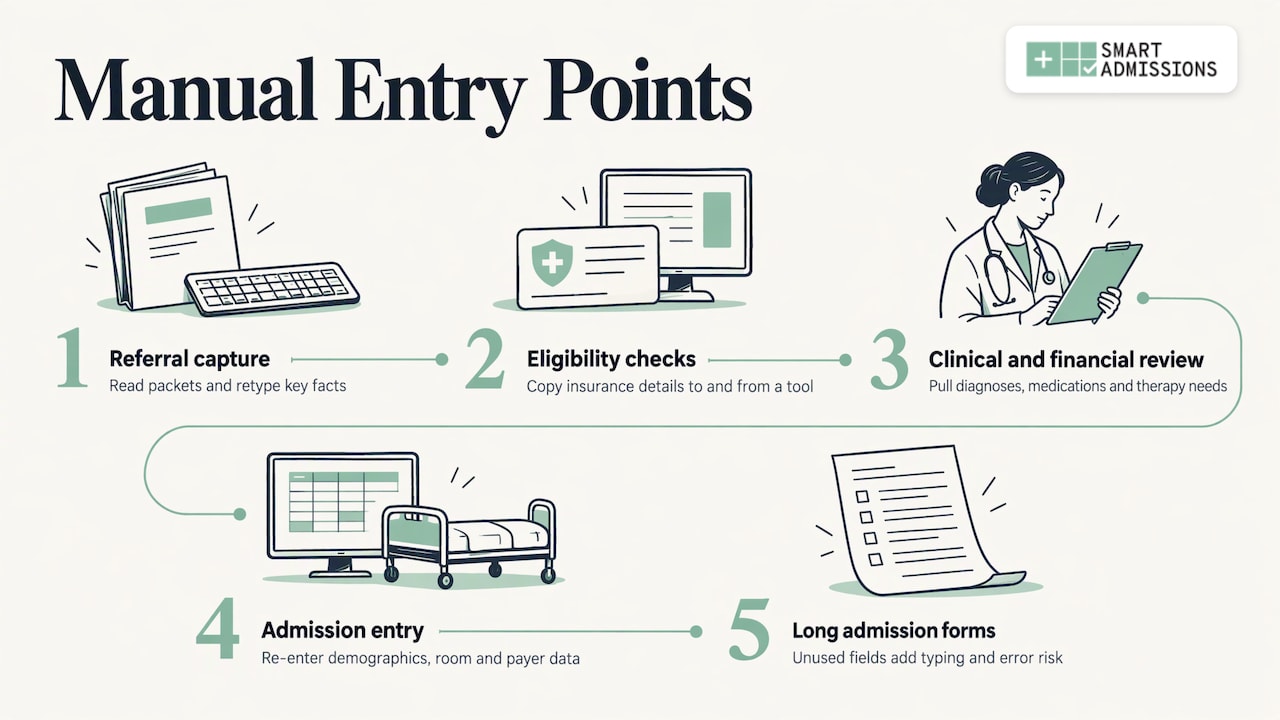
Before you reduce manual data entry, find where it happens. In most facilities it is not one task. It is a chain of small ones.
Referral capture. A hospital case manager sends a referral through a portal, a fax or an email. Someone opens it, reads a packet that may run dozens of pages, and types the key facts into a worksheet or the EHR.
Eligibility and payer checks. Insurance details are copied from the referral into a verification tool, then the result is copied back.
Clinical and financial review. Diagnoses, medications and therapy needs are pulled out by hand to judge whether you can care for the patient and what the stay will pay.
Admission entry. Once a patient is accepted, demographics, room and payer data are entered again in the EHR, the bed board and sometimes a separate spreadsheet.
The form itself. Long admission forms collect fields that nobody uses. An Australian peer-reviewed study of one nursing admission form found that of 165 data elements, 32% (53) were never used and 25% (43) were always used, which led the authors to recommend cutting 91% of the elements. Your form is different, but the pattern is common: the longer the form, the more typing and the more room for error.
Write down each point where a person types something a system already holds. That list is your project plan.
7 Steps to Reduce Manual Data Entry in Your Facility
Step 1: Audit your current touches
Follow ten recent admissions from first referral to the first day in the building. For each, count how many times someone typed or copied patient data, into which system, and how long it took. Include the referrals you declined, because declined referrals consume the same entry time and never produce revenue.
Where it goes wrong: teams audit only accepted admissions and miss the largest block of effort. Declined and pended referrals often take as long to review as accepted ones.
Step 2: Cut the admission form down
Delete fields that no one reads, and mark the rest as required, optional or pulled from another system. This is the cheapest way to reduce manual data entry, because it needs no software. Ask the people who use the form which fields they have never needed in a decision.
Where it goes wrong: removing fields that surveyors, payers or your MDS coordinators need later. Check each deletion with the person who owns that downstream task. Your clinical documentation requirements set the floor.
Step 3: Capture referrals once, whatever the channel
Referrals that arrive by fax and email are the heaviest source of typing. Optical character recognition (OCR) turns a scanned page into text, and extraction software then finds the fields you care about. Research shows why design matters. A UCSF team built a referral-automation tool in which extracted fields carried confidence values, low-confidence values were rejected, and the referral date, priority, diagnosis and specialty went to a coordinator for review before the referral reached the EHR.
Where it goes wrong: a tool that handles the portal but not fax or email leaves your team typing the most difficult documents. Smart Admissions reads every incoming referral, whether it arrives through a hospital portal, fax or email, so one intake path covers all three. You can see how that works on the how it works page.
Step 4: Validate extracted data with rules
Extraction is never 100% accurate. In a study of 2,814 paper COVID-19 assessment forms with 141 fields each, optical mark and character recognition averaged 70% accuracy, with a median of 78% against crowd validation, which took a mean of 157 seconds per document. Forms are not referral packets, but the lesson holds: unchecked extraction creates errors you then have to find.
Rules close much of the gap. An arXiv study on faxed healthcare referrals found that adding domain-specific rules to a document model improved precision, recall and F1 scores by average gains of 38.5%, 10.06% and 14.1%. Practical rules for admissions include:
- Check that an NPI has the right number of digits.
- Cross-reference member IDs against the payer format.
- Flag dates of birth that do not fit the patient’s stated age.
- Require a diagnosis before a referral can be scored.
Where it goes wrong: treating the model’s output as the truth. Build the rule layer first and review exceptions only.
Step 5: Score the referral against your own facility
Typing a referral into a worksheet is only half the work. The other half is the decision: can you meet this patient’s clinical needs, and does the stay make sense financially? Smart Admissions acts as a facility-specific decision engine. It evaluates each referral against your clinical capabilities, staffing, payer mix, PDPM reimbursement and bed availability, then summarizes and scores it so you can answer with a confident yes or a defensible no in minutes instead of hours.
It also raises med cost alerts that flag high-cost medications before acceptance, so the number someone would have looked up by hand is in front of you when you decide. For veterans homes, the platform supports DD214 review to speed eligibility decisions. If you want the reimbursement side in detail, see our 15 minute PDPM admission workflow.
Where it goes wrong: generic scoring that ignores your building. A rule that fits another facility’s staffing will reject patients you could serve, or accept ones you cannot.
Step 6: Push accepted referrals into your EHR
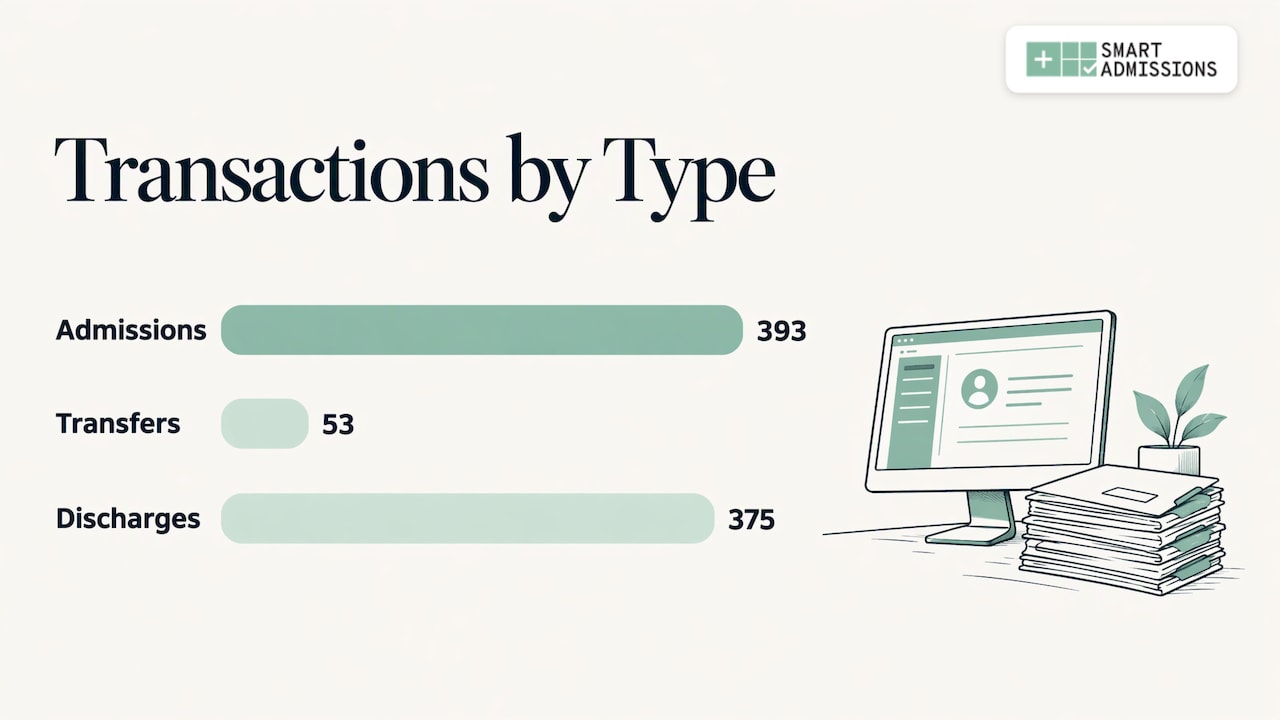
The biggest single saving comes from entering data once. The RCare and PointClickCare integration case study describes users entering data only once in the EHR, with resident and room information pushed automatically at frequent intervals. At Eastcastle Place, a 40-bed skilled nursing facility in Milwaukee, 393 admissions, 53 transfers and 375 discharges were completed over 15 months after the January 2018 implementation, more than 800 transactions, with no duplicate entry. The EHR-pushed fields were also locked in the secondary system to protect integrity.
Smart Admissions is EHR-independent and integrates with PointClickCare, so accepted referrals flow into existing workflows without duplicate entry. Our guide to duplicate chart prevention covers the checks that keep one patient from becoming two records.
Where it goes wrong: integrations that sync some fields and leave staff to fill the rest. The case study’s team advised field testing and a rigorous quality-assurance process that exercises every known use case. Do the same before go-live.
Step 7: Train, go live and watch for workarounds
The Actors Fund, a LeadingAge member, built a training environment that mirrored its live system. Within five weeks it cut reliance on paper charts to about 10% and replaced an admissions workflow that had taken three hours. Its executive director reported no more weekend stress from manual entries or blocked admissions.
Watch for workarounds. A study of five Midwestern nursing homes found that staff often solved problems with quick workarounds such as overriding safety alerts, rather than reengineering the process around the technology. If staff keep a side spreadsheet after go-live, ask why, then fix the workflow instead of the person. Our admission workflow guide lays out a sequence you can adapt.
What Still Needs a Human Reviewer
Your goal when you reduce manual data entry is less typing, not less judgment. Some parts of a referral should always be read by a clinician or an experienced coordinator.
A study of faxed outside records for referred cardiovascular patients at Mayo Clinic shows the risk. It describes a best case in which an expert care coordinator or nurse manually reviews outside records before the encounter, and a worst case in which incoming records are skimmed and useful information is missed. Review takes real time and can still miss things, which is the case for software that organizes the packet and surfaces what matters.
A workable split looks like this:
| Task | Software | Staff |
|---|---|---|
| Reading the packet and pulling demographics, payer, diagnosis | Extracts and summarizes | Confirms key fields |
| Format checks on NPI, member ID, dates | Validates automatically | Handles exceptions |
| Reimbursement and bed-fit scoring | Scores against your facility rules | Applies judgment on borderline cases |
| Medication cost flags | Alerts before acceptance | Decides on acceptance |
| Clinical acceptability, complex wound or behavior cases | Highlights the relevant sections | Makes the final call |
| Hospital relationship, family conversations | None | Owns it |
That last row is the point. When your admissions director is not re-keying referrals, more of the day goes to the case managers who send you patients.
Protect the Data You Automate
Every system that handles referral data is in scope for HIPAA. The HHS summary of the Security Rule requires regulated entities to implement safeguards for the confidentiality, integrity and availability of ePHI, including access control, audit controls, authentication and transmission security. Required documentation must be kept for six years after the later of its creation or the date it was last in effect. HHS defines integrity as data not being altered or destroyed in an unauthorized manner, which is why locked EHR-pushed fields and validation rules matter.
Two practical points for admissions teams:
- Fax and copiers count. An AHIMA Journal article on admissions security notes that analog fax machines without activity logging and multifunction devices that retain images and e-mail addresses are common vulnerabilities in admissions and discharge processes. Moving fax intake into a managed system gives you a log and fewer paper copies.
- Encryption is heading toward a requirement. A proposed rule published in the Federal Register on January 6, 2025 would make encryption of ePHI generally required with limited exceptions, rather than addressable. Ask any vendor how data is encrypted in transit and at rest, and confirm the status of the rule with your compliance officer or counsel.
Your compliance officer should sign off on any new system that touches referral data before go-live.
Measure Whether You Did Reduce Manual Data Entry
Take a baseline in step 1, then compare at 30 and 90 days. Useful measures:
- Minutes of staff time per referral, split by accepted, declined and pended.
- Number of times patient data is typed per admission.
- Time from referral received to response sent to the hospital.
- Referrals lost because no one answered in time.
- Corrections made after admission to demographics, payer or room data.
- Acceptance rate and payer mix of accepted patients.
Smart Admissions gives leadership visibility into referral sources, response times, acceptance rates and lost opportunities across one facility or a whole network, so these numbers come from the platform and not from a manual tally. Our guides on referral tracking and analyzing referral data show how to read them.
Perspective: Why Facility-Specific Matters
Most advice on how to reduce manual data entry treats it as a typing problem. In admissions it is a decision problem. A referral packet is not data waiting to be copied. It is a question: can we care for this person, and can we afford to?
That is why we built Smart Admissions as a decision engine for your facility and not a generic form reader. It reads each referral however it arrives, then matches it to your clinical capabilities, payer mix and available beds. PDPM-aware scoring puts the reimbursement story up front, and med cost alerts catch expensive drugs before acceptance. Speed is table stakes. The goal is more right admissions and fewer costly mistakes.
We built it with people who have run admissions and know MDS and reimbursement firsthand. They know that a coordinator’s time is better spent on the hospital relationship than on retyping a face sheet.
Harry
Put It to Work in Your Facility
Smart Admissions is built to reduce manual data entry across the whole referral-to-bed path: intake from portal, fax and email, scoring against your own rules, and a clean handoff into PointClickCare. Onboarding is fast, and configuration matches each facility’s rules.
Plans are published on the pricing page: $597 per month, or $6,447 per year.
FAQ
How do I reduce manual data entry errors in admissions?
Enter each data point once and let software carry it forward. Add rules that check formats such as NPI digits and member IDs, reject low-confidence extractions, and send the key clinical fields to a coordinator for confirmation. Locking fields pushed from the EHR in downstream systems also prevents edits that drift out of sync.
Can automation read faxed referrals?
Yes. OCR and document-understanding models can pull fields from scanned fax pages, though accuracy varies with scan quality and layout. That is why extraction should be paired with validation rules and human review of key fields. Smart Admissions reads referrals that arrive by fax, portal or email.
Will this work with PointClickCare?
Smart Admissions integrates with PointClickCare, so accepted referrals flow into your existing workflow without duplicate entry. It is also EHR-independent, so the decision step does not depend on which system you use.
What should I fix first?
Start with an audit of ten recent referrals, including declined ones, and count every time data is typed. Then shorten the admission form, since removing unused fields costs nothing. After that, tackle fax and email intake and the EHR handoff, where the largest time savings usually sit.
Sources
- Adopting an American framework to optimize nursing admission documentation (PMC9272497)
- Design and development of Referrals Automation (PMC7660949)
- Extracting Medical Information from Paper COVID-19 Assessment Forms (PMC7946598)
- Document Understanding for Healthcare Referrals (arXiv 2309.13184)
- The RCare-PointClickCare Integration case study
- Actors Fund-Netsmart Case Study, LeadingAge
- Technology Implementation and Workarounds in the Nursing Home (PMC2274876)
- Salience of Medical Concepts of Inside Clinical Texts and Outside Medical Records (PMC8982748)
- Summary of the HIPAA Security Rule, HHS.gov
- HIPAA Security Rule To Strengthen the Cybersecurity of ePHI, Federal Register
- Security Starts at Admissions, But Can’t End After Discharge, AHIMA Journal