
Access control admissions is the set of rules that decides who on your team can open, edit, export or sign off on each referral and patient record. In a skilled nursing facility, that means your admissions coordinator sees what she needs to screen a referral, your nurse reviewer sees the clinical packet, and nobody sees more than the job requires. Done well, it protects electronic protected health information (ePHI), satisfies HIPAA, and speeds up intake instead of slowing it down.
This guide is written for admissions coordinators, admissions directors, administrators and owners. It covers what HIPAA requires, which access models fit an admissions office, seven steps to put in place, and the mistakes that most often cause trouble.

TL;DR
- HIPAA treats information access management as a required administrative safeguard: access to ePHI must follow a person’s role and the minimum necessary standard.
- Role-based access control (RBAC) is the best fit for admissions teams, because permissions follow the job, not the individual.
- Shared logins and shared passwords remove accountability and cannot be defended in an audit.
- Multi-factor authentication, unique user IDs, audit trails and tested emergency access procedures are the core of a defensible setup.
- A purpose-built referral platform can automate roles and logging so your team spends less time on administration.
Table of Contents
- What access control means in an admissions office
- What HIPAA requires for access control
- Which access control model fits an admissions team
- Seven steps to build access control admissions workflows
- Mistakes that weaken access control admissions
- Our perspective: access control should speed admissions up
- Choosing software with access control built in
- How Smart Admissions fits
- A 30-day access control checklist
- FAQ
- Sources
What access control means in an admissions office
Most search results for this topic describe door readers, badge systems or IT permission lists. Those matter, but an admissions office has a more specific problem. Referrals arrive from hospitals, case managers and families. They contain diagnoses, medications, insurance details and sometimes behavioral health notes. Many people want to touch that data: coordinators, nurse reviewers, business office staff, therapy leads, the administrator and sometimes outside partners.
Access control answers three questions for every one of those people:
- Who are you? Authentication, such as a unique username and multi-factor login.
- What are you allowed to do? Authorization, such as view, edit, upload, export or approve.
- What did you do? Accountability, meaning logs that tie each action to a named user.
HHS draws a useful line between two related ideas. In its Summer 2021 OCR Cybersecurity Newsletter, it explains that Information Access Management is an administrative safeguard, while Access Control is a technical safeguard. The first is the policy: who should have access. The second is the technology that enforces it. You need both.
What HIPAA requires for access control
The HIPAA Security Rule applies to health plans, clearinghouses and health care providers that transmit health information electronically in connection with covered transactions. Most skilled nursing facilities fall in that last group.
For admissions, three requirements carry the most weight:
- Authorize access by role. Policies must say who may access ePHI and why, using the minimum necessary standard. HHS explains that standard in its minimum necessary guidance.
- Enforce it technically. The Access Control standard requires systems to allow access to ePHI only to those people or programs that have been granted it, as described in HHS guidance on controlling access to ePHI.
- Keep audit controls that identify users. If an action cannot be traced to a specific person, you cannot investigate it.
The rule is the same whether your facility has 40 beds or 400. What changes is how much effort it takes to comply, and that is where tooling matters.
Which access control model fits an admissions team
The three models you will see most often are described in the NIST guide to attribute based access control. Here is how they compare for a nursing facility.
| Model | How it works | Fit for admissions |
|---|---|---|
| Discretionary (DAC) | The owner of a file or folder decides who can open it, often through access control lists | Flexible but weak: no central policy, easy to expose data by accident |
| Role-based (RBAC) | Permissions attach to job functions such as admissions coordinator or nurse reviewer | Best default: simple to explain, easy to audit |
| Attribute-based (ABAC) | Rules use attributes such as role, location, time of day or record type | Precise, useful for larger groups or multi-site operators |
NIST cautions that DAC lacks centralized enforcement, which makes it susceptible to accidental exposure. That matches what many admissions offices actually do: a shared drive, a few spreadsheets, and folders that someone once opened up for convenience.
RBAC solves the staff turnover problem directly. When an admissions director leaves, you disable one account and reassign one role. You do not hunt through every folder to remove her name.
Many facilities start with RBAC and add a few attribute rules later, for example limiting behavioral health notes to clinical reviewers or restricting exports to off-hours review.
Seven steps to build access control admissions workflows
Use this sequence whether you are tightening an existing process or setting up a new system.
Step 1: Map every role that touches a referral
List each position and what it needs to do. A typical map looks like this:
- Admissions coordinator: receives referrals, verifies insurance eligibility, requests missing documents.
- Nurse or clinical reviewer: reads clinical records and records the clinical decision.
- Admissions director: approves exceptions, sees reports and pipeline analytics.
- Business office: sees payer and authorization details, not full clinical notes.
- Administrator: sees summary reporting and manages user accounts.
Write it down in one page. If two roles need identical access, they may be one role.
Step 2: Apply the minimum necessary standard
For each role, decide the smallest set of data and actions it needs. HHS describes the minimum necessary standard as limiting uses and disclosures to what is needed for the task. A coordinator who verifies eligibility needs demographics and insurance data. She rarely needs the full psychiatric history in the packet.
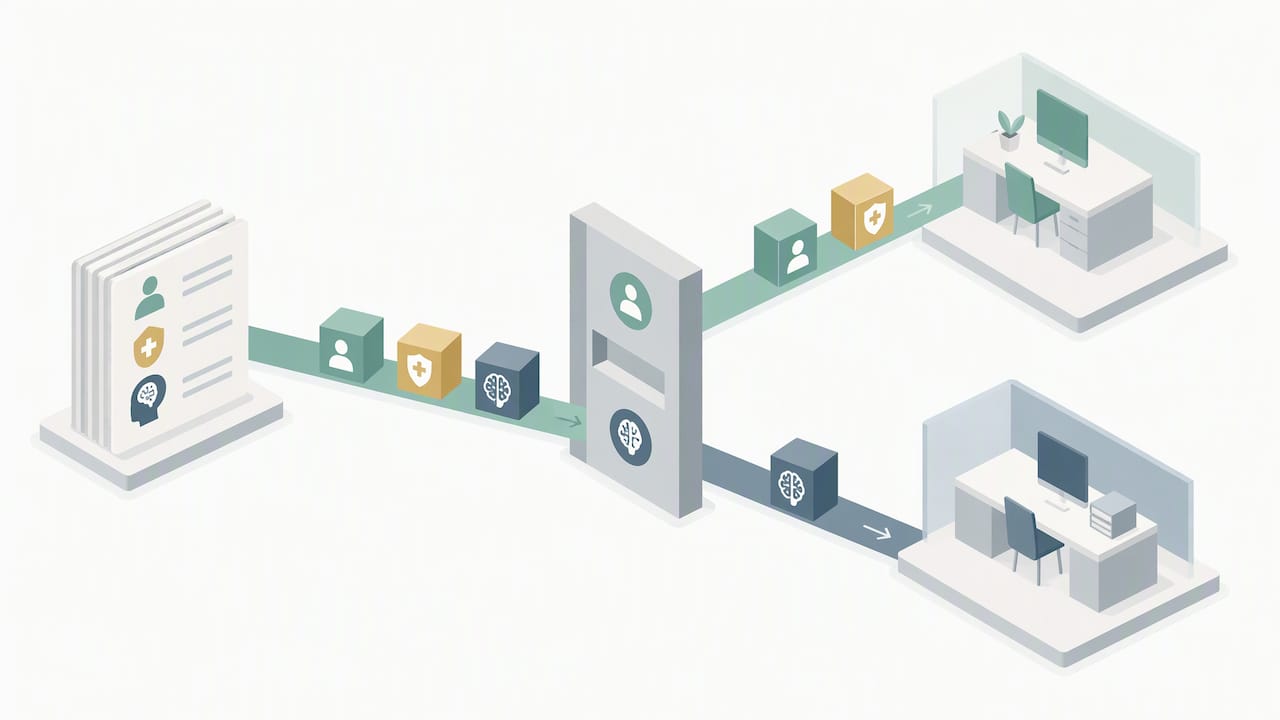
This is more than a compliance exercise. When people see only what is relevant, they find it faster, and decisions speed up.
Step 3: Give every user a unique ID
Every person gets a named account. No “admissions@” mailbox login, no shared tablet profile. The OCR newsletter linked above makes the point that audit controls must uniquely identify users. If a shared account is involved in an incident, you cannot attribute the action to anyone, and you cannot show regulators you control access.
Step 4: Require multi-factor authentication
Passwords alone are the weakest link. An HHS OIG audit of a large hospital found that an account management web application lacked strong user identification and authentication controls, such as multi-factor authentication. That audit concerned a hospital, but the lesson transfers to any web-based patient-management tool your team uses. Turn on MFA for every user who can reach ePHI, especially for remote access and email.
Step 5: Log and review activity
Access control is only credible if you can see how it is used. Your system should record who viewed, changed, exported or signed each record, with timestamps. Then someone has to look. Schedule a short monthly review: unusual after-hours access, a spike in exports, access to records outside a user’s usual caseload.
For a deeper look at what logs should capture, see our guide to audit trail requirements.
Step 6: Plan and test emergency access
HIPAA also expects a plan for getting to critical information when systems fail. Power loss, an internet outage or a vendor incident can all hit on a Friday evening while a hospital is pressing for a weekend admission. Define in advance how authorized staff reach essential patient data, who can do it, and how it is recorded. The OCR newsletter notes that “break-glass” accounts are risky when they are not uniquely assigned or periodically audited. Test the procedure at least once, and write down what you learned.
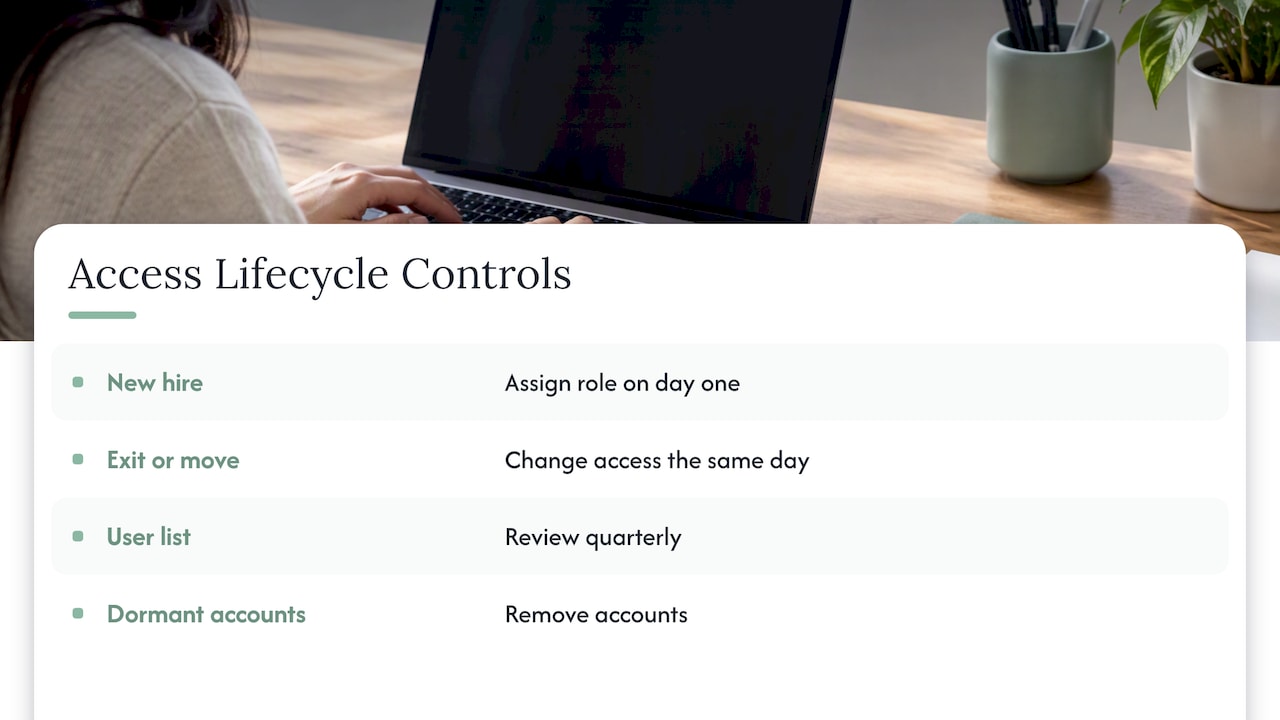
Step 7: Tie access to onboarding and offboarding
Most access problems come from people changing jobs. Create a checklist: when someone joins, the role is assigned on day one; when someone leaves or changes position, access changes the same day. Review the full user list on a fixed schedule, quarterly for most teams, and remove dormant accounts.
Mistakes that weaken access control admissions
The same patterns appear in facility after facility.
Shared accounts for convenience
HHS regulators frequently see convenience mistaken for compliance. A shared login saves a minute when a coordinator is covering for a colleague. It also removes accountability. If something goes wrong, you cannot say who opened which record.
Open folders and spreadsheets
Referral trackers built in spreadsheets are common, and they often live on a shared drive with broad permissions. They also tend to get emailed. If you must use them during a transition, restrict them by role and move toward a system that logs every access.
Confusing authorization dates with referral dates
This is an operational accuracy issue that sits close to access control, because the right people need to enter the right data. According to the CMS OASIS-E1 manual, the date of referral (item M0104) is the date the agency received the initial information needed to start assessment, not the date a payer authorized services. That manual governs home health, so check which assessment instrument applies to your setting, but the principle holds: define who may enter key dates and make the entry auditable.
Treating security as an IT-only job
Access control decisions are clinical and operational. The administrator, the director of nursing and the admissions director should help set roles, because they know what each job needs. IT configures the system, but the policy comes from the people who do the work.
Forgetting the vendor chain
Every tool that touches referrals extends your access control boundary. Ask vendors how they handle user roles, logging, encryption and support. Cover this in contracts and business associate agreements. Our overview of patient data security in admissions goes into this in more detail.
Our perspective: access control should speed admissions up
We build software for skilled nursing and post-acute admissions teams, and we hear the same worry from administrators: security controls will add clicks to a process that already runs on thin staffing. We understand the concern, and we think it is backwards.
When access is unstructured, admissions staff lose time. They search for the right document, wait for someone to share a file, or ask a colleague to check a payer portal on their behalf. Each workaround is a security gap and a delay at the same time. When roles are clear and the system is connected to your EMR and insurance portals, the right information reaches the right person automatically, and the log is a by-product of the work rather than a separate task.
That is how we approach the platform. Roles define what each team member sees, eligibility verification and clinical assessments sit in one workspace, and documentation stays attached to the referral instead of scattering across inboxes. Our aim is faster referral review and faster bed fill, with accountability built in.
If you take one thing from this guide, make it this: replace shared accounts first. It costs little, it is visible to every auditor, and it is the change that makes every other control meaningful.
— Harry
Choosing software with access control built in
Whether you build on your EMR, a shared drive or a dedicated platform, evaluate admissions software against this checklist:
- Role-based permissions that you can adjust without a developer
- Unique user accounts and multi-factor authentication
- Detailed activity logs you can export for review
- Integration with your EMR and insurance portals, so staff do not re-key data or share exports
- Clear documentation of how the vendor handles emergency access and support
- Onboarding that does not pull your team away from patients for weeks
Integration matters more than it seems. Every manual copy from an EMR into a spreadsheet creates a second, unmanaged version of the record. Our pages on what EMR integration is and how to integrate your EMR with referrals explain how to avoid that.
Automation also reduces the need to hand data around. See manual vs automated admissions for a side-by-side view, and our guide to electronic signatures in healthcare compliance for the signature side of the workflow.
How Smart Admissions fits
Smart Admissions is an AI-powered referral management assistant for skilled nursing facilities, rehabilitation centers and post-acute providers. It connects with your existing EMR and insurance portals, verifies eligibility in real time, supports clinical assessments and keeps referral documentation in one place. Onboarding takes under an hour, and our team provides hands-on support.
Pricing is published: $597 per month or $6,447 per year. We back it with a guarantee that the software pays for itself within 30 days. If you want to see how it would map to your roles and workflow, start from our home page.
A 30-day access control checklist
If you want a practical starting point, work through this list over the next month:
Week 1
- Export a list of everyone with access to referral data, in every system.
- Mark shared accounts, dormant accounts and anyone who has changed roles.
Week 2
- Draft your role map and the minimum necessary data for each role.
- Replace shared accounts with named accounts.
Week 3
- Enable multi-factor authentication for all users who reach ePHI.
- Confirm that activity logs exist and who reads them.
Week 4
- Test your emergency access procedure and document the result.
- Add access changes to your hiring and exit checklists.
- Schedule a quarterly user review on the calendar.
This will not make a facility audit-proof, and your compliance officer or counsel should review your policies against your own risk analysis. It will, however, close the most common gaps and give you a documented process to show for it. For the broader compliance picture, our patient record compliance steps are a good next read.
FAQ
What is access control in admissions?
It is the combination of policies and system settings that limits each team member to the patient information and actions their role requires. It covers logins, permissions and activity logs. In a nursing facility, it applies to referral packets, insurance data, clinical assessments and signed documents.
Is role-based access control required by HIPAA?
HIPAA does not name RBAC specifically. It requires policies that authorize access to ePHI and technical controls that enforce them, guided by the minimum necessary standard. RBAC is a common, practical way to meet that requirement because it ties permissions to job functions.
Can admissions staff share a login during busy periods?
No. Shared accounts prevent you from tracing actions to individuals, and HIPAA audit controls must uniquely identify users. Give covering staff their own accounts with the appropriate role instead, so coverage is quick and still accountable.
How often should we review who has access?
A quarterly review of all users is a sensible baseline, with same-day changes whenever someone joins, leaves or changes roles. Add a monthly glance at activity logs for unusual patterns. Your own risk analysis may justify a tighter schedule.
Sources
- Summary of the HIPAA Security Rule, HHS
- Summer 2021 OCR Cybersecurity Newsletter, HHS
- Minimum necessary requirement, HHS
- Controlling access to ePHI, HHS newsletter
- Guide to Attribute Based Access Control, NIST SP 800-162
- HHS OIG audit A-18-22-08021
- OASIS-E1 Manual, CMS