
HIPAA compliant admissions means that every referral, intake form, eligibility check and phone call your team handles protects patient information from the first contact to move-in day. For a skilled nursing facility, that comes down to seven practical habits: know what counts as protected health information (PHI), share only what you need, control who sees records, secure every channel, sign vendor agreements, train your team and know your breach steps. This guide walks through each one so your admissions team can work quickly and stay compliant.
TL;DR
- HIPAA protects PHI in any form, whether electronic, paper or spoken, so admissions compliance covers faxes, emails, hallway conversations and software alike.
- You may use and share PHI for treatment, payment and health care operations without separate authorization, but non-routine disclosures are limited to the minimum necessary.
- Any software vendor that handles your electronic PHI needs a written business associate agreement before it touches a single referral.
- An impermissible disclosure is presumed to be a breach unless a risk assessment shows a low probability of compromise, and most breaches must be reported within 60 days of discovery.
- HIPAA does not hand you a required admissions form. What matters is that your process, whatever its format, follows the rules.
Table of Contents
- Why HIPAA compliant admissions deserve their own process
- Step 1: Know what counts as PHI in your admissions file
- Step 2: Use and share PHI only as the Privacy Rule allows
- Step 3: Control access to referral records
- Step 4: Secure every channel your referrals travel through
- Step 5: Put business associate agreements in place before go-live
- Step 6: Give residents their privacy notice and rights at admission
- Step 7: Train your team and prepare your breach response
- A compliance table for your admissions workflow
- Our perspective: compliance and speed are not opposites
- Where Smart Admissions fits
- FAQ
- Sources
Why HIPAA compliant admissions deserve their own process
Admissions is where your facility receives the most sensitive information from the most outside parties in the shortest time. Hospital case managers send clinical summaries. Families call with questions. Payers return eligibility details. Each exchange is a chance for PHI to land in the wrong inbox, fax tray or shared folder.
The stakes are not theoretical. In 2022, the HHS Office for Civil Rights entered a resolution agreement with a nursing facility that failed to give a personal representative timely access to medical records. That case involved records access rather than a data theft, which is a useful reminder: compliance covers how you respond to people, not only how you lock things down.
The good news is that a HIPAA compliant admissions workflow is mostly a matter of consistent habits. The seven steps below are written for admissions coordinators, admissions directors and administrators who want a process they can document and repeat.
Step 1: Know what counts as PHI in your admissions file
The HIPAA Privacy Rule protects PHI held or transmitted in any form, including electronic, paper or verbal. That single point changes how many facilities think about admissions. A referral packet in a fax tray is PHI. So is a voicemail from a discharge planner and a sticky note with a diagnosis.
PHI is identified by 18 HIPAA identifiers. The ones your team sees daily include:
- Names and geographic subdivisions smaller than a state
- All elements of dates (except year) related to an individual, such as birth, admission and discharge dates
- Telephone and fax numbers and email addresses
- Social Security numbers and medical record numbers
- Health plan beneficiary numbers and account numbers
The full list also reaches certificate and license numbers and vehicle identifiers. Put the list where your coordinators work, because it makes one thing obvious: almost every field on a typical referral or intake form is an identifier.
Map where PHI enters and moves
Before you change anything, trace one referral from arrival to admission. Write down every place it appears: the referral portal, the fax line, the shared inbox, the EMR, the eligibility site, the printed face sheet and the whiteboard in the admissions office. Each of those is a place you must be able to secure and explain.
Step 2: Use and share PHI only as the Privacy Rule allows
Admissions staff often worry that reviewing a referral from a hospital requires a signed release. In most cases it does not. HHS guidance explains that a covered entity may use or disclose PHI without authorization for its own treatment, payment and health care operations, and may disclose it for another provider’s treatment activities.
In practice, that covers:
- Reviewing a hospital’s clinical packet to decide whether you can meet the person’s care needs
- Verifying insurance eligibility and benefits as part of payment
- Internal quality review and referral analytics as health care operations
Apply the minimum necessary standard
Permission to share is not permission to share everything. Covered entities must develop role-based access policies for workforce uses and limit non-routine disclosures to the minimum necessary. Disclosures to health care providers for treatment are excepted.
For admissions, that means a business office employee verifying coverage does not need the full psychiatric history, and a family member asking about a bed does not receive clinical details by default. Define which roles see which parts of a referral, and write it down.
Handle facility directory and visitor questions carefully
Callers will ask whether a person is in your building. A covered entity may disclose a person’s name, location within the facility and general condition for directory purposes to people who ask for the individual by name, provided the individual was informed and had a chance to object. Give your front desk and admissions staff a script that reflects each resident’s recorded choice.
Step 3: Control access to referral records
Facilities must adopt privacy procedures, train employees and secure PHI records so they are not readily available to people who do not need to see them. For admissions, translate that into specific controls:
- Unique logins for every user. No shared admissions accounts, and no passwords on monitors.
- Role-based permissions. Admissions, nursing, billing and administration each see what their job requires.
- Locked storage for paper. Face sheets and printed referral packets belong in locked cabinets or shredding bins, not on desks.
- Screen privacy. Position monitors away from visitor areas and lock workstations when staff step away.
- Access reviews. Check user lists regularly, and remove access the day someone changes roles or leaves.
The same logic applies to your digital tools. Our guide to patient data security in admissions goes deeper on the technical side.
Step 4: Secure every channel your referrals travel through
The Privacy Rule expects safeguards when your team communicates by email, phone or fax. The Security Rule goes further for electronic PHI (ePHI): regulated entities must develop reasonable and appropriate security policies, analyze security risks and protect the confidentiality, integrity and availability of ePHI.
A channel checklist for your admissions desk
- Fax: confirm numbers before sending, use cover sheets, and keep fax machines out of public areas.
- Email: send PHI only through approved, secured methods, and never to personal accounts.
- Phone: verify who you are speaking with before discussing a referral, and avoid speakerphone in shared spaces.
- Text messaging: keep clinical details out of unsecured consumer apps.
- Portals and EMR: prefer a single, access-controlled system of record over copies scattered across inboxes.
That last point matters most. The fewer places a referral lives, the fewer places it can leak. Connecting referral intake to your records system reduces re-keying and stray copies, which is why we cover it in how to integrate EMR with referrals.
Accept that some incidental disclosure is normal
HIPAA does not demand perfection in a busy building. Limited incidental disclosures are not violations if the facility takes steps to protect patient privacy whenever it can. A clinician overheard in a hallway is different from a referral packet left at a public counter. Your documented reasonable steps are what make the difference.
Step 5: Put business associate agreements in place before go-live
Admissions technology almost always involves outside vendors: referral platforms, eligibility tools, e-signature services, cloud storage and answering services. Before permitting a business associate to create, receive, maintain or transmit ePHI, a regulated entity must have a compliant written agreement in place. The same page notes that the agreement must require the business associate to ensure that subcontractors handling ePHI agree to comply with the Security Rule.
Ask every vendor these questions before you sign:
- Will you sign a business associate agreement, and can I review it first?
- Which subcontractors will touch our ePHI, and are they bound by the same terms?
- How and when will you notify us of a security incident?
- What happens to our data if we end the contract?
On that third question, HHS notes the Security Rule does not prescribe the detail, frequency or format of security incident reports, and the parties can work those out in the agreement. If you do not set the terms, nobody has. Negotiate a notice timeline now.
Step 6: Give residents their privacy notice and rights at admission
Admission paperwork is where residents first meet your privacy practices. One published facility policy shows a common approach: provide a Notice of Privacy Practices to each resident upon each admission and make a good-faith effort to obtain a signed acknowledgement of receipt.
Build the notice into your admission package alongside the other required disclosures. Our admissions checklist step on the admissions agreement and required disclosures shows where it fits.
Train staff on what the Privacy Rule gives residents: the right to examine and copy their medical records, to request corrections, and to restrict their health plan’s access to information about treatments they paid for in cash. The 2022 enforcement case above began with a records request that went unanswered, so give your front office a clear route for forwarding these requests to the right person quickly.
Does HIPAA require a specific admissions form or software?
No source we reviewed points to a mandated admissions form or product. Federal surveyors are not expected to assess EHRs for compliance with the Privacy and Security Rules. They assess whether facility practices meet applicable confidentiality requirements. Treat any vendor claim of being “HIPAA certified” with caution, and judge the vendor by its agreement, safeguards and answers instead.
Step 7: Train your team and prepare your breach response
Policies fail when people do not know them. Training should be specific to admissions: how to verify a caller, what to do with a misdirected fax, how to handle a family member who wants records, and where to report a mistake. Run it at hire and refresh it when workflows or tools change.
Know what a breach is
An impermissible use or disclosure of PHI is considered a breach unless a risk assessment shows a low probability that the PHI was compromised. Most breaches must be reported without unreasonable delay and no later than 60 days after discovery.
A simple internal sequence keeps your team moving:
- Report immediately. Staff tell the privacy officer the same day, without fear of blame.
- Contain. Retrieve the fax, recall the email, disable the account.
- Assess. Document what PHI was involved, who received it and whether it was actually viewed.
- Decide and notify. Follow your policy and the official breach notification requirements for any reportable event.
- Fix the cause. Change the process so the same mistake cannot repeat.
If a case is unclear, ask your privacy officer or healthcare counsel before deciding it is not reportable.
A compliance table for your admissions workflow
| Admissions task | PHI involved | Main safeguard | Who owns it |
|---|---|---|---|
| Receiving a referral | Clinical summary, identifiers | Secured portal or system of record, no loose copies | Admissions coordinator |
| Eligibility check | Name, DOB, plan numbers | Role-based access, minimum necessary | Admissions or business office |
| Clinical review | Diagnoses, medications, assessments | Access limited to reviewing clinicians | Admissions director, DON |
| Family communication | Directory information only by default | Verify caller, honor objections | Admissions coordinator |
| Vendor tools | ePHI in transit and at rest | Signed business associate agreement | Administrator, privacy officer |
| Resident paperwork | Notice of Privacy Practices | Signed acknowledgement on file | Admissions coordinator |
Our perspective: compliance and speed are not opposites
We talk with admissions teams every day, and the same worry comes up: that tighter privacy controls will slow referral response. We see the opposite. Most compliance problems in admissions come from scattered handling, such as copies in inboxes, re-typed data, and referral status tracked on paper. Those are also what slow a team down.
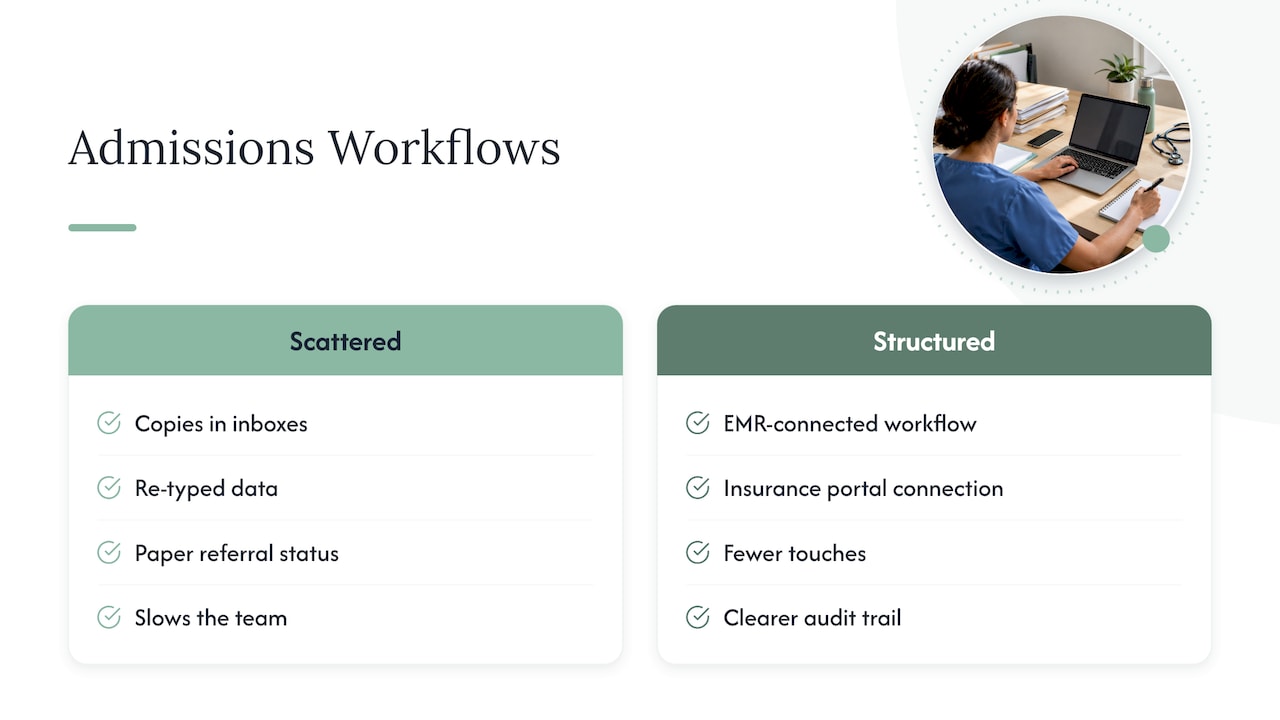
When referrals, eligibility checks, clinical documentation and decisions live in one structured workflow connected to your EMR and insurance portals, there are fewer touches and fewer places for information to stray. Your reviewers see what they need, and your audit trail is clearer. That is how we design Smart Admissions: to cut manual work while keeping your team in control of who sees what.
Our advice does not change with the tool. Ask any vendor, including us, for the business associate agreement and the security details before you commit, and involve your privacy officer. A platform supports your compliance program. It does not replace it.
— Harry
Where Smart Admissions fits
If your admissions process still runs on faxes, shared inboxes and re-keyed data, it is worth seeing what a structured workflow can do. Smart Admissions automates intake, checks insurance eligibility in real time, manages clinical documentation and integrates with your existing EMR. Onboarding takes under an hour, and our support team is available to help.
Plans are published on our pricing page: $597 per month or $6,447 per year. We guarantee the software pays for itself within 30 days. To keep the rest of your workflow tight, see our guides on referral documentation best practices and real-time eligibility verification.
FAQ
Is there a HIPAA compliant way to handle referrals by email?
Yes, if the email method has appropriate safeguards and the vendor providing it signs a business associate agreement where required. The Privacy Rule expects safeguards for email, phone and fax communication. Many facilities reduce the risk by moving referral exchange into a secured system and keeping PHI out of ordinary inboxes.
Do we need patient authorization to review a hospital referral?
Usually not. HHS guidance allows a covered entity to use PHI for its own treatment, payment and health care operations, and to receive information for treatment purposes, without separate authorization. Limit what you share beyond that to the minimum necessary, and check your policy for special categories of information.
Does HIPAA certify admissions software?
The sources we reviewed describe no HIPAA certification program for software, and surveyors are not expected to assess EHRs for HIPAA compliance. Evaluate vendors on their business associate agreement, security safeguards, subcontractor controls and incident notice terms rather than on a badge.
How fast must we report a breach?
Most breaches must be reported without unreasonable delay and no later than 60 days after discovery. An impermissible disclosure is presumed to be a breach unless your risk assessment shows a low probability of compromise. Bring in your privacy officer or counsel the day an incident is found.
Sources
- HIPAA Basics for Providers: Privacy, Security & Breach Notification Rules (CMS)
- Hillcrest Nursing and Rehabilitation Resolution Agreement (HHS)
- The 18 HIPAA Identifiers (Loyola University Chicago)
- Uses and Disclosures for Treatment, Payment, and Health Care Operations (HHS)
- Minimum Necessary Requirement (HHS)
- Practice Brief: Patient Anonymity (NCVHS)
- Summary of the HIPAA Security Rule (HHS)
- Security incident reporting FAQ (HHS)
- Notice of Privacy Practices policy (Bridgecare Suites)
- CMS survey and certification letter on EHRs