
Fax referral automation means software reads every inbound referral fax, pulls out the patient, payer and clinical details, and places them in a structured record your admissions team can act on. For skilled nursing facilities, that replaces the cycle of printing, re-keying and phone-chasing that slows every admission decision. This guide walks you through how it works, what it can and cannot extract, how it connects to your EHR, which HIPAA safeguards apply, and how to roll it out without disrupting your census work.
TL;DR
- Fax referral automation captures faxed referral data into a structured record and routes it to the right reviewer, so your team stops retyping packets.
- At Stanford Health Care, an automated fax workflow cut processing time for urgent faxed referrals from about 33 hours to about 1 hour.
- Automation is hybrid: it flags missing information and sends unclear documents to a person, so human judgment stays in the loop.
- HIPAA allows faxing PHI for treatment with reasonable safeguards, and your automation setup should build those safeguards in.
- Track processing time per referral, extraction errors and referrals handled per day to prove the result.
Table of Contents
- What fax referral automation is, and how it differs from a referral management system
- Why faxed referrals cost you admissions
- How an automated fax referral workflow runs, step by step
- What the evidence shows about speed
- What automation can and cannot read
- Connecting fax referral automation to your EHR and payers
- HIPAA safeguards to build in
- Implementing fax referral automation without disrupting admissions
- Measures that show it is working
- Our perspective on fax referral automation
- How Smart Admissions handles referrals
- FAQ
- Sources
What fax referral automation is, and how it differs from a referral management system
A referral fax arrives as an image. Nobody can search it, sort it or report on it until a person reads it and types the details into another system. Fax referral automation closes that gap. It captures the information on the incoming fax into a structured referral record and connects that record to routing and follow-up, as ReferralMD describes the workflow.
A referral management system is the wider layer. It coordinates a referral from receipt through clinical and financial review, the admit or decline decision, scheduling and follow-up. Fax automation is the front door of that system. Without it, even a good referral management platform depends on someone manually creating each record.
For a nursing home, the practical difference is simple:
- Without automation: a hospital case manager faxes a packet, someone prints it, an admissions coordinator reads 30 pages, and the facility calls back for the missing face sheet.
- With automation: the fax is read on arrival, key fields are populated, gaps are flagged, and the referral appears in a queue ready for review.
If you want a broader view of platform options by type, our guide to examples of referral management systems shows how the pieces fit together.
Why faxed referrals cost you admissions
Slow fax handling is not only an annoyance. It loses patients. UCSF Health estimated in 2018 that 46,000 referrals were lost, a problem tied to manual, inefficient fax processing and the scheduling delays that follow. That is an outpatient health system, not a nursing home, but the mechanism is the same for post-acute care.
Hospital discharge planners send the same referral to several facilities. The facility that responds first, with a clear answer, usually gets the patient. When your packet sits in a tray for half a day, a competitor with a faster process takes the bed.
The costs show up in several places:
- Hours of admissions coordinator time spent on data entry rather than on clinical review and family conversations.
- Beds that stay empty while a decision waits on a missing insurance detail.
- Staff fatigue from repetitive work, which feeds turnover.
We cover the downstream effect on census in why automating admissions speeds bed occupancy.
How an automated fax referral workflow runs, step by step
Most fax referral automation follows the same path, whatever the vendor. Here is the sequence a nursing home should expect.
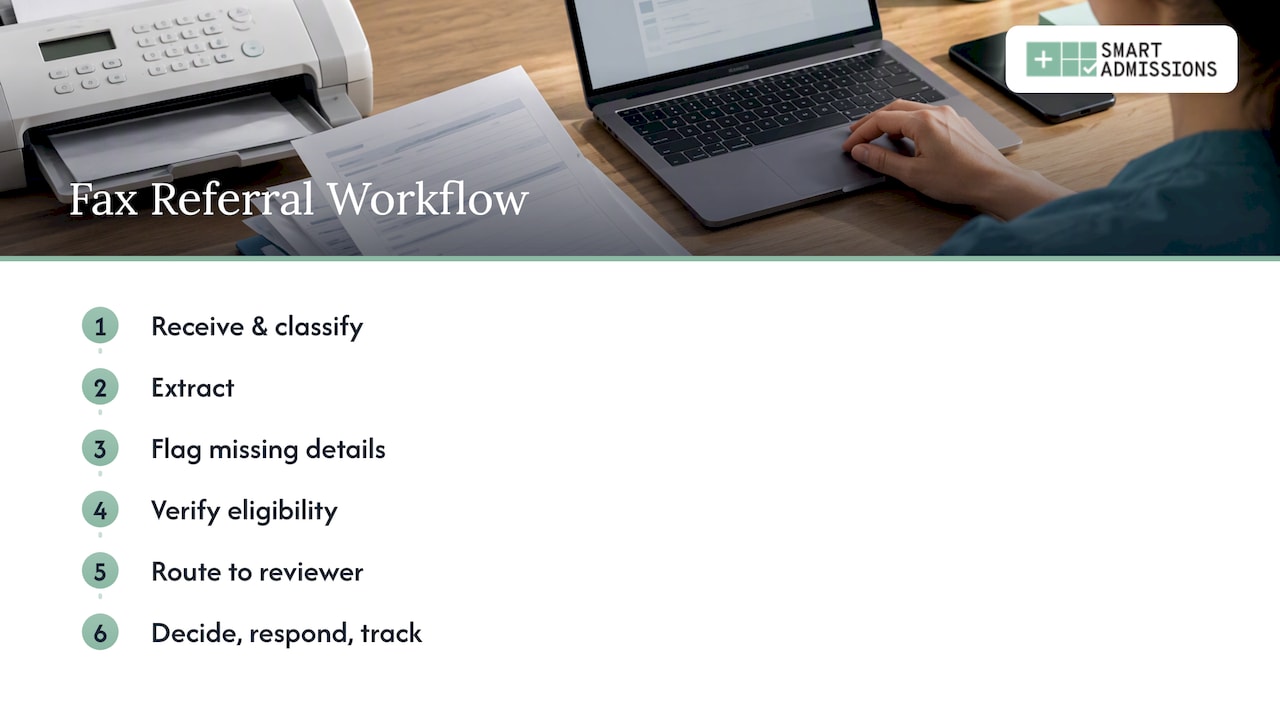
1. Receive the fax
The fax arrives through a digital fax line or secure inbox rather than a paper machine. The file is stored as an image or PDF with a time stamp. That time stamp becomes the start of your response-time clock.
2. Read and classify the document
Optical character recognition (OCR) converts the image into text, and the system decides what the document is: a referral packet, a face sheet, a history and physical, a medication list or something unrelated. Our 8-step OCR for referrals guide explains this stage in more detail.
3. Extract the key fields
The system pulls demographics, referring-provider details, referral date, priority, diagnosis and specialty, which are the fields documented in the UCSF Referrals Automation project. For admissions, you also want payer name, member ID, therapy needs and wound or isolation flags, though what a given tool reads depends on its configuration.
4. Flag what is missing
When the system reads a referral and finds no insurance information, or an unreadable date of birth, it should raise a flag rather than pass along a bad record. Some platforms can message the referring office from inside the queue, which removes the phone tag. Missing patient or insurance details remain a known limitation of extraction, so this step matters.
5. Verify eligibility
Once the payer is known, the record can be checked against the insurance portal. Real-time checks keep you from clinically accepting a patient whose coverage fails later. See our real-time eligibility verification guide and the 10-step eligibility verification list.
6. Route to the right reviewer
Urgent referrals, such as hospital discharges expected today, move to the top. Others go to the admissions coordinator, the director of nursing or the clinical liaison depending on your rules.
7. Decide, respond and track
The reviewer accepts, declines or requests information, and the outcome is stored with the original fax. That gives you a full audit trail and the data for reporting.
What the evidence shows about speed
The strongest published result comes from Stanford Health Care. Its FastFax tool shortened processing for urgent faxed referrals from about 33 hours to about 1 hour in a 2023 pilot, and the work continued after the pilot ended. Stanford is a large academic system, so do not expect your facility to see the same ratio. The lesson is that the wait is usually in handling, not in clinical decision-making.
Our own client-facing figures sit on separate pages. If you want the admissions-specific numbers, read automated referrals and faster processing.
What automation can and cannot read
Be realistic with your team about accuracy. Fax quality varies: skewed scans, handwriting, stamps, and 60-page packets with pages out of order all reduce reading accuracy.
In one infusion provider deployment, automated document classification reached 85% accuracy, with the remaining documents routed to human reviewers. That is the pattern you should plan for: automation handles the bulk, and people resolve the exceptions.
Use these questions when you test any tool:
- What happens when a field cannot be read? It should be left blank and flagged, not guessed.
- Can a reviewer see the original fax beside the extracted data?
- Are corrections logged so you can see error patterns?
- Does the system recognize a duplicate referral for the same patient from the same hospital?
Our guide to referral documentation best practices covers what a clean record should contain.
Connecting fax referral automation to your EHR and payers
Extracted data helps only if it lands where your team works. The UCSF project used OCR and SMART on FHIR to convert inbound faxes into structured digital referrals in the EHR. The same paper describes the common integration options: FHIR and EHR-native APIs for lookups, HL7 v2 for updates, and Redox for bidirectional exchange.
For a nursing home, ask your EHR vendor three things before you sign anything:
- Which interfaces do you support for inbound referral data: FHIR, HL7 v2 or a vendor API?
- Can referral status flow back to the hospital, or only into your system?
- Who maintains the interface when your EHR updates?
CMS is also pushing the industry away from paper. Its Electronic Medical Documentation Interoperability initiative publishes guides and pilot frameworks for adopting standards such as HL7 attachments and FHIR to reduce reliance on faxing. Until your referral sources have all moved, though, you will keep receiving faxes, which is why automation at the inbox is still worth doing.
For technical depth, see our pages on FHIR referral integration, Epic referral integration and how to integrate your EMR with referrals.
HIPAA safeguards to build in
Faxing is not prohibited under HIPAA. HHS guidance says covered providers may share PHI by fax for treatment without patient authorization if they use reasonable safeguards. Examples HHS gives include confirming unfamiliar fax numbers and pre-programming frequently used numbers.
Responsibility is split. According to HHS, the disclosing provider is responsible for secure disclosure and for reasonable steps to send PHI to the right address. After the information is received in accordance with HIPAA, the receiving covered entity is responsible for safeguarding it.
As the receiver, you should translate that into concrete settings:
- Role-based access, so only admissions and clinical reviewers open referral records.
- Audit logs showing who viewed, edited or forwarded each referral.
- Encryption of stored faxes and extracted data.
- A written retention and disposal rule for declined referrals.
- A signed business associate agreement with any vendor that handles PHI. Ask your compliance officer or privacy counsel to confirm the terms for your facility.
If you also send outbound faxes, such as acceptance letters, keep verified recipient numbers in a controlled directory.
Implementing fax referral automation without disrupting admissions
The Stanford team recommended a bottom-up approach: involve frontline staff in finding the workflow leverage points, prototype iteratively, then scale. They also found that front-line staff are essential for identifying the specific bottlenecks automation can address. Other sectors reach the same conclusion; this piece on healthcare workflow automation shows how frontline input shapes what gets automated.
A practical rollout for a nursing home looks like this:
Week 1: Map and measure
Sit with your admissions coordinator for a day. Count faxes received, pages per packet, minutes per referral and how many need a callback. This is your baseline.
Week 2: Configure and test
Set your priority rules, required fields and routing. Run a batch of past referrals through the system and compare the extracted fields with what your team entered.
Week 3: Run in parallel
Keep your current process while the automated queue runs beside it. Let staff mark errors and gaps.
Week 4: Switch over
Move live referrals to the new queue, keep a named person responsible for exceptions, and review the numbers weekly.
For more tactics, our five post-acute automation hacks and ways to reduce referral times help you choose where to start.
Measures that show it is working
The UCSF design paper suggests evaluating with user-action logs, processing time per referral, referrals processed per day and hour, extraction error rates and API response times. For a nursing home, add business measures on top:
| Measure | Why it matters | How to track it |
|---|---|---|
| Time from fax receipt to first response | Hospitals favor fast answers | Fax time stamp vs. first reply |
| Minutes of staff time per referral | Shows workload relief | Weekly sample |
| Extraction error rate | Shows trust in the data | Reviewer corrections |
| Referrals with missing information | Shows where sources need education | Flag counts by hospital |
| Referral-to-admit conversion | Ties work to census | Admits divided by referrals |
| Eligibility denials after admit | Shows verification quality | Billing reports |
Review the table monthly with your administrator. Our guide on how to enhance referral tracking explains how to connect these numbers to occupancy.
Our perspective on fax referral automation
We build Smart Admissions for skilled nursing, rehabilitation and post-acute teams, so we see the same pattern in every facility: the fax is not the problem, the re-keying is. Admissions coordinators are skilled people spending their day on data entry, and that is what drives burnout and slow answers to hospitals.
We believe automation should handle the repeatable work and leave decisions with your team. That is why our assistant connects to your existing EMR and insurance portals, verifies eligibility in real time and keeps documentation attached to each referral. Onboarding is designed to take under an hour, and our support is hands-on because busy administrators should not need IT staff to get started.
Our advice is to begin with the inbox, measure for a month, and expand once your coordinators trust the data.
— Harry
How Smart Admissions handles referrals
Smart Admissions is an AI-powered referral and admissions assistant for skilled nursing facilities, rehabilitation centers and post-acute providers. It automates intake workflows, checks eligibility, supports clinical assessment and documentation, and reports on referral activity.
Pricing is published: $597 per month or $6,447 per year. We back the software with a guarantee that it pays for itself within 30 days. You can see the platform in action on our home page.
FAQ
Is fax referral automation HIPAA compliant?
HIPAA permits sharing PHI by fax for treatment when reasonable safeguards are used. Compliance depends on how the system is configured and operated: access controls, encryption, audit logs and a business associate agreement with your vendor. Confirm your setup with your privacy officer.
Will automation replace my admissions coordinator?
No. Automation reads and organizes the referral, but people still review clinical fit, talk with hospital case managers and families, and decide. Documents the system cannot classify go to a human reviewer, so your coordinator shifts from typing to deciding.
Do I still need fax if hospitals move to electronic referrals?
For now, yes. CMS is promoting standards that reduce faxing, but your referral sources will adopt them at different speeds. Automation lets you handle faxes and electronic referrals in one queue.
How long does implementation take?
The four-week plan above is a realistic pilot for most facilities. Our onboarding is designed to take under an hour, and the rest of the time goes to testing your rules and training staff.
Sources
- Optimizing Enterprise Referral Processing through Automated Workflows (Stanford Health Care, PubMed)
- Design and development of Referrals Automation, a SMART on FHIR application (PMC)
- HHS FAQ 482: HIPAA and faxing PHI
- HHS: Permitted Uses and Disclosures, Exchange for Treatment
- CMS: EMDI Program Guides
- UCSF Health Patient Access Program (UC Office of the President)
- Electronic Referral Management: Automate Fax Workflows
- How Health Systems Automate Inbound Referral Management
- Healthcare Workflow Automation