
Multi-facility referral routing works when every incoming referral, from any channel, is read once, checked against each facility’s own capabilities, staffing, payer mix and beds, and answered with a clear yes or a defensible no. Hospitals send the same patient to several skilled nursing facilities at once and pick the best match, so the team that answers first with the most complete, accurate response has the advantage. This guide gives admissions directors, coordinators, administrators and owners a five-step routine, the federal rules behind it, and the measures that show whether it works.
Key Takeaways
- Hospitals commonly contact several SNFs for one patient and choose the best match, so your response is one entry in a comparison, not a private conversation.
- Routing quality depends on one intake queue, written acceptance criteria for each facility, and a scored decision on every referral.
- Cost and reimbursement checks, including high-cost medications and PDPM, belong before acceptance, not after admission.
- Five measures tell you whether routing works: response time, acceptance rate, referral source mix, lost opportunities and admit-to-bed time.
- For groups, one shared view across facilities shows where referrals are lost and which building is the right fit.
Table of Contents
- What Multi-Facility Referral Routing Means in Post-Acute Care
- Why Hospitals Send One Patient to Many Facilities
- Where Referral Routing Breaks Down
- The 5-Step Multi-Facility Referral Routing Routine
- Measures That Show Whether Routing Is Working
- A Worked Example: One Patient, Three Facilities
- Our Perspective
- How Smart Admissions Fits Your Routing Workflow
- Compliance Points to Keep in Mind
- Practical Tips for Groups and Owners
- FAQ
- Sources
What Multi-Facility Referral Routing Means in Post-Acute Care
In post-acute care, multi-facility referral routing has two sides. On the hospital side, a case manager sends a patient’s referral to several facilities and compares the answers. On your side, especially if you run more than one building, it is how an incoming referral is read, matched to the facility that can serve the patient well, and answered.
The federal 360X guide for long-term care transfers describes the hospital side plainly. Hospitals commonly contact several SNFs and choose the best match based on multiple criteria. Each facility receives its own request with a unique ID and must accept or decline. After the first accept arrives, the hospital may choose a facility, confirm the transfer date and time, and cancel the requests to facilities that have not declined.
Two things follow for your team. Speed matters because the hospital may decide soon after the first accept. Accuracy matters because an accept you cannot honor, or a decline that was really a missed fit, costs you census or margin.
Why Hospitals Send One Patient to Many Facilities
Hospitals are required to plan discharges early. Under 42 CFR 482.43, a hospital evaluates a patient’s likely post-hospital needs in a timely way. For indicated post-acute services, the discharge plan includes a list of available Medicare-participating providers in the patient’s geographic area. The hospital also informs patients of their freedom to choose among those providers, shares quality and resource-use data, and sends necessary medical information to the providers at discharge.
That structure is why referrals fan out. The patient or family has a right to choose, and the hospital wants a safe, timely discharge. The rule itself is not new: the 1994 HCFA final rule, effective January 12, 1995, made discharge planning a condition of participation for hospitals. The 2019 CMS final rule, effective November 29, 2019, revised the section to implement IMPACT Act requirements, giving patients and families more quality and resource-use information for post-acute decisions.
The practical result: your facility is compared with others on quality data, availability and response. Your internal routing has to be as organized as the hospital’s process.
Where Referral Routing Breaks Down
Most failures are not clinical. They are process failures that show up in the same few places:
- Scattered channels. Referrals arrive through hospital portals, fax and email. Without one queue, the same patient appears twice or one referral sits unread.
- Unwritten criteria. One person knows that building A cannot take a certain IV therapy, and another does not. Answers vary by who is on shift.
- Late cost discovery. An expensive medication or a weak reimbursement picture is found after acceptance.
- Bed uncertainty. The referral is accepted without confirming which unit and bed will actually be available on the transfer date.
- No feedback loop. Declines and lost referrals are never counted, so patterns stay invisible.
Hospital-side tools show how much the timing matters. In Mayo Clinic’s CareLink workflow, an unopened referral request triggers an email notification after 15 minutes, and the facility responds Accept, Consider or Decline. Trinity Health’s guidance notes that when a request goes to multiple facilities, the status stays Accepted until the patient selects a facility. An accept is therefore not a guaranteed admission, but it is what keeps you in the running.
The 5-Step Multi-Facility Referral Routing Routine
The routine below works for a single building and scales to a group. At each step, we note where teams usually lose time and what Smart Admissions takes off your staff’s hands.
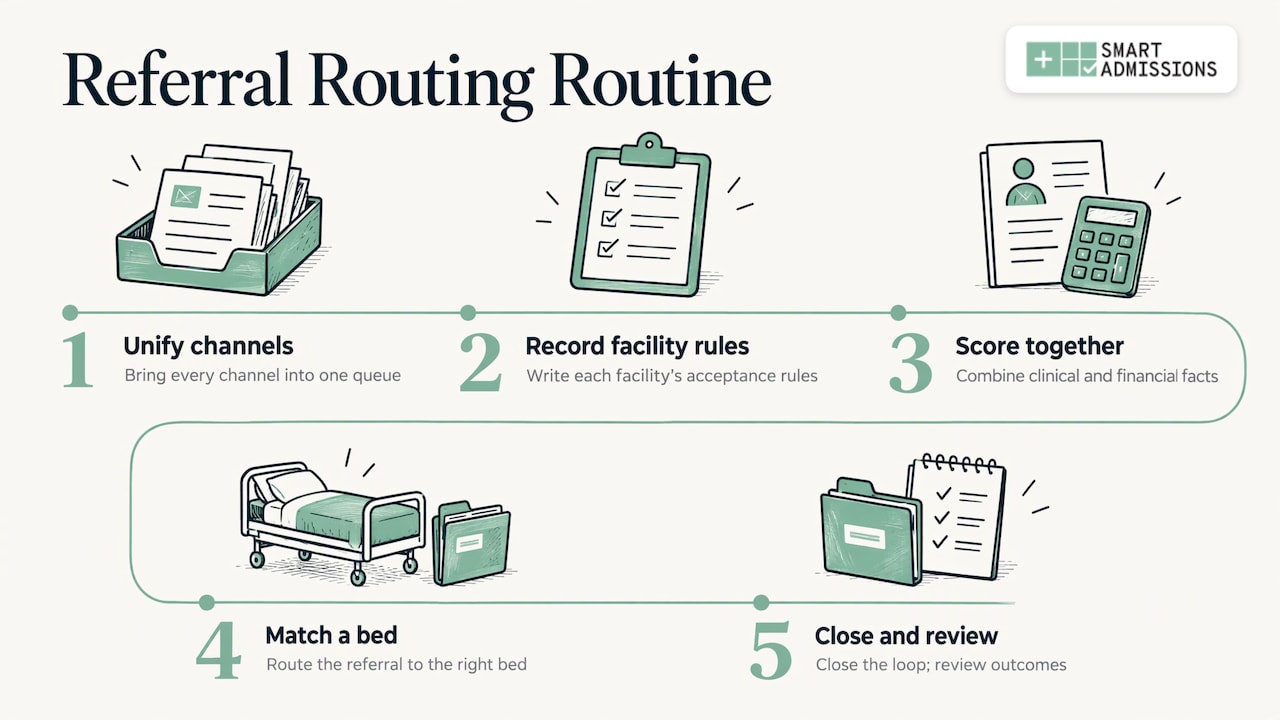
Step 1: Bring Every Channel Into One Queue
Start by listing every way a referral can reach you: portal messages, faxes, email, phone calls that become documents. Each one needs an owner and a single place where it is logged. The goal is one place to look and one place to assign.
Where it goes wrong: staff read faxes in one tray and portal messages in another, so response time depends on who checked what. Duplicate referrals for the same patient get worked twice, and a misdirected one waits for the wrong building.
What we do here: Smart Admissions reads every incoming referral, whether it arrives through a hospital portal, fax or email, so your coordinators are not retyping or hunting across inboxes. Accepted referrals flow into your existing workflows through the PointClickCare integration without duplicate entry. For the technical side, see our guide to OCR for referrals.
Step 2: Write Down Each Facility’s Acceptance Rules
Routing is only as good as the criteria behind it. For every facility, document what it can clinically support, what staffing allows on each shift, which payers and payer mix targets apply, and how beds are allocated by unit.
A useful rule set answers these questions:
- Which clinical needs can this building meet today: wound care, IV therapy, ventilator, bariatric, dialysis, behavioral health?
- What staffing levels does each of those needs require, and are they in place on weekends?
- Which payer types does the facility accept, and at what share of the census?
- What medication cost level triggers a financial review?
- Which beds are reserved or restricted?
The hospital’s request often carries these needs already. The 360X guide specifies a full request package: a C-CDA document with current clinical information in discharge-summary format, plus an HL7 v2 message with the referral order and pre-placement requirements such as pain management, special equipment or expensive medications. If your criteria are written in the same terms, matching is faster.
What we do here: configuration in Smart Admissions matches each facility’s rules, so the evaluation reflects your building, not a generic template.
Step 3: Score and Decide With Clinical and Financial Facts Together
A referral is a clinical decision and a financial one. Treating them separately is how a team accepts a patient it can care for but cannot afford to serve, or declines one that was a strong fit.
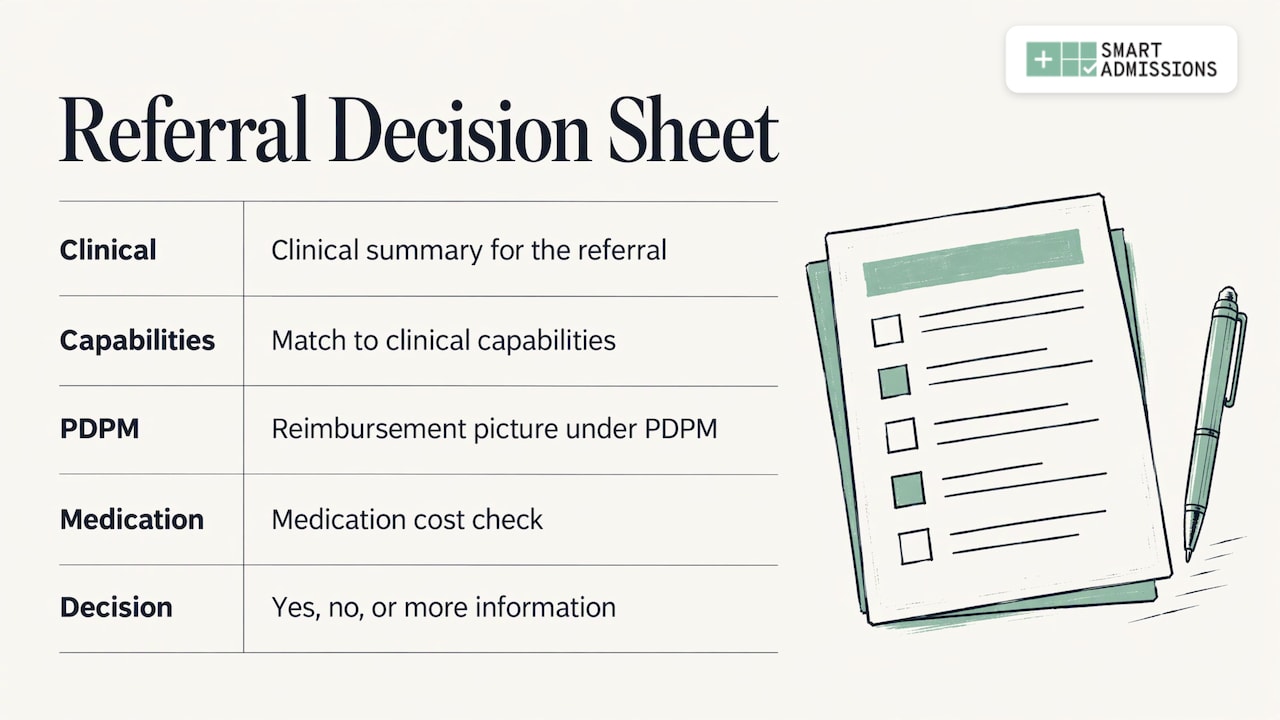
Build a short decision sheet for each referral with four parts: a clinical summary, a capability match, the reimbursement picture under PDPM (the Patient Driven Payment Model, the case-mix system that sets SNF payment), and a medication cost check. Then record yes, no or need more information, with the reason in a sentence.
Where it goes wrong: reading a 40-page packet by hand in the middle of the afternoon, then deciding on instinct. The reviewer who is tired, or new, decides differently from the veteran director.
What we do here: Smart Admissions summarizes and scores each referral against your clinical capabilities, staffing, payer mix, PDPM reimbursement and bed availability, so your director can respond with a confident yes or a defensible no in minutes instead of hours. Med cost alerts flag high-cost medications before acceptance. For veterans homes, the platform supports DD214 review to speed eligibility decisions. Our PDPM preadmission checklist and PDPM admission workflow show the financial checks in more detail.
Step 4: Match the Referral to the Right Bed
An accept is a promise about a date, a unit and a bed. Before you send it, confirm that the bed, the staff and the equipment will exist when the patient arrives. In a group, this is also where you decide which building is the best fit when a patient could go to more than one of yours.
The hospital will want a firm answer on timing. Once it selects a facility, it confirms the transfer date and time with that facility and cancels the other open requests, so a vague accept can lose to a clearer one.
What we do here: referral-to-bed matching places the right patient in the right bed, and leadership gets visibility across one facility or an entire network. Read more in our referral-to-bed process guide.
Step 5: Close the Loop and Review the Numbers
After the decision, track what happened. Did the hospital select you? If not, why? Did the patient arrive with complete records? The 360X specification expects the hospital to send currently available discharge information with reconciled medications and equipment and later the complete discharge summary once ready, sometimes days after transfer. Your team should check that both arrive.
Then review the numbers weekly. The next section explains which ones.
Measures That Show Whether Routing Is Working
Pick a small set and review it on a fixed schedule. These five cover speed, quality and lost revenue:
| Measure | What it tells you | How to read it |
|---|---|---|
| Response time | How fast the first answer leaves your team | Track by source and by facility, and look at weekends and evenings separately |
| Acceptance rate | Share of referrals you accept | A sudden drop or rise often means criteria changed or are applied inconsistently |
| Referral source mix | Which hospitals and systems send volume | Shows where relationships need attention |
| Lost opportunities | Referrals you declined, missed or lost to another facility | Group by reason: clinical, financial, bed, no response |
| Referral-to-admission time | How long from accept to patient in bed | Long gaps point to bed or documentation problems |
These are management measures, not regulatory ones, so set your own targets from your baseline. Smart Admissions gives leadership visibility into referral sources, response times, acceptance rates and lost opportunities across one facility or an entire network. Our guides on how to analyze referral data and referral tracking walk through the reporting.
A Worked Example: One Patient, Three Facilities
Consider a group with three buildings. A hospital sends a referral for a patient needing wound care and a costly IV antibiotic. The request arrives by portal at one building and by fax at another, and both are the same patient.
With one queue, the team sees a single referral. The criteria show that building A has no available bed on the needed unit, building B has the wound-care capability and a bed, and the medication cost alert says the antibiotic needs a financial review before acceptance. The director reviews the PDPM picture, decides the admission is sustainable, and answers for building B with a transfer date. Building A sends a clear decline with the reason, which tells the hospital quickly and lets its case manager move on.
The same case without a shared view might produce two accepts for one bed, one late decline, or a missed window while someone reads the packet. The example is illustrative, not a client result, but each step maps to a gap you can find in your own process.
Our Perspective
We built Smart Admissions because speed alone does not win referrals. Every admissions team can answer fast if it says yes to everything. The harder job is saying yes to the right patients and a clear no to the rest, with a reason you can defend to the hospital and to your own finance team.
That is why we treat each facility as its own decision engine. Your clinical capabilities, staffing, payer mix, PDPM reimbursement and bed availability are different from the building down the road, and a referral should be judged against yours. When a group has several facilities, the same logic applies to each, with leadership seeing the whole network in one place.
The people who designed the platform have worked in admissions, MDS and reimbursement. We know what an admissions director’s afternoon looks like. Our aim is to take the manual review off the desk so you can spend your time on hospital relationships, which is where census is really won.
Harry
How Smart Admissions Fits Your Routing Workflow
Smart Admissions is an AI-powered referral intelligence and admissions platform for skilled nursing facilities, rehabilitation centers, state veterans homes and other post-acute providers. It is EHR-independent and integrates with PointClickCare. Plans are published at $597 per month or $6,447 per year, and you can see the product flow on the how it works page.

If you are comparing approaches first, our overview of referral management systems lays out what to expect, and our guide to hospital-to-SNF referrals covers the relationships that feed your queue. Teams on other record systems can also read about our Cerner referrals integration.
Compliance Points to Keep in Mind
A few rules shape how hospitals send referrals, and your process should be ready for them.
Freedom of choice. Hospitals must inform patients of their freedom to choose among participating providers, per 42 CFR 482.43. Your response should therefore be accurate and complete, because the patient and family may weigh it.
Financial interests. The same section requires the discharge plan to identify any home health agency or SNF in which the hospital has a disclosable financial interest, and any that has a disclosable financial interest in the hospital. If your facility has such a relationship, expect it to be disclosed in the plan.
Transfer policies. Under 42 CFR 482.43©, effective July 1, 2025, hospitals must have written policies for transferring patients to the appropriate level of care and train relevant staff annually. That means hospital teams are likely to ask more structured questions about your capabilities.
For legal questions about a specific arrangement, speak with your compliance officer or healthcare counsel.
Practical Tips for Groups and Owners
If you oversee several facilities, a few habits make routing smoother:
- Keep one version of each facility’s acceptance criteria and review it monthly or when staffing changes.
- Decide in advance who may approve exceptions, such as a high-cost medication, and how quickly.
- Send declines with a reason code so hospital partners learn what each building does well.
- Share lost-referral reasons with administrators and owners, so staffing and service-line decisions use real demand.
- Run a short weekly huddle on referrals that were close calls, then update the rules.
In one published example from the hospital side, 11 of 17 long-stay complex patients rejected by other SNFs were discharged to a collaborating SNF through case conferencing, with a mean of 44 days from conference to discharge. It shows that direct, structured conversations with hospital partners about difficult cases can open placements, and that clear criteria on your side make those conversations productive.
FAQ
What is multi-facility referral routing?
It is the process of sending and answering a referral across several facilities. Hospitals send one patient’s request to multiple SNFs and compare responses. Operators with several buildings also route each referral to the location best able to care for the patient and fit the budget.
How fast do we need to respond to a hospital referral?
As fast as you can while still being accurate. Hospitals may select a facility after the first accept, so a response in minutes is better than one in hours. Set an internal target from your own baseline and track it by referral source.
Does an accept mean the patient is coming to us?
Not always. When a request goes to several facilities, the hospital and patient choose among those that accepted. Trinity Health’s guidance says the request stays in your In Basket as Accepted until it changes to Selected or Not Selected. Prepare for admission once you are selected.
Which information should we check before accepting?
Check the clinical summary, the pre-placement requirements in the request, such as special equipment or expensive medications, the payer and PDPM picture, staffing and bed availability. Matching these to your written criteria makes each decision consistent and easier to explain.
Sources
- 360X and Long Term Care Transfers, ONC
- 42 CFR 482.43, eCFR
- Federal Register, December 13, 1994, discharge planning final rule
- Federal Register, September 30, 2019, discharge planning final rule
- Viewing and Responding to a Referral Request, Mayo Clinic
- EpicCare Link: Responding to Service Requests, Trinity Health
- 42 CFR 482.43 transfer policy text
- Case-conferencing model abstract, Society of Hospital Medicine