
If you need to compare AI referral management software for skilled nursing facilities, judge each option on one question: does it help your team make a right admission decision in minutes, or does it only make the inbox faster? Speed matters, but a fast yes to a patient you cannot care for or afford to serve is an expensive mistake. The strongest platforms are facility-specific. They read every referral and test it against your own clinical capabilities, staffing, payer mix, PDPM reimbursement and open beds. That is the approach Smart Admissions is built around.
This guide gives admissions coordinators, directors and administrators seven criteria for the comparison, a side-by-side view of the main types of tools, the pricing facts you can verify, and the questions to settle before you sign.
Key Takeaways
- Compare tools on the decision they support, not the intake speed they advertise. A referral score only helps if it reflects your facility’s capabilities, payer mix and beds.
- Look for coverage of every referral channel (hospital portal, fax and email) and for PDPM-aware scoring, so the reimbursement picture is visible before you accept.
- Medication cost alerts and referral-to-bed matching protect margin and census on each admission.
- Check EHR fit, HIPAA safeguards and who reviews the AI’s recommendation. Your admissions policy and resident rights under federal rules still apply.
- Smart Admissions publishes its prices: $597 per month or $6,447 per year.
Table of Contents
- What AI referral management software does in an SNF admissions workflow
- The types of tools you will meet
- Seven criteria to compare AI referral management software
- Special case: state veterans homes
- Pricing: what you can verify
- A short evaluation plan for your team
- Our perspective: speed is table stakes
- See it on your own referrals
- FAQ
- Sources
What AI referral management software does in an SNF admissions workflow
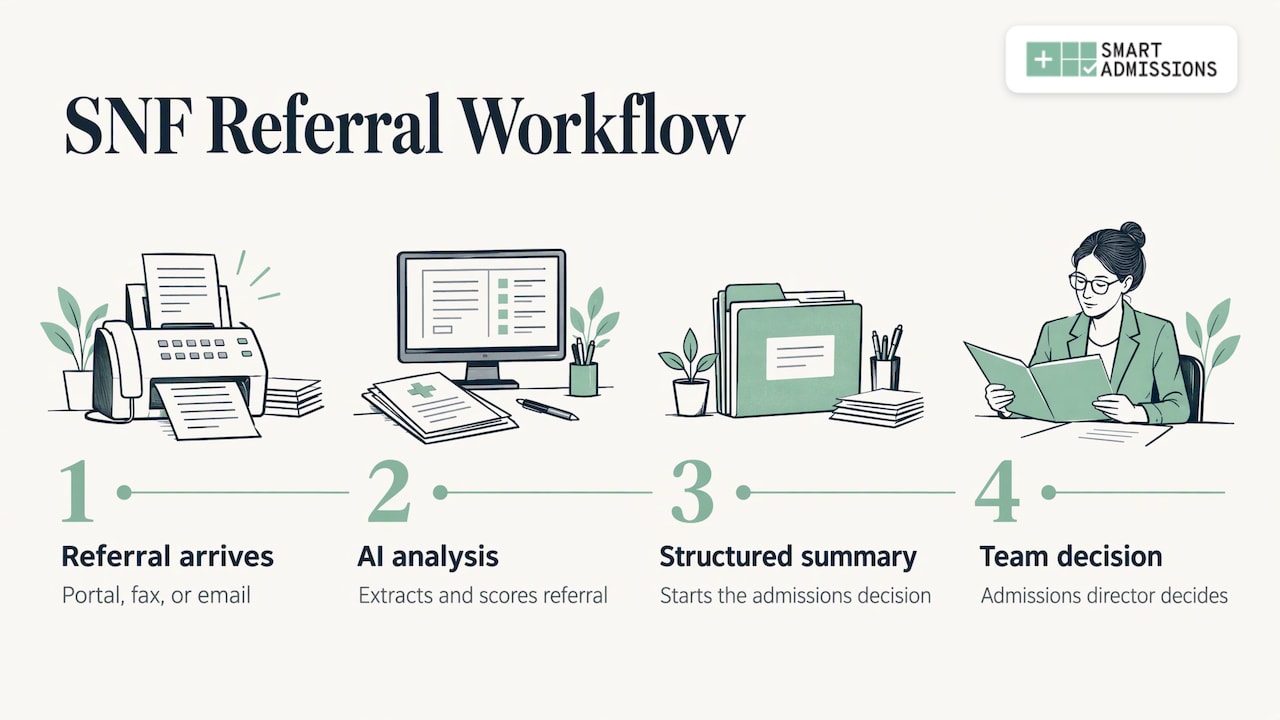
A referral arrives from a hospital case manager, often as a portal message, a fax or an email with attachments. Someone on your team reads the clinical notes, checks the payer, asks the clinical team whether you can meet the patient’s needs, looks at the bed board and replies. Done by hand, this takes a long stretch of the day, and the hospital is usually waiting.
AI referral management software takes over the reading and first-pass analysis. It extracts the diagnoses, medications, therapy needs and payer details, summarizes the referral, and scores it against rules you set. The admissions director still decides. What changes is that the decision starts from a structured summary rather than a stack of pages.
For the reader of this article, the useful way to think about the category is as a decision-support layer between your referral sources and your EHR. Anything that stops at “intake” (collecting documents and routing them) solves a smaller problem than one that answers “should we accept this patient?”
Our own write-up on referral management and census covers the basics if your team is new to the category.
The types of tools you will meet
Most options fall into four types. Knowing the type tells you what to expect before any demo.
| Type | What it does well | Where it usually stops |
|---|---|---|
| Hospital-side referral networks and portals | Send referrals to many post-acute providers at once | Built around the sender’s workflow, not your acceptance rules |
| EHR-native intake modules | Keep data in one system | Tied to one EHR and often limited to forms and tracking |
| General-purpose AI assistants | Summarize text and draft documents | Not configured to your payer mix, PDPM economics or bed board |
| Facility-specific decision engines | Read every referral and evaluate it against your own capabilities, staffing, payers and beds | Needs configuration to your rules, which is where the value comes from |
Smart Admissions belongs in the last row. It reads referrals arriving through hospital portals, fax and email, evaluates each one against your clinical capabilities, staffing, payer mix, PDPM reimbursement and bed availability, and then summarizes and scores it. That lets you give a confident yes or a defensible no in minutes instead of hours.
For a longer list of system types, see our examples of referral management systems.
Seven criteria to compare AI referral management software
Use these as a scorecard. Rate every vendor on the same seven lines, and ask each to show the feature working on a real, de-identified referral from your own mix.
1. Facility-specific clinical fit
A generic score tells you the patient is complex. A facility-specific score tells you whether your building can take that patient. Ask whether the tool evaluates referrals against your own clinical capabilities and staffing, such as IV therapy, wound care, bariatric needs, dialysis arrangements or behavioral health limits, and whether you can change those rules yourself as your capabilities change.
This also supports compliance. Under 42 CFR 483.15(a), a nursing facility must establish and implement an admissions policy and must disclose special characteristics or service limitations before admission. A tool that encodes your written capabilities makes that policy consistent from one reviewer to the next.
2. PDPM-aware reimbursement scoring
The Patient Driven Payment Model, or PDPM, is how Medicare pays SNFs for Part A stays. According to the Medicare administrative contractor’s PDPM page, it uses five case-mix adjusted components, and it took effect on October 1, 2019. Because payment follows patient characteristics, the clinical details in the referral largely determine the revenue story.
A useful platform shows that story before acceptance. Smart Admissions uses PDPM-aware scoring so the reimbursement picture is visible up front. When you compare tools, ask where the PDPM view appears: in the referral summary at decision time, or only in a report weeks later.
Our 15-minute PDPM admission workflow and PDPM preadmission checklist show how the pieces fit together.
3. Payer mix visibility
A referral with a good clinical fit can still push your payer mix the wrong way. Look for a tool that weighs each referral against your current mix and your targets. Smart Admissions evaluates referrals against each facility’s own payer mix, which supports the goal of a stronger payer mix over time. For KPIs to track, see our guide to payer mix analysis.
4. Medication cost alerts
High-cost medications can turn a reimbursed admission into a loss. The question to ask is when the alert fires. Smart Admissions flags high-cost medications before acceptance, so your team can weigh the cost when the decision is still open, not after the patient arrives. In a demo, ask each vendor to show a referral containing an expensive drug and walk you through what your team would see.
5. Referral-to-bed matching
Accepting the referral is half the job. The other half is placing the patient in the right bed: the right unit, the right roommate situation, the right care level. Smart Admissions provides referral-to-bed matching so the right patient lands in the right bed. Compare how each tool reads your live bed availability and whether it connects acceptance to a specific bed or leaves that step to a whiteboard.
6. Every referral channel, plus EHR fit
Referrals do not arrive in one format. Check that the tool handles hospital portals, fax and email, not just one of them. Then check how accepted referrals reach your EHR.
Smart Admissions is EHR-independent and integrates with PointClickCare, so accepted referrals flow into existing workflows without duplicate entry. If you run a different system, ask each vendor to state exactly how data moves and who maintains the connection. Our pages on PointClickCare integration and integrating your EMR with referrals list the questions to ask.
7. Security, review and reporting
Referrals contain protected health information. Under HHS guidance on HIPAA and cloud computing, a cloud service provider that creates, receives, maintains or transmits ePHI for a covered entity is a business associate, and the two parties need a HIPAA-compliant business associate agreement. Make the agreement a standard item in your contract review.
On oversight, treat the AI output as a recommendation your admissions director reviews, with the final yes or no made by your team and recorded under your admissions policy. Finally, check reporting. Leadership should see referral sources, response times, acceptance rates and lost opportunities, for one facility or a whole network. Smart Admissions provides this visibility, and our guide to analyzing referral data shows how to use it.
Special case: state veterans homes
If you run a state veterans home, add one more line to your scorecard: eligibility review. Smart Admissions supports DD214 review to speed eligibility decisions, so the discharge document is part of the referral evaluation instead of a separate manual step.
Pricing: what you can verify
Pricing in this category is often quote-only, which makes budgeting harder. Smart Admissions publishes two subscription plans on its pricing page:
| Plan | Price |
|---|---|
| Monthly | $597 per month |
| Annually | $6,447 per year |
Prices were read from the site in September 2026. When you compare, put every vendor on the same footing: subscription fee, any onboarding or integration charges, the number of facilities covered, and what support is included. Then divide by the number of referrals your team reviews each month to see the cost per decision.
A simple way to size the return is to count the admissions your team declined or delayed last quarter because review took too long, and multiply by your average daily rate and length of stay. Our article on filling beds faster with AI referral management walks through that thinking.
A short evaluation plan for your team
Running the comparison takes less time than most teams expect if you structure it.
- Pull a sample. Take 20 to 30 recent referrals across portal, fax and email, including some you accepted, some you declined and some that stalled.
- Write down your rules. List your clinical capabilities, staffing limits, payer targets and drug-cost thresholds. A tool is only as good as the rules it applies.
- Score each vendor on the seven criteria. Use the same sample for each one.
- Check the paperwork. Confirm the HIPAA business associate agreement, the EHR connection and who supports you after launch.
- Plan the review step. Decide who reviews AI summaries, how a no is documented, and how quickly the hospital hears back.
Our admissions decision-making guide and referral screening steps can serve as the template for step 5. If you want a second angle on the shortlist itself, see the criteria for evaluating AI referral review options.
Our perspective: speed is table stakes
Every platform in this category promises faster responses. That is no longer a differentiator, because hospitals already expect answers in minutes. The real question is whether the answer is right for your building.
We built Smart Admissions as a facility-specific decision engine because admissions directors do not need another inbox. They need each referral read, summarized and scored against their own clinical capabilities, payer mix, PDPM reimbursement and open beds, so a yes is confident and a no is defensible.
The people who built it have run admissions and worked in MDS and reimbursement, and that shapes the design: medication cost alerts before acceptance, referral-to-bed matching, and reporting on lost opportunities. Our aim is more right admissions and fewer costly mistakes, with your director’s time going to hospital relationships instead of paperwork.
Harry
See it on your own referrals
If your team reviews referrals from several hospitals and the decision still depends on one person’s memory of your capabilities, Smart Admissions is designed to move that knowledge into the workflow. It reads every referral, scores it against your facility’s rules, and sends accepted referrals into PointClickCare without duplicate entry. Onboarding is fast, and configuration matches each facility’s rules.

Plans are $597 per month or $6,447 per year, listed on the Smart Admissions pricing page. You can also start from the Smart Admissions homepage.
FAQ
What is the most important feature when comparing AI referral management software for SNFs?
Facility-specific evaluation. The software should score each referral against your own clinical capabilities, staffing, payer mix, PDPM reimbursement and bed availability. That is what turns a faster inbox into a better admission decision.
Does AI referral management software replace the admissions director?
No. It reads and summarizes referrals and scores them so the director can decide in minutes. The director keeps the final decision and the hospital relationships, and spends less time on manual review.
Do I need to change my EHR to use one?
Not with Smart Admissions. It is EHR-independent and integrates with PointClickCare, so accepted referrals flow into your existing workflow without duplicate entry.
How much does Smart Admissions cost?
The published plans are $597 per month or $6,447 per year, as listed on the pricing page in September 2026. Check the page for the current plans before you budget.
Sources
- 42 CFR Part 483, Requirements for States and Long Term Care Facilities (2025 CFR, govinfo.gov)
- Skilled Nursing Facility Patient Driven Payment Model (PDPM), Noridian Medicare
- Guidance on HIPAA and Cloud Computing, HHS