
Hospital portal integration means connecting the systems hospitals use to send referrals, such as Epic-based provider portals, fax and secure email, to your own admissions workflow so each referral arrives complete, gets reviewed against your criteria and is answered without re-keying data. For a skilled nursing facility, the goal is simple: say a confident yes or a defensible no in minutes, and let accepted patients flow into your EHR without duplicate entry. This guide explains what moves through a hospital portal, which standards matter, and the seven steps your team can follow to get it right.
TL;DR
- Hospital portal integration connects hospital referral channels to your admissions process so referrals are received, reviewed and answered in one place.
- Integrated portals can expose charts, referrals, placement requests and insurance authorization details, but your clinical and financial review still needs a decision layer.
- U.S. standards such as HL7 FHIR, US Core and TEFCA are the technical foundation, and HIPAA permits treatment-related exchange between providers.
- Plan the data elements, triggers, security and testing first; connect second.
- Smart Admissions reads referrals from portals, fax and email, scores them against your facility’s rules and integrates with PointClickCare.
Table of Contents
- What hospital portal integration means for post-acute admissions
- What information moves through an integrated hospital portal
- The standards behind hospital portal integration
- 7 steps to plan and run hospital portal integration
- Where integration helps and where staff still decide
- Our perspective on hospital portal integration
- How Smart Admissions fits into your portal workflow
- Choosing a hospital portal integration approach
- Common mistakes to avoid
- FAQ
- Sources
What hospital portal integration means for post-acute admissions
Hospitals increasingly run referral and discharge planning through provider portals tied to their own EHR. Piedmont Healthcare, for example, describes its Piedmont Link portal as a way for post-acute providers to receive referrals electronically and accept or deny them quickly. That is the hospital’s side of the exchange.
Your side is different. You may work with a dozen or more hospitals, each with its own portal, plus referrals that still arrive by fax or email. Without integration, your admissions coordinator logs in to several systems, copies data into a spreadsheet or your EHR and then reads each packet by hand.
Hospital portal integration closes that gap. It brings every channel into one queue, standardizes what you see, and carries the decision and the accepted patient’s data into your existing workflow.
Three levels of integration
Not every facility needs the same depth. Think of it in three levels:
- Access: your staff have logins to hospital portals and view referrals there. No data leaves the hospital system.
- Aggregation: referrals from all portals, fax and email are collected in one queue and summarized.
- Decision and handoff: each referral is evaluated against your clinical capabilities, payer mix and beds, and accepted patients move into your EHR.
Most of the time savings come from the third level, because that is where manual review and re-entry disappear.
What information moves through an integrated hospital portal
The scope depends on the hospital and your agreement with it. Novant Health’s community connect guide shows what a mature arrangement can include: access to patient charts with test results, notes, diagnostic images and demographics, plus referrals and placement requests. The same guide describes billing views with insurance authorization and precertification numbers.
For an admissions director, that translates into a practical checklist of what a complete referral should carry:
- Demographics and payer information, including authorization status
- Diagnosis, recent notes and the hospital course
- Medication list, including high-cost drugs
- Therapy needs and functional status
- Wound, IV, dialysis, ventilator or behavioral health needs
- Discharge date and the requested response time
If any of these are missing, your integration should flag the gap before staff spend time on the referral. Our admissions documentation checklist covers what to confirm at intake.
The standards behind hospital portal integration
You do not need to be a developer, but you should know the vocabulary when your IT lead or a hospital’s integration team talks to you.
FHIR, US Core and TEFCA
U.S. health IT relies on HL7 FHIR, the US Core Implementation Guide and Bulk FHIR for API-based exchange, and the Trusted Exchange Framework and Common Agreement (TEFCA) sets a nationwide governance, policy and technical floor for secure exchange. The same ASTP report notes TEFCA reached operational status in December 2023.
For referrals specifically, see our guides on FHIR referral integration and the developer steps for FHIR referral workflows. If you want a broader primer on interoperable health data exchange, that covers the standards and APIs that let different systems share structured information.
Post-acute data requirements
The IMPACT Act of 2014 requires that standardized patient assessment data across post-acute settings, including skilled nursing facilities, inpatient rehabilitation facilities and long-term care hospitals, be interoperable. CMS also built the Data Element Library to map assessment data elements to nationally accepted health IT standards. In practice, this means your assessment data and hospital data are moving toward a shared language.
What this means for your facility
You are rarely asked to build anything. You are asked to choose tools that speak these standards, and to ask each hospital which methods it supports: portal access, API, Direct messaging or a managed feed. Our overview of interoperability in healthcare and admissions efficiency goes deeper.
7 steps to plan and run hospital portal integration
These steps follow the order we recommend to facilities, from first inventory to ongoing measurement.
Step 1: Inventory your referral channels
List every hospital that sends you patients, and for each one record how referrals arrive: portal, fax, email, phone or a mix. Add the monthly referral count and your current average response time. Rank hospitals by volume and by the quality of the patients they send.
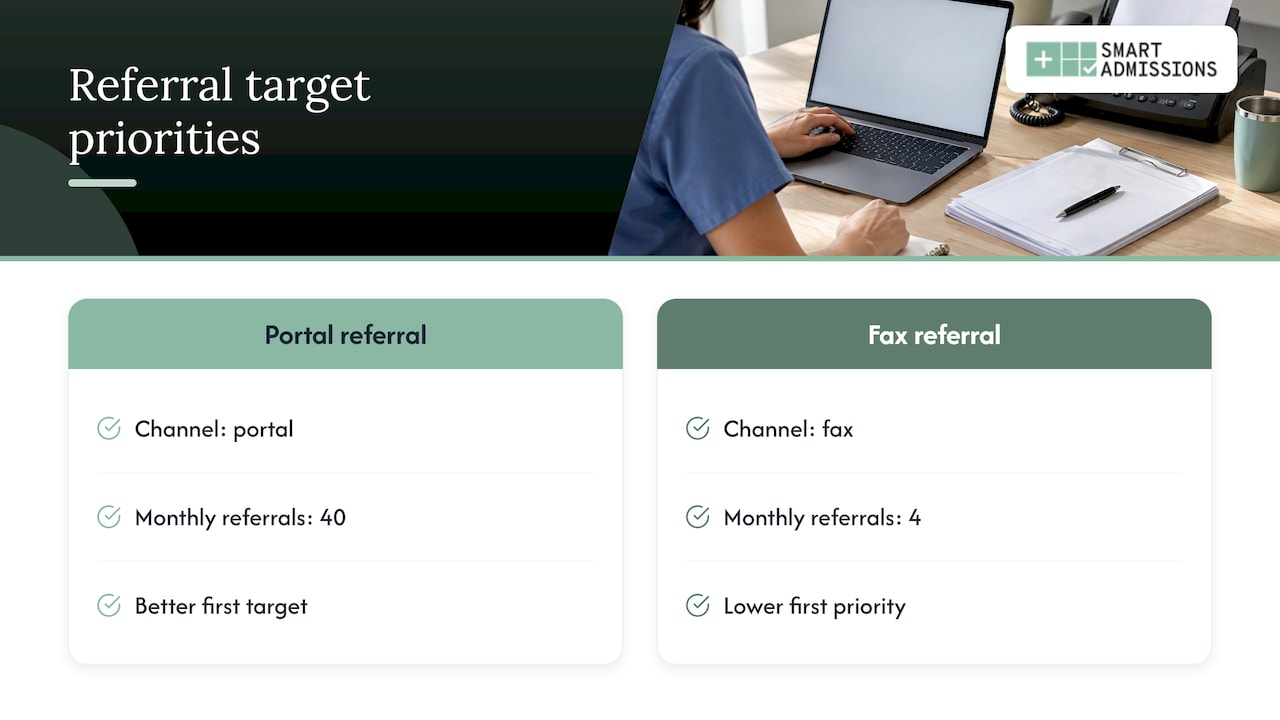
This list tells you where integration pays back first. A hospital sending 40 referrals a month through a portal is a better first target than one sending four by fax.
Step 2: Map the data elements you need
The Office of the National Coordinator for Health IT suggests bounding an implementation by clearly mapping the specific data elements clinicians require, selecting participating hospitals and defining triggers. That guidance was written for ADT alerts, and it applies equally to referral integration.
For your facility, define the minimum dataset required to decide on a referral, such as diagnosis, payer, medications, therapy needs and care needs. Anything outside that list can wait for the post-acceptance handoff.
Step 3: Define your admission criteria in writing
Integration speeds up whatever process you feed it. If your criteria live in one director’s head, automation will not fix that. Write down:
- Clinical capabilities you can and cannot support
- Staffing limits by unit or shift
- Payer mix targets and PDPM considerations
- Medications or treatments that need cost review before acceptance
- Bed types and availability rules
Our admissions decision-making guide for skilled nursing facilities and the pre-admission clinical review playbook help you structure this.
Step 4: Confirm privacy and security terms
Under HIPAA, covered entities may disclose protected health information to another provider for treatment or care coordination without patient authorization, and electronic disclosures must comply with the Security Rule. A referral to your facility generally falls under that treatment purpose, but your own policies and contracts still apply.
Ask every vendor and hospital partner about access controls, audit logs, encryption and business associate agreements. ONC’s guidance on secure alert systems names Direct messaging with S/MIME and VPNs among the technical strategies for protecting data in transit. Our patient data security guide for admissions lists questions to ask. Your compliance officer or privacy counsel should review the final setup.
Step 5: Connect the downstream workflow
A referral that is accepted but then retyped into your EHR has only been half integrated. Confirm how accepted referrals reach your clinical record. Smart Admissions is EHR-independent and integrates with PointClickCare, so accepted referrals flow into existing workflows without duplicate entry. For background, read how to integrate EMR with referrals and what EMR integration means for patient intake.
If your hospital partners also use Epic, our page on Epic referral integration explains the admissions and IT view.
Step 6: Test with real referrals
Before you go live, run a pilot with one or two hospitals for a few weeks. Test with real, de-identified or properly authorized referrals and check:
- Does every portal, fax and email referral land in one queue?
- Are patient fields parsed correctly, including medications and payer?
- Does the summary match what your clinician would extract by hand?
- Do accepted patients appear correctly in your EHR?
- Are denials documented with a reason you can share with the hospital?
Have a clinician or senior admissions team member compare the output with their own review on the first batch. Correct the rules, then expand.
Step 7: Measure and adjust
Track four numbers from day one: response time, acceptance rate, referral source mix and lost opportunities. Compare them with your Step 1 baseline. Our guides on referral tracking for higher bed occupancy and referral leakage show how to read these numbers.
Where integration helps and where staff still decide
Integration reduces typing, searching and waiting. It does not replace clinical judgment. A summary and a score give your director a faster starting point, but a clinician still confirms whether you can safely meet a patient’s needs, and an admissions leader still owns the final decision.
Here is a simple way to divide the work:
| Task | Automated or assisted | Staff decision |
|---|---|---|
| Collecting referrals from portal, fax, email | Yes | Set up channels |
| Summarizing the packet | Yes | Verify on complex cases |
| Checking clinical fit against your capabilities | Scored | Final clinical sign-off |
| Flagging high-cost medications | Alerts before acceptance | Accept, negotiate or decline |
| Estimating PDPM reimbursement | Shown up front | Financial judgment |
| Moving accepted patients into the EHR | Yes | Spot-check |
| Hospital relationships | No | Yes |
There is also a workflow principle behind this. Reporting in TechTarget on care coordination argues that providers should be met in their existing workflows rather than asked to log in to yet another system or web portal. For a busy admissions coordinator, that is the main reason to pull hospital referrals into one queue instead of adding another login.
If you also receive discharge alerts, see our rules for ADT feed integration.
Our perspective on hospital portal integration
We built Smart Admissions with people who have run admissions, MDS and reimbursement, and what we see is consistent: speed alone does not fix admissions. A fast yes to the wrong patient costs more than a slow no.
That is why we treat hospital portal integration as the start of the process, not the end. Getting a referral out of a portal and onto your screen is the easy part. The harder part is deciding, in minutes, whether this patient fits your clinical capabilities, your staffing, your payer mix and your open beds, and showing the reimbursement picture before you accept.
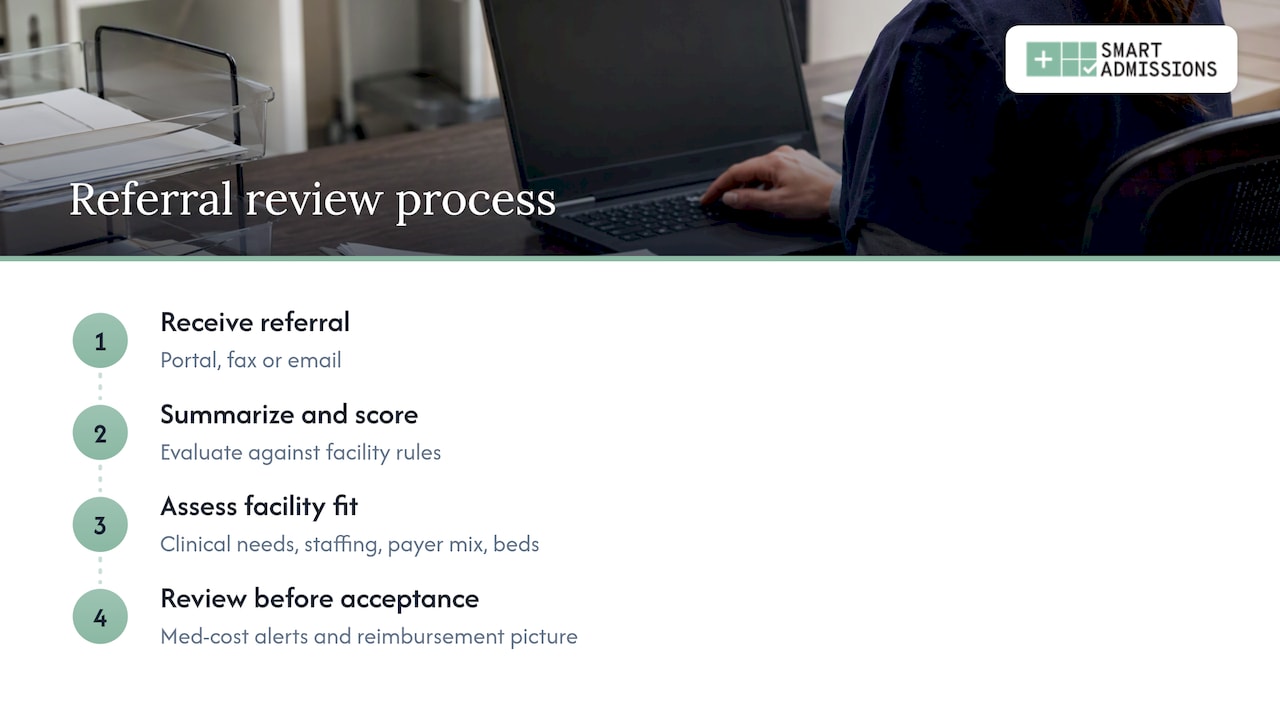
So our platform reads every referral, whether it arrives through a hospital portal, fax or email, and evaluates it against your facility’s own rules. Referrals are summarized and scored. Med cost alerts flag high-cost medications before acceptance. Leadership sees referral sources, response times, acceptance rates and lost opportunities across one facility or a whole network.
Our advice: start with your criteria, not your technology. Teams that write down what a good admission looks like get the most from any integration.
— Harry
How Smart Admissions fits into your portal workflow
Smart Admissions is built for skilled nursing facilities, rehabilitation centers, state veterans homes and other post-acute providers. It acts as a facility-specific decision engine on top of the channels you already receive referrals through. Configuration matches each facility’s rules, onboarding is fast and support comes from people who understand SNF operations. For veterans homes, the platform also supports DD214 review to speed eligibility decisions.
Plans are published on our pricing page: $597 per month, or $6,447 per year when billed annually. See how the platform works before you decide.
If you want to see how your own referral mix would be scored, start with the Smart Admissions referral management platform and compare it with your Step 1 baseline.
Choosing a hospital portal integration approach
When you evaluate options, whether a tool, an internal build or a hospital-provided portal alone, use criteria that tie to admissions results:
- Channel coverage: does it handle portal, fax and email referrals in one queue?
- Decision support: does it score referrals against your facility’s rules, not generic ones?
- Financial visibility: does it show PDPM reimbursement and medication costs before acceptance?
- EHR handoff: does it integrate with your EHR, such as PointClickCare, without duplicate entry?
- Security: does it support HIPAA-aligned access controls, audit logs and encryption?
- Reporting: can you see response times, acceptance rates and lost opportunities?
- Support and onboarding: who configures it, and do they understand SNF operations?
Our comparison pages on referral management tools and examples of referral management systems walk through these criteria by type of solution.
Common mistakes to avoid
- Integrating before defining criteria. You automate inconsistency.
- Connecting every hospital at once. Pilot with one or two, then expand.
- Ignoring fax and email. Many referrals still arrive that way, so a portal-only approach leaves gaps.
- Skipping the financial view. A clinically suitable patient can still be a poor fit if medication costs or payer terms are not visible before acceptance.
- Forgetting the hospital relationship. Fast, documented responses, including clear reasons for a no, build trust with discharge planners.
FAQ
What is hospital portal integration?
It is the connection between hospital referral portals, and other referral channels, and your facility’s admissions workflow. It lets you receive, review and answer referrals in one place, then pass accepted patients to your EHR without retyping.
Do I need FHIR for hospital portal integration?
Not necessarily on your end. FHIR and US Core are the main standards for API-based exchange in the U.S., but many facilities connect through portals, fax parsing or a platform that handles the technical side. Ask your vendor and each hospital which methods they support.
Is sharing patient information through a hospital portal allowed under HIPAA?
HHS guidance says covered entities may share PHI with another provider for treatment without patient authorization, and electronic exchange must meet Security Rule requirements. Your compliance officer should confirm that your specific setup and contracts meet your obligations.
Can integration make admission decisions for me?
No. It summarizes and scores referrals so your team can decide faster, but clinicians and admissions leaders make the final call, especially on complex cases.
How much does Smart Admissions cost?
Our published plans are $597 per month or $6,447 per year. Details are on the pricing page.
Sources
- Piedmont Link EpicCare portal, Piedmont Healthcare
- Novant Health Link community connect guide
- ASTP report on the Further Consolidated Appropriations Act, 2024
- CMS MLN call transcript on post-acute data interoperability
- ONC guide to ADT alerts for transitions of care
- HHS: Permitted uses and disclosures, exchange for treatment
- TechTarget: Going beyond ADT notification requirements, Part II